Listen to this Post
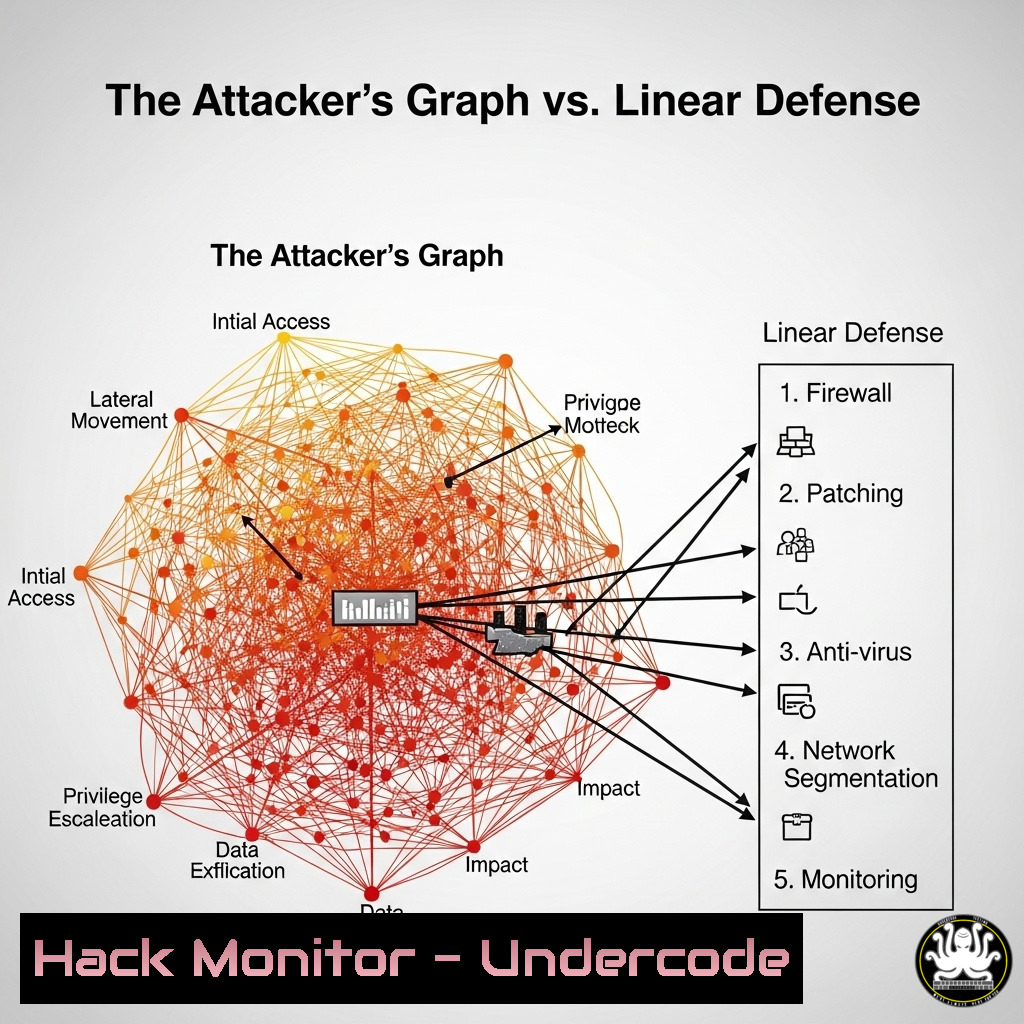
Introduction:
The fundamental asymmetry of cybersecurity lies not in tools or intelligence, but in mindset. Defenders operate from a position of authorized action, protecting known assets with predefined lists of rules. Attackers, unburdened by such constraints, operate in a web of possibilities, exploiting the relationships between systems to achieve their goals. This graph-based thinking is why perimeter defenses and signature-based detection consistently fail against determined adversaries.
Learning Objectives:
- Understand the critical difference between defensive (list-based) and offensive (graph-based) thinking.
- Learn to identify and map attack paths and privilege relationships within your own environment.
- Implement proactive hunting techniques that move beyond static Indicators of Compromise (IOCs) to uncover attacker behavior.
You Should Know:
1. Mapping Your Environment with BloodHound
BloodHound is a powerful tool for mapping privilege relationships and attack paths in an Active Directory environment, visualizing the very graphs attackers exploit.
 On Linux Attack Box:
sudo apt-get install bloodhound

On Windows Domain-Joined System (using SharpHound collector):
.\SharpHound.exe --CollectionMethod All --Domain CONTOSO.LOCAL --ZipFilename contoso_collection.zip

In the BloodHound UI, run pre-built queries like:
"Find Shortest Paths to Domain Admins"
"Find Principals with DCSync Rights"
Step-by-Step Guide:
BloodHound reveals the hidden pathways attackers use to move from a low-privilege account to domain administrator. First, deploy the SharpHound data collector on a system within the target domain using the command above. It will collect data on users, groups, sessions, and ACLs. Import the resulting ZIP file into the BloodHound GUI. From there, you can run built-in analytics, such as “Find Shortest Paths to Domain Admins,” to visually identify the most critical vulnerabilities in your domain structure—like a user who has local admin rights on a machine where a Domain Admin is logged in. This moves defense from a list of “secure users” to understanding the exploitable relationships between them.
2. Beyond IP Blocking: Hunting with Sigma Rules
Static blocklists of malicious IPs are a classic example of list-based defense. Sigma is a generic signature format for log events that allows you to describe attacker techniques, which can then be converted into queries for your specific SIEM (e.g., Splunk, Elasticsearch).
title: Suspicious PowerShell Execution Patterns
id: a7474e69-993c-4c49-86b6-891d2e5f5f57
status: experimental
description: Detects PowerShell being used with hidden window options and encoded commands, common in attacker scripts.
references:
- https://attack.mitre.org/techniques/T1059/001/
author: John Doe
date: 2023/10/26
tags:
- attack.execution
- attack.t1059.001
logsource:
category: process_creation
product: windows
detection:
selection:
Image|endswith: '\powershell.exe'
CommandLine|contains:
- '-WindowStyle Hidden'
- '-EncodedCommand'
condition: selection
falsepositives:
- Legitimate administration scripts
level: high
Step-by-Step Guide:
This Sigma rule hunts for a specific behavior (technique) rather than a specific hash or IP. Convert this rule using the Sigma converter (Sigmac) for your SIEM. For Splunk, the command might be sigmac -t splunk -c tools/config/splunk-windows.yml rule.yml. The resulting query searches for the method (obfuscated PowerShell execution) rather than a specific instance of it. This allows you to detect novel attacks that use the same underlying graph-based technique but with different “nodes” (e.g., a new malicious script).
3. Lateral Movement Mitigation: Restricting Service Principal Names
Attackers use Service Principal Names (SPNs) to discover and target services like SQL Server for Kerberoasting attacks. Defending requires finding and securing these accounts.
 Discover all user accounts with SPNs (Potential targets for Kerberoasting):
Get-ADUser -Filter {ServicePrincipalName -like ""} -Properties ServicePrincipalName, PasswordLastSet, LastLogonDate | Select-Object Name, ServicePrincipalName, PasswordLastSet, LastLogonDate

Mitigation: Apply a strong password policy for these accounts or, better yet, use Group Managed Service Accounts (gMSAs).
Step-by-Step Guide:
This PowerShell command, run from a domain-joined machine with the Active Directory module, queries for all user accounts that have an SPN set. These accounts are prime targets for Kerberoasting, where an attacker requests a ticket for the service and attempts to crack the password offline. The defensive action is to move these accounts to use gMSAs, which have automatically managed, complex passwords, breaking this common attack path in the graph.
4. Cloud Graph Security: Azure ARM Access Check
In cloud environments like Azure, attackers exploit relationships between identities and resources. The `Export-AzRuleBenchmarkBaseline` cmdlet (part of the `Az.Inquirer` module) helps map these relationships for hardening.
 Install the module (Preview)
Install-Module -Name Az.Inquirer -AllowPrivilege

Generate a benchmark report for your Azure subscription
Export-AzRuleBenchmarkBaseline -SubscriptionId (Get-AzContext).Subscription.Id -OutputPath .\azure_baseline.json
Step-by-Step Guide:
This command generates a comprehensive report detailing the security posture of your Azure subscription. It checks for misconfigurations across identity and access management (IAM), storage, networking, and more. It effectively maps the “graph” of your cloud tenant, highlighting relationships like a user with excessive permissions or a storage account exposed to the public internet. Analyzing this report allows you to proactively eliminate attack paths before an adversary can discover and exploit them.
5. Linux Persistence Hunting: Systemd Service Analysis
Attackers often establish persistence on Linux systems by creating malicious systemd services. Defenders must be able to audit all services.
 List all loaded unit files and their states, looking for anomalies:
systemctl list-unit-files --type=service --state=enabled,generated

Investigate a specific suspicious service file:
systemctl status suspicious_service
cat /etc/systemd/system/suspicious_service.service
 Check for scripts executed by the service:
grep ExecStart /etc/systemd/system/suspicious_service.service
Step-by-Step Guide:
The first command lists all service unit files that are enabled. Analysts should baseline what is normal and investigate any unknown or newly appeared services. The subsequent commands drill down into a specific service, showing its status and displaying the contents of its configuration file. The key is to examine the `ExecStart` directive to see what command or script is being executed automatically. This moves beyond a simple list of “known good” services to an understanding of the execution relationships on the host.
- API Security: Testing for Broken Object Level Authorization (BOLA)
APIs are a rich target graph. A common flaw is BOLA, where an attacker can access objects belonging to other users by changing an ID in a request.
 Simple curl test for a BOLA vulnerability:
 Authenticate and get a token
TOKEN=$(curl -s -X POST -H "Content-Type: application/json" -d '{"username":"user1","password":"pass1"}' https://api.target.com/v1/auth | jq -r '.token')

Use the token to access user1's data (should be allowed)
curl -H "Authorization: Bearer $TOKEN" https://api.target.com/v1/users/user1/data

Now try to access user2's data by changing the ID in the URL (should be blocked)
curl -H "Authorization: Bearer $TOKEN" https://api.target.com/v1/users/user2/data
Step-by-Step Guide:
This simple test demonstrates graph-based thinking for API security. The attacker isn’t using a new tool; they are manipulating the relationship between a valid token and a user ID parameter. If the second request returns user2’s data (HTTP 200), a critical BOLA vulnerability exists. The API endpoint is only checking if the token is valid (a list-based check) but not if the user associated with the token is authorized for the specific requested object (a graph-based check). Automated API scanning should include these types of logical tests.
What Undercode Say:
- The core problem is a paradigm mismatch: lists are finite and static, while graphs are dynamic and infinite. Defense must adopt graph-based tools and thinking.
- Proactive hunting, using tools like BloodHound and Sigma, is no longer optional. It is the only way to surface the attack paths that exist within your own environment’s inherent relationships.
The traditional model of building taller walls and longer blocklists is fundamentally broken. It addresses symptoms, not the underlying cause. The analysis from John LaTwC’s seminal work, which Jamie Williams referenced, remains critically relevant. Defenders are playing checkers, focused on removing individual pieces, while attackers are playing chess, thinking ten moves ahead and seeing the entire board. The only path to resilience is to start viewing your network, cloud environment, and applications as an attacker does—not as a collection of isolated assets, but as a interconnected web of exploitable relationships. Security must shift from a prevention-only, list-centric model to one focused on continuous discovery, visibility, and disruption of attack graphs.
Prediction:
The cognitive gap between defender and attacker will be exacerbated by AI. Offensive AI will rapidly generate and test millions of novel attack paths through complex graphs, far exceeding human or traditional automated scale. Defensive AI that can similarly model an organization’s digital environment as a dynamic graph, predict the most probable attack routes, and automatically implement micro-segmentation or deception policies will become the new standard for critical infrastructure defense. Organizations that fail to invest in these graph-native defensive capabilities will be systematically outmaneuvered and compromised.
🎯Let’s Practice For Free:
IT/Security Reporter URL:
Reported By: Jamie Williams – Hackers Feeds
Extra Hub: Undercode MoN
Basic Verification: Pass ✅


