
Listen to this Post
Introduction
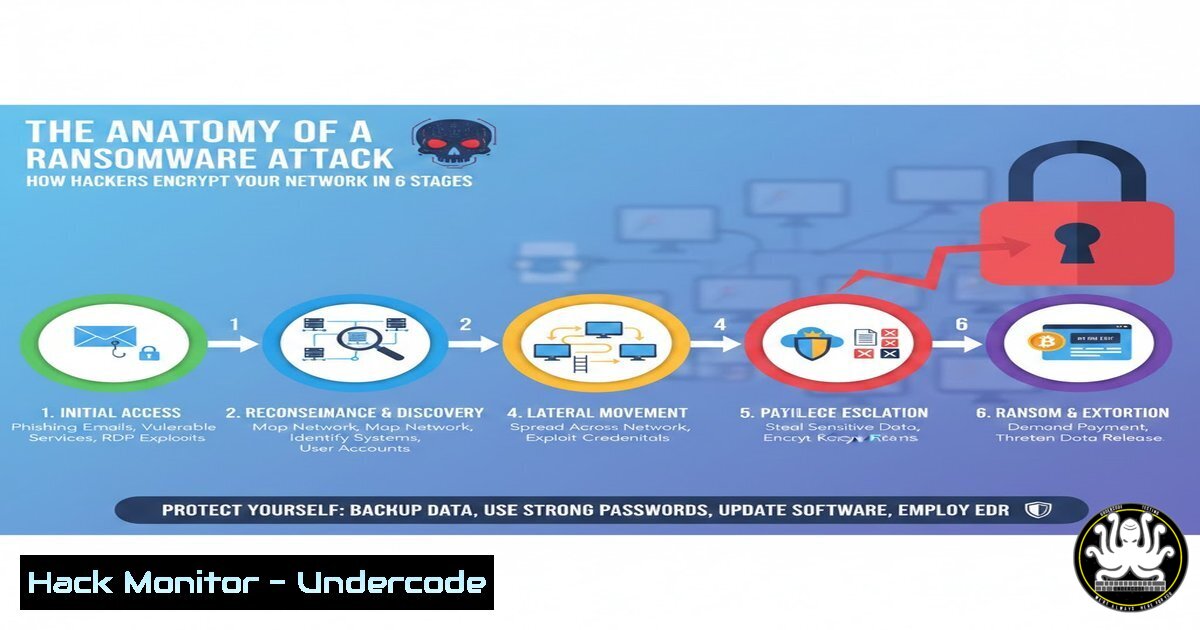
Ransomware has evolved from opportunistic malware into a sophisticated, multi-billion dollar cybercriminal enterprise. Understanding the precise methodology behind these attacks is crucial for cybersecurity professionals and organizational defenders. This article dissects the complete ransomware kill chain—from initial compromise to final encryption—providing technical insights into each phase and equipping you with defensive commands and configurations to harden your infrastructure against these devastating intrusions.
Learning Objectives
- Understand the six distinct phases of a ransomware attack lifecycle
- Identify common entry vectors and privilege escalation techniques used by threat actors
- Implement practical mitigation strategies using Linux and Windows security commands
You Should Know
1. Initial Access: The Digital Point of Entry
Ransomware operators begin by establishing a foothold in your environment. The most common vectors remain phishing campaigns, unpatched vulnerabilities, and exposed services like Remote Desktop Protocol (RDP). According to the post content, threat actors specifically target misconfigured cloud systems and weak authentication mechanisms.
Windows Defense Commands:
 Check for exposed RDP services
netstat -an | findstr :3389

Audit local user accounts and weak passwords
net user
wmic useraccount get name,sid,status

Enable RDP Network Level Authentication
reg add "HKLM\SYSTEM\CurrentControlSet\Control\Terminal Server\WinStations\RDP-Tcp" /v UserAuthentication /t REG_DWORD /d 1 /f

Review Windows Event Logs for failed logins (Event ID 4625)
Get-EventLog -LogName Security -InstanceId 4625 -Newest 50 | Format-Table TimeGenerated, Message -Wrap
Linux Hardening Commands:
 Check for exposed SSH services
ss -tulpn | grep :22

Audit failed SSH login attempts
grep "Failed password" /var/log/auth.log | tail -20

Implement fail2ban for SSH protection
sudo apt install fail2ban -y
sudo systemctl enable fail2ban
sudo systemctl start fail2ban

Check for listening services that shouldn't be exposed
netstat -tulpn | grep LISTEN
2. Establishing Persistence and Control
Once inside, attackers immediately work to ensure they maintain access. They install backdoors, create hidden user accounts, and disable security monitoring tools. This phase is critical—if detected here, the attack can still be contained.
Windows Persistence Detection:
 List all user accounts including hidden ones
Get-LocalUser | Where-Object {$_.Enabled -eq $true}

Check for scheduled tasks created by attackers
schtasks /query /fo LIST /v | findstr /i "taskname"

Examine startup programs
Get-CimInstance Win32_StartupCommand | Select-Object Name, Command, Location

Monitor for disabled security services
Get-Service | Where-Object {$<em>.Status -eq 'Stopped' -and $</em>.StartType -eq 'Automatic'}

Check registry for autorun entries
reg query HKLM\SOFTWARE\Microsoft\Windows\CurrentVersion\Run
reg query HKCU\SOFTWARE\Microsoft\Windows\CurrentVersion\Run
Linux Persistence Checks:
 Check for new user accounts
cat /etc/passwd | grep -v nologin

Review cron jobs for malicious entries
crontab -l
ls -la /etc/cron
cat /etc/crontab

Check systemd services for unauthorized services
systemctl list-units --type=service --state=running

Examine authorized_keys for backdoor access
cat ~/.ssh/authorized_keys
sudo cat /root/.ssh/authorized_keys

Look for processes hiding from tools
ps auxf | grep -v grep
- Privilege Escalation: Gaining the Keys to the Kingdom
Attackers need administrative privileges to maximize damage. They exploit misconfigured services, unpatched vulnerabilities, or harvest credentials through tools like Mimikatz. This phase transforms a limited breach into a full-scale compromise.
Windows Privilege Escalation Detection:
 Check for users in administrative groups
net localgroup administrators
net localgroup "Remote Desktop Users"

Audit privilege assignments
whoami /priv
whoami /groups

Look for vulnerable services running with SYSTEM privileges
wmic service get name,startname,pathname | findstr /i "LocalSystem"

Check UAC settings
reg query HKLM\SOFTWARE\Microsoft\Windows\CurrentVersion\Policies\System /v EnableLUA

Review credential dumping tools in memory
Get-Process | Where-Object {$<em>.ProcessName -like "mimikatz" -or $</em>.ProcessName -like "procdump"}
Linux Privilege Escalation Checks:
 Check sudo privileges
sudo -l

Find SUID binaries (common privilege escalation vectors)
find / -perm -4000 2>/dev/null

Check kernel version for known exploits
uname -a

Review sudoers file for misconfigurations
cat /etc/sudoers | grep -v "^"

Check for world-writable files in critical paths
find /etc -type f -perm -o+w 2>/dev/null
4. Lateral Movement: Spreading Across the Network
With elevated privileges, attackers move laterally to identify high-value targets: file servers, backup systems, and databases. They use legitimate administrative tools like PsExec, WMI, or SSH to blend in with normal traffic.
Windows Lateral Movement Detection:
 Monitor for PsExec usage (Event ID 4688)
Get-WinEvent -FilterHashtable @{LogName='Security'; ID=4688} |
Where-Object {$_.Message -like "psexec"} |
Select-Object TimeCreated, Message

Check for suspicious network connections
netstat -an | findstr ESTABLISHED

Review WMI activity (Event ID 5861)
Get-WinEvent -LogName "Microsoft-Windows-WMI-Activity/Operational" -MaxEvents 50

Identify admin shares being accessed
net view \target-server
net use

Check for remote service creation
Get-Service | Where-Object {$<em>.Status -eq 'Running' -and $</em>.StartType -eq 'Manual'}
Linux Lateral Movement Detection:
 Monitor SSH connections
last -i | grep still

Check for unusual outbound connections
netstat -tunap | grep ESTABLISHED

Review authentication logs for multiple host connections
grep "Accepted" /var/log/auth.log | awk '{print $11}' | sort | uniq -c

Monitor for SCP/RSYNC activity
ps aux | grep -E "(scp|rsync)"

Check for SSH key forwarding
grep "forwarding" /var/log/auth.log
5. Data Exfiltration: The Modern Double Extortion Tactic
Modern ransomware groups steal sensitive data before encryption. They use this stolen data as leverage, threatening public release if the ransom isn’t paid. This phase often involves large data transfers during off-hours.
Data Exfiltration Detection:
 Monitor for large outbound transfers (PowerShell)
Get-NetTCPConnection | Where-Object {$_.State -eq 'Established'}

Check for archive creation (potential staging)
Get-ChildItem -Recurse -Include .zip, .rar, .7z |
Where-Object {$_.Length -gt 100MB}

Review DNS queries for data exfiltration patterns
Get-WinEvent -LogName "Microsoft-Windows-DNS-Client/Operational" |
Where-Object {$_.Message -like "long-subdomain"}

Monitor BITS transfers
Get-BitsTransfer | Format-List

Check for cloud upload tools
Get-Process | Where-Object {$<em>.ProcessName -like "rclone" -or $</em>.ProcessName -like "gdrive"}
Linux Data Exfiltration Detection:
 Monitor large file creations
find / -type f -size +100M -mmin -60 2>/dev/null

Check for data staging directories
ls -la /tmp /dev/shm /var/tmp

Monitor outbound traffic volume
iftop -i eth0 -n -P

Check for compression tools usage
ps aux | grep -E "(gzip|zip|tar|7z)"

Review bash history for exfiltration commands
cat ~/.bash_history | grep -E "(curl|wget|nc|scp|rsync)"
6. The Encryption Phase: Point of No Return
The final stage involves deploying the ransomware payload. Attackers encrypt files, delete volume shadow copies, and drop ransom notes. This phase is designed for maximum disruption with minimal time for response.
Windows Ransomware Mitigation Commands:
 Immediately isolate infected systems
New-NetFirewallRule -DisplayName "BlockAll" -Direction Outbound -Action Block
New-NetFirewallRule -DisplayName "BlockAllIn" -Direction Inbound -Action Block

Stop suspicious processes
Get-Process | Where-Object {$_.CPU -gt 80} | Stop-Process -Force

Protect remaining files (if caught early)
icacls C:\Share\ /grant Everyone:F /T
attrib +r +s +h C:\CriticalData

Disable SMBv1 to prevent worm-like propagation
Set-SmbServerConfiguration -EnableSMB1Protocol $false -Force

Check and protect shadow copies (if still available)
vssadmin list shadows
vssadmin create shadow /for=C:
vssadmin delete shadows /for=C: /oldest

Kill malicious processes by name pattern
taskkill /F /IM .encrypt /IM .lock /IM .ransom
Linux Ransomware Response:
 Immediately block outbound traffic
sudo iptables -P OUTPUT DROP
sudo iptables -P INPUT DROP

Kill suspicious processes
pkill -f "ransom"
pkill -f "encrypt"

Find recently modified encrypted files
find / -type f -mmin -5 -exec file {} \; | grep -i encrypted

Protect critical directories (read-only)
mount -o remount,ro /important-data

Check for mass file modifications
find /home -type f -mmin -10 | wc -l

Kill all processes of a specific user (attacker account)
sudo pkill -u attackerusername

Emergency backup of critical data
tar czf /tmp/emergency-backup.tar.gz /critical --exclude=/proc --exclude=/sys
7. Organizational Defense Strategy Implementation
Beyond immediate technical responses, organizations must implement comprehensive security measures. The post emphasizes patching, MFA, user training, and offline backups.
Windows Hardening Script:
 Enable MFA for all administrative accounts
Install-Module -Name MSOnline
Connect-MsolService
Get-MsolUser -All | Where-Object {$_.StrongAuthenticationRequirements -eq $null} |
Set-MsolUser -StrongAuthenticationRequirements @()

Implement AppLocker rules
New-AppLockerPolicy -RuleType Exe -User Everyone -Action Deny -Path "C:\Users\AppData\"

Enable PowerShell logging
Set-ItemProperty -Path "HKLM:\SOFTWARE\Policies\Microsoft\Windows\PowerShell\ScriptBlockLogging" -Name EnableScriptBlockLogging -Value 1

Configure Windows Defender aggressive mode
Set-MpPreference -DisableRealtimeMonitoring $false
Set-MpPreference -CloudBlockLevel High
Set-MpPreference -PUAProtection Enabled

Backup critical data offline
wbadmin start backup -backupTarget:\offline-server\backup -include:C: -allCritical -quiet
Linux Hardening Commands:
 Implement mandatory access control
sudo apt install apparmor -y
sudo systemctl enable apparmor
sudo aa-enforce /etc/apparmor.d/

Configure automatic security updates
sudo apt install unattended-upgrades
sudo dpkg-reconfigure --priority=low unattended-upgrades

Harden SSH configuration
sed -i 's/PermitRootLogin yes/PermitRootLogin prohibit-password/' /etc/ssh/sshd_config
sed -i 's/PasswordAuthentication yes/PasswordAuthentication no/' /etc/ssh/sshd_config
systemctl restart sshd

Implement file integrity monitoring
sudo apt install aide
sudo aideinit
mv /var/lib/aide/aide.db.new /var/lib/aide/aide.db

Offline backup strategy
tar czf /mnt/usb/backup-$(date +%Y%m%d).tar.gz /important-data
umount /mnt/usb  physically remove USB after backup
What Undercode Say
Key Takeaway 1: Ransomware is a systematic process, not a random event. Each phase presents detection and prevention opportunities if defenders understand the methodology and implement appropriate monitoring.
Key Takeaway 2: Technical controls alone are insufficient. The human element—security awareness training, strong password policies, and incident response preparedness—remains the most critical defense layer.
Key Takeaway 3: The shift to double extortion tactics means organizations must protect both data availability AND confidentiality. Offline backups are non-negotiable, but so is preventing initial data theft through network segmentation and egress filtering.
Analysis: The evolution of ransomware from simple encryption to sophisticated data theft operations represents a fundamental shift in the threat landscape. Attackers now operate with the precision of nation-states, leveraging living-off-the-land techniques that bypass traditional defenses. Organizations must adopt zero-trust architectures, implement comprehensive logging and monitoring, and conduct regular red team exercises that simulate full ransomware kill chains. The commands and configurations provided above represent baseline security measures, but true resilience requires continuous validation of these controls through penetration testing and tabletop exercises. The days of “it won’t happen to us” are over—every organization must operate under the assumption that breach is inevitable and focus on detection, containment, and recovery capabilities.
Prediction
Within the next 18 months, ransomware groups will increasingly leverage AI-generated phishing campaigns that bypass traditional email filters and incorporate real-time victim reconnaissance. The convergence of ransomware with wiper malware will become more common, targeting critical infrastructure where downtime costs exceed ransom demands. Cloud environments will become primary targets as organizations continue digital transformation, with attackers exploiting misconfigured serverless functions and container orchestration platforms. Regulatory pressure will intensify, with mandatory ransomware incident reporting becoming standard in most jurisdictions, forcing organizations to prioritize preventative controls over reactive insurance-based strategies.
▶️ Related Video (80% Match):
🎯Let’s Practice For Free:
IT/Security Reporter URL:
Reported By: Oladele Boluwatife – Hackers Feeds
Extra Hub: Undercode MoN
Basic Verification: Pass ✅


