
Listen to this Post
Introduction:
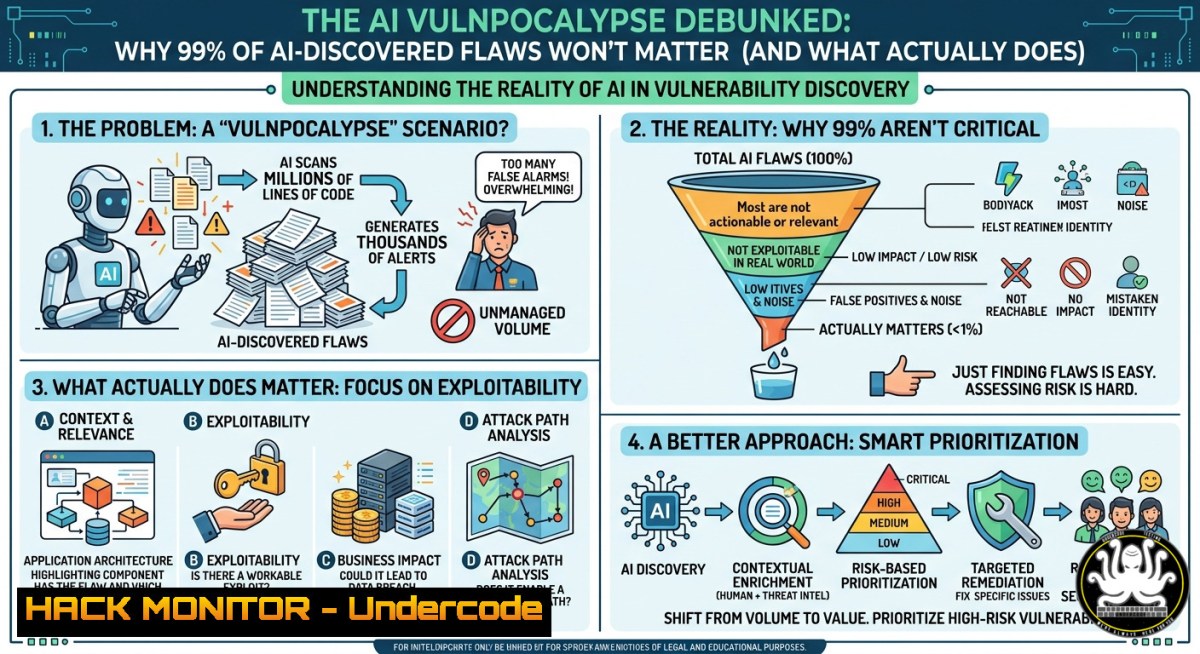
The cybersecurity industry is abuzz with warnings of an AI‑driven “vulnpocalypse” – where autonomous models like Anthropic’s Mythos/Glasswing discover thousands of new vulnerabilities and shrink the window between disclosure and exploitation to zero. Yet industry veterans argue that security teams already drown in a backlog of unpatched CVEs, and only 1‑2% of all known vulnerabilities have ever been exploited. Understanding this disconnect is critical: the real challenge isn’t finding more flaws, but knowing which tiny fraction actually matters.
Learning Objectives:
- Differentiate between vulnerability discovery volume and real‑world exploitation likelihood using empirical data.
- Apply EPSS (Exploit Prediction Scoring System) and CISA’s KEV catalog to prioritize remediation.
- Build a risk‑based vulnerability management workflow that ignores noise and focuses on actionable threats.
You Should Know:
- The 1-2% Exploitation Reality: Why Volume Doesn’t Equal Risk
The post highlights a staggering fact: of ~330,000 known CVEs, only ~1‑2% have ever been exploited, and just 0.2% lead to material financial loss. Attackers don’t need infinite vulnerabilities – they need a handful that work reliably. This section teaches you how to query real exploit data and avoid wasting time on low‑probability flaws.
Step‑by‑step guide to querying CVE exploitation stats:
Linux – Fetch EPSS scores for a CVE using curl:
 Query EPSS API for a specific CVE (e.g., CVE-2023-44487)
curl -X GET "https://api.first.org/data/v1/epss?cve=CVE-2023-44487" | jq '.data[bash] | {cve: .cve, epss: .epss, percentile: .percentile}'

Batch check multiple CVEs from a file
while read cve; do
curl -s "https://api.first.org/data/v1/epss?cve=$cve" | jq -r '.data[bash] | "(.cve): EPSS=(.epss)"'
done < cve_list.txt
Windows PowerShell – Retrieve CISA Known Exploited Vulnerabilities:
 Download the official KEV catalog
Invoke-WebRequest -Uri "https://www.cisa.gov/sites/default/files/csv/known_exploited_vulnerabilities.csv" -OutFile "KEV.csv"

Filter for actively exploited CVEs
Import-Csv .\KEV.csv | Where-Object { $_.'vulnerabilityName' -match "CVE" } | Select-Object vulnerabilityName, shortDescription, dateAdded
Interpretation: An EPSS score >0.1 (10% probability of exploitation in next 30 days) or presence in the KEV catalog signals immediate action. Ignore everything else.
- Prioritization with EPSS and KEV: Cutting Through the Noise
Your VM team already has a backlog of thousands of vulnerabilities. Adding AI‑discovered flaws doesn’t help unless you have a prioritization model. The industry standard is combining EPSS (exploit probability) with asset criticality.
Step‑by‑step guide to building a risk score:
Linux – Automate EPSS + CVSS scoring:
 Install jq and curl if missing
sudo apt install jq curl -y

Script to calculate risk = EPSS  CVSS (simplified)
cve="CVE-2024-6387"
cvss_score=8.1
epss=$(curl -s "https://api.first.org/data/v1/epss?cve=$cve" | jq -r '.data[bash].epss')
risk=$(echo "$cvss_score  $epss" | bc -l)
echo "Risk score for $cve: $risk (Threshold >0.5 = critical)"
Windows – Integrate KEV with your vulnerability scanner output (Nessus/OpenVAS CSV):
 Load scanner CSV and flag KEV matches
$scannerResults = Import-Csv ".\nessus_export.csv"
$kev = Import-Csv ".\KEV.csv"
$matched = $scannerResults | Where-Object { $_.CVE -in $kev.vulnerabilityName }
$matched | Export-Csv ".\priority_fixes.csv" -NoTypeInformation
Write-Host "$($matched.Count) critical KEV vulnerabilities found – remediate now."
Tutorial: Use this data to build a dashboard (e.g., with Grafana + PostgreSQL) that refreshes EPSS daily. Automate ticket creation in Jira only for CVEs with EPSS >0.05 or KEV presence.
3. Building a Risk‑Based Vulnerability Management Program
The post’s key insight: the adversary doesn’t exploit everything – only what works and is worth their time. Your program must shift from “patch everything” to “patch what matters.”
Step‑by‑step implementation:
Step 1 – Inventory assets and assign criticality (Linux):
 Use nmap to discover live hosts
nmap -sn 192.168.1.0/24 | grep "Nmap scan" | cut -d" " -f5 > hosts.txt

Tag critical assets (e.g., domain controllers, payment gateways)
echo "192.168.1.10,DC,CRITICAL" >> asset_tags.csv
Step 2 – Correlate vulnerabilities with asset context using OpenVAS (Linux):
 Run a scan (non‑intrusive)
omp -u admin -w password -i -X "<create_task>..."
 Export results as CSV
omp -u admin -w password --get-tasks --format csv > vulns.csv
Step 3 – Apply prioritization filter:
 Python one-liner to filter by EPSS >0.05 AND critical asset
python3 -c "
import csv, sys
with open('vulns.csv') as f, open('filtered.csv','w') as out:
reader = csv.DictReader(f)
writer = csv.DictWriter(out, fieldnames=reader.fieldnames)
writer.writeheader()
for row in reader:
if float(row.get('EPSS',0)) > 0.05 and row.get('Asset_Tag') == 'CRITICAL':
writer.writerow(row)
"
Windows – Using PowerShell with Tenable.io API:
$apiKey = "your_api_key"
$headers = @{"X-ApiKeys" = "accessKey=$apiKey"}
$vulns = Invoke-RestMethod -Uri "https://cloud.tenable.com/vulns/export" -Headers $headers
$criticalAssets = @("sql01", "webpay01")
$priority = $vulns | Where-Object { $<em>.epss_score -gt 0.05 -and $</em>.asset -in $criticalAssets }
4. AI’s Real Impact: Time‑to‑Exploit Compression, Not Volume
While Jeremiah Grossman argues AI won’t increase exploitation volume, others note that for the 1‑2% of vulnerabilities that do matter, AI could compress discovery‑to‑exploit from weeks to hours. This section shows how to mitigate that compressed window.
Step‑by‑step guide to rapid patch automation:
Linux – Automate patching for critical KEV vulnerabilities using Ansible:
 playbook.yml
- name: Emergency patch for KEV CVEs
hosts: all
tasks:
- name: Update package cache
apt:
update_cache: yes
when: ansible_os_family == "Debian"
- name: Patch critical CVEs (e.g., CVE-2024-6387)
apt:
name: openssh-server
state: latest
when: ansible_facts['distribution_version'] == "22.04"
 Run the playbook immediately after CISA adds a new CVE
ansible-playbook -i inventory playbook.yml --tags "emergency"
Windows – Deploy out‑of‑band patches via PDQ or PowerShell:
 Check for a specific patch (KB5043064 for CVE-2024-38213)
$kb = "KB5043064"
if (-not (Get-HotFix -Id $kb -ErrorAction SilentlyContinue)) {
 Download from Microsoft Update Catalog
Invoke-WebRequest -Uri "https://catalog.s.download.windowsupdate.com/c/msdownload/update/software/secu/2024/09/windows10.0-kb5043064-x64.msu" -OutFile "$env:TEMP\$kb.msu"
Start-Process wusa.exe -ArgumentList "$env:TEMP\$kb.msu /quiet /norestart" -Wait
Write-Host "Patch $kb deployed - reboot required"
}
Mitigation strategy: Implement a 48‑hour SLA for all KEV‑listed vulnerabilities. Use automated deployment pipelines (e.g., GitOps with ArgoCD for Kubernetes CVEs).
- Cyber Insurance Perspective: What Underwriters Actually Care About
The post notes that cyber‑insurance carriers aren’t panicking about AI‑discovered vulns – they rely on actuarial data. Insurers ask specific questions about your vulnerability management program, not total CVE count.
Step‑by‑step guide to align with insurance requirements:
Step 1 – Document your KEV remediation policy:
 Policy Statement
All vulnerabilities listed in CISA’s Known Exploited Vulnerabilities catalog must be remediated within 14 days of disclosure.
Step 2 – Generate proof of compliance using PowerShell (Windows):
 Compare your patched CVEs against KEV
$kev = Import-Csv "KEV.csv"
$patched = Get-HotFix | ForEach-Object { $<em>.HotFixID -replace "KB","" } | ForEach-Object { "CVE-$</em>" }  approximate mapping
$unpatchedKEV = $kev | Where-Object { $_.vulnerabilityName -notin $patched }
if ($unpatchedKEV) {
Write-Warning "Unpatched KEV CVEs: $($unpatchedKEV.vulnerabilityName -join ', ')"
exit 1
} else {
Write-Host "All KEV CVEs patched - compliant"
}
Step 3 – Create an executive dashboard (Linux with Metabase):
 Query EPSS API daily and store in SQLite
sqlite3 vuln_risk.db <<EOF
CREATE TABLE IF NOT EXISTS cve_risk (cve TEXT, epss REAL, date TEXT);
INSERT INTO cve_risk VALUES ('CVE-2024-6387', 0.95, date('now'));
EOF
 Then connect Metabase to this DB for visual reporting
Insurers want to see that you track remediation SLAs for the 0.2% of vulnerabilities that cause material loss – not the 99% of AI‑found noise.
6. Practical Remediation Workflow for the Real 1-2%
Given that only a tiny fraction of vulnerabilities ever get exploited, your daily workflow should ignore most scanner output. Here’s a realistic, time‑saving approach.
Step‑by‑step workflow:
Morning (10 min) – Fetch latest KEV and EPSS updates:
 Linux cron job or Windows Task Scheduler
curl -s https://www.cisa.gov/sites/default/files/csv/known_exploited_vulnerabilities.csv -o /opt/kev.csv
curl -s https://api.first.org/data/v1/epss?date=$(date +%Y-%m-%d) | jq '.data' > /opt/epss.json
Daily Triage (30 min) – Identify new KEV entries since yesterday:
 Compare with yesterday's file
diff /opt/kev_old.csv /opt/kev.csv | grep ">" | cut -d',' -f1 | tee new_kev.txt
For each new CVE in new_kev.txt, create a critical ticket and assign to patch team.
Weekly Remediation (2 hours) – Patch only KEV + EPSS >0.1:
 Using the earlier Ansible playbook, but scoped to high‑risk CVEs
ansible-playbook playbook.yml --limit "critical_assets" --extra-vars "epss_threshold=0.1"
Monthly Review – Analyze which CVEs were actually exploited (using AlienVault OTX or MISP):
 Pull threat intel feeds
curl -s https://otx.alienvault.com/api/v1/pulses/subscribed | jq '.results[].indicators[] | select(.type=="CVE") .indicator'
Compare against your backlog – you’ll likely find that 98% of your patching effort was unnecessary.
What Undercode Say:
- Focus on exploitability, not severity. CVSS scores without EPSS are misleading; a critical 10.0 CVE with zero exploit history is less urgent than a 7.5 CVE actively used in ransomware.
- AI will not flood defenders with actionable threats. It will increase the backlog of irrelevant vulnerabilities, making prioritization tools (EPSS, KEV) more valuable than ever.
- Attackers are rational. They reuse what works (e.g., Log4Shell, ProxyShell) because developing new exploits for obscure CVEs has poor ROI – even with AI assistance.
- Cyber insurance is the canary. The absence of warnings from insurers, who have the best loss data, strongly suggests the AI vulnpocalypse is overhyped.
Prediction:
Over the next 18 months, AI‑powered vulnerability discovery will produce a flood of low‑impact CVE reports, but exploitation rates will remain steady at 1‑2%. The real shift will be in the speed of weaponization for the small subset of critical vulnerabilities – forcing organizations to adopt automated patching pipelines for KEV‑listed flaws. Security vendors will pivot from “find more” to “filter better,” and the term “vulnpocalypse” will fade as practitioners realize that prioritization, not discovery, was always the bottleneck. Expect EPSS and KEV to become mandatory compliance metrics by 2027.
▶️ Related Video (78% Match):
🎯Let’s Practice For Free:
IT/Security Reporter URL:
Reported By: Grossmanjeremiah Over – Hackers Feeds
Extra Hub: Undercode MoN
Basic Verification: Pass ✅


