Listen to this Post
Introduction:
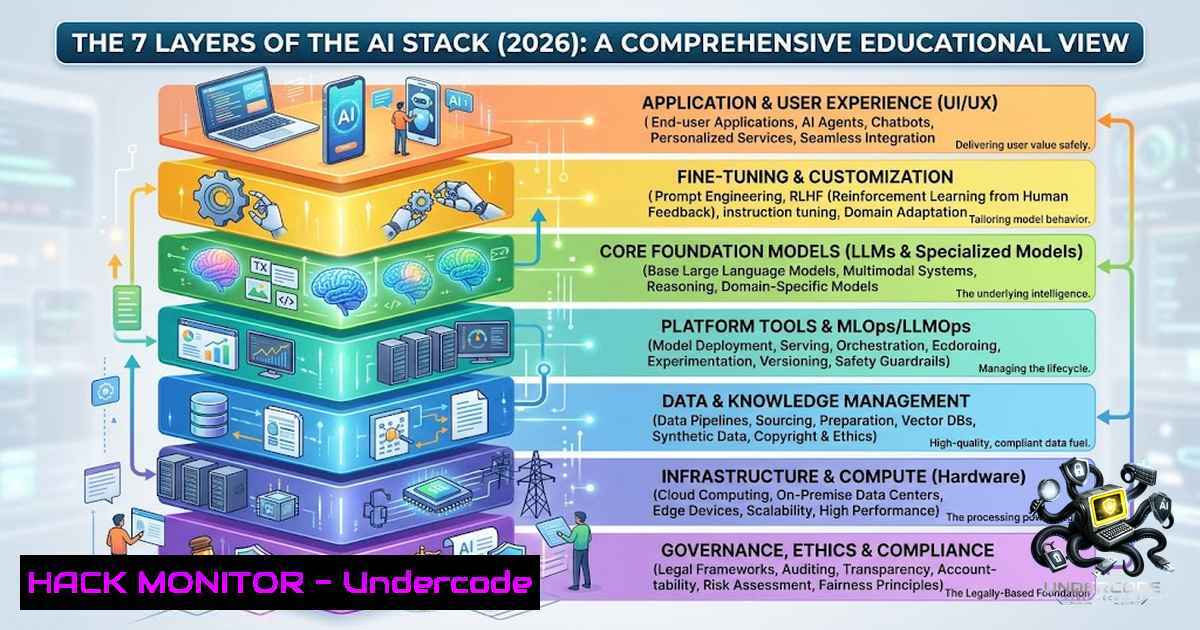
The artificial intelligence landscape has undergone a seismic shift. A year ago, building an AI application largely meant selecting a large language model (LLM). Today, that choice represents merely 5% of the journey. The modern AI ecosystem has evolved into a sophisticated, multi-layered stack encompassing models, orchestration frameworks, vector databases, data extraction pipelines, and rigorous evaluation systems. The real challenge for AI engineers in 2026 is no longer picking the “best” model, but architecting a production-ready system where every component works in harmony.
Learning Objectives:
- Understand the seven critical layers of the modern AI stack and how they interconnect.
- Learn to select and implement the right tools for orchestration, data retrieval, and model deployment.
- Acquire practical skills for evaluating, securing, and deploying AI systems in production environments.
You Should Know:
1. The Orchestration Layer: LangChain, LlamaIndex, and Haystack
The orchestration layer is the brain of your AI application, managing the flow of data between the LLM, external tools, and memory. Frameworks like LangChain, LlamaIndex, and Haystack are the primary tools for building these complex workflows. LangChain is often recommended for beginners due to its extensive documentation, while LlamaIndex is optimized for Q&A-focused applications. Haystack offers a robust alternative with typed pipeline validation.
Step‑by‑step guide: Building a Basic RAG Pipeline with LangChain
This guide demonstrates how to set up a Retrieval-Augmented Generation (RAG) pipeline using LangChain, a process that combines a retrieval system with an LLM to generate context-aware responses.
1. Installation: Install the necessary Python packages.
pip install langchain langchain-community chromadb openai tiktoken
- Environment Setup: Set your OpenAI API key as an environment variable.
export OPENAI_API_KEY='your-api-key-here'  Linux/macOS
set OPENAI_API_KEY='your-api-key-here'  Windows (Command Prompt)
-
Load and Split Documents: Load your text data and split it into manageable chunks.
from langchain_community.document_loaders import TextLoader from langchain.text_splitter import CharacterTextSplitter</p></li> </ol> <p>loader = TextLoader("path/to/your/data.txt") documents = loader.load() text_splitter = CharacterTextSplitter(chunk_size=1000, chunk_overlap=0) texts = text_splitter.split_documents(documents)- Create Embeddings and Vector Store: Generate embeddings for the text chunks and store them in a vector database like Chroma.
from langchain_community.embeddings import OpenAIEmbeddings
from langchain_community.vectorstores import Chroma</li>
</ol>

embeddings = OpenAIEmbeddings()
vectorstore = Chroma.from_documents(texts, embeddings)
- Build the Retrieval Chain: Create a chain that retrieves relevant documents and passes them to the LLM for answer generation.
from langchain.chains import RetrievalQA
from langchain_openai import OpenAI</li>
</ol>

llm = OpenAI()
qa_chain = RetrievalQA.from_chain_type(
llm=llm,
chain_type="stuff",
retriever=vectorstore.as_retriever()
)
response = qa_chain.invoke("Your question here")
print(response)
2. The Memory Layer: Vector Databases
Vector databases are the memory of an AI system, enabling semantic search and retrieval for applications like RAG. They store data as high-dimensional vectors, allowing for incredibly fast similarity searches. The choice of vector database is critical. Chroma is often called the “SQLite of vector DBs” for its ease of use, making it ideal for prototyping. For enterprise-scale applications, Milvus supports GPU acceleration and handles massive datasets, while Pinecone is a leading fully-managed, serverless option.
Step‑by‑step guide: Setting Up and Querying a Vector Database with Chroma
1. Install Chroma: Install the Chroma package.
pip install chromadb
- Create a Client and Collection: Initialize a Chroma client and create a collection to store your vectors.
import chromadb
from chromadb.utils import embedding_functions</li>
</ol>

client = chromadb.PersistentClient(path="./chroma_db")
openai_ef = embedding_functions.OpenAIEmbeddingFunction(
api_key="your-api-key",
model_name="text-embedding-3-small"
)
collection = client.get_or_create_collection(
name="my_documents",
embedding_function=openai_ef
)
- Add Documents: Add your documents and their metadata to the collection.
collection.add( documents=["This is a document about AI.", "This is a document about machine learning."], metadatas=[{"source": "doc1"}, {"source": "doc2"}], ids=["id1", "id2"] ) -
Query the Collection: Perform a similarity search to find the most relevant documents.
results = collection.query(
query_texts=["What is AI?"],
n_results=1
)
print(results)
3. The Data Ingestion Layer: Crawl4AI and FireCrawl
Before an AI can reason, it needs data. The data ingestion layer is responsible for extracting and preparing this information. Tools like Crawl4AI and FireCrawl are designed for modern, LLM-friendly web scraping. They can navigate complex websites, handle JavaScript-rendered content, and output structured data ready for ingestion into your AI pipeline.
Step‑by‑step guide: Extracting Data with Crawl4AI
1. Install Crawl4AI:
pip install crawl4ai
- Basic Web Crawl: Use the `AsyncWebCrawler` to fetch and extract content from a webpage.
import asyncio
from crawl4ai import AsyncWebCrawler</li>
</ol>

async def crawl():
async with AsyncWebCrawler() as crawler:
result = await crawler.arun(
url="https://example.com",
word_count_threshold=10,
bypass_cache=True
)
print(result.markdown)  Extracted content in markdown format

asyncio.run(crawl())
- Extract Specific Information: You can instruct the crawler to extract specific data points.
... inside the crawl function
result = await crawler.arun(
url="https://example.com",
instruction="Extract all product names and their prices."
)
print(result.extracted_content)
-
The Model Access Layer: Hugging Face, Ollama, and Groq
This layer provides access to the vast ecosystem of open and proprietary models. Hugging Face is the “GitHub of AI,” offering thousands of models via its Inference API. For privacy-focused or offline applications, Ollama allows you to run models locally. Groq provides a free, high-speed API for inference, making it a powerful option for production applications.
Step‑by‑step guide: Running a Local Model with Ollama
- Install Ollama: Download and install Ollama from ollama.com.
- Pull a Model: Download a model like Llama 3.
ollama pull llama3
- Run the Model: Interact with the model directly from the command line.
ollama run llama3 "What is the capital of France?"
- Integrate with Python: Use the OpenAI-compatible API to call the local model from your code.
from openai import OpenAI</li>
</ol>

client = OpenAI(
base_url='http://localhost:11434/v1',
api_key='ollama',  Required but ignored
)

response = client.chat.completions.create(
model="llama3",
messages=[{"role": "user", "content": "Explain quantum computing in simple terms."}]
)
print(response.choices[bash].message.content)
5. The Evaluation Layer: Ensuring Quality and Safety
Evaluation is what separates a demo from a production-grade AI system. Frameworks like Ragas, TruLens, and Giskard provide the tools to measure the quality, safety, and reliability of your AI applications. They offer metrics for RAG systems, such as context relevancy and answer correctness, and can help identify issues like hallucinations or bias.
Step‑by‑step guide: Evaluating a RAG Pipeline with Ragas
1. Install Ragas:
pip install ragas
- Prepare Your Dataset: You need a dataset containing questions, answers, and contexts.
from datasets import Dataset</li> </ol> data = { "question": ["What is the capital of France?"], "answer": ["Paris is the capital of France."], "contexts": [["France is a country in Europe. Its capital is Paris."]], } dataset = Dataset.from_dict(data)- Run the Evaluation: Use Ragas to compute metrics like `context_precision` and
answer_correctness.from ragas import evaluate from ragas.metrics import context_precision, answer_correctness</li> </ol> result = evaluate( dataset, metrics=[context_precision, answer_correctness], ) print(result)
6. Security and Hardening the AI Stack
Security is paramount in any production AI system. This involves securing the infrastructure layer—the deployment platform, governance controls, and secrets management. Key practices include:
– API Key Management: Never hardcode API keys. Use environment variables or dedicated secrets management tools like HashiCorp Vault.
– Input Validation and Sanitization: Protect against prompt injection attacks by validating and sanitizing all user inputs.
– Rate Limiting and Access Control: Implement rate limiting to prevent abuse and ensure fair usage of your AI services.
– Audit Trails: Maintain detailed logs of all API calls and system interactions for monitoring and compliance.7. The Future: Full-Stack AI Engineering
The future belongs to AI engineers who understand the entire stack, not just how to prompt an LLM. This requires a broad skill set encompassing data engineering, software development, and MLOps. The shift is from isolated AI tools to a holistic, “full-stack” approach where intelligence is embedded throughout the entire engineering workflow. As the ecosystem rapidly evolves, the ability to navigate and integrate these diverse components will be the defining skill of the successful AI engineer.
What Undercode Say:
- Key Takeaway 1: The modern AI stack is a complex, multi-layered ecosystem. Mastering it requires understanding the interplay between models, frameworks, data, and infrastructure, not just the LLM itself.
- Key Takeaway 2: Production-ready AI is built on a foundation of robust evaluation, security, and observability. These layers are essential for building trustworthy and scalable systems.
- Analysis: The LinkedIn post by Aswini K. perfectly captures the current state of AI engineering. The ecosystem’s rapid evolution has made it imperative for engineers to adopt a full-stack mindset. The focus has rightly shifted from model selection to system design. The challenge is no longer technological capability but the architectural and engineering discipline required to assemble these powerful, yet disparate, components into a coherent, reliable, and secure product. The engineers who thrive will be those who can bridge the gap between cutting-edge research and production-grade software engineering.
Prediction:
- +1 The democratization of AI through open models and accessible tooling will accelerate innovation, enabling smaller teams and individuals to build sophisticated AI applications.
- +1 The rise of comprehensive evaluation and observability frameworks will lead to more reliable and trustworthy AI systems, increasing enterprise adoption.
- -1 The complexity of the AI stack will create a significant skills gap, potentially leading to a shortage of qualified full-stack AI engineers and widening the gap between AI leaders and laggards.
- -1 Without robust security and governance, the proliferation of AI systems will increase the attack surface, leading to more sophisticated and damaging security breaches, including data poisoning and model theft.
▶️ Related Video (66% Match):
🎯Let’s Practice For Free:
🎓 Live Courses & Certifications:
Join Undercode Academy for Verified Certifications
🚀 Request a Custom Project:
Secure, high-velocity infrastructure and disruptive technological engineering. Contact our engineering team for high-tier development and proprietary systems:
[email protected]
💎 Smart Architecture | 🛡️ Secure by Design | ⭐ Trusted by ThousandsIT/Security Reporter URL:
Reported By: Aswini K – Hackers Feeds
Extra Hub: Undercode MoN
Basic Verification: Pass ✅🔐JOIN OUR CYBER WORLD [ CVE News • HackMonitor • UndercodeNews ]
📢 Follow UndercodeTesting & Stay Tuned:
- Run the Evaluation: Use Ragas to compute metrics like `context_precision` and
- Prepare Your Dataset: You need a dataset containing questions, answers, and contexts.
- Extract Specific Information: You can instruct the crawler to extract specific data points.
- Add Documents: Add your documents and their metadata to the collection.
- Create a Client and Collection: Initialize a Chroma client and create a collection to store your vectors.
- Build the Retrieval Chain: Create a chain that retrieves relevant documents and passes them to the LLM for answer generation.
- Create Embeddings and Vector Store: Generate embeddings for the text chunks and store them in a vector database like Chroma.


