Listen to this Post
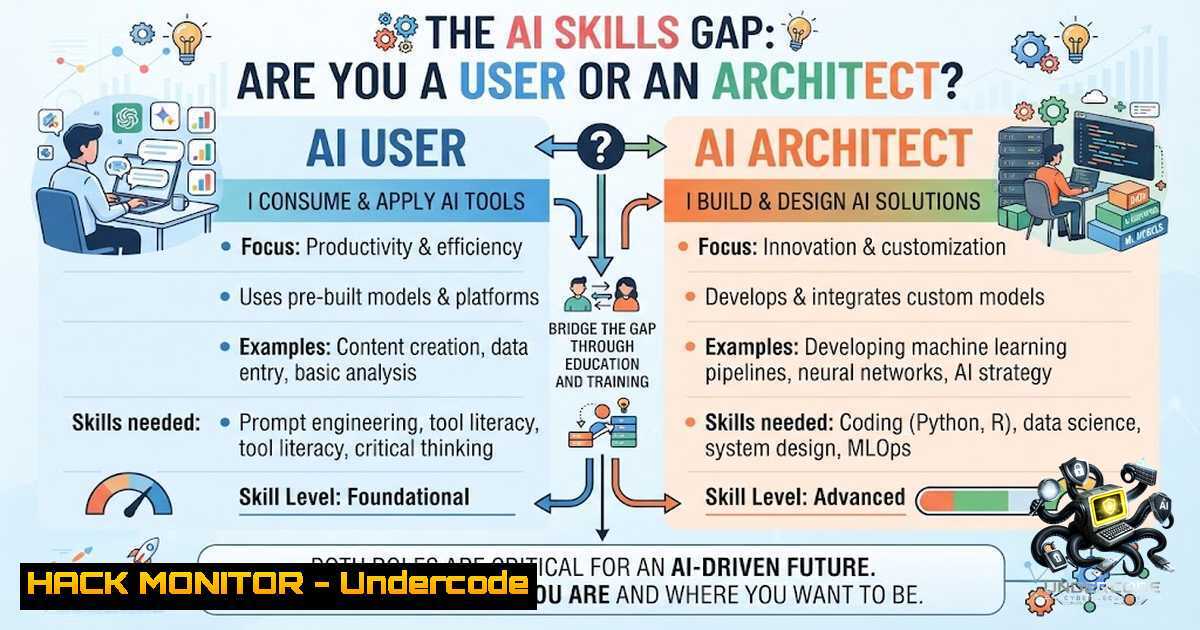
Introduction:
The conversation around artificial intelligence has shifted dramatically from “What is AI?” to “What can AI do for my career?” In 2022, AI literacy was a nice-to-have bonus skill; today, it is rapidly becoming the primary differentiator between professionals who get hired, promoted, and paid more, and those who get left behind. As highlighted by industry leaders and PwC’s 2025 Global AI Jobs Barometer, workers with AI skills are commanding a 56% wage premium, signaling that the market is quietly but decisively voting with money.
Learning Objectives:
- Understand the foundational skills required to transition from an AI user to an AI builder
- Master the core components of LLMs, including tokenization, context windows, and embeddings
- Learn practical prompt engineering techniques for structured and reliable AI outputs
- Build and deploy functional AI systems like RAG applications and autonomous agents
- Develop a project-based learning strategy to showcase tangible AI implementation skills
You Should Know:
- Mastering the AI Builder’s Toolkit: From Python to Production
The journey from AI consumer to AI creator begins with a solid technical foundation. While many professionals are comfortable using ChatGPT for emails and summaries, the real competitive edge starts when you understand how to build with AI. This means learning Python, data manipulation, basic mathematics, cloud services, and API integrations. This is the prerequisite for moving beyond using AI as a toy and treating it as a builder’s toolkit.
Start by setting up your development environment. On Windows, you can install Python via the Microsoft Store or the official installer. On Linux (Ubuntu/Debian), use the following commands to install Python and essential libraries:
sudo apt update
sudo apt install python3 python3-pip python3-venv
python3 -m pip install --upgrade pip
After installation, create a virtual environment for your AI projects to manage dependencies cleanly:
python3 -m venv ai_env
source ai_env/bin/activate  On Windows: ai_env\Scripts\activate
pip install requests openai pandas numpy
Understanding APIs is critical for interacting with LLMs. Here’s a simple Python script that connects to an AI model using the OpenAI API to demonstrate how to programmatically generate text, moving beyond the web interface:
import openai

openai.api_key = "YOUR_API_KEY"
response = openai.ChatCompletion.create(
model="gpt-4",
messages=[{"role": "user", "content": "Explain the concept of tokenization in AI"}]
)
print(response.choices[bash].message.content)
This foundational step is essential before progressing to more complex systems.
- Demystifying Large Language Models: How They Actually Work
To build with AI, you need to understand what’s under the hood. LLMs operate through mechanisms like tokenization, where text is broken down into smaller units (tokens). Context windows define how much text the model can “remember” at once, and embeddings are vector representations of meaning used to find relationships in data. Choosing the right model, whether closed-source (like GPT-4) or open-source (like Llama 3), depends on the use case for data privacy, cost, and performance.
A practical step to understanding embeddings is using a library like `sentence-transformers` to generate and compare text vectors. Install the library:
pip install sentence-transformers
Then, run this Python script to see how semantic similarity works:
from sentence_transformers import SentenceTransformer
from sklearn.metrics.pairwise import cosine_similarity

model = SentenceTransformer('all-MiniLM-L6-v2')
sentences = ["AI will replace jobs", "Automation threatens employment", "Cats are independent animals"]
embeddings = model.encode(sentences)
similarity = cosine_similarity([embeddings[bash]], [embeddings[bash]])
print(f"Similarity between sentence 1 and 2: {similarity[bash][0]}")
This demonstrates how AI “understands” context, which is fundamental when building Retrieval-Augmented Generation (RAG) systems or search applications.
3. Prompt Engineering in Production: Moving Beyond Zero-Shot
Prompt engineering is the art and science of designing inputs to achieve specific outputs from LLMs. While casual users rely on zero-shot prompting (simply asking a question), professionals use few-shot prompting, structured outputs, and reasoning paths to drive consistency. In a production environment, you cannot afford hallucinations or random variations; you need predictable, reliable outputs.
To implement a few-shot prompt in Python using the OpenAI API, structure your messages to include examples:
messages = [
{"role": "system", "content": "You are a customer service agent. Classify user queries as 'Billing', 'Technical', or 'General'."},
{"role": "user", "content": "I was charged twice for my subscription."},
{"role": "assistant", "content": "Billing"},
{"role": "user", "content": "My login isn't working"}
]
response = openai.ChatCompletion.create(model="gpt-4", messages=messages)
print(response.choices[bash].message.content)
For advanced applications, consider using structured outputs. Some models now support JSON mode, but a robust method is to force the model to output JSON and parse it. This is critical for integrating AI into automated workflows where the output must be processed by another system. To achieve this, use the `response_format` parameter:
response = openai.ChatCompletion.create(
model="gpt-4",
messages=messages,
response_format={"type": "json_object"}
)
- Building a RAG System: Enhancing LLMs with External Knowledge
Retrieval-Augmented Generation (RAG) is one of the most impactful AI applications available today. RAG allows an LLM to reference external data sources, drastically reducing hallucinations and grounding the AI’s responses in your proprietary data. This is the architecture behind “Chat with your PDF” applications and enterprise knowledge bases.
A simple RAG pipeline involves:
1. Loading your documents (PDF, Word, etc.).
2. Splitting them into manageable chunks.
- Embedding those chunks and storing them in a vector database.
- Retrieving relevant chunks based on a user query.
- Augmenting the user prompt with those chunks and sending it to the LLM.
To build this on your local machine, install the necessary packages:
pip install llama-index chromadb
Here’s a minimal example using LlamaIndex to create a RAG system from a local text file:
from llama_index import SimpleDirectoryReader, VectorStoreIndex

Load documents from the 'data' folder
documents = SimpleDirectoryReader('data').load_data()
 Create an index from the documents
index = VectorStoreIndex.from_documents(documents)
 Query the index
query_engine = index.as_query_engine()
response = query_engine.query("What are the key policies mentioned?")
print(response)
This code processes the documents, creates embeddings, and stores them in memory. This is a fundamental pattern for building context-aware AI assistants.
5. Deploying AI Agents and Automations with MCP
The next level of AI proficiency involves creating autonomous agents that can perform complex tasks, manage workflows, and interact with external tools. The Model Context Protocol (MCP) is an emerging standard that allows AI models to interface with servers to access resources, tools, and prompts. This moves AI from a question-answering machine to an active participant in your operations.
To set up an MCP server on a Linux system, you might run a Node.js or Python server that exposes endpoints for the AI to call. However, a more accessible entry point is building a simple automation script that chains multiple AI calls together. For example, a script that analyzes sentiment, summarizes text, and drafts a response automatically. On Linux, you can schedule this automation with cron; on Windows, you would use Task Scheduler.
crontab -e
 Add this line to run a script every day at 9 AM
0 9    /usr/bin/python3 /home/user/ai_automation.py
Here’s a conceptual Python script that demonstrates a multi-step agent that decides, fetches data, and summarizes it:
import subprocess
import json

def fetch_web_data(query):
 Simulate fetching data
return "Latest news about AI..."

def summarize_data(data):
 Use an LLM to summarize
response = openai.ChatCompletion.create(...)
return response

user_request = "Get the latest AI news and summarize it for me."
data = fetch_web_data(user_request)
summary = summarize_data(data)
print(summary)
This principle can be scaled to manage customer support, marketing campaigns, and internal reporting.
6. The Command Line Interface for AI Management
For developers and IT professionals, managing AI models and resources often requires command-line tools. For example, if you are using open-source models like Llama 3 locally, you might use ollama. Here are some useful commands for managing models on Linux and Windows:
Linux (ollama):
 Install ollama
curl -fsSL https://ollama.com/install.sh | sh

Download and run a model
ollama run llama3

List installed models
ollama list

Pull a specific model
ollama pull mistral
Windows (PowerShell):
If you are using Docker to run AI models, typical Docker commands apply:
 Run an AI API container
docker run -d -p 5000:5000 --1ame ai-api my-ai-image

Check logs
docker logs ai-api

Stop the container
docker stop ai-api
These commands are vital for deploying AI in a cloud environment or on-premise server, where system administrators need to ensure high availability and performance.
- Cloud Hardening and API Security for AI Systems
When deploying AI applications to the cloud, security is paramount. AI APIs expose your infrastructure and data to potential threats. Key security measures include implementing robust authentication, rate limiting, and network security.
A practical step is to secure your OpenAI API keys. Instead of hardcoding them, use environment variables. On Linux, add them to your .bashrc:
export OPENAI_API_KEY='your_key_here'
On Windows, use the `setx` command in Command
setx OPENAI_API_KEY "your_key_here"
For a production-grade deployment using FastAPI, implement authentication with API keys and rate limiting:
from fastapi import FastAPI, HTTPException, Depends
from fastapi.security import APIKeyHeader
import time

app = FastAPI()
API_KEY = "secure_key_here"
api_key_header = APIKeyHeader(name="X-API-Key")

request_counts = {}

@app.middleware("http")
async def rate_limiter(request, call_next):
client_ip = request.client.host
if client_ip in request_counts:
if time.time() - request_counts[bash] < 60:
raise HTTPException(status_code=429, detail="Too many requests")
request_counts[bash] = time.time()
return await call_next(request)

@app.get("/secure-ai")
async def secure_endpoint(api_key: str = Depends(api_key_header)):
if api_key != API_KEY:
raise HTTPException(status_code=403, detail="Invalid API Key")
return {"message": "AI service running securely"}
This code ensures only authorized and rate-limited clients can access your AI service, preventing abuse and data breaches.
What Undercode Say:
- The Evolution is a Choice, Not a Gift: The gap between AI users and AI builders is widening. The tools are accessible, but the discipline to learn and adapt is rare. Investing in foundational skills and consistently shipping projects is the only way to stay relevant.
- The Future Belongs to the Architect-Leader: AI isn’t just about automating emails; it’s about reshaping how teams operate. The value compounds exponentially as you move from using AI to building systems that leverage it for solving expensive, complex problems.
Analysis:
The post emphasizes that the market is rapidly rewarding those who demonstrate tangible AI implementation over passive consumption. The infographic referenced provides a structured roadmap, but the core message is that without action—building and shipping—all the knowledge in the world is theoretical. The discussion around domain expertise and business thinking is crucial; AI is a multiplier, but it requires a solid base of industry knowledge to be effective. The trend shows that the “AI User” will become a commoditized role, while the “AI Architect” will drive innovation and efficiency. The economic data from PwC reinforces that this is not a niche skill but a core component of future employability.
Prediction:
- +1: The rise of AI will democratize software development, enabling non-programmers (with the right foundational skills) to become “Citizen Developers,” creating internal tools and automations that significantly boost productivity in previously tech-averse departments.
- +1: AI will evolve into a collaborative partner within organizations, moving beyond a tool for individual tasks to a system integrated into the business’s core decision-making processes, with AI agents managing complex workflows across departments like finance, HR, and marketing.
- -1: As AI becomes more proficient, the barrier to entry for many “builder” tasks will lower, leading to a devaluation of simple AI implementations (like basic chatbots). This will create a “race to the top” where only the most innovative and deeply integrated AI solutions command a premium.
- -1: The demand for AI skills will outpace the supply of qualified professionals, leading to a “skills gap” crisis where companies will offer exorbitant salaries for talent, but many organizations will struggle to adopt AI effectively, widening the competitive gap between early adopters and laggards.
- +1: The market will increasingly prioritize “judgment” and “ethics” in AI development. Professionals who can not only build AI but also navigate data privacy, bias, and regulatory compliance will become the most valuable leaders, as trust and governance become paramount in AI adoption.
▶️ Related Video (86% Match):
🎯Let’s Practice For Free:
🎓 Live Courses & Certifications:
Join Undercode Academy for Verified Certifications
🚀 Request a Custom Project:
Secure, high-velocity infrastructure and disruptive technological engineering. Contact our engineering team for high-tier development and proprietary systems:
[email protected]
💎 Smart Architecture | 🛡️ Secure by Design | ⭐ Trusted by Thousands
IT/Security Reporter URL:
Reported By: Jonathan Parsons – Hackers Feeds
Extra Hub: Undercode MoN
Basic Verification: Pass ✅


