Listen to this Post
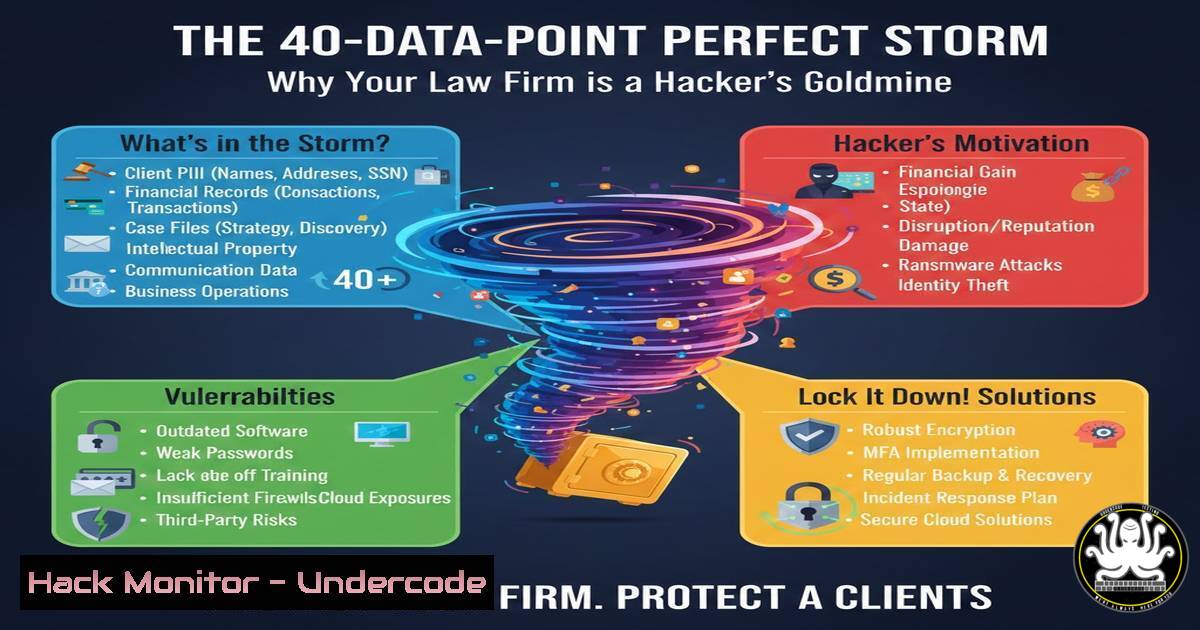
Introduction:
A recent industry alert revealed a staggering breach where 40 distinct types of personal data per individual were exfiltrated from a single organization, a scale rarely seen outside one critical sector: legal. Law firms have become the ultimate prize for cybercriminals, not for their technology, but because they serve as concentrated, high-value data hubs. This article deconstructs why legal data is a unique liability and provides a technical blueprint for firms to transform from soft targets into hardened fortresses.
Learning Objectives:
- Understand the unique composition and extreme value of the data assets held by legal firms that attract advanced threat actors.
- Implement immediate, actionable technical controls across data discovery, access management, and network security to reduce attack surface.
- Develop a proactive incident response and staff awareness strategy tailored to the legal sector’s specific risk profile.
You Should Know:
1. Discover and Classify Your “Crown Jewels” Data
The first step in defending your data is knowing what you have and where it lives. The mentioned breach of 40 data types per person likely included everything from national IDs and financial records to private communications and intellectual property. Attackers use automated tools to find this; you must get there first.
Step-by-step guide:
- Initiate a Data Discovery Scan: Use a combination of tools to scan file servers, document management systems (like iManage or NetDocuments), email archives, and local workstations.
Linux/macOS Command: Use the `find` command to locate files containing sensitive patterns. For example, to search for files mentioning “SSN” or “Confidential” in the `/data` directory:find /data -type f ( -iname ".pdf" -o -iname ".doc" -o -iname ".xls" ) -exec grep -l "SSN|Confidential|Attorney-Client" {} \;Windows PowerShell: Use the `Select-String` cmdlet to search across network shares.
Get-ChildItem -Path "\fileserver\clients" -Recurse -Include .doc, .docx, .pdf, .xlsx | Select-String -Pattern "CONFIDENTIAL" | Select-Object -Unique Path
- Classify and Tag Data: Create classification labels (e.g., “Public,” “Internal,” “Confidential,” “Restricted”). Use native features in Microsoft 365/Azure Purview or third-party Data Loss Prevention (DLP) tools to automatically apply these labels based on content analysis (e.g., the presence of credit card numbers or client names).
- Map Data Flow: Diagram where sensitive client data is created, shared, stored, and archived. This visual map is critical for applying targeted security controls.
-
Enforce Strict Access Control with the Principle of Least Privilege
Broad internal access is a major vulnerability. A single compromised account can lead to a massive breach. Access must be based on explicit need-to-know.
Step-by-step guide:
- Conduct an Access Review Audit: Generate a report of all user permissions for key client matter directories and sensitive applications. Compare this against active matters and employee roles.
- Implement Role-Based Access Control (RBAC): Define roles (e.g., “Partner,” “Associate,” “Paralegal,” “Finance”) and assign data access permissions to these roles, not individuals.
- Enable Multi-Factor Authentication (MFA) Everywhere: MFA is non-negotiable. Enforce it for all users on all systems—email, document management, VPN, and cloud portals. Use an authenticator app or hardware token, not SMS.
4. Command Example – Review NTFS Permissions (Windows):
 PowerShell to get permissions for a sensitive folder
Get-Acl -Path "C:\ClientMatters\HighProfileMerger" | Format-List
3. Segment Your Network to Contain Breaches
A flat network allows an attacker who gains a foothold to move laterally to your most critical servers. Network segmentation acts as internal firewalls.
Step-by-step guide:
- Design Segments: Separate your network into logical zones: User Workstations, Client Servers (document management, case files), Financial Systems, and Guest Wi-Fi.
- Configure Firewall Rules: On your core firewall (e.g., Palo Alto, Fortinet, pfSense), create rules that only allow specific, necessary traffic between segments. For example, workstations can only reach the document management server on port 443 (HTTPS), and no segment can directly initiate contact with the financial system except the finance workstation subnet.
- Linux Example (Using iptables concepts): A rule to allow only HTTPS from the workstation subnet (
192.168.1.0/24) to the server subnet (10.0.1.0/24).iptables -A FORWARD -s 192.168.1.0/24 -d 10.0.1.0/24 -p tcp --dport 443 -j ACCEPT iptables -A FORWARD -s 10.0.1.0/24 -d 192.168.1.0/24 -p tcp --sport 443 -m state --state ESTABLISHED -j ACCEPT Default policy to DROP other traffic between these subnets
4. Encrypt Data at Rest and in Transit
Encryption ensures that even if data is stolen, it is useless without the decryption keys.
Step-by-step guide:
- Enable Full-Disk Encryption: Use BitLocker (Windows) or FileVault (macOS) on all laptops and workstations. This is critical for mobile devices.
- Encrypt Sensitive File Shares: Use Microsoft’s Encrypting File System (EFS) or VeraCrypt containers for highly sensitive matter folders stored on network shares.
- Mandate TLS 1.3 for All Communications: Ensure your email server (via TLS), website, client portals, and remote access solutions use strong, updated TLS protocols. Disable old, insecure protocols like SSLv3 and TLS 1.0.
- Command Example – Generate a GPG Key for Encrypting Files (Linux):
gpg --full-generate-key  Follow prompts to create a key
gpg --output confidential_memo.pdf.gpg --encrypt --recipient [email protected] confidential_memo.pdf
-
Prepare for Breach: Develop and Test an Incident Response Plan
Assuming a breach will happen allows you to respond effectively, minimizing damage and complying with legal notification obligations.
Step-by-step guide:
- Form a Core Team: Designate members from IT, senior management, legal counsel, and communications. Define clear roles.
2. Create a Playbook: Document step-by-step procedures for:
Detection & Analysis: How to confirm a breach (e.g., SIEM alerts, endpoint detection).
Containment: Isolating affected systems (e.g., taking network segments offline, disabling accounts).
Eradication & Recovery: Removing malware, patching vulnerabilities, restoring clean data from backups.
Notification: Procedures for notifying clients, regulators, and the public in line with jurisdictional laws (GDPR, state laws).
3. Conduct Tabletop Exercises: Every quarter, run a simulated breach scenario (e.g., “ransomware on the document server”) with the team to test the plan.
6. Foster a Culture of Security Awareness
Your staff is your last line of defense. Phishing remains the top attack vector.
Step-by-step guide:
- Implement Continuous Training: Move beyond annual videos. Use engaging, short training modules and simulated phishing campaigns tailored to legal (e.g., phishing emails mimicking court summons or client inquiries).
- Create Clear Reporting Channels: Make it easy and blame-free for staff to report suspicious emails or activity to the IT/security team.
- Secure Communication Policy: Train staff to use secure client portals or encrypted email for sending sensitive documents, never regular email without encryption.
What Undercode Say:
- Legal Data is a Unique, High-Yield Asset: The breach of 40 data points per individual underscores that law firms aggregate a more complete profile of a person or business than perhaps any other sector—combining financial, personal, legal, and commercial secrets. This makes a single firm breach equivalent to multiple breaches across other industries.
- Risk Misperception is the Greatest Vulnerability: Many law firms culturally prioritize client service and billable hours over “IT security,” viewing themselves as service providers, not data warehouses. This perception gap creates the soft underbelly that sophisticated attackers, including nation-states and organized crime, expertly exploit for espionage, extortion, and pre-litigation intelligence gathering.
Prediction:
The targeting of law firms will intensify, driven by AI-powered attack automation and data aggregation platforms used by threat actors. AI will enable hyper-realistic, spear-phishing campaigns impersonating specific clients or partners. Furthermore, attackers will increasingly use AI to automatically correlate stolen firm data with public and previously breached data, constructing terrifyingly detailed dossiers for blackmail or insider trading. Regulatory pressure will explode, moving beyond data breach notification to potentially holding firms legally accountable for failing to implement baseline cybersecurity controls commensurate with the sensitivity of the data they steward. Firms that invest in the technical and cultural shifts outlined above will survive; those that do not may face existential liability.
🎯Let’s Practice For Free:
IT/Security Reporter URL:
Reported By: Andrew Alston – Hackers Feeds
Extra Hub: Undercode MoN
Basic Verification: Pass ✅


