Listen to this Post
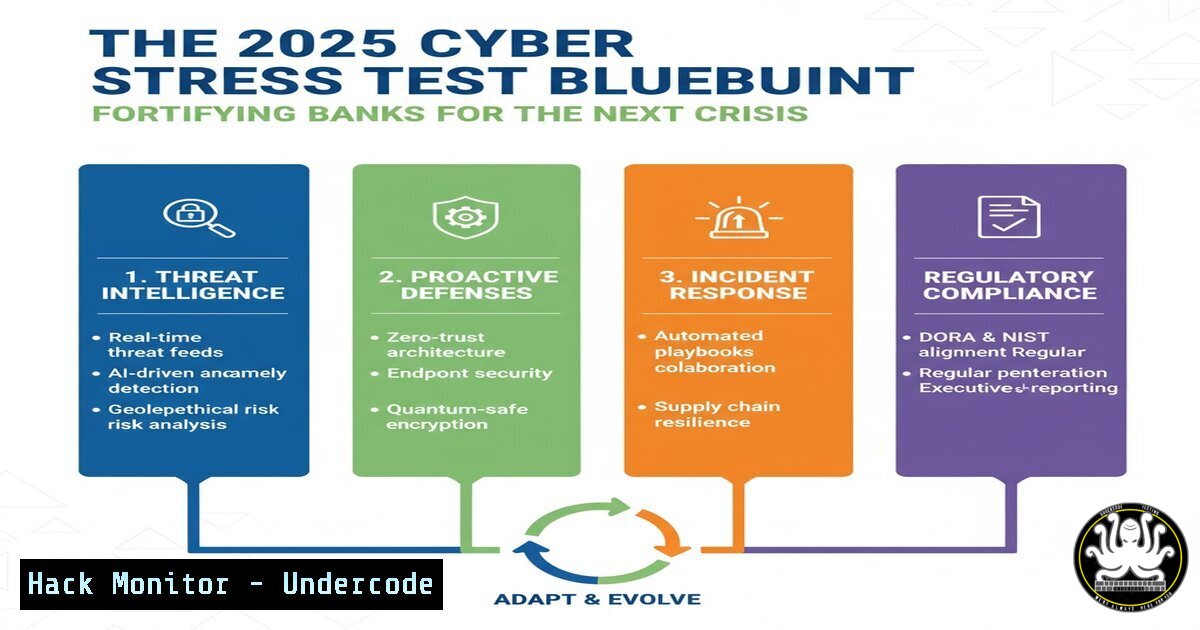
Introduction:
The Reserve Bank of New Zealand’s 2025 Bank Industry Stress Test reveals critical vulnerabilities in the financial sector’s resilience to geopolitical shocks. While the report focuses on economic metrics, its findings underscore an urgent, parallel need: fortifying digital infrastructure against the sophisticated cyber-attacks that inevitably accompany global instability. This article translates the RBNZ’s macroeconomic warnings into actionable cybersecurity hardening strategies.
Learning Objectives:
- Understand and implement critical system hardening commands for Linux and Windows servers.
- Develop skills to detect and mitigate advanced persistent threats (APTs) targeting financial data.
- Learn to secure cloud configurations and API endpoints against automated exploitation during crisis-induced high-traffic periods.
You Should Know:
1. Hardening Linux Bastion Hosts
Financial institutions rely on Linux servers for critical infrastructure. A single misconfiguration can be an entry point for an attacker during a period of distraction, such as a liquidity shock.
 1. Check for unnecessary network services
sudo netstat -tulpn

<ol>
<li>Enforce password complexity policies
sudo apt-get install libpam-pwquality  Debian/Ubuntu
sudo yum install libpwquality  RHEL/CentOS
Edit /etc/security/pwquality.conf: minlen = 14, minclass = 4</p></li>
<li><p>Configure and enable the Uncomplicated Firewall (UFW)
sudo ufw default deny incoming
sudo ufw default allow outgoing
sudo ufw allow ssh
sudo ufw enable</p></li>
<li><p>Set strict file permissions for sensitive directories
sudo chmod 700 /etc/ssh/sshd_config
sudo chmod 750 /var/log/audit/</p></li>
<li><p>Install and configure an Intrusion Detection System (AIDE)
sudo apt-get install aide
sudo aideinit
sudo mv /var/lib/aide/aide.db.new /var/lib/aide/aide.db
Step-by-step guide: Begin by auditing running services with `netstat` and disable any that are non-essential. Next, enforce strong password policies by installing and configuring libpam-pwquality. The UFW firewall should be enabled with a default-deny inbound policy, only explicitly allowing SSH. File permissions on configuration and log directories must be restrictive. Finally, initialize AIDE to create a database of file hashes, which will allow you to detect unauthorized changes by running `sudo aide –check` regularly.
2. Securing Windows Domain Controllers
As the identity backbone of a bank’s IT network, Domain Controllers are prime targets. The “major effort” for recovery cited by the RBNZ is exponentially greater if Active Directory is compromised.
 1. Audit and harden Kerberos settings to prevent Golden Ticket attacks
PowerShell> Auditpol /set /subcategory:"Kerberos Service Ticket Operations" /success:enable /failure:enable

<ol>
<li>Enforce LAPS (Local Administrator Password Solution) to manage local admin passwords
PowerShell> Get-ADComputer -Filter  -Properties ms-Mcs-AdmPwd | Where-Object {$_.'ms-Mcs-AdmPwd' -ne $null}</p></li>
<li><p>Disable SMBv1 to mitigate wormable vulnerabilities
PowerShell> Set-SmbServerConfiguration -EnableSMB1Protocol $false -Force</p></li>
<li><p>Enable PowerShell logging for deep auditing
PowerShell> Set-ItemProperty -Path "HKLM:\SOFTWARE\Policies\Microsoft\Windows\PowerShell\ModuleLogging" -Name "EnableModuleLogging" -Value 1</p></li>
<li><p>Apply a restrictive Windows Defender Firewall policy
PowerShell> New-NetFirewallRule -DisplayName "Block Inbound SMB" -Direction Inbound -Protocol TCP -LocalPort 445 -Action Block
Step-by-step guide: Start by enabling detailed Kerberos auditing to monitor for malicious ticket-granting activity. Ensure LAPS is deployed and functional across all domain-joined computers to prevent lateral movement using a single local admin password. SMBv1, an outdated and dangerous protocol, must be disabled system-wide. To gain visibility into attacker tradecraft, enable ModuleLogging for PowerShell. Finally, create specific firewall rules to block high-risk ports like SMB (445) from unauthorized subnets.
3. Vulnerability Scanning and Patch Management
The stress test’s call for “improved tools to assess risk” applies directly to IT assets. Unpatched vulnerabilities are a primary vector for initial compromise.
 1. Use Nmap to perform a vulnerability-oriented network scan
nmap -sV --script vuln -O 192.168.1.0/24 -oA network_vuln_scan

<ol>
<li>Automate patch assessment on Linux using yum/apt
sudo apt update && apt list --upgradable  Debian/Ubuntu
sudo yum check-update  RHEL/CentOS</p></li>
<li><p>Query the CVE database for specific software
curl -s "https://cve.circl.lu/api/search/openssh" | jq '.'
Step-by-step guide: Regularly schedule network vulnerability scans using Nmap with the `vuln` script suite to identify exploitable services. Automate the process of checking for available security updates using your distribution’s package manager. For critical software, use API-based tools to query CVE databases directly, allowing for proactive risk assessment of your specific software inventory before patches are even available in your repositories.
4. API Security Hardening
Banks’ digital services are API-driven. A “sharp liquidity shock” could trigger massive, automated API traffic, perfect cover for an attack.
 1. Use JQ to parse and analyze API log files for anomalies
cat api_access.log | jq '. | select(.status_code == 500)' | wc -l

<ol>
<li>Test for common API vulnerabilities with curl
curl -X POST https://api.bank.com/v1/login -H "Content-Type: application/json" -d '{"user":"admin","pass":"admin"}'</p></li>
<li><p>Implement rate limiting testing
for i in {1..101}; do curl -s -o /dev/null -w "%{http_code}\n" http://localhost/api/balance; done
Step-by-step guide: Monitor your API logs for an abnormal number of 5xx errors, which can indicate fuzzing or injection attempts. Proactively test your own login endpoints for weak default credentials and broken authentication. To validate that rate limiting is working, script a loop that sends a burst of requests to a sensitive endpoint; the requests should be throttled or blocked after exceeding the defined limit.
5. Cloud Infrastructure Hardening (AWS S3 & IAM)
The “range of scenarios” must include cloud misconfigurations, which can lead to catastrophic data exposure.
 1. Scan for publicly accessible S3 buckets using the AWS CLI
aws s3api get-bucket-acl --bucket my-bucket-name --profile prod

<ol>
<li>Enforce MFA deletion for critical S3 buckets
aws s3api put-bucket-versioning --bucket my-bucket --versioning-configuration Status=Enabled,MFADelete=Enabled --mfa "arn-of-mfa-device mfa-code" --profile prod</p></li>
<li><p>Audit IAM policies for over-privileged roles
aws iam simulate-principal-policy --policy-source-arn arn:aws:iam::123456789012:user/DevUser --action-names "s3:" "ec2:" --profile prod
Step-by-step guide: Regularly use the AWS CLI to check the ACL and policies of your S3 buckets, ensuring none are set to `PublicRead` or PublicReadWrite. For buckets containing sensitive financial data, enable MFA Delete, which adds a critical layer of protection against ransomware or destruction attacks. Use the IAM policy simulator to verify that developer and service accounts adhere to the principle of least privilege and cannot perform unauthorized actions.
6. Incident Response: Memory Forensics and Threat Hunting
When a breach is suspected, rapid response is key to minimizing the “time to recovery.”
 1. Acquire a memory dump from a potentially compromised Linux host
sudo dd if=/proc/kcore of=/external_drive/memory_dump.img bs=1M

<ol>
<li>Use Volatility 3 to analyze the dump for malware
vol -f memory_dump.img windows.pslist
vol -f memory_dump.img linux.check_afinfo</p></li>
<li><p>Hunt for network connections associated with C2 servers
vol -f memory_dump.img windows.netscan
Step-by-step guide: In the event of a suspected compromise, use `dd` or a dedicated tool like `LiME` to capture the system’s memory to an external drive. Analyze this dump using the Volatility framework. Start by listing running processes (pslist) to identify malware masquerading as legitimate software, then check for rootkits that may have hooked kernel functions (check_afinfo). Concurrently, use the `netscan` plugin to uncover hidden network connections to known malicious command-and-control (C2) IP addresses.
What Undercode Say:
- Economic Stress is Cyber Opportunity: The RBNZ’s scenarios are a playbook for threat actors. During periods of economic panic and internal focus, defensive alertness drops, creating the perfect operational environment for long-planned cyber heists or espionage campaigns.
- Model Scenarios, Not Just Economies: The 40% spike in mortgage impairments from a 10% house price drop has a direct cybersecurity parallel. A 10% increase in phishing success during a crisis could lead to a 100% increase in compromised employee accounts, as security teams are overwhelmed. Banks must model these cascading cyber risks with the same rigor as their financial counterparts.
The RBNZ’s findings are a stark warning that goes beyond balance sheets. The interconnectedness of global finance means a technical failure or a successful cyber-attack on one institution during a period of systemic stress could trigger a contagion far more severe than the initial economic shock. The “additional mitigating actions” banks must prepare must include cyber crisis simulations, immutable backups, and proven incident response playbooks. Resilience is no longer just capital adequacy; it is digital integrity.
Prediction:
The 2025 stress test implicitly predicts the battlefield for the next financial crisis. We will see a rise in “Shock and Awe” cyber-attacks—sophisticated, multi-vector campaigns deliberately timed to coincide with periods of peak geopolitical and economic instability. These attacks will aim not just to steal data, but to disrupt market operations, manipulate critical financial data (e.g., altering collateral valuations), and destroy trust in the system itself. Banks that have integrated cybersecurity stress testing into their economic modeling will be the ones that survive and maintain stability.
🎯Let’s Practice For Free:
IT/Security Reporter URL:
Reported By: Reserve Bank – Hackers Feeds
Extra Hub: Undercode MoN
Basic Verification: Pass ✅


