Listen to this Post
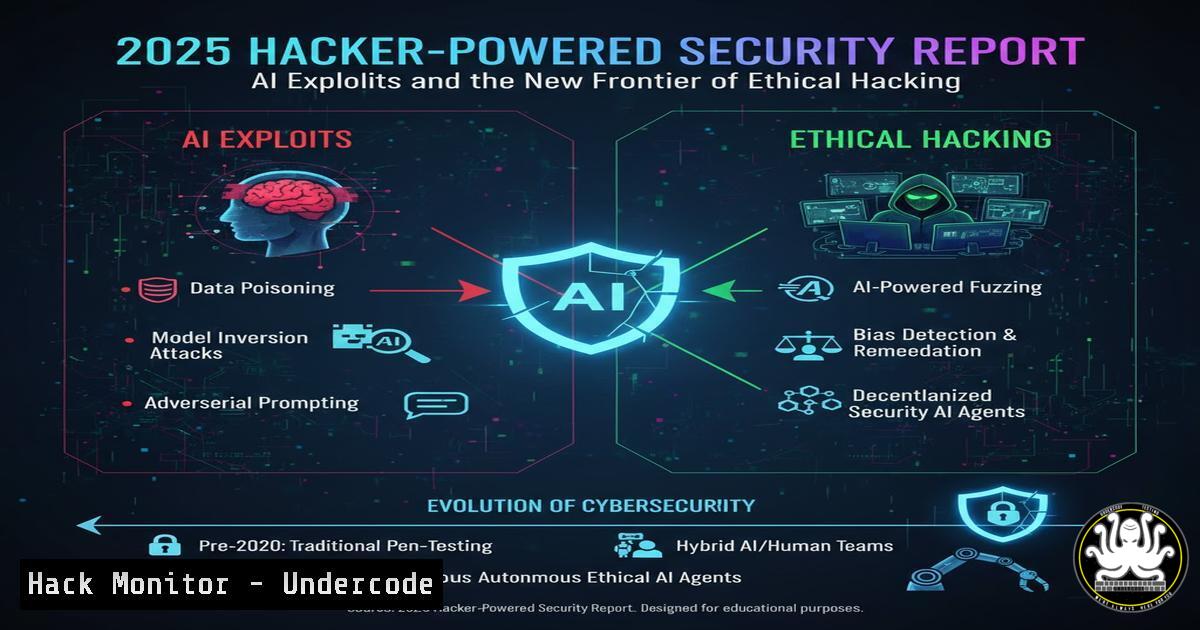
Introduction:
The cybersecurity landscape is undergoing a seismic shift, driven by the dual forces of artificial intelligence and the growing legitimization of the ethical hacker community. The recently released Hacker-Powered Security Report: Year in Review for 2025 highlights a critical transition from purely defensive postures to proactive, intelligence-driven vulnerability management, where collaboration between organizations and security researchers is becoming the cornerstone of modern cyber defense.
Learning Objectives:
- Understand the emerging vulnerability classes being exploited by AI-powered tools.
- Learn the essential commands and techniques for replicating and mitigating critical findings from bug bounty programs.
- Develop a proactive security hardening posture across cloud, API, and application layers.
You Should Know:
1. AI-Powered SQL Injection Exploitation
While AI can generate exploit code, the underlying vulnerabilities remain classic. This command uses sqlmap, a tool that exemplifies the automation now accessible to malicious actors.
sqlmap -u "https://target.com/search?q=test" --batch --level=5 --risk=3 --dbms=mysql --os-shell
Step-by-step guide:
- Reconnaissance: The `-u` parameter specifies the target URL, typically a search or login form.
- Automation: `–batch` runs the tool without user interaction, a hallmark of automated attacks.
- Thorough Testing: `–level=5` and `–risk=3` increase the depth and potential intrusiveness of the tests.
- Database Fingerprinting: `–dbms=mysql` tells `sqlmap` the database type, speeding up the exploitation.
- Goal: The `–os-shell` flag attempts to gain a system shell on the underlying server if the injection is successful and permissions allow.
2. Detecting Container Breakouts with Linux Auditd
As cloud-native applications proliferate, container escapes are a high-value target. This command set configures auditing to detect such attempts.
 Add a rule to monitor the /proc filesystem for writes from container processes
echo '-w /proc -p wa -k container_escape' >> /etc/audit/rules.d/containers.rules
 Restart the audit service to load the new rule
systemctl restart auditd
 Search the logs for relevant events
ausearch -k container_escape | aureport -f -i
Step-by-step guide:
- Rule Creation: The `echo` command appends a new audit rule (
-w) to watch the `/proc` directory. - Permissions: `-p wa` makes the rule trigger on any write or attribute change.
- Tagging: The `-k container_escape` tag helps filter logs for these specific events.
- Activation: Restarting the `auditd` service loads the new rule into the kernel.
- Monitoring: The `ausearch` and `aureport` commands are used to query and format the logs for suspicious activity.
3. Hardening Cloud IAM Roles with AWS CLI
Misconfigured Identity and Access Management (IAM) roles are a primary attack vector. This command checks for over-privileged roles.
aws iam get-account-authorization-details --query 'Policies[?AttachmentCount!=<code>0</code>]' --output table
Step-by-step guide:
- Authorization: Ensure your AWS CLI is configured with appropriate read permissions for IAM.
- Execution: Run the command to list all managed and inline policies currently attached to users, groups, or roles.
- Analysis: The `–query` parameter filters the output to show only policies that are actively in use (
AttachmentCount!=0). - Output: The `–output table` flag presents the data in a readable format for manual review. Look for policies with excessive permissions like `””` or
"s3:".
4. API Security Testing with curl and jq
APIs are increasingly targeted due to their direct access to data. This series of commands tests for common API flaws like Broken Object Level Authorization (BOLA).
 Test for BOLA by accessing another user's resource
curl -H "Authorization: Bearer $YOUR_TOKEN" https://api.target.com/v1/users/12345/data | jq
 Fuzz API endpoints for hidden parameters
ffuf -w /usr/share/wordlists/parameter-names.txt -u "https://api.target.com/v1/user?FUZZ=test" -fs 0
Step-by-step guide:
- BOLA Test: Replace `$YOUR_TOKEN` with a valid JWT and the user ID `12345` with another ID you should not have access to. A successful 200 response indicates a critical authorization flaw.
- Parsing: The `jq` command nicely formats the JSON response for easier analysis.
- Parameter Fuzzing: The `ffuf` command takes a wordlist (
-w) and tests for valid parameters (FUZZ) on the target endpoint. - Filtering: The `-fs 0` flag filters out responses of size 0, helping to identify valid parameters that return data.
5. Windows Privilege Escalation Enumeration
Initial access is often followed by lateral movement and privilege escalation. This PowerShell command helps identify misconfigurations.
Get-WmiObject -Class Win32_UserAccount | Where-Object {$_.LocalAccount -eq $true} | Format-Table Name, SID, Status
Step-by-step guide:
- Execution: Run this command in a PowerShell prompt with standard user privileges.
- Function: It queries WMI for all local user accounts on the system.
- Analysis: Review the output for non-standard or poorly configured accounts. Attackers look for accounts with weak passwords or excessive privileges that are not part of the default OS installation.
- Context: This is a basic form of host enumeration that ethical hackers and penetration testers use to map the attack surface after gaining a foothold.
6. Mitigating Memory Corruption Vulnerabilities
With exploits for memory corruption bugs like buffer overflows becoming more refined, system-level mitigations are critical.
 Check the current status of kernel security features on Linux
cat /proc/sys/kernel/randomize_va_space
grep -i grub_cmdline_linux /etc/default/grub
 Check for Windows Exploit Protection (PowerShell)
Get-ProcessMitigation -System
Step-by-step guide:
- ASLR Check: The `randomize_va_space` file shows the status of Address Space Layout Randomization (0=off, 1=conservative, 2=full).
- Kernel Parameters: The `grep` command checks the boot parameters for other security settings like `slub_debug` or
page_poison. - Windows Audit: The PowerShell `Get-ProcessMitigation` cmdlet displays the status of Control Flow Guard (CFG), Data Execution Prevention (DEP), and other exploit guards system-wide.
- Goal: Ensure these features are enabled to drastically raise the difficulty of successful exploitation.
7. Incident Response: Rapid Network Isolation
When a compromise is detected, speed is critical. These commands can help contain a threat on Linux and Windows systems.
 Linux: Immediately block all inbound/outbound traffic (DRASTIC)
iptables -P INPUT DROP && iptables -P OUTPUT DROP && iptables -P FORWARD DROP
 Windows: Disable all active network profiles
Get-NetAdapter | Disable-NetAdapter -Confirm:$false
Step-by-step guide:
- Assessment: Use these commands only when you need to immediately isolate a host from the network to prevent data exfiltration or lateral movement.
- Linux: The `iptables` commands set the default policy for INPUT, OUTPUT, and FORWARD chains to
DROP, effectively severing all network connectivity. - Windows: The PowerShell command fetches all network adapters with `Get-NetAdapter` and pipes them to `Disable-NetAdapter` to disable them.
- Warning: These are last-resort commands. They will terminate all remote sessions and network-dependent services.
What Undercode Say:
- The integration of AI into offensive security tools is not creating entirely new vulnerabilities but is dramatically accelerating the discovery and weaponization of existing logic and configuration flaws.
- The boundary between “ethical” and “malicious” hacking is increasingly defined by intent and authorization, not the tools or techniques used, forcing a more nuanced and collaborative security model.
The 2025 report underscores that defensive strategies reliant on secrecy and obscurity are no longer viable. The community’s collective knowledge, as seen in bug bounty platforms, is creating a rising tide that lifts all boats—organizations that actively engage with this community are hardening their assets against the very attacks being refined there. The key insight is that resilience is no longer about building impenetrable walls, but about creating transparent, monitored systems where vulnerabilities are found and fixed faster than they can be weaponized at scale.
Prediction:
The normalization of hacker-powered security will lead to a fundamental bifurcation in the cyber landscape by 2028. Organizations that embrace transparency and continuous, collaborative testing will achieve a significantly higher security maturity, suffering fewer and less severe breaches. Conversely, entities that resist this model will face an accelerating wave of AI-augmented attacks, finding their legacy perimeter-based defenses systematically dismantled by automated tools probing for the well-documented vulnerabilities they are not looking for themselves. The “security through obscurity” mantra will be rendered completely obsolete.
🎯Let’s Practice For Free:
IT/Security Reporter URL:
Reported By: Hackerone The – Hackers Feeds
Extra Hub: Undercode MoN
Basic Verification: Pass ✅


