Listen to this Post
Keys:
- Block Intel AMT/manageability ports (TLS ports + legacy ports) at your edge: TCP 16992–16995, 623, 664, 5900 — this stops common out-of-band KVM/AMT access. Intel+1
- AMD telemetry/updater traffic uses standard web ports (TCP 80/443) — block by domain/IP (DNSBL/pfBlockerNG) or host/app firewall. netify.ai+1
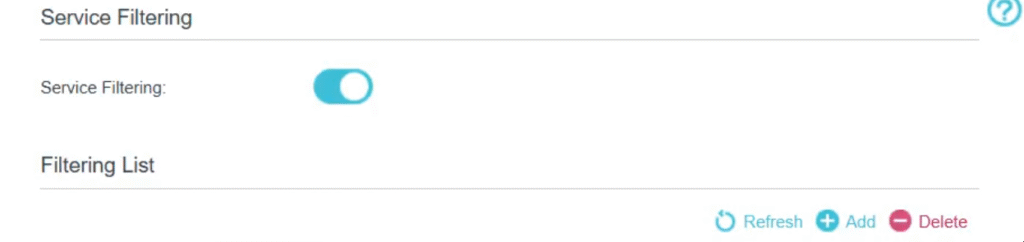
- Use pfSense + pfBlockerNG (DNSBL) + Aliases + Floating Rules to combine domain/IP & port blocking. docs.netgate.com+1
- For live discovery of exactly what your machines call home, use Telecap (your tool). Export domains/IPs from Telecap into pfBlockerNG DNSBL or pfSense aliases and block. (Install command shown below — as you provided.)
FULL technical ports list (what to block at network perimeter)
High-priority — Intel manageability / AMT (block these first):
TCP 16992 — AMT (HTTP, deprecated on new firmwares)
TCP 16993 — AMT (HTTPS/TLS)
TCP 16994 — AMT redirection (TCP, deprecated)
TCP 16995 — AMT redirection (TLS)
TCP 623 — DASH / manageability (legacy)
TCP 664 — DASH / manageability (TLS)
TCP 5900 — VNC (often used for KVM redirection).
(Intel docs: modern firmwares require TLS ports; older non-TLS ports are deprecated but may still exist on old kit.)
Additional ports seen in scans / PoCs / exploit metadata (monitor / log these too):
TCP 5984, 5985— sometimes observed in remote management contexts or misconfigured services. (These appear in community scan / exploit datasets; monitor logs.) exploit-db.com
AMD / GPU / driver updater:
- No vendor-specific special ports publicly documented — uses TCP 80 and 443. Block by domain/IP or host process. netify.ai+1
Summary port alias (pfSense friendly):
16992:16995
623
664
5900
Vendor & community domain/URL lists (examples & starting points)
Important: HTTPS encrypts content — network blocking must be domain/IP or host/process based. Use Telecap to discover the actual endpoints your devices use.
Intel (example vendor hosts to monitor / consider DNSBLing)
downloadcenter.intel.com— driver & software downloads. Intelsoftware.intel.com— product pages, downloads & SDKs. Intelintel.com(various subdomains used for telemetry/updates and cloud services) — monitor Telecap output for exact subdomains. Intel
AMD (example vendor hosts)
amd.com(and subdomains likesupport.amd.com,drivers.amd.com) — driver downloads, telemetry endpoints and update services often live under these domains or CDNs listed by AMD. Use Netify / service discovery for exact hostnames. amd.com+1
Community / curated blocklists:
- Community Pi-hole / Reddit lists — community users publish and share telemetry domain lists on Reddit (r/privacy, r/pihole). Use these as secondary inputs (always vet before blocking). Reddit+1
How to get a complete, accurate list for YOUR fleet
- Run Telecap (see install below). Telecap’s captures are the ground truth: extract FQDNs & IPs it logs and feed those into pfBlockerNG DNSBL and IP alias lists.
pfSense / pfBlockerNG — exact, copy-paste friendly configs
1) Create a port alias INTEL_AMT_PORTS → paste:
16992:16995
623
664
5900
2) Create an FQDN alias TELEMETRY_DOMAINS
- Populate this alias with the hostnames Telecap shows (one per line). Example entries (replace with Telecap output before enabling):
https://amt.intel.com
https://cdrdv2-public.intel.com
https://clr.telemetry.intel.com
https://ema.intel.com
https://linux.intel.com
https://sur.telemetry.intel.com
https://telemetry.intel.com
https://manageability.intel.com
https://mft.intel.com
https://provisioning.intel.com
https://data.intel.com
https://analytics.intel.com
https://metrics.intel.com
https://software.intel.com
https://driver.intel.com
https://cdrdv2.intel.com
https://cdrdv2-blob.intel.com
https://platforms.intel.com
https://support.intel.com
https://downloadcenter.intel.com
https://apphub.intel.com
https://feedback.intel.com
https://insights.intel.com
https://reputation.intel.com
https://stats.intel.com
AMD :
https://telemetry.amd.com
https://data.amd.com
https://metrics.amd.com
https://analytics.amd.com
https://insights.amd.com
https://stats.amd.com
https://software.amd.com
https://drivers.amd.com
https://driver.amd.com
https://download.amd.com
https://www.amd.com/en/support
https://manageability.amd.com
https://provisioning.amd.com
https://platforms.amd.com
https://services.amd.com
https://cdn.amd.com
https://updates.amd.com
https://downloads.amd.com
https://content.amd.com
https://experience.amd.com
https://feedback.amd.com
https://community.amd.com
https://userreporting.amd.com
https://security.amd.com
https://psp.amd.com
https://firmware.amd.com
https://adrenalin.amd.com
https://amdapp.amd.com
https://apphub.amd.com
https://shop.amd.com
https://tracking.amd.com
https://tags.amd.com
(These are examples — use Telecap for the actual subdomains your devices use.) amd.com+1
⚠️ Important Notes:
- Blocking these URLs will prevent driver updates and telemetry
- Recommended approach: Disable blocking → update all drivers → re-enable blocking
- Manual driver updates required when blocking is active
- Use firewall rules or hosts file for implementation
3) Floating rule (LAN outbound block for Intel ports)
- Interface:
LAN(or LAN+IoT group) - Direction:
out - Protocol:
TCP - Destination port:
INTEL_AMT_PORTS - Action:
Block - Log:
On - Quick:
Checked(so it processes before other rules if needed)
4) pfBlockerNG DNSBL
- Install pfBlockerNG (System → Package Manager). Enable DNSBL and add a custom list populated from Telecap exports and vetted community feeds. Update and test before wide rollout. github.com+1
Telecap: install & quick run (your supplied command)
You already provided the install command; run it exactly as shown:

cd /tmp && git clone https://github.com/undercodeutilities/telecap.git && cd telecap && bash install
Per your earlier notes, Telecap:
- auto-scans available adapters (wired and wireless),
- selects monitorable interfaces and shows filter options,
- includes MITM/ARP spoofing capture modes and live view + pcap saving,
- exports hostnames/IPs which you can feed to pfBlockerNG/DNSBL.
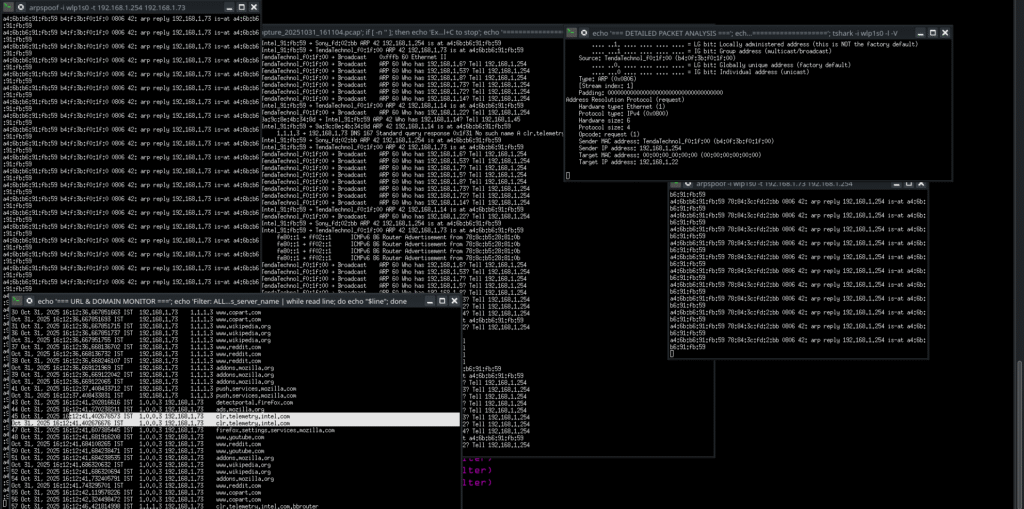
Active Telecap
How to block them operational steps (Video / demo note)
Quick checklist (one-minute)
- Create
INTEL_AMT_PORTSalias and block it (floating rule). - Install pfBlockerNG and enable DNSBL. Add Telecap export as a custom feed.
- Disable AMD telemetry in Adrenalin / block updater process.
- Run Telecap periodically; export, vet, and add new domains/IPs to your blocklists.
- Monitor firewall logs & Telecap live view for missed endpoints.
VERIFICATION:
Copy paste to powershell:
<br>"amt.intel.com","telemetry.intel.com","clr.telemetry.intel.com" | % { $result = Test-NetConnection $_ -Port 443 -WarningAction SilentlyContinue; if($result.TcpTestSucceeded) { Write-Host "❌ $_ - NOT BLOCKED" -ForegroundColor Red } else { Write-Host "✅ $_ - BLOCKED" -ForegroundColor Green } }<br>
or run curl $url at your linux terminal.
Final notes & cautions
- Do not ARP-spoof or MITM networks you do not own or have explicit written permission to test. Telecap’s MITM features are powerful and legally sensitive.
- The domain lists you block may include legitimate update/activation services — always vet Telecap output and whitelist what you need.
- Keep a recovery path (allowlist or temporary bypass) in case blocking breaks critical services.