Listen to this Post
Introduction:
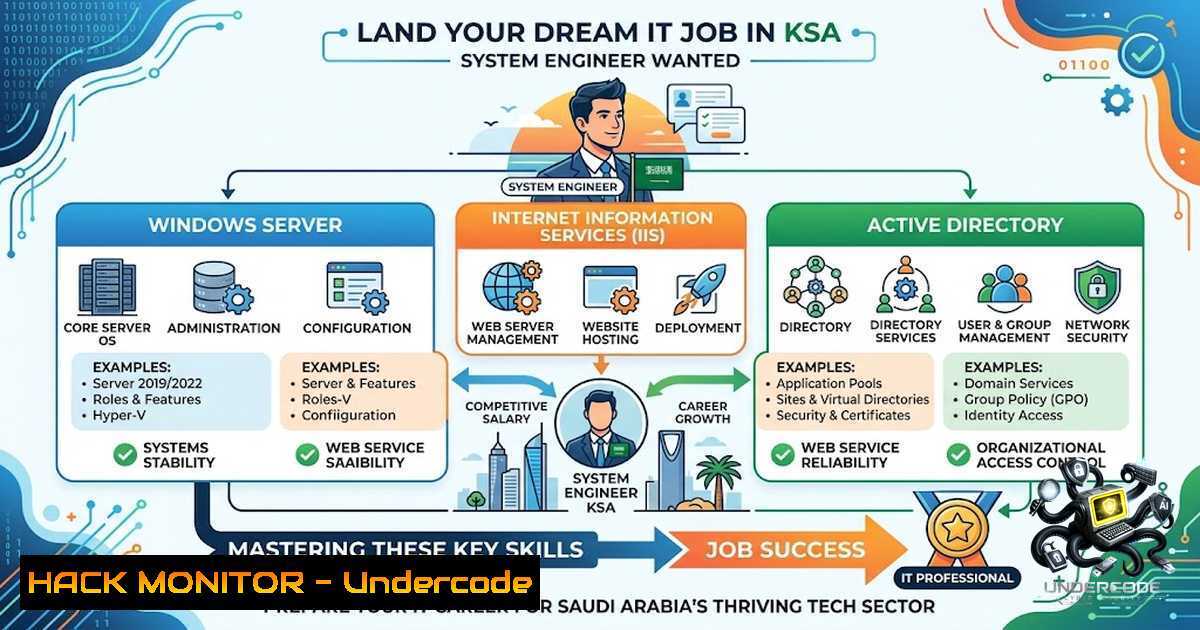
The Global Information Security Society for Professionals of Pakistan (GISPP) has spotlighted a critical opening for a System Engineer in Saudi Arabia, reflecting the Kingdom’s surging demand for IT infrastructure talent. As organizations across the Middle East accelerate digital transformation, the role of a System Engineer has evolved from basic server maintenance to a cybersecurity‑adjacent position requiring deep knowledge of Windows Server, Active Directory, IIS web hosting, and network security fundamentals. This article breaks down the job requirements, provides hands‑on technical tutorials for the core skills demanded, and offers actionable insights for candidates aspiring to secure this role or similar positions in the region.
Learning Objectives:
- Master the installation, configuration, and troubleshooting of Windows Server, Active Directory, DNS, and DHCP in an enterprise environment.
- Develop proficiency in managing IIS web applications, including SSL certificate binding, application pool configuration, and resolving common HTTP errors.
- Acquire hands‑on skills in system monitoring, user access administration, and applying security patches to maintain infrastructure integrity.
- Windows Server & Active Directory: The Backbone of Enterprise IT
The job description explicitly requires “hands‑on knowledge of Windows Server, Active Directory, DNS, DHCP, TCP/IP networking, and virtualization technologies”. Active Directory Domain Services (AD DS) is the cornerstone of user authentication and access control in most corporate networks. A System Engineer must be able to deploy, manage, and troubleshoot AD, DNS, and DHCP services.
Step‑by‑Step: Setting Up a Domain Controller with Active Directory, DNS, and DHCP
This lab simulates an enterprise network using Hyper‑V, Windows Server 2022, and Windows 10/11 clients.
- Enable Hyper‑V and Create Virtual Machines: On a Windows 10/11 Pro host, enable Hyper‑V via Turn Windows features on or off → check Hyper‑V. Create two Generation 2 VMs: one for the Domain Controller (DC01) and one for a client workstation (PC01). Allocate at least 4GB RAM and 64GB storage for the DC.
- Install Windows Server 2022 on DC01 and assign a static IP address (e.g., 192.168.10.10/24) with the DNS server pointing to itself (127.0.0.1).
- Promote the Server to a Domain Controller: Open Server Manager → Add roles and features → select Active Directory Domain Services. After installation, click the notification flag and select Promote this server to a domain controller. Choose Add a new forest and specify a root domain name (e.g.,
corp.local). - Install and Configure DHCP: In Server Manager, add the DHCP Server role. After installation, open the DHCP Management Console, create a new scope (e.g., 192.168.10.100–192.168.10.200), and configure scope options such as Default Gateway (192.168.10.1) and DNS Servers (192.168.10.10).
- Verify DNS Resolution: From PC01 (joined to the domain), run `ping dc01.corp.local` to confirm that name resolution is functioning correctly.
6. Automate User Creation with PowerShell:
Import-Module ActiveDirectory
$Password = ConvertTo-SecureString "P@ssw0rd123" -AsPlainText -Force
New-ADUser -1ame "John Doe" -GivenName "John" -Surname "Doe" -SamAccountName "jdoe" -UserPrincipalName "[email protected]" -AccountPassword $Password -Enabled $true
This script creates a domain user and sets an initial password.
Troubleshooting Tip: If a client cannot obtain an IP address, verify that the DHCP service is running (Get-Service DHCP in PowerShell) and that the scope is activated. If DNS resolution fails, check that the client’s DNS server is correctly set to the DC’s IP address and that the DC’s DNS forwarders are configured for external resolution.
- IIS Web Server Management: Hosting and Troubleshooting Web Applications
The job requires supporting “web applications hosted on IIS” and troubleshooting related issues. Internet Information Services (IIS) is Microsoft’s flexible web server for hosting ASP.NET, static content, and services. A System Engineer must know how to install, configure, and diagnose IIS problems.
Step‑by‑Step: Installing IIS and Deploying a Web Application
- Install IIS on Windows Server: Open Server Manager → Add Roles and Features → select Web Server (IIS). During installation, include common security features like Request Filtering and Windows Authentication.
- Create a Website: Open IIS Manager → right‑click Sites → Add Website. Provide a site name, specify the physical path (e.g.,
C:\inetpub\wwwroot\myapp), and assign a port (default 80 for HTTP). - Configure an Application Pool: Each website runs within an application pool, which isolates processes for stability and security. In IIS Manager, select Application Pools → Add Application Pool. Choose the .NET CLR version and managed pipeline mode appropriate for your application.
- Bind an SSL Certificate (Required for secure HTTPS communication):
– Obtain a certificate (.pfx) or create a self‑signed certificate for testing.
– In IIS Manager, select your site → Bindings → Add → choose https and select the certificate.
– Ensure the firewall allows port 443.
5. Troubleshoot Common IIS Errors:
- HTTP Error 500.19 – Internal Server Error: This indicates a malformed `web.config` or `applicationHost.config` file. Check the HRESULT code in the error message. For code
0x8007000d, an unrecognized XML element exists—remove it or install the required IIS module. - HTTP Error 500.21 – Handler “xxx” has a bad module: This often occurs when ASP.NET is not installed correctly. Re‑install the ASP.NET role service or use `aspnet_regiis -i` from the .NET Framework directory.
- IIS Service Not Starting: Open an elevated Command Prompt and run `iisreset` to restart IIS. If the service fails, check the Event Viewer under Windows Logs → Application for detailed error messages.
- Monitor IIS Performance: Use IIS Manager’s Worker Processes feature to view CPU and memory usage per application pool. For deeper analysis, enable Failed Request Tracing to capture detailed logs for errors.
3. Network Troubleshooting and Connectivity
The role involves “support
 network troubleshooting and connectivity issues”. A System Engineer must be adept at diagnosing Layer 2/3 problems, using both Windows and Linux command‑line tools.

<h2 style="color: yellow;">Essential Commands for Network Diagnostics:</h2>

| Task | Windows Command | Linux Command |

<h2 style="color: yellow;">||-||</h2>

| Check IP configuration | `ipconfig /all` | `ip addr` or `ifconfig` |
| Test connectivity | `ping <target>` | `ping <target>` |
| Trace route | `tracert <target>` | `traceroute <target>` |
| Display active connections | `netstat -an` | `ss -tulpn` or `netstat -tulpn` |
| DNS lookup | `nslookup <hostname>` | `dig <hostname>` or `nslookup` |
| Check ARP table | `arp -a` | `arp -1` |
| Test port connectivity | `Test-1etConnection <host> -Port <port>` (PowerShell) | `telnet <host> <port>` or `nc -zv <host> <port>` |

<h2 style="color: yellow;">Step‑by‑Step: Diagnosing a Connectivity Issue</h2>

<ol>
<li>Identify the Failure Point: Start with `ping` to the default gateway. If it fails, check physical cabling or Wi‑Fi connection. If it succeeds, ping an external IP (e.g., 8.8.8.8). If external ping fails but internal works, the issue is likely with the router or firewall.</li>
<li>Verify DNS Resolution: Use <code>nslookup google.com</code>. If it fails, check that the DNS server IP is correctly configured and that the DNS service is running on the server.</li>
<li>Trace the Path: Run `tracert 8.8.8.8` to see where packets are dropped. A timeout at a specific hop indicates a routing or firewall blockage.</li>
<li>Check for Port Blocking: Use `Test-1etConnection google.com -Port 443` to verify that HTTPS traffic can reach the destination. If blocked, review firewall rules on both the local machine and any network security groups.</li>
</ol>

<h2 style="color: yellow;">4. User Account Management and Access Administration</h2>

The job requires “assist[bash] in user account management and access administration”. This involves creating, modifying, and disabling user accounts, as well as managing group memberships and permissions.

<h2 style="color: yellow;">Step‑by‑Step: Managing Users and Groups in Active Directory</h2>

<ol>
<li>Create a New User via Active Directory Users and Computers (ADUC): Right‑click the Users container → New → User. Fill in the required fields and set a password.</li>
<li>Add User to a Group: In ADUC, locate the user, right‑click → Add to a group → type the group name (e.g., “Domain Admins”).</li>
<li>Reset a Password: Right‑click the user → Reset Password → enter new password and confirm.</li>
<li>Disable or Delete an Account: Right‑click the user → Disable Account or Delete.</li>
<li>Delegate Control: To allow junior admins to reset passwords without full domain admin rights, right‑click an OU → Delegate Control → follow the wizard to assign specific permissions (e.g., “Reset user passwords and force password change at next logon”).</li>
</ol>

<h2 style="color: yellow;">PowerShell Automation for Bulk Operations:</h2>

[bash]
 Import users from a CSV file
$Users = Import-Csv -Path "C:\users.csv"
foreach ($User in $Users) {
$Password = ConvertTo-SecureString $User.Password -AsPlainText -Force
New-ADUser -1ame $User.Name -GivenName $User.FirstName -Surname $User.LastName -SamAccountName $User.Username -UserPrincipalName "$($User.Username)@corp.local" -AccountPassword $Password -Enabled $true
}
5. Security Hardening and Patch Management
The job includes “follow
 security policies and IT best practices” and “participat[bash] in system upgrades, patches, and preventive maintenance activities”. A System Engineer must implement baseline security controls and keep systems updated.

<h2 style="color: yellow;">Step‑by‑Step: Hardening Windows Server</h2>

<ol>
<li>Apply the Latest Security Patches: Use Windows Update or WSUS (Windows Server Update Services) to deploy critical and security updates monthly. Automate via Group Policy: Computer Configuration → Administrative Templates → Windows Components → Windows Update.</li>
<li>Configure Windows Firewall: Enable the firewall and create inbound/outbound rules to allow only necessary ports (e.g., 80, 443, 3389 for RDP from trusted IPs). Use `netsh advfirewall` or PowerShell:
[bash]
New-1etFirewallRule -DisplayName "Allow HTTPS" -Direction Inbound -Protocol TCP -LocalPort 443 -Action Allow
Get-Service | Where-Object {$_.StartType -eq 'Automatic'}) to review and disable services like Telnet, Simple TCP/IP Services, and Print Spooler if not needed.auditpol /set /category:"Logon/Logoff" /subcategory:"Logon" /success:enable /failure:enable.6. Virtualization and Cloud Fundamentals
The preferred qualifications include “Azure Fundamentals” and “virtualization technologies”. A System Engineer should be comfortable with hypervisors like Hyper‑V and basic cloud concepts.
Step‑by‑Step: Creating a Virtual Machine in Hyper‑V
- Open Hyper‑V Manager → New → Virtual Machine.
- Specify a name and location for the VM.
- Choose the generation (Generation 2 for UEFI‑based OS like Windows Server 2022).
- Assign memory (e.g., 4096 MB) and configure networking (connect to a virtual switch previously created).
- Create a virtual hard disk (VHDX) with a size (e.g., 127 GB) and select Install an operating system from a bootable image file → browse to your Windows Server ISO.
6. Click Finish and start the VM.
Azure Fundamentals: Understand the difference between IaaS, PaaS, and SaaS. Know how to create a virtual machine in Azure, configure network security groups, and use Azure Backup for disaster recovery. The Microsoft Learn platform offers free modules on these topics.
What Undercode Say:
- Key Takeaway 1: The System Engineer role in KSA is not just about maintaining servers—it is a gateway to cybersecurity. Mastering Active Directory, IIS, and network troubleshooting builds a foundation for advanced security roles like SOC Analyst or Security Engineer.
- Key Takeaway 2: Candidates with hands‑on lab experience (even from personal projects) stand out. Employers value practical skills over theoretical knowledge. Setting up a home lab with Hyper‑V, Windows Server, and simulating real‑world issues is the fastest way to gain confidence.
Analysis: The job market in Saudi Arabia is rapidly evolving, with organizations prioritizing professionals who can bridge the gap between traditional IT operations and modern security practices. The GISPP network, with members across 18 countries, provides a unique platform for Pakistani professionals to access job opportunities, mentorship, and knowledge sharing. The emphasis on certifications like CCNA, CompTIA A+, and Azure Fundamentals indicates that employers value structured learning pathways. However, the most critical differentiator for candidates is the ability to demonstrate problem‑solving through real‑world scenarios—such as recovering a failed DC, troubleshooting an IIS 500 error, or automating user provisioning with PowerShell.
Prediction:
- +1 The demand for System Engineers in KSA will continue to grow as Vision 2030 drives digital transformation across government and private sectors, creating a sustained need for infrastructure talent.
- +1 Professionals who combine Windows Server expertise with cloud (Azure/AWS) and security hardening skills will command premium salaries and faster career progression.
- -1 The rapid adoption of automation and Infrastructure‑as‑Code (IaC) may reduce the need for manual system administration tasks, pressuring engineers to upskill in scripting and DevOps practices.
- +1 GISPP and similar professional societies will play an increasingly vital role in bridging the skills gap, offering training, certifications, and networking that directly align with employer needs.
- -1 Without continuous learning and adaptation to emerging threats (e.g., ransomware, zero‑day exploits), traditional System Engineers risk becoming obsolete in a security‑first IT landscape.
▶️ Related Video (72% Match):
🎯Let’s Practice For Free:
🎓 Live Courses & Certifications:
Join Undercode Academy for Verified Certifications
🚀 Request a Custom Project:
Secure, high-velocity infrastructure and disruptive technological engineering. Contact our engineering team for high-tier development and proprietary systems:
[email protected]
💎 Smart Architecture | 🛡️ Secure by Design | ⭐ Trusted by Thousands
IT/Security Reporter URL:
Reported By: System Engineer – Hackers Feeds
Extra Hub: Undercode MoN
Basic Verification: Pass ✅


