Listen to this Post
Introduction:
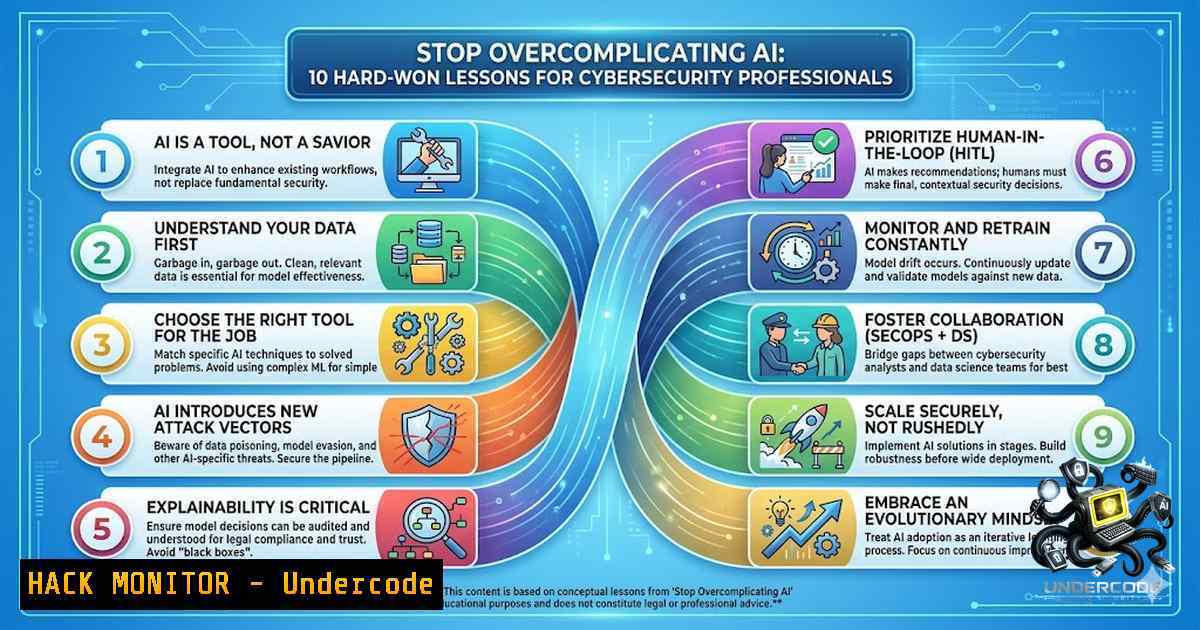
In the rapidly evolving landscape of cybersecurity, the adoption of Artificial Intelligence (AI) is no longer optional—it is a strategic imperative. However, the path to effective implementation is often littered with overhyped solutions, misunderstood capabilities, and unnecessary complexity. This article distills expert advice into a pragmatic blueprint for security leaders, engineers, and analysts looking to harness AI for defensive and offensive operations without falling prey to common pitfalls.
Learning Objectives:
- Identify and automate repetitive security tasks to enhance operational efficiency.
- Design and deploy lightweight AI agents using accessible technologies.
- Understand and apply AI fundamentals, including the new paradigm of MCP (Model Context Protocol), to avoid vendor lock-in and technical debt.
You Should Know:
- Automate Your Daily Pain Points with Custom Scripts
The most effective application of AI in a security context is the automation of mundane, time-consuming tasks. Instead of trying to “AI-fy” an entire security operations center (SOC), focus on a single, repetitive process that consumes analyst time, such as log parsing, initial threat triage, or user provisioning.
Step‑by‑step guide:
- Identify the Task: List your daily tasks and categorize them by frequency and required cognitive load.
- Select the Tool: Start with Python and open-source libraries (e.g., `transformers` for NLP, `scikit-learn` for data classification) rather than expensive enterprise solutions.
- Create a Script: Develop a minimal viable script that consumes an API (e.g., a SIEM query output) and processes it using a local LLM.
- Test the Workflow: Run the script on historical data to compare its output against manual analyst decisions.
- Iterate: Adjust your prompts and logic based on accuracy, then schedule the script to run daily.
- Build, Don’t Just Buy: Creating Simple AI Agents
The urge to subscribe to multiple AI platforms is strong, but it often leads to underutilization. The “build” approach starts with open-source models (like Llama or Mistral) or lightweight API calls to create agents that tackle specific problems.
Step‑by‑step guide:
- Environment Setup: Use a lightweight framework like LangChain or a simple Python script to orchestrate your agent.
- Define the Agent’s Role: For example, an “IOC Extractor” agent that reads threat intelligence reports and extracts Indicators of Compromise.
- Connect to Data Sources: Use the Requests library in Python to pull data from a REST API.
- Implement the Loop: Create a loop where the agent reads new data, processes it via an LLM, and outputs structured JSON.
- Enhance with Memory: Add a vector database like ChromaDB for memory so the agent learns from past reports.
- Avoiding the “API Subscription” Trap: Understand MCP (Model Context Protocol)
“MCP is the new API.” The Model Context Protocol represents a shift towards standardized communication between AI models and external data sources. Understanding this protocol allows you to build more portable, flexible agents that aren’t locked into a single vendor.
Step‑by‑step guide:
- Review the Spec: Visit the official MCP GitHub or documentation to understand its architecture (clients, servers, and tools).
- Set Up an MCP Server: Install the Python MCP library (
pip install mcp). - Create a Server Instance: Write a simple server that exposes a tool for querying a vulnerability database.
- Connect a Client: Connect your LLM client to this server to test the handshake.
- Evaluate Overhead: Determine if the MCP implementation reduces the complexity of your code compared to custom API calls.
4. Review Your Process Before Implementing AI
As highlighted by Joice Dantas, AI will not fix a broken process. If your vulnerability management workflow is chaotic, an AI agent will only accelerate that chaos and produce inaccurate results. The implementation must begin with a “process audit.”
Step‑by‑step guide:
- Map the Process: Draw a flowchart of the current manual workflow.
- Identify Bottlenecks: Ask “Why” five times to get to the root cause of delays.
- Standardize Input/Output: Ensure that data entering the AI is structured and consistent.
- Define Failure Conditions: What happens if the AI gives a false positive? Implement a human-in-the-loop (HITL) check at critical junctions.
- Test in a Sandbox: Run the new process with the AI model in a test environment before deploying to production.
- The “Harness vs. LLM” Fallacy: Understanding Your Stack
Don’t let “AI gurus” confuse you with fancy terminology. A “harness” is essentially the orchestration layer that guides an LLM. This section details how to configure that harness to prevent the model from generating hallucinated commands.
Step‑by‑step guide:
- Understand the Tech Stack: Ensure the team understands the basics of the underlying API and language (e.g., Python vs. Golang).
- Implement Static Analysis: Before allowing the LLM’s generated code to run, pass it through a linter or a static analysis security testing (SAST) tool.
- Use a “System” Define a strict “System” prompt that instructs the LLM to only output JSON or code that adheres to a specific schema.
- Set Temperature Low: Set the model’s “temperature” parameter to 0.1 or 0.2 to prevent creative deviations.
- Validate Output: Write a validation function to check the output against expected data types.
6. Linux/Windows Command Hardening with AI
Use AI to verify system hardening commands. For example, you can ask an AI agent to check the syntax and security implications of a Linux `iptables` rule or a Windows `Set-ExecutionPolicy` command.
Step‑by‑step guide:
- Write the Command: E.g.,
iptables -A INPUT -p tcp --dport 22 -j ACCEPT. - Create a Ask the LLM: “Analyze this rule. What are the security risks? Is it persistent?”
- Linux Hardening Example: Use commands like `auditd` for auditing. AI can generate `audit.rules` based on CIS benchmarks.
- Command: `auditctl -w /etc/passwd -p wa -k identity`
– Windows PowerShell Example: AI can assist in creating scripts to enforce BitLocker or update the Windows Firewall rules via the `New-1etFirewallRule` cmdlet. - Command: `New-1etFirewallRule -DisplayName “Block RDP” -Direction Inbound -LocalPort 3389 -Protocol TCP -Action Block`
7. Building High-Precision Educational Materials via RAG
As mentioned by Joas, moving “beyond simple prompting” is crucial. To build an agent for creating educational materials, you need a Retrieval-Augmented Generation (RAG) system that ensures the AI only generates facts based on your curated internal documents.
Step‑by‑step guide:
- Chunk the Data: Break down your internal playbooks or courses into chunks of 500-1000 words.
- Generate Embeddings: Use an embedding model to store these chunks in a vector database.
- Set Up the Retriever: Configure the system to retrieve the most relevant chunks based on the user’s question.
- Build the Generation Insert the retrieved text into the prompt’s context window.
- Fact-Checking: Implement a secondary “verifier” agent that checks the final output against the source documents.
8. The “Human-in-the-Loop” Roadblock Strategy
When AI agents fail (which they will), the complexity of debugging them increases. Selim Erünkut points out that hitting a roadblock is the signal to implement human-in-the-loop, not to code a more complex agent.
Step‑by‑step guide:
- Implement Logging: Ensure your agent logs every decision path and API call.
- Set a Confidence Threshold: If the AI’s confidence score is below 85%, flag the item for review.
- Create a Review Dashboard: Build a UI (using Streamlit or Flask) that shows the AI’s output and the original context.
- Feedback Loop: Allow reviewers to correct the AI output. Use this corrected data to fine-tune the model later.
- Escalate: Move the item from the AI queue to the SOC queue when flagged.
9. The “No Re-invention” Rule: Leverage Existing Tools
Don’t build a PDF parser from scratch. Don’t write a custom SQL connector. Use standard libraries: PyPDF2, requests, sqlalchemy. The goal is integration, not construction.
Step‑by‑step guide:
- Inventory Existing Tools: Map the tools you already own (e.g., Splunk, Elastic, Tenable).
- Check for APIs: Ensure these tools have robust REST APIs.
- Use Connectors: Use pre-built connectors from community libraries (e.g., the `elasticsearch` Python library).
- Orchestrate: Write the glue code (often a 20-line Python script) that moves data from Tool A to the AI orchestrator.
- Schedule Execution: Use `cron` (Linux) or Task Scheduler (Windows) to run the orchestrator script.
10. Moving Beyond LLMs: Integrating Predictive Models
LLMs are text-based. However, security is data-intensive. Use Random Forest or XGBoost models for anomaly detection on network traffic or user behavior, which are often faster and more accurate than LLMs for numeric data.
Step‑by‑step guide:
- Collect Numeric Data: Gather network flow logs (
src_ip,dst_ip,bytes,packets). - Feature Engineering: Convert categorical data (e.g., IPs) to numerical features using encoding.
- Train a Simple Model: Use Scikit-Learn to train an Isolation Forest model to detect outliers.
- Export the Model: Save the model as a `.pkl` file.
- Script Execution: Write a script that loads the model daily, scores new logs, and alerts if anomalies are above a threshold.
What Undercode Say:
- Key Takeaway 1: Pragmatic application beats theoretical complexity. Starting with a simple Python script that utilizes a local LLM to parse logs will yield more immediate security value than investing in an enterprise-wide “AI Transformation” initiative.
- Key Takeaway 2: The future of security automation lies in modular, standardized protocols (like MCP) and human oversight. The goal is not to replace the human analyst but to augment their capabilities by reducing cognitive load and automating the “grunt work.”
Analysis:
Joas A Santos’ advice cuts through the noise, emphasizing that the foundational skills of programming and process comprehension are more critical than ever. The tech industry is witnessing a democratization of AI tools, yet a significant knowledge gap exists between understanding how to use an interface and understanding how to build an integration. The emphasis on “starting small” is a direct counter to the “Shiny Object Syndrome” that plagues many security departments. Furthermore, the warning against “AI Gurus” highlights a crucial truth: effective AI implementation is domain-specific and requires a deep understanding of the underlying architecture, not just prompt engineering. By focusing on MCP, Joas subtly predicts a future where interoperability will define success, preventing vendor lock-in—a critical factor for long-term strategic security planning. Finally, the reminder that AI extends beyond LLMs to include classical ML models is essential for a balanced security posture, as network anomalies are often better caught by traditional statistical models than generative text models.
Prediction:
- +1 By 2027, over 60% of security operations tasks will be augmented by lightweight, single-purpose AI agents rather than monolithic platforms, significantly reducing average response times.
- -1 The rise of AI-driven automation will initially widen the skill gap, forcing organizations to heavily invest in upskilling analysts in Python and data science before they can realize the benefits of MCP and orchestration.
- +1 The standardization of MCP will lead to a surge in “plug-and-play” security tools, enabling smaller firms to leverage best-in-breed AI components without the constraints of a single vendor’s ecosystem.
▶️ Related Video (90% Match):
🎯Let’s Practice For Free:
🎓 Live Courses & Certifications:
Join Undercode Academy for Verified Certifications
🚀 Request a Custom Project:
Secure, high-velocity infrastructure and disruptive technological engineering. Contact our engineering team for high-tier development and proprietary systems:
[email protected]
💎 Smart Architecture | 🛡️ Secure by Design | ⭐ Trusted by Thousands
IT/Security Reporter URL:
Reported By: Joas Antonio – Hackers Feeds
Extra Hub: Undercode MoN
Basic Verification: Pass ✅


