Listen to this Post
Introduction:
The cybersecurity industry is flooded with content that explains what an attack is, but very little teaches you how a SOC Analyst actually detects, investigates, and responds to these threats in a real Security Operations Center. This gap between theoretical knowledge and practical investigation skills is what separates a junior analyst from a true blue-team professional. This article bridges that divide by walking you through the core network attacks every SOC analyst must master, complete with detection strategies, log analysis techniques, and hands-on commands you can use immediately.
Learning Objectives:
- Master the investigative workflow for detecting and responding to MITM, DNS spoofing, and DDoS attacks in a live SOC environment
- Learn to identify Indicators of Compromise (IoCs) across network, host, and application layers
- Map attack patterns to the MITRE ATT&CK framework for structured threat hunting
- Acquire practical Linux and Windows commands for real-time network investigation and log analysis
You Should Know:
1. Network Attacks Demystified: Beyond the Textbook Definition
Most training materials define network attacks in abstract terms. A SOC analyst, however, must translate these definitions into observable behaviors. Let’s break down the key attacks mentioned in the notebook and what they look like from a detection standpoint.
Man-in-the-Middle (MITM) Attack: An attacker intercepts communication between two parties. In a SOC, you’re not looking for “MITM” as an event—you’re looking for ARP cache poisoning, rogue DHCP servers, or SSL certificate anomalies. Detection starts with monitoring for duplicate IP addresses, unexpected ARP replies, and certificate validation failures.
Rootkits: These are kernel-level or user-mode malware that hide their presence. Detection requires comparing running processes against known good baselines, checking for hidden services, and analyzing system call hooks. On Windows, use `Autoruns` and `Process Explorer` from Sysinternals. On Linux, `rkhunter` and `chkrootkit` are essential scanning tools.
Botnets: Compromised machines under attacker control. Look for outbound connections to known C2 (Command and Control) IPs, unusual DNS queries (DGA domains), and traffic patterns that show periodic beaconing. Use your SIEM to correlate firewall logs with threat intelligence feeds.
IP Spoofing: Attackers forge source IP addresses. While modern networks often block spoofed traffic at the edge, internal spoofing can still occur. Monitor for packets with source IPs that don’t belong to your internal subnet ranges, or traffic originating from RFC 1918 addresses leaving the network.
DNS Spoofing: The attacker poisons DNS responses to redirect users to malicious sites. Detection involves monitoring for DNS response anomalies—multiple responses to the same query, TTL values that are unusually low, or responses that resolve to known malicious IPs. Enable DNSSEC where possible and log all DNS queries and responses.
DDoS Attacks: Distributed denial-of-service floods your network with traffic. While volumetric attacks are often handled upstream, application-layer DDoS (HTTP floods, Slowloris) requires analysis of web server logs, connection rates, and unusual user-agent strings.
Malware-Based Network Attacks: This category includes ransomware, worms, and trojans that use the network for propagation or data exfiltration. Detection relies on network traffic analysis—look for SMB traffic to unusual destinations, large outbound data transfers, or connections to domains with low reputation scores.
Phishing & Credential Attacks: These are often the entry point for larger breaches. SOC analysts must monitor for suspicious login attempts, impossible travel scenarios, and unusual email patterns. Use your SIEM to correlate failed logins with successful ones, and watch for credential dumping tools like Mimikatz being executed on endpoints.
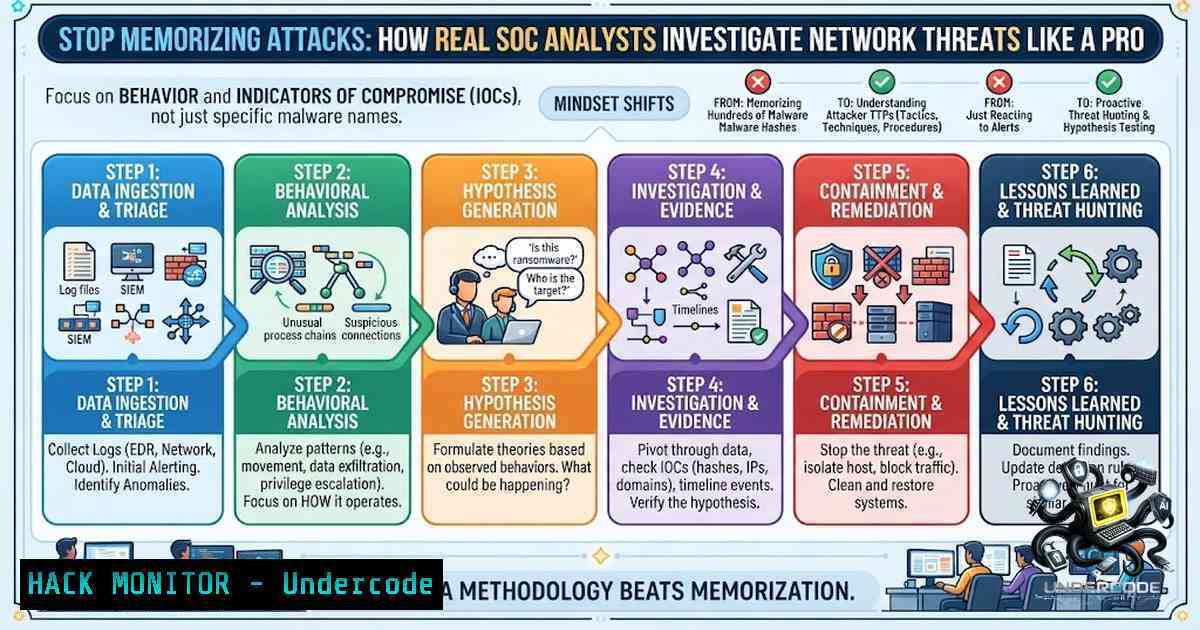
- The SOC Investigation Workflow: From Alert to Containment
A structured workflow prevents you from missing critical evidence during an incident. Here’s a step-by-step approach based on the notebook’s SOC Investigation Workflow:
Step 1: Triage – When an alert fires, determine if it’s a true positive. Check the severity, asset criticality, and any related alerts. Use your SIEM to query for similar activity in the last 7 days.
Step 2: Data Collection – Gather logs from affected systems. Essential sources include:
– Firewall logs (ingress/egress traffic)
– DNS logs (queries and responses)
– Endpoint logs (process creation, network connections)
– Authentication logs (Windows Event ID 4624, 4625)
– Proxy logs (web requests)
Step 3: Analysis – Correlate the data. For example, a suspicious outbound connection from an endpoint should be mapped against DNS logs to see what domain was resolved, and against process creation logs to see which executable initiated the connection.
Step 4: Containment – Isolate the affected system using network segmentation or by disabling the user account. On Windows, you can use `netsh advfirewall` to block outbound traffic temporarily. On Linux, use `iptables` to drop traffic from the compromised IP.
Step 5: Eradication & Recovery – Remove the threat and restore systems from clean backups. Ensure the root cause is addressed—patch vulnerabilities, update signatures, and improve monitoring rules.
Step 6: Lessons Learned – Document the incident, update your playbooks, and share indicators of compromise with the broader security community.
- Indicators of Compromise (IoCs): What to Look For
IoCs are forensic artifacts that signal a potential breach. The notebook emphasizes simple explanations and SOC-focused investigation tips. Here are critical IoCs across different layers:
Network Layer IoCs:
- Unusual outbound connections to non-standard ports
- DNS queries to algorithmically generated domains (DGA)
- Large data transfers during off-hours
- ICMP tunneling traffic (large packets with unusual payloads)
Host Layer IoCs:
- Unexpected processes running as SYSTEM or root
- New user accounts with administrative privileges
- Scheduled tasks or cron jobs that appear suspicious
- Files with double extensions (e.g.,
invoice.pdf.exe)
Application Layer IoCs:
- Web requests containing SQL injection payloads
- Authentication attempts with default credentials
- Unusual user-agent strings in HTTP requests
Practical Command – Extracting IoCs from Logs:
On Linux, use `grep` and `awk` to parse syslog for suspicious IPs:
grep "Failed password" /var/log/auth.log | awk '{print $11}' | sort | uniq -c | sort -1r
On Windows PowerShell, extract failed logon attempts from Security logs:
Get-WinEvent -LogName Security | Where-Object { $<em>.Id -eq 4625 } | Select-Object TimeCreated, @{Name="IpAddress";Expression={$</em>.Properties[bash].Value}}
4. Log Sources Every SOC Analyst Must Master
The notebook highlights “log sources to analyze” as a core component. Without logs, you’re flying blind. Here’s a breakdown of critical log sources and how to query them:
Windows Event Logs:
- Security Log (Event IDs):
- 4624: Successful logon
- 4625: Failed logon
- 4672: Special privileges assigned
- 4688: Process creation
- 7045: Service installation
- PowerShell command to query failed logons:
Get-WinEvent -FilterHashtable @{LogName='Security'; ID=4625} -MaxEvents 50
Linux System Logs:
– `/var/log/auth.log` – Authentication events
– `/var/log/syslog` – General system messages
– `/var/log/ufw.log` – Firewall logs (if using UFW)
– Command to monitor real-time authentication attempts:
tail -f /var/log/auth.log | grep -E "Failed|Accepted"
Network Logs:
- Firewall logs – Show allowed/denied traffic
- DNS logs – Show queries and responses (enable debug logging on your DNS server)
- Proxy logs – Show web requests with URLs and user agents
SIEM Correlation: Your SIEM (Splunk, QRadar, Sentinel) should ingest all these sources and allow you to run correlation searches. For example, a search for `(source_ip=malicious_ip) AND (destination_port=445)` might reveal SMB traffic indicative of ransomware propagation.
5. Mapping Attacks to MITRE ATT&CK
The notebook explicitly mentions MITRE ATT&CK mapping. This framework is your roadmap for understanding attacker behavior. Here are common mappings for the attacks discussed:
| Attack | MITRE Technique | Tactic |
|–|-|–|
| MITM (ARP Spoofing) | T1557.002 – Adversary-in-the-Middle (ARP Cache Poisoning) | Credential Access |
| Rootkit | T1014 – Rootkit | Persistence / Defense Evasion |
| Botnet C2 Communication | T1071 – Application Layer Protocol | Command and Control |
| IP Spoofing | T1090 – Proxy | Command and Control |
| DNS Spoofing | T1568 – Dynamic Resolution | Command and Control |
| DDoS | T1498 – Network Denial of Service | Impact |
| Phishing | T1566 – Phishing | Initial Access |
| Credential Dumping | T1003 – Credential Dumping | Credential Access |
Practical Exercise: When you see an alert, map it to a MITRE technique. This helps you understand the attacker’s objective and predict their next move. For instance, if you detect credential dumping (T1003), you should immediately look for lateral movement techniques (T1021) and privilege escalation (T1068).
6. Hands-On Commands for Real-Time Investigation
Here’s a toolkit of commands you can run during an active investigation:
Linux Network Investigation:
– `netstat -tulpn` – Show active listening ports and associated processes
– `ss -tunap` – Modern replacement for netstat, shows socket statistics
– `tcpdump -i eth0 -1 ‘port 53’` – Capture DNS traffic on interface eth0
– `lsof -i :443` – List processes using port 443 (HTTPS)
– `ps aux –sort=-%mem | head -20` – Show top 20 memory-consuming processes
Windows Network Investigation (PowerShell):
– `Get-1etTCPConnection -State Established` – Show established TCP connections
– `Get-Process | Where-Object { $_.Path -like “temp” }` – Find processes running from temp directories
– `Get-Service | Where-Object { $_.Status -eq ‘Running’ -and $_.StartType -eq ‘Automatic’ }` – List auto-start services
– `netstat -ano | findstr :443` – Find processes using port 443
Log Analysis with Splunk (SPL):
index=main sourcetype=WinEventLog:Security EventCode=4625
| stats count by src_ip, user
| sort - count
This query returns the top source IPs with failed logon attempts.
Threat Hunting Query (Elasticsearch/KQL):
process.name:cmd.exe AND process.parent.name:explorer.exe AND user.name:Administrator
This hunts for command prompt spawned by explorer.exe under the Administrator account—a potential sign of interactive admin access.
7. Building Your SOC Analyst Mindset
The notebook emphasizes “SOC-focused investigation tips” and “real SOC workflows”. Beyond technical skills, here’s what makes a great analyst:
- Assume Breach: Treat every alert as if it’s a real incident until proven otherwise.
- Think Like an Attacker: Understand the kill chain—what would an attacker do next after gaining a foothold?
- Document Everything: Your notes are your memory. Use a structured template for every investigation.
- Collaborate: Share findings with other analysts. Threat hunting is a team sport.
- Continuous Learning: The threat landscape evolves daily. Dedicate time each week to read threat reports and practice on platforms like TryHackMe or HackTheBox.
What Undercode Say:
- Key Takeaway 1: Memorizing attack definitions is useless if you can’t detect them in your environment. Shift your focus from “what” to “how” by practicing with real logs and SIEM queries.
- Key Takeaway 2: The MITRE ATT&CK framework is not just a buzzword—it’s a practical tool for structuring your investigations and predicting attacker behavior. Map every alert to a technique and tactic.
- Key Takeaway 3: Your most valuable asset as a SOC analyst is your investigative workflow. A structured approach (Triage → Collect → Analyze → Contain → Eradicate → Learn) ensures you don’t miss critical evidence.
- Key Takeaway 4: Logs are your eyes and ears. Master your SIEM’s query language, know where to find key logs on Windows and Linux, and practice correlating data from multiple sources.
- Key Takeaway 5: The best analysts are curious and methodical. They don’t just close alerts—they ask “why” and “what else” until they fully understand the threat.
Prediction:
- +1 The demand for SOC analysts with practical investigation skills will continue to outstrip supply, making this skillset one of the most valuable in cybersecurity over the next five years.
- +1 As AI-driven threat detection becomes more prevalent, the human analyst’s role will shift from alert triage to advanced threat hunting and investigation—exactly the skills this notebook emphasizes.
- -1 Organizations that rely solely on automated detection without investing in analyst training will suffer from alert fatigue and miss sophisticated, low-and-slow attacks that evade signature-based detection.
- -1 The growing complexity of cloud and hybrid environments will make network attack detection even more challenging, requiring analysts to master new log sources and telemetry from containers, serverless functions, and SaaS applications.
- +1 Community-driven resources like handwritten notebooks and shared playbooks will become essential for upskilling the next generation of blue-team professionals, democratizing access to high-quality SOC training.
▶️ Related Video (82% Match):
🎯Let’s Practice For Free:
🎓 Live Courses & Certifications:
Join Undercode Academy for Verified Certifications
🚀 Request a Custom Project:
Secure, high-velocity infrastructure and disruptive technological engineering. Contact our engineering team for high-tier development and proprietary systems:
[email protected]
💎 Smart Architecture | 🛡️ Secure by Design | ⭐ Trusted by Thousands
IT/Security Reporter URL:
Reported By: Cybersecurity Socanalyst – Hackers Feeds
Extra Hub: Undercode MoN
Basic Verification: Pass ✅


