
Listen to this Post
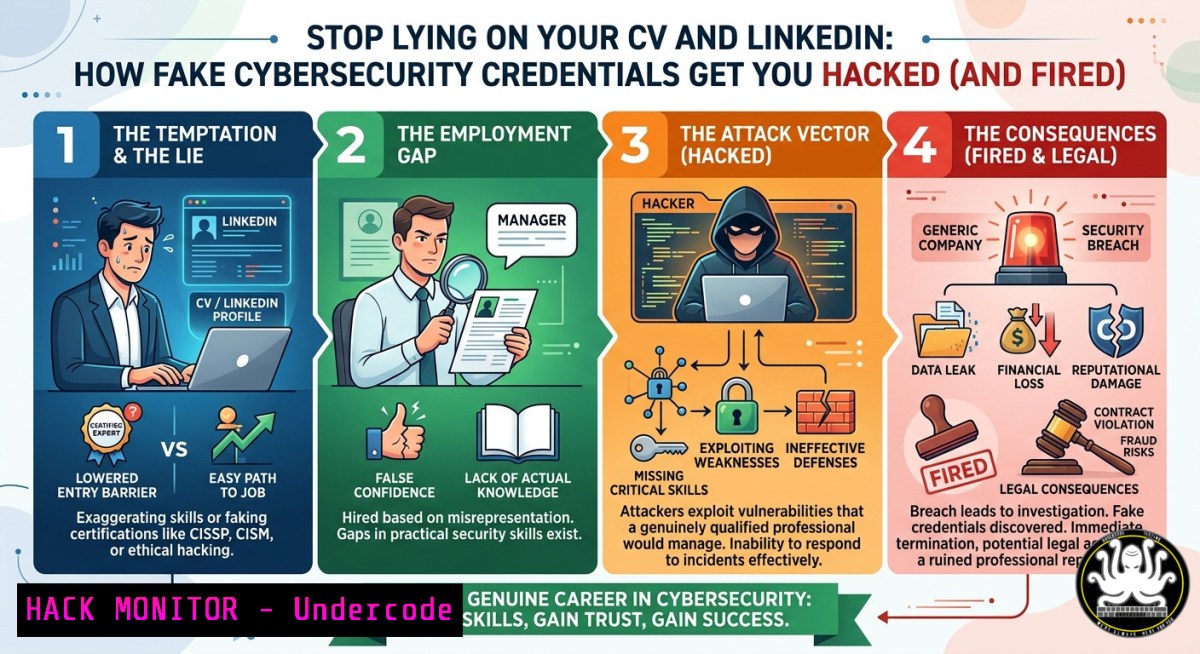
Introduction:
In a profession built on trust, confidentiality, and integrity, fabricating experience, posting AI-generated technical content you don’t understand, or inventing incident response stories to boost engagement is not just unethical—it’s a security risk. When cybersecurity professionals fake their knowledge, they open doors to misconfigurations, undetected breaches, and legal liability, violating core principles of accountability and truthfulness echoed in both professional ethics and universal moral teachings.
Learning Objectives:
- Detect red flags of fabricated credentials, AI‑generated technical posts, and invented professional stories.
- Use open‑source intelligence (OSINT) and command‑line tools to verify someone’s claimed skills and certifications.
- Build an authentic, verifiable personal brand through documented lab work, open‑source contributions, and transparent incident write‑ups.
You Should Know:
- Your LinkedIn Bio Is a Threat Vector – How Attackers Exploit Fake Credentials
Fake bios and inflated summaries are not just harmless exaggerations; they become attack surfaces. Adversaries use OSINT to correlate your claimed skills with real‑world gaps, then craft spear‑phishing or social engineering attacks targeting those weaknesses. For example, if you claim “advanced incident response” but your activity shows no logs or tools, attackers assume you won’t notice their lateral movement.
Step‑by‑step guide to verify (or self‑audit) a professional bio:
- Extract claimed job titles and tools from a bio or CV.
- Run OSINT username enumeration across platforms using `sherlock` (Linux):
git clone https://github.com/sherlock-project/sherlock.git
cd sherlock
pip install -r requirements.txt
python3 sherlock <username> --output output.txt
Look for mismatches: a “senior cloud architect” with no GitHub commits or Stack Overflow activity.
- Check domain ownership if they claim a personal or company site:
whois example.com Linux/macOS
On Windows: `nslookup -type=any example.com` or use `whois` via PowerShell if installed.
- Correlate claimed certifications with public registries (e.g., (ISC)², CompTIA, SANS). No match? Major red flag.
- Use `theHarvester` to find emails, subdomains, and employee names linked to the claimed employer:
theHarvester -d targetcompany.com -b google,linkedin -f report.html
Why this matters: Verifying your own bio prevents you from becoming a liability. If you oversell, security teams will test you in interviews with live fire drills—and fail you.
- The AI‑Generated Post Trap – Why Copy‑Pasting Code You Don’t Understand Backfires
Posting AI‑generated technical content without understanding it misleads peers, spreads incorrect commands, and exposes your ignorance when someone asks a follow‑up question. Worse, malicious actors can inject poisoned training data or subtly wrong code into public AI outputs—then watch you blindly share it.
Step‑by‑step guide to detect AI‑generated fluff and build authentic content:
- Run a perplexity score on any suspicious post using open‑source tools like `gpt-2-detector` (Python):
pip install transformers torch
Download a detector script or use online API like GPTZero (manual)
Low human‑likeness? The text is likely AI‑generated.
- Test every command before sharing. Example: an AI might suggest `rm -rf /tmp/` without proper safety. Instead, write original commands with explanations:
Securely clear a log directory (Linux)
find /var/log/apache2/ -type f -name ".log" -exec truncate -s 0 {} \;
On Windows PowerShell:
Clear-Content -Path "C:\logs.log" -Force
3. Add unique context from your own lab. Show your actual terminal history:
history | grep "nmap" | tail -20
4. Validate API security snippets you post. For example, never share hardcoded API keys. If you see a post with Bearer sk-xxxx, report it.
5. Use `shellcheck` to lint any shell script before publishing:
shellcheck myscript.sh
Why this matters: Authentic technical writing includes mistakes you fixed, lessons learned, and reproducible steps. That builds trust. AI‑copied posts without verification weaken the entire community.
- Fabricated Incident Response Stories – How They Collapse Under Log Forensics
Inventing a “hero moment” in a breach response not only violates ethics but also fails basic technical scrutiny. Real incident response leaves artifacts: logs, timelines, SIEM alerts, and forensic images. A fake story cannot produce those.
Step‑by‑step guide to build honest, verifiable incident simulations:
- Use your own lab (e.g., Security Onion, ELK stack, or Splunk Free). Simulate an attack with `Atomic Red Team` (Linux/Windows):
Linux (install via git)
git clone https://github.com/redcanaryco/atomic-red-team.git
cd atomic-red-team/atomics/T1547.001
./T1547.001.sh  Simulate persistence via .bash_profile
Windows (PowerShell as Admin):
Invoke-AtomicTest T1059.001 -ExecutionScript
2. Extract real logs to write about:
- Linux: `journalctl -u sshd –since “2 hours ago” > ssh_logs.txt`
– Windows: `Get-WinEvent -FilterHashtable @{LogName=’Security’; ID=4624} | Export-Csv -Path logins.csv`
3. Write a transparent “lessons learned” post including what you missed, not just what you caught.
4. Validate detection rules using `sigma-cli`:
pip install sigma-cli
sigma list rules
sigma convert -t splunk rules/windows/process_creation/win_susp_powershell_download.yml
5. Share the entire playbook as a markdown file on GitHub, with redacted real data if from a genuine engagement.
Why this matters: A fake story might get likes, but a real simulation with downloadable logs gets you job offers. Employers can ask you to repeat your analysis under observation.
- Technical Verification of Cybersecurity Certifications – Commands You Can Run Now
Many claim “CISSP,” “CEH,” or “OSCP” without ever passing the exam. Employers and peers can verify most certifications using public CRLs, OCSP, or vendor APIs.
Step‑by‑step guide to verify a certification (self‑audit or vet others):
- Check the issuing vendor’s verification portal (e.g., Credly, CertMetrics, Pearson VUE). Manual step.
- Use `openssl` to validate a digital badge’s certificate chain if the badge is cryptographically signed:
openssl s_client -connect verify.credly.com:443 -showcerts
Look for the badge‑specific serial number.
- On Windows, use `certutil` to examine a downloaded badge certificate:
certutil -dump badge.cer
- Query CRL (Certificate Revocation List) for revoked credentials:
curl -O http://crl.example.com/revoked.crl
openssl crl -inform DER -in revoked.crl -text -noout
5. Use OSINT automation with `recon-ng`:
recon-ng
marketplace install cert_verify
workspaces create cert_check
run
Why this matters: A lying candidate wastes weeks of interview loops. For yourself, periodically validate your own certifications remain in good standing and unrevoked.
- Building Ethical Personal Branding with CTFs and Open Source – Commands to Prove Your Work
Instead of inventing stories, contribute to real projects or public Capture The Flag (CTF) write‑ups. Every commit, log, and screen recording becomes immutable proof of skill.
Step‑by‑step guide to create verifiable content:
- Set up a home lab with Vagrant and Docker:
vagrant init ubuntu/focal64
vagrant up
vagrant ssh
docker pull vulnerables/web-dvwa
docker run -d -p 80:80 vulnerables/web-dvwa
- Document every penetration test in markdown, including commands used:
nmap -sV -sC -p- 192.168.1.100 -oA scan1
gobuster dir -u http://192.168.1.100 -w /usr/share/wordlists/dirb/common.txt
- Push all findings to GitHub with timestamps from
git log:git add writeup.md git commit -m "SQLi on DVWA low security" git push origin main git log --pretty=format:"%h - %an, %ar : %s" Shows date and author
4. Automate environment reproducibility with Ansible:
- name: Deploy vulnerable VM
hosts: localhost
tasks:
- name: Launch Docker DVWA
docker_container:
name: dvwa
image: vulnerables/web-dvwa
ports: "80:80"
5. Share live demos via `asciinema` (terminal recorder):
asciinema rec demo.cast
 Perform your hack
 Exit, then upload
asciinema upload demo.cast
Why this matters: A GitHub with 5 small CTF write‑ups is worth more than 100 AI‑generated LinkedIn posts. Recruiters now automate checking commit histories.
- Cloud Hardening for Digital Identity – Why Fake Cloud Credentials Are Instantly Detectable
Claiming “AWS Certified Solutions Architect” but never having touched IAM policies or S3 bucket ACLs is dangerous. Cloud providers log every API call. A single `aws s3 ls` command reveals competence.
Step‑by‑step guide to authenticate and harden your cloud identity:
- Enable AWS CloudTrail to log all actions (even
ListBuckets):aws cloudtrail create-trail --name my-trail --s3-bucket-name my-bucket aws cloudtrail start-logging --name my-trail
- Check your own IAM policy simulation to see what you can actually do:
aws iam simulate-principal-policy --policy-source-arn arn:aws:iam::123456789012:user/me --action-names s3:ListBucket
- On Azure, use CLI to verify role assignments:
az role assignment list --assignee [email protected] --output table
4. For GCP:
gcloud projects get-iam-policy my-project --format=json | jq '.bindings[] | select(.members[] | contains("user:"))'
5. Harden your own profile by enforcing MFA and deleting unused keys:
aws iam list-access-keys --user-name me
aws iam delete-access-key --access-key-id AKIA... --user-name me
Why this matters: If you claim cloud expertise, you must know these commands. Fake credentials are exposed in the first five minutes of a technical screen.
What Undercode Say:
- Integrity is not optional in cybersecurity. The post’s warning—“Say what you do, do what you say”—mirrors security’s zero‑trust principle: verify, never assume. Fake bios, AI posts without understanding, and invented stories degrade the profession and cause real breaches.
- Technical depth beats reach every time. You can boost engagement with lies, but actual skills are proven with logs, commits, and terminal history. The commands and tools listed above (theHarvester, Atomic Red Team, openssl, aws cli) are the real assets that hiring managers and peers will check.
- The future belongs to transparent, verifiable professionals. As AI generates more noise, authenticity becomes the only scarce resource. Those who document their learning journey honestly will rise; fabricators will be outed by OSINT and automated credential verification.
Prediction:
Within two years, AI‑powered background checks will scan LinkedIn, GitHub, and certification registries in real time, flagging discrepancies with >90% accuracy. Professional forums will adopt cryptographic proof‑of‑work for contributions (e.g., signing posts with your PGP key or wallet). The “personal branding” shortcut will die; in its place, immutable skill histories on decentralized identity platforms (DID, Verifiable Credentials) will become standard. If you’re lying today, start telling the truth—or your own digital footprint will become your breach disclosure.
▶️ Related Video (76% Match):
🎯Let’s Practice For Free:
IT/Security Reporter URL:
Reported By: H4y7h4m %D9%82%D8%A8%D9%84 – Hackers Feeds
Extra Hub: Undercode MoN
Basic Verification: Pass ✅


