
Listen to this Post
Introduction
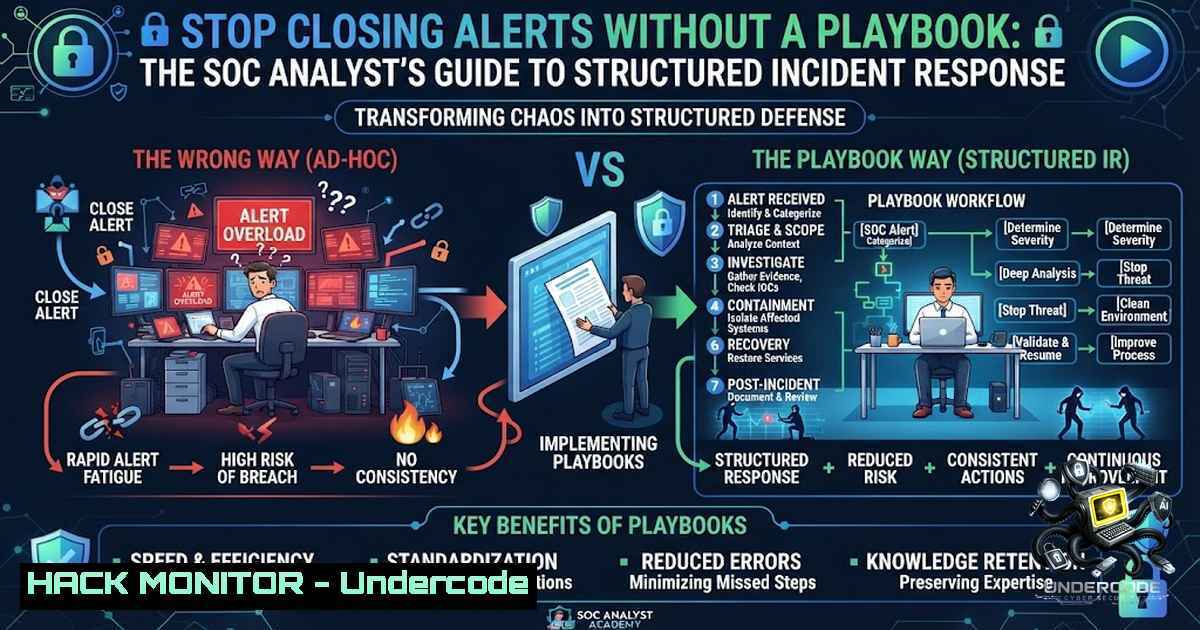
In today’s threat landscape, Security Operations Center (SOC) analysts face an overwhelming volume of security alerts daily. The difference between a mature security team and an immature one often comes down to one critical factor: the presence of structured Incident Response Playbooks. Without these documented procedures, analysts risk missing critical evidence, closing real incidents as false positives, and allowing attackers to maintain persistence within the environment—ultimately transforming reactive security into proactive defense through standardized workflows.
Learning Objectives
- Master the structured incident response workflow across detection, validation, investigation, containment, eradication, recovery, and documentation phases
- Develop proficiency in investigating phishing emails, malware infections, brute force attacks, and privilege escalation attempts using verified technical procedures
- Implement playbook-driven response strategies that reduce mean time to respond (MTTR) and improve consistency across the SOC team
1. Phishing Email Investigation Playbook
Phishing remains the primary initial access vector for ransomware gangs and Advanced Persistent Threat (APT) groups. Every SOC analyst must know exactly how to investigate a reported suspicious email without guessing.
Step-by-Step Investigation Guide
Step 1: Email Header Analysis
Extract and analyze email headers to identify spoofing, routing anomalies, and origin IP addresses.
Linux Command (using `email-analyzer` or manual method):
 Extract headers from an email file
cat suspicious_email.eml | grep -E "^From:|^Return-Path:|^Received:|^Message-ID:|^Authentication-Results:"

Analyze SPF, DKIM, and DMARC records
dig TXT _spf.google.com +short
dig TXT _dmarc.gmail.com +short
Windows PowerShell Method:
 Parse email headers from Outlook or .msg files
Get-Content suspicious_email.eml | Select-String "Received:|From:|Return-Path:"
Step 2: URL and Attachment Analysis
Never open attachments directly. Use sandbox environments.
 Submit URLs to VirusTotal for reputation check
curl -X GET "https://www.virustotal.com/api/v3/urls/$(echo -1 'https://suspicious-domain.com' | base64 | tr -d '\n=' | tr '+/' '-_')"

Use yara for attachment pattern detection
yara -r /path/to/yara_rules/ ./suspicious_attachment.pdf
Step 3: Lookup Sender Reputation
Check the sender’s domain and IP against threat intelligence feeds.
 Using AbuseIPDB CLI
abuseipdb check 192.168.1.100
 Check domain reputation via ThreatCrowd
curl -s https://www.threatcrowd.org/domain.php?domain=suspicious-domain.com | grep -E "blacklist|malicious"
Step 4: Document and Escalate
Record all findings in the ticketing system with IOCs (Indicators of Compromise) including sender addresses, malicious URLs, file hashes, and timeline.
2. Malware Alert Investigation Playbook
When EDR or antivirus generates a malware alert, analysts must verify whether the alert is a false positive or a legitimate threat before containing and eradicating.
Malware Investigation Workflow
Step 1: Validate Alert with Process Analysis
Review the exact file path, process tree, and command line arguments.
Linux Forensics Commands:
 Check running processes for suspicious entries
ps aux --sort=-%mem | head -20
netstat -tulpn | grep ESTABLISHED
lsof -i -P -1 | grep LISTEN

Examine scheduled tasks for persistence
crontab -l
ls -la /etc/cron.d/
systemctl list-timers --all
Windows Forensics:
 Get detailed process information
Get-Process | Where-Object { $<em>.CPU -gt 10 } | Format-Table -AutoSize
Get-WmiObject Win32_Process | Where-Object { $</em>.CommandLine -match "powershell|cmd|wscript" }

Check startup entries for persistence
Get-CimInstance Win32_StartupCommand | Format-Table Name, Command, Location
Step 2: File System Artifacts
Check for file creation, modification timestamps, and alternate data streams.
 Linux - find recently created files
find / -type f -mtime -1 -ls 2>/dev/null

Windows - use Sysinternals Autoruns
autoruns.exe -accepteula -a
Step 3: Network Indicators
Identify command-and-control (C2) communication attempts.
 Linux - monitor real-time network connections
tcpdump -i any -1 host suspicious_ip
ss -tunap | grep ESTAB

Windows - capture traffic with netsh
netsh trace start capture=yes tracefile=c:\temp\capture.etl
Step 4: Hash Verification
Calculate file hashes and cross-reference with threat intelligence.
 Linux
sha256sum suspicious_file.exe
 Windows
Get-FileHash -Path "C:\suspicious_file.exe" -Algorithm SHA256
Step 5: Containment Action
Isolate the endpoint from the network while preserving evidence.
 Windows - block outbound traffic from compromised host
New-1etFirewallRule -DisplayName "Block Outbound Malware" -Direction Outbound -Action Block -RemoteAddress $malicious_ip
3. Brute Force Attack Detection and Response
Brute force attacks targeting authentication services like RDP, SSH, and O365 represent a significant threat. Playbooks must address both detection and prevention.
Detection and Mitigation Steps
Step 1: Identify the Attack Pattern
Monitor authentication logs for repeated failed login attempts.
Linux – Check SSH logs:
grep "Failed password" /var/log/auth.log | awk '{print $11}' | sort | uniq -c | sort -1r
grep "Invalid user" /var/log/auth.log | awk '{print $10}' | sort | uniq -c | sort -1r

Set up fail2ban for automated response
sudo fail2ban-client set sshd banip 192.168.1.100
Windows – Security Event Log Analysis:
 Filter event ID 4625 for failed logins
Get-WinEvent -FilterHashtable @{LogName='Security'; ID=4625} |
Select-Object TimeCreated, @{N='Account';E={$_.Properties[bash].Value}} |
Group-Object Account | Sort-Object Count -Descending
Step 2: Identify Account Involvement
Determine which accounts are targeted. Document compromised accounts immediately.
 Linux - Check sudo and authentication success logs
grep "Accepted password" /var/log/auth.log | awk '{print $9}' | sort | uniq -c
Step 3: Implement Account Lockout Policies
Configure account lockout thresholds to prevent continued brute forcing.
Linux (pam configuration):
 Edit /etc/pam.d/common-auth (Debian) or /etc/pam.d/system-auth (RHEL)
auth required pam_tally2.so deny=5 onerr=fail unlock_time=900
Windows Group Policy:
Set-ADDefaultDomainPasswordPolicy -LockoutThreshold 5 -LockoutDuration "00:30:00" -LockoutObservationWindow "00:30:00"
Step 4: Block Attackers at Network Level
Implement IP blocking at the firewall level.
 Linux iptables block
iptables -A INPUT -s 192.168.1.100 -j DROP
 UFW deny
ufw deny from 192.168.1.100
Azure/Cloud Environment:
 Azure NSG rule with Azure CLI
az network nsg rule create --resource-group MyResourceGroup --1sg-1ame MyNSG --1ame BlockBruteForce --priority 100 --direction Inbound --access Deny --protocol '' --source-address-prefixes 192.168.1.100 --destination-address-prefixes '' --destination-port-ranges 3389
4. Privilege Escalation Detection Playbook
Privilege escalation attempts indicate that attackers are trying to gain elevated permissions. Immediate detection and containment are critical.
Detection and Investigation Workflow
Step 1: User Account Activity Monitoring
Detect suspicious changes in user privileges, especially during off-hours.
Linux – Check sudoers and group changes:
 Recent sudo usage
grep "sudo" /var/log/auth.log | tail -20

Check for unauthorized sudoers modifications
sudo cat /etc/sudoers | grep -v "^" | grep -v "^$"
 Monitor user group membership changes
ausearch -m USER_GROUP -ts recent
Windows PowerShell:
 Check privileged group membership additions
Get-EventLog -LogName Security -InstanceId 4732 | Select-Object TimeGenerated, ReplacementStrings
 Review recent privilege assignments
net localgroup administrators
 Check for recent account changes
Get-EventLog -LogName Security -InstanceId 4728 | Select-Object TimeGenerated, ReplacementStrings
Step 2: Privilege Escalation Command Detection
Attackers often use specific commands to escalate privileges.
 Linux - detect common privilege escalation commands
grep -E "sudo |su -|chmod 777|chown" /var/log/auth.log
 Windows - detect PowerShell privilege escalation attempts
Get-WinEvent -FilterHashtable @{LogName='Microsoft-Windows-PowerShell/Operational'} |
Where-Object { $_.Message -match "Set-ExecutionPolicy|Invoke-Expression" }
Step 3: Monitor Service and Scheduled Task Changes
Services are commonly used for persistence and privilege escalation.
Linux systemd monitoring:
 Check for new systemd services
systemctl list-units --type=service --state=running | grep -v systemd
 Review modified crontabs
ls -la /etc/cron.d/
Windows Scheduled Task Detection:
Get-ScheduledTask | Where-Object { $<em>.State -eq "Running" } | Select-Object TaskName, TaskPath, State
 Check recent scheduled task creations
Get-WinEvent -FilterHashtable @{LogName='Microsoft-Windows-TaskScheduler/Operational'} |
Select-Object TimeCreated, Message | Where-Object { $</em>.Message -match "Task created" }
Step 4: Containment Actions
Immediately disable the compromised account and restrict network access.
 Linux - disable account
sudo usermod -L compromised_user
 Force logout of all sessions
sudo pkill -u compromised_user
 Windows - disable account and force logout
Disable-ADAccount -Identity compromised_user
 Force logout active sessions
invoke-command -ComputerName $server -ScriptBlock { query user | Where-Object { $_ -match 'compromised_user' } | ForEach-Object { logoff $_.split()[bash] } }
5. Building Your Own Incident Playbook Collection
Creating effective playbooks requires documenting your environment, known threats, and response procedures.
Essential Playbook Components
- Detection Criteria: Define exact alert IDs, log sources, and thresholds that trigger investigation
- Validation Checklist: Steps to confirm the alert is legitimate (not a false positive) including TTP (Tactics, Techniques, and Procedures)
- Investigation Commands: Pre-validated commands for different operating systems
- Containment Procedures: Step-by-step isolation instructions for the specific environment
- Eradication Steps: How to remove the threat completely
- Recovery Plan: Methods to restore systems and verify integrity
- Documentation Template: Standardized fields for logging IOCs and actions
Recommended Tools for Playbook Automation
 TheHive (Incident Response Platform) setup with Docker
docker run -d -p 9000:9000 -e THEHIVE_APP_SECRET=yoursecret thehiveproject/thehive:latest

MISP integration for threat intelligence sharing
docker run -d -p 80:80 -p 443:443 misp/misp:latest

Cortex (Analyzers) for automated enrichment
docker run -d -p 9001:9001 cortexproject/cortex:latest
6. Creating a Culture of Playbook-Driven Response
The human element remains critical in effective incident response. Playbooks transform reactive SOC analysts into proactive defenders through consistency and standardization.
Implementation Strategy
- Conduct Tabletop Exercises: Walk through each playbook scenario with the team quarterly
- Maintain Version Control: Use Git to track playbook changes and revisions
- Integrate with ITSM Tools: Embed playbooks directly into ticketing systems
- Measure Effectiveness: Track metrics like time to contain, number of false negatives, and analyst confidence scores
- Update Regularly: Review playbooks based on new threat intelligence and lessons learned
- Automate Repetitive Steps: Use SOAR tools to automate validation and enrichment tasks
Okan YILDIZ’s Key Takeaways
- Playbooks are Human-Readable Code: They provide repeatable, documented procedures that transform institutional knowledge into actionable guides, ensuring consistent response even when senior analysts are unavailable
- The First Action Matters: When a user reports a suspicious email, the correct first action is “C” – Analyze the email headers, sender, URLs, and attachments. This systematic approach prevents attackers from leveraging the organization’s own response against them
- SOC Analysts Are Problem Solvers, Not Ticket Closers: The true value lies in understanding root causes, assessing impact, and preventing recurrence rather than simply resolving alerts
- Maturity Requires Standardization: Mature SOC teams rely on playbooks as their primary investigative framework, reducing human error and improving overall security posture
- Continuous Improvement Through Feedback: Effective playbooks evolve based on lessons learned, new threat intelligence, and changes in the attack landscape
Analysis
The SOC analyst’s journey represents a critical evolution in cybersecurity defense. Organizations investing in playbook-driven response demonstrate measurably faster containment and lower dwell time for attackers. The shift from “closing alerts” to “investigating incidents” embodies a cultural transformation that values understanding over completion. Playbooks serve as the bridge between junior analysts and experienced investigators, enabling rapid skill development while maintaining quality standards. Ultimately, mature SOC teams understand that their incident response playbooks are living documents requiring regular updates based on emerging threats, changes in the environment, and lessons learned from previous incidents.
Prediction
+1 : Organizations will increasingly embed machine learning models into playbook generation, automating the creation of tailored response procedures based on real-time threat intelligence
+1 : The adoption of playbook-as-code frameworks will accelerate, enabling version-controlled, auditable, and continuously validated incident response procedures
-1 : Without consistent playbook enforcement, organizations will continue to suffer from inconsistent response, increased dwell time, and regulatory compliance failures
+1 : SOC teams that integrate playbooks with SOAR platforms will reduce MTTR by up to 70%, significantly improving security outcomes
-1 : The proliferation of AI-generated alerts will overwhelm analysts who lack structured playbooks, leading to alert fatigue and missed critical incidents
+1 : Playbook-driven response will become a standard requirement for cybersecurity insurance coverage, driving organizational adoption
-1 : Legacy organizations that fail to transition to playbook-based operations will become prime targets for sophisticated attackers exploiting response inconsistency
+1 : Community-driven playbook sharing across industry verticals will emerge as a best practice, improving collective defense
-1 : Shadow IT and cloud sprawl will create response blind spots that playbooks must rapidly adapt to address
+1 : The focus on playbooks will elevate the SOC analyst role from reactive monitoring to strategic threat hunting, improving retention and career development
“A good analyst follows a process. A great analyst follows a playbook.”
The next time a phishing email is reported, remember: your first action defines your organization’s security posture.
▶️ Related Video (80% Match):
🎯Let’s Practice For Free:
🎓 Live Courses & Certifications:
Join Undercode Academy for Verified Certifications
🚀 Request a Custom Project:
Secure, high-velocity infrastructure and disruptive technological engineering. Contact our engineering team for high-tier development and proprietary systems:
[email protected]
💎 Smart Architecture | 🛡️ Secure by Design | ⭐ Trusted by Thousands
IT/Security Reporter URL:
Reported By: Yildizokan Cybersecurity – Hackers Feeds
Extra Hub: Undercode MoN
Basic Verification: Pass ✅


