
Listen to this Post
Introduction:
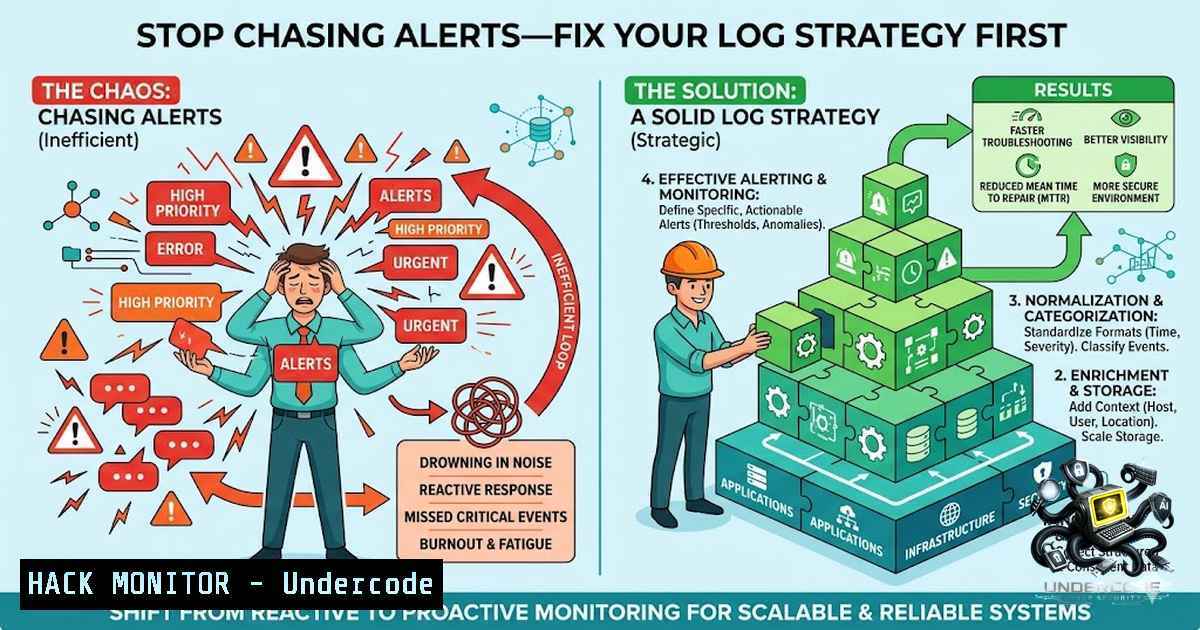
In the high-stakes world of cybersecurity, the difference between a swift incident response and a catastrophic data breach often comes down to one factor: visibility. While organizations invest heavily in sophisticated Security Information and Event Management (SIEM) tools and alerting mechanisms, the harsh reality is that these systems are entirely blind without high-quality, comprehensive log data. The foundation of effective threat detection and forensic investigation is not the tool itself, but the raw telemetry it ingests; as highlighted by a recent comprehensive guide on Wazuh log analysis, your security posture is only as strong as the logs you collect.
Learning Objectives:
- Understand the critical role of centralized log management and system integration in modern SIEM architectures.
- Learn how to configure and validate Wazuh agents for comprehensive Linux and Windows log monitoring.
- Master the implementation of specific log collection strategies for firewall events, remote access, and authentication.
- Linux Log Monitoring: The Heartbeat of Your Infrastructure
Linux servers form the backbone of most enterprise environments, and monitoring their system activity is non-1egotiable. The guide emphasizes the necessity of collecting critical logs that provide insight into system health, user activity, and potential compromise.
What the post says: The guide highlights the importance of monitoring authentication events (/var/log/auth.log), cron jobs, boot processes, and package installations. These logs are not just for troubleshooting system errors but are vital for identifying malicious activity like unauthorized privilege escalation or the installation of backdoors.
Step‑by‑step guide:
This section covers the essential Linux logs and the commands used to monitor them.
- Authentication Logs: For Debian-based systems, the `auth.log` records all authentication attempts. Use the `tail -f` command to watch new entries in real-time, filtering for failed attempts using
grep "Failed password" /var/log/auth.log. - System and Boot Logs: The `/var/log/syslog` captures general system messages and boot processes. To view boot-time messages specifically, use
dmesg. - Package Management Logs: Monitor `/var/log/dpkg.log` for Debian/Ubuntu or `/var/log/yum.log` for RHEL/CentOS. This helps track any unauthorized software installations or updates.
- Service Logs: Web servers like Apache and Nginx, and mail services like Postfix, have their own logs (e.g.,
/var/log/apache2/access.log). Ensure these are rotated and archived properly to manage disk space while preserving historical data.
2. Centralized Wazuh Integration: Configuration and Validation
Centralization is key to eliminating blind spots. The guide details configuring Wazuh through the `ossec.conf` file to aggregate logs from various endpoints into a single pane of glass.
What the post says: Security teams need a unified view of security events. Wazuh serves as an open-source SIEM solution that allows for this centralization, but it requires proper configuration to be effective.
Step‑by‑step guide:
This section details the steps to configure a Wazuh agent on a Linux system.
- Configure ossec.conf: The main configuration file for the Wazuh agent is located at
/var/ossec/etc/ossec.conf. It defines which logs to collect and how to forward them to the manager.<localfile> <log_format>syslog</log_format> <location>/var/log/syslog</location> </localfile> <localfile> <log_format>auth</log_format> <location>/var/log/auth.log</location> </localfile>
- Restart the Agent: After any changes, restart the Wazuh agent to apply the new configuration. For systemd-based systems, run:
sudo systemctl restart wazuh-agent. - Validate Agent Status: Verify the agent is running and connected to the server using the command:
sudo systemctl status wazuh-agent. - Dashboard Validation: On the Wazuh manager, check the dashboard to ensure that the agent is reporting and that telemetry is flowing correctly. The `agents` section should show a green status for the agent ID.
3. Firewall Monitoring: Tracking the Network Perimeter
Firewalls are the first line of defense, but their logs are often overlooked. The guide stresses the importance of tracking allowed and blocked connections to identify suspicious network activity.
What the post says: Using UFW (Uncomplicated Firewall) logs, security teams can monitor configuration changes and detect anomalous inbound or outbound traffic.
Step‑by‑step guide:
This section will guide you through enabling and monitoring UFW logging.
- Enable UFW Logging: Ensure UFW logging is active and set to an appropriate level. Use `sudo ufw logging on` to enable logging, and `sudo ufw logging high` for more verbose logging.
- View Firewall Logs: UFW logs are typically stored in
/var/log/ufw.log. Use `tail -f /var/log/ufw.log` to monitor in real-time. - Analyze Blocked Connections: To analyze denied or blocked connections, use
grep "UFW BLOCK" /var/log/ufw.log. This will help you identify potential port scans or brute-force attempts. - Monitor Rule Changes: Tracking `ufw` command history is also crucial. Check the user’s shell history (
~/.bash_history) for commands like `ufw allow` or `ufw delete` that might indicate compromised accounts altering firewall rules.
4. Windows Event Monitoring: Enhancing Endpoint Visibility
Windows endpoints are a primary target for attackers. The guide emphasizes collecting Windows Security Events through Event Viewer and Group Policy to improve endpoint visibility.
What the post says: Correlating Windows security events with other logs provides critical context for threat detection.
Step‑by‑step guide:
This section covers the configuration of Windows Event Forwarding and log collection.
- Configure Windows Auditing: Use Group Policy Management to set up advanced audit policies. Navigate to
Computer Configuration > Windows Settings > Security Settings > Advanced Audit Policy Configuration. - Enable Critical Audits: Ensure “Audit Logon Events,” “Audit Account Management,” and “Audit Process Tracking” are set to log successes and failures.
- Collect with Wazuh: The Wazuh Windows agent, through the
ossec.conf, can be configured to read specific event logs. Add configurations to pull fromSecurity,System, and `Application` logs.<localfile> <log_format>eventchannel</log_format> <location>Security</location> </localfile>
- Correlate Events: Look for specific Event IDs like 4624 (successful logon), 4625 (failed logon), and 4672 (special privileges assigned) to identify high-risk activities.
5. Remote Access Monitoring: Detecting Suspicious RDP Activity
Remote access is a necessary evil in modern IT. The guide highlights the need to monitor RDP activity to detect authentication attempts and suspicious behavior.
What the post says: Monitoring RDP activity is crucial for identifying brute-force attacks or unauthorized access attempts.
Step‑by‑step guide:
This section explains how to audit RDP events on a Windows system.
- Enable RDP Auditing: RDP events are captured as part of the Windows Security log. Ensure Logon/Logoff audits are enabled as described above.
- Filter RDP Logons: Look for logon type 10 (RemoteInteractive) in the Security logs. In Event Viewer, filter by Event ID 4624 and Logon Type 10.
- Analyze Source IP: In the log details, the “Source Network Address” field contains the IP address of the connecting client. Monitor this for connections originating from unexpected countries or IP ranges.
- Wazuh Rule Configuration: Create a rule in Wazuh to generate an alert when multiple failed RDP logins occur (Event ID 4625 with Logon Type 10) within a short timeframe, identifying potential brute-force attacks.
What Undercode Say:
- Key Takeaway 1: A SIEM’s effectiveness is entirely dependent on the quality and breadth of log data it receives. Missing logs equate to blind spots in your security posture.
- Key Takeaway 2: The correlation of data across multiple log sources—such as authentication logs, firewall events, and system telemetry—provides the essential context needed to differentiate false positives from genuine threats.
Analysis:
The central theme of the post resonates deeply with the challenges faced by modern Security Operations Centers (SOCs). The “alert fatigue” epidemic is often a symptom of poor telemetry. When logs are incomplete, the SIEM generates low-fidelity alerts, overwhelming analysts with noise. By shifting focus to ensuring comprehensive logging across all assets—Linux and Windows alike—we move toward “alert reduction” through high-fidelity telemetry. The emphasis on Wazuh as a tool highlights the industry shift towards powerful, open-source solutions that can level the playing field for organizations of all sizes, provided they are configured correctly. The question posed—which log source provides the most value—reveals a common pitfall: organizations often over-prioritize one source while ignoring others. True resilience is not about having one perfect source but about the synergy of all sources working together to provide a complete picture of the attack surface. This blog serves as a necessary reminder that cybersecurity is fundamentally a data problem, and that data starts with logs.
Prediction:
- +1 There will be a significant shift in cybersecurity training and resource allocation from deploying new, expensive tools to optimizing existing log collection and management strategies.
- -1 Organizations that continue to neglect their log management practices will face catastrophic breaches, as their security teams will remain blind to advanced persistent threats that evade signature-based detection.
- +1 As AI and Machine Learning become further integrated into SIEM platforms, the demand for structured, high-quality log data will increase exponentially, making log hygiene a primary competitive advantage.
- +1 The industry will see a rise in “log hygiene” as a formalized best practice, driving the adoption of frameworks like the MITRE ATT&CK framework to map and collect relevant logs for specific adversary techniques.
▶️ Related Video (94% Match):
🎯Let’s Practice For Free:
🎓 Live Courses & Certifications:
Join Undercode Academy for Verified Certifications
🚀 Request a Custom Project:
Secure, high-velocity infrastructure and disruptive technological engineering. Contact our engineering team for high-tier development and proprietary systems:
[email protected]
💎 Smart Architecture | 🛡️ Secure by Design | ⭐ Trusted by Thousands
IT/Security Reporter URL:
Reported By: Yildizokan Cybersecurity – Hackers Feeds
Extra Hub: Undercode MoN
Basic Verification: Pass ✅


