
Listen to this Post
Introduction:
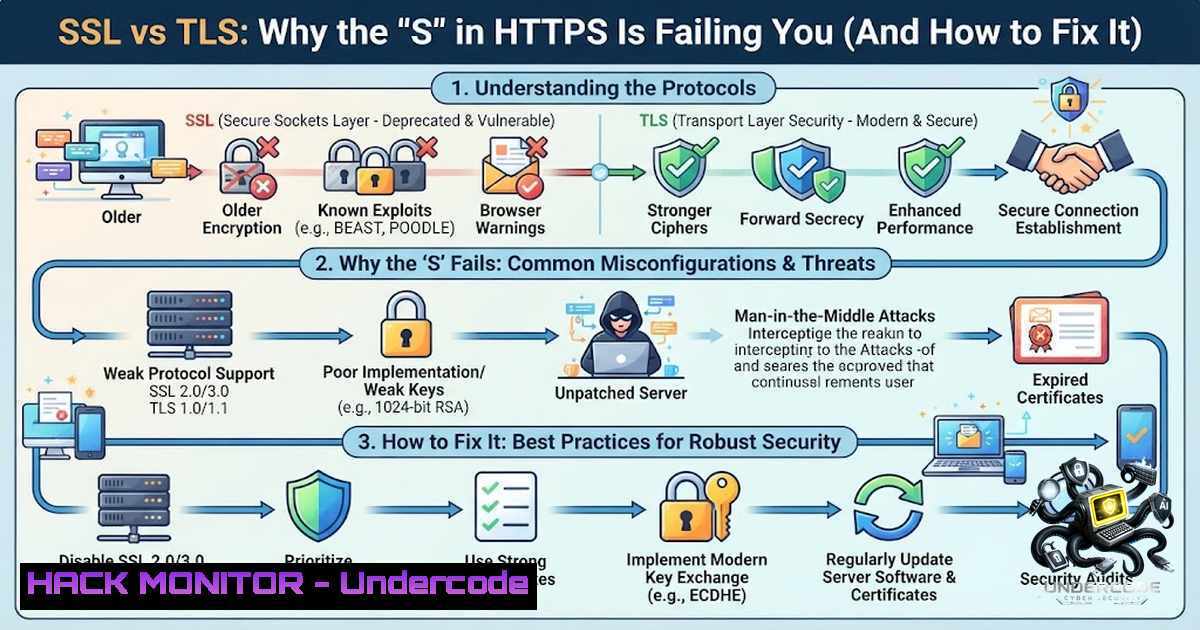
In the realm of cybersecurity, acronyms are often used interchangeably, but few misnomers are as dangerous as confusing SSL and TLS. While both protocols serve the same fundamental purpose—securing data in transit—treating them as synonyms is a legacy mindset that introduces significant organizational risk. As of 2025, SSL is a formally deprecated protocol riddled with vulnerabilities, yet many enterprise environments still harbor misconfigurations that leave them exposed to downgrade attacks and cipher suite weaknesses.
Learning Objectives:
- Understand the cryptographic and performance differences between SSL and TLS and why the transition is mandatory for compliance.
- Learn to audit your infrastructure for insecure SSL/TLS versions and cipher suites using open-source tools.
- Acquire the command-line skills to harden web servers (Nginx/Apache), mail servers, and APIs against protocol-based attacks.
You Should Know:
- The 1999 Handshake That Still Haunts Your Network
The journey from SSL 3.0 to TLS 1.3 is a story of breaking cryptographic algorithms. SSL relied on weak hash functions like MD5 and SHA-1 for the handshake, making it susceptible to the POODLE and BEAST attacks. TLS 1.2 introduced Authenticated Encryption with Associated Data (AEAD) ciphers, while TLS 1.3 went a step further by deprecating RSA key exchange in favor of ephemeral Diffie-Hellman (ECDHE), ensuring Perfect Forward Secrecy (PFS).
To illustrate the performance leap, TLS 1.3 reduces the handshake latency from two round-trips (2-RTT) to just one (1-RTT), and in some cases, zero-RTT for resumed sessions.
Step‑by‑step guide: Auditing your SSL/TLS exposure
To identify if your organization is running depreciated protocols, you do not need expensive scanners. The OpenSSL toolkit is your best friend.
- Linux (Debian/Ubuntu):
sudo apt-get update && sudo apt-get install openssl -y
openssl s_client -connect yourdomain.com:443 -tls1_2
Analysis: If this command connects successfully, TLS 1.2 is enabled. Change the flag to `-tls1` or
-ssl3. If it connects, you have a critical vulnerability. -
Windows (PowerShell):
For a quick check without third-party tools, use the .NET library:[System.Net.ServicePointManager]::SecurityProtocol = [System.Net.SecurityProtocolType]::Tls12; Invoke-WebRequest -Uri https://yourdomain.com
If this fails but the browser loads the site, the server might be forcing an older protocol.
-
Using Nmap for Network Sweeps:
nmap --script ssl-enum-ciphers -p 443 yourdomain.com
This script provides a grade (A-F) for your SSL configuration and explicitly lists weak ciphers like `RC4` or `3DES` that must be removed.
- Dismantling the “Legacy” Excuse in Windows Server Environments
One of the most common points of failure is the Windows Server registry. Despite TLS 1.2 being supported since Windows Server 2008, many applications default to older versions due to hardcoded `SCHANNEL` settings. Attackers exploiting SSL vulnerabilities often use downgrade attacks; they force the client to negotiate SSLv3, capturing the hash and cracking it offline.
Step‑by‑step guide: Hardening Windows SCHANNEL
To enforce TLS 1.2/1.3 system-wide, you must modify the registry. This is critical for closing compliance gaps (PCI-DSS v4.0 explicitly forbids TLS 1.0).
1. Open `regedit` and navigate to `HKLM\SYSTEM\CurrentControlSet\Control\SecurityProviders\SCHANNEL\Protocols`.
- For
TLS 1.2, create two keys: `Client` andServer.
3. Add DWORD values:
– `DisabledByDefault` = `0`
– `Enabled` = `1`
4. To mitigate vulnerabilities, ensure that for `SSL 3.0` and TLS 1.0, the `Enabled` DWORD is set to 0.
5. Command Line (PowerShell Admin) to enable TLS 1.3 (Windows 11/Server 2022):
New-Item 'HKLM:\SYSTEM\CurrentControlSet\Control\SecurityProviders\SCHANNEL\Protocols\TLS 1.3\Client' -Force
Set-ItemProperty -Path 'HKLM:\SYSTEM\CurrentControlSet\Control\SecurityProviders\SCHANNEL\Protocols\TLS 1.3\Client' -1ame 'DisabledByDefault' -Value 0 -Type DWord
Note: A reboot is required for these changes to take effect.
- Configuring Web Servers for Modern Cipher Suites (The Hardening Guide)
Knowing the theory is one thing; implementing it in your web server configuration is another. Modern standards require disabling RSA key exchange and prioritizing Elliptic Curve algorithms.
Step‑by‑step guide: Nginx Configuration
Place this snippet in your `nginx.conf` file to achieve an “A+” rating on SSL Labs:
ssl_protocols TLSv1.2 TLSv1.3;
ssl_ciphers ECDHE-ECDSA-AES128-GCM-SHA256:ECDHE-RSA-AES128-GCM-SHA256:ECDHE-ECDSA-AES256-GCM-SHA384:ECDHE-RSA-AES256-GCM-SHA384:ECDHE-ECDSA-CHACHA20-POLY1305:ECDHE-RSA-CHACHA20-POLY1305:DHE-RSA-AES128-GCM-SHA256:DHE-RSA-AES256-GCM-SHA384;
ssl_prefer_server_ciphers off;
ssl_session_cache shared:SSL:10m;
ssl_session_timeout 1d;
ssl_session_tickets off;  Disable session tickets for better PFS
Step‑by‑step guide: Apache Configuration
Similarly, in Apache (`httpd-ssl.conf` or `virtual host`):
SSLProtocol -all +TLSv1.2 +TLSv1.3
SSLCipherSuite ECDHE-ECDSA-AES128-GCM-SHA256:ECDHE-RSA-AES128-GCM-SHA256:ECDHE-ECDSA-AES256-GCM-SHA384:ECDHE-RSA-AES256-GCM-SHA384:ECDHE-ECDSA-CHACHA20-POLY1305:ECDHE-RSA-CHACHA20-POLY1305:DHE-RSA-AES128-GCM-SHA256:DHE-RSA-AES256-GCM-SHA384
SSLHonorCipherOrder off
4. Securing Email Servers (SMTP/IMAP) and APIs
Cybersecurity training often focuses solely on HTTPS, but attackers pivot to mail servers where SSLv3 is often still enabled for legacy Outlook clients. The same principles apply to securing APIs. For REST APIs, enforcing TLS 1.2 is non-1egotiable.
Step‑by‑step guide: Testing Mail Server Security
Use OpenSSL to simulate a client connection to an IMAP or SMTP service:
openssl s_client -connect mail.yourcompany.com:993 -tls1_2 -crlf -starttls imap
If the `-starttls` parameter returns “SSL3_GET_RECORD:wrong version number,” the server is likely misconfigured to accept unsupported protocols, requiring you to check the `main.cf` (Postfix) or `exim.conf` to enforce:
`tls_min_protocol = TLSv1.2`
- Automated Scanning with Open Source (The CI/CD Approach)
Integration of security into the DevOps pipeline means checking for SSL weaknesses during the build phase. Tools like `testssl.sh` provide a comprehensive, scriptable solution.
Step‑by‑step guide: Automated TLS Auditing
Clone the repository and run a scan against a staging environment:
git clone --depth 1 https://github.com/drwetter/testssl.sh.git
cd testssl.sh
./testssl.sh --protocols --openssl=/usr/bin/openssl your-api-endpoint.com
Pipe the output into a JSON format to feed into your security dashboards:
./testssl.sh --jsonfile-pretty scan_report.json yourdomain.com
This allows you to automatically fail a deployment if a server accepts SSLv3 or weak ciphers.
6. Handling API Security and Client-Side Restrictions
For development teams, it is essential to restrict the client-side .NET application to only use TLS 1.2 to prevent “handshake failures.” In C/DotNet Core, ensure your application code specifies the security protocol before making web requests.
Step‑by‑step guide: Code-level enforcement (C)
ServicePointManager.SecurityProtocol = SecurityProtocolType.Tls12 | SecurityProtocolType.Tls13;
For Python developers using requests, you can audit the SSL version via:
import ssl
import socket
context = ssl.create_default_context()
with socket.create_connection(("yourdomain.com", 443)) as sock:
with context.wrap_socket(sock, server_hostname="yourdomain.com") as ssock:
print(ssock.version())  Returns TLSv1.2 or TLSv1.3
What Undercode Say:
- Key Takeaway 1: SSL is not just “old”; it is a residual attack vector. Many ransomware groups use “downgrade attacks” to intercept encrypted traffic. Disabling it is the first step in Zero Trust network architecture.
- Key Takeaway 2: The transition to TLS 1.3 is not just about security; it is about performance. The reduced latency translates directly to faster page load times, improving both SEO rankings and user experience.
- Analysis: The cybersecurity community’s failure to distinguish between SSL and TLS often stems from historical naming conventions (e.g., “SSL Certificates”). This semantic laziness leads to severe misconfigurations in load balancers. The industry must standardize terminology to ensure that junior engineers don’t implicitly trust legacy protocols. Furthermore, the move toward quantum-resistant cryptography will likely build upon the TLS 1.3 framework, meaning understanding these foundational handshake mechanics is crucial for future-proofing enterprise security.
Prediction:
- +1: The enforcement of TLS 1.3 as a mandatory standard by major browsers (Chrome and Firefox phasing out TLS 1.0/1.1) will accelerate, forcing legacy IoT device manufacturers to finally update their firmware, significantly reducing the global botnet attack surface.
- +1: As AI-driven fuzzing tools become prevalent, they will specifically target cipher suite negotiation flaws, automating the discovery of timing-side-channel attacks in custom implementations of TLS.
- -1: The reliance on legacy hardware that cannot support the advanced cryptography of TLS 1.3 (due to lack of hardware acceleration for AES-GCM) will cause a fragmentation in the enterprise sector, leaving Critical National Infrastructure (CNI) running on isolated, vulnerable SSL 3.0 networks for the next 5 years.
- +1: The use of TLS 1.3’s “0-RTT” session resumption will be heavily utilized in 5G and edge computing, drastically reducing handshake overhead for mobile devices and enabling truly low-latency secure communications.
- -1: Without continuous education like this post provides, there will be an uptick in “Alice and Bob” style Man-in-the-Middle attacks targeting misconfigured cloud load balancers (AWS ALB/NLB) that default to TLS 1.2 with outdated cipher suites, particularly in financial APIs.
▶️ Related Video (76% Match):
🎯Let’s Practice For Free:
🎓 Live Courses & Certifications:
Join Undercode Academy for Verified Certifications
🚀 Request a Custom Project:
Secure, high-velocity infrastructure and disruptive technological engineering. Contact our engineering team for high-tier development and proprietary systems:
[email protected]
💎 Smart Architecture | 🛡️ Secure by Design | ⭐ Trusted by Thousands
IT/Security Reporter URL:
Reported By: Ai For – Hackers Feeds
Extra Hub: Undercode MoN
Basic Verification: Pass ✅


