Listen to this Post
Introduction:
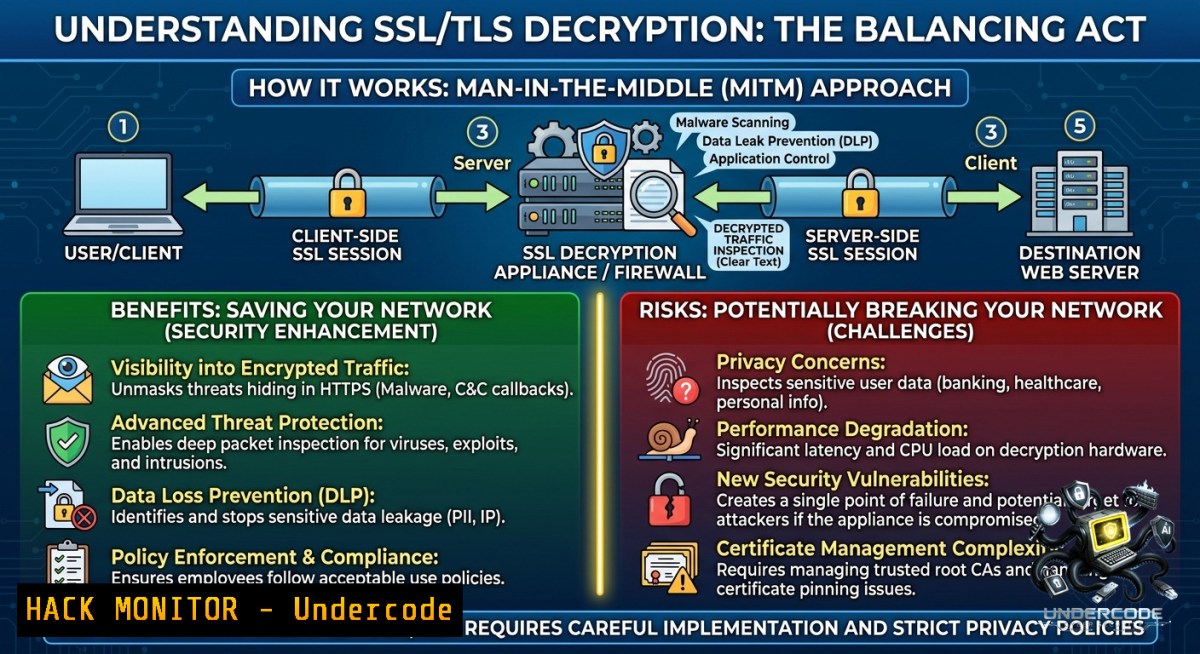
Encrypted traffic now accounts for over 90% of internet communications, creating a blind spot for security teams. Attackers weaponize TLS to hide malware, phishing, and command‑and‑control channels inside seemingly legitimate HTTPS streams. SSL decryption on next‑generation firewalls like Palo Alto Networks restores visibility by acting as a controlled man‑in‑the‑middle – but poor implementation can violate privacy, break applications, and introduce new risks.
Learning Objectives:
– Understand how SSL/TLS decryption works on Palo Alto firewalls and its role in Zero Trust architectures.
– Configure trusted CA certificates, decryption policies, and security rules while protecting sensitive traffic categories.
– Troubleshoot common decryption failures using Linux, Windows, and firewall CLI commands.
You Should Know:
1. How SSL Decryption Changes the Trust Model – and How to Deploy the Root CA
SSL decryption forces the firewall to impersonate the destination server. The client must trust a firewall‑generated certificate, signed by an enterprise root Certificate Authority (CA). Without proper CA distribution, browsers show security errors and connections fail.
Step‑by‑step guide to deploy the Palo Alto root CA:
1. Generate the Forward Trust CA on the firewall:
`Device` → `Certificate Management` → `Certificates` → `Generate` → select `Forward Trust` as certificate type.
2. Export the CA certificate (PEM or DER format) from the firewall:
`Device` → `Certificate Management` → `Certificates` → select the CA → `Export`.
3. Deploy to Windows clients via Group Policy:
certutil -addstore -enterprise Root "C:\path\to\PaloAltoCA.cer"
4. Deploy to Linux clients (Ubuntu/Debian):
sudo cp PaloAltoCA.cer /usr/local/share/ca-certificates/PaloAltoCA.crt
sudo update-ca-certificates
5. On macOS: double‑click the certificate, add to “System” keychain, and set trust to “Always Trust”.
2. Building a Decryption Policy Rule – Selective vs. Full Inspection
Decrypting everything breaks banking, healthcare, and privacy‑regulated traffic. Use policy rules with source/destination zones, URL categories, and custom exclusions.
Step‑by‑step to create a decryption rule on Palo Alto:
1. Navigate to `Policies` → `Decryption`. Click `Add`.
2. Name: “SelectiveWebInspection”.
Source Zone: Trust. Destination Zone: Untrust.
Source Address: internal subnets (e.g., 192.168.0.0/16).
Destination Address: any.
3. Service: service-https (TCP/443).
4. URL Category: exclude `financial-services`, `health-and-medicine`, `government`.
(Create custom category lists using `Object` → `Custom URL Category`.)
5. Action: `Decrypt`. Type: `SSL Forward Proxy`.
6. Commit changes: `commit` from CLI or `Commit` button.
To verify a rule is matched:
> show counter global | match ssl_decrypt
> less mp-log ssl_decrypt.log
3. Security Policy Enforcement After Decryption – App‑ID and Content‑ID
Once traffic is decrypted, the firewall can inspect the payload. Combine decryption with security policies that block threats hidden inside HTTPS.
Configure a security rule that acts on decrypted traffic:
1. `Policies` → `Security` → `Add`.
Name: “BlockMalwareInHTTPS”.
Source/Destination same as decryption rule.
2. Application: `ssl`, `web-browsing`, `ssl-encrypted-db` (App‑ID detects the underlying app after decryption).
3. Service: application-default.
4. Action: `Allow` (but enable profiles).
Profile → Anti-Virus, Anti-Spyware, Vulnerability Protection, URL Filtering.
5. Log at session end: enable.
Test detection by downloading a known EICAR test file over HTTPS:
curl -k https://secure.eicar.org/eicar.com.txt
The firewall should log “virus detected” under `Monitor` → `Logs` → `Threat`.
4. Excluding Sensitive Traffic – The “Do Not Decrypt” List
Decrypting patient portals or payment gateways violates compliance (HIPAA, PCI‑DSS). Create exclusion rules with `No Decrypt` action.
Step‑by‑step to exclude sensitive domains:
1. `Policies` → `Decryption` → `Add`.
Name: “NoDecryptSensitive”.
Source: internal. Destination: any.
2. URL Category: create a custom list `SensitiveExclude` containing:
`.mybank.com`, `.healthcare.gov`, `.payment-processor.com`.
3. Action: `No Decrypt`. Place this rule above your selective decrypt rule.
4. Confirm with packet capture or `test decryption` command:
> test decryption forward-proxy https://www.mybank.com
Expected output: “no-decrypt – matched rule NoDecryptSensitive”.
For Windows, you can also disable decryption for a specific process using `netsh` (not firewall native, but client‑side bypass):
netsh winhttp set proxy proxy-server="direct" bypass-list=".mybank.com"
5. Troubleshooting SSL Decryption Failures – Certificate Pinning and Cipher Mismatches
Applications with certificate pinning (e.g., many mobile apps, Windows Update) break under decryption. Use logs and CLI to identify and exclude them.
Common diagnostics:
– Check decryption failure reason on firewall CLI:
> show ssl-decrypt session all
> show log traffic | match decrypt-failure
– View client‑side error – browser shows `ERR_CERT_AUTHORITY_INVALID`. Export the failing domain:
> show ssl-decrypt block-list
– Add pinned domains to No Decrypt:
`Object` → `Custom URL Category` → “PinnedApps” → add `.windowsupdate.com`, `.googleapis.com`.
On Linux, test pinning with `openssl s_client` and compare expected vs actual public key:
openssl s_client -connect github.com:443 -servername github.com | openssl x509 -pubkey -1oout | openssl rsa -pubin -text 2>/dev/null
If the firewall substitutes a different key, pinning fails – add the domain to exclusions.
6. Performance Tuning – Offloading and Hardware Acceleration
Decryption is CPU‑intensive. Palo Alto appliances with dedicated crypto offload (e.g., PA‑5200 series) handle it better. For virtual firewalls, monitor resource usage.
Commands to check decryption load:
> show running resource-monitor | match ssl
> show system resources | match cpu
> show ssl-decrypt statistics
Tune by:
– Limiting decryption to high‑risk categories (newly seen domains, unknown traffic).
– Enabling Session offload for repetitive connections.
– Using SSL Decryption Exclusion for CDNs (e.g., `.cloudflare.com`).
Windows performance baseline – check if hardware supports AES‑NI:
Get-CimInstance -ClassName Win32_Processor | Select-Object -Property Name, AES
What Undercode Say:
– SSL decryption is not about breaking encryption; it’s about controlled visibility where security inspection is required.
– Balance is everything – visibility without overreach, inspection without unnecessary risk, security without breaking user trust.
Analysis: The post underscores a mature cybersecurity mindset: treat decryption as a surgical tool, not a blanket mandate. Many SOCs fail because they decrypt everything (breaking apps and trust) or nothing (leaving 90% of traffic unevaluated). Undercode’s emphasis on exclusion lists for banking, healthcare, and pinned applications reflects real‑world compromise. The key is policy granularity – using URL filtering, App‑ID, and dynamic address groups to decide what to decrypt in real time. Without this, firewalls become either useless blind spots or brittle chokepoints that trigger helpdesk tickets for “broken internet.”
Prediction:
– -1 Over‑reliance on SSL decryption as the primary visibility tool will degrade as more traffic shifts to QUIC and Encrypted Client Hello (ECH), forcing vendors to rebuild inspection engines.
– +1 Adoption of out‑of‑band TLS inspection (e.g., using eBPF or sidecar proxies in cloud environments) will complement firewall decryption, enabling granular policy per workload.
– -1 Legacy firewalls without crypto offload will struggle with decryption at 10Gbps+, leading organizations to either skip inspection or accept latency – both dangerous.
– +1 Integration of SSL decryption with zero‑trust network access (ZTNA) agents will allow client‑side per‑app inspection without man‑in‑the‑middle, reducing certificate management overhead.
▶️ Related Video (82% Match):
🎯Let’s Practice For Free:
🎓 Live Courses & Certifications:
[Join Undercode Academy for Verified Certifications](https://undercode.co.uk/certifications/)
🚀 Request a Custom Project:
Secure, high-velocity infrastructure and disruptive technological engineering. Contact our engineering team for high-tier development and proprietary systems:
[[email protected]](mailto:[email protected])
💎 Smart Architecture | 🛡️ Secure by Design | ⭐ Trusted by Thousands
IT/Security Reporter URL:
Reported By: [Yildizokan Paloalto](https://www.linkedin.com/posts/yildizokan_paloalto-ssldecryption-tls-share-7467947382131912704-nEQW/) – Hackers Feeds
Extra Hub: Undercode MoN
Basic Verification: Pass ✅
🔐JOIN OUR CYBER WORLD [ CVE News • HackMonitor • UndercodeNews ]
[💬 Whatsapp](https://undercode.help/whatsapp) | [💬 Telegram](https://t.me/UndercodeCommunity)
📢 Follow UndercodeTesting & Stay Tuned:
[𝕏 formerly Twitter 🐦](https://x.com/undercodeupdate) | [@ Threads](https://www.threads.net/@undercodetesting) | [🔗 Linkedin](https://www.linkedin.com/company/undercodetesting/) | [🦋BlueSky](https://bsky.app/profile/undercode.bsky.social)


