
Listen to this Post
Introduction:
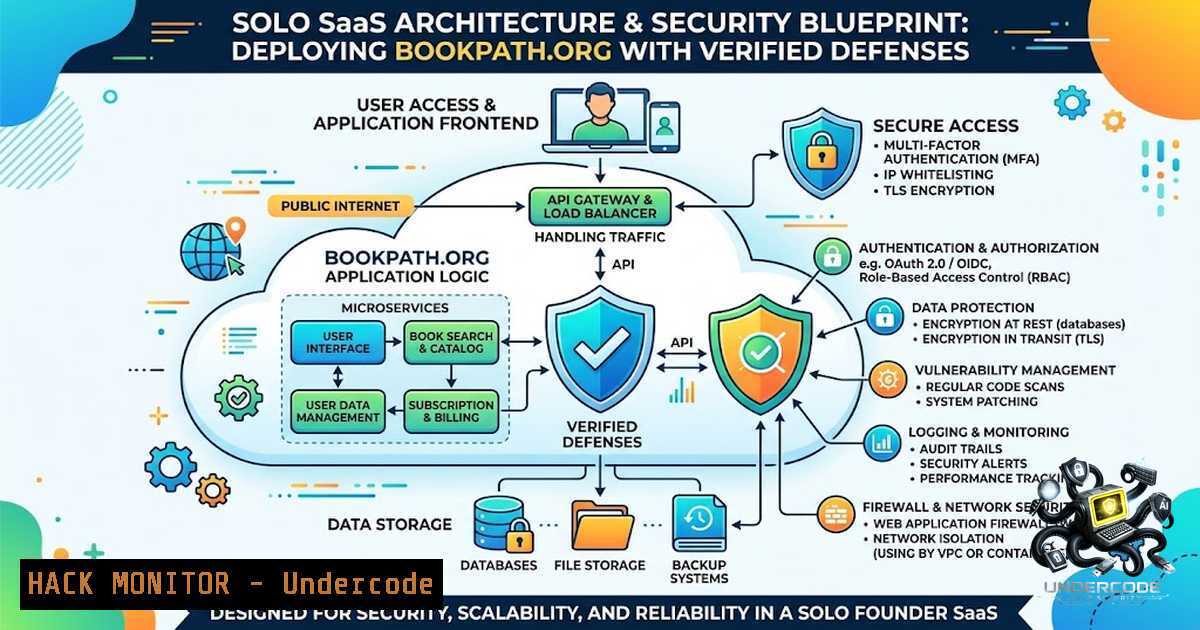
Indie hacking and solo SaaS development are increasingly popular avenues for launching digital products. However, building a production-grade web application that is both functional and secure requires navigating a maze of technical challenges, from content security policies to server hardening. This article breaks down the architecture and cybersecurity considerations behind BookPath.org, a full-stack book discovery platform, offering a comprehensive guide for developers who are building and deploying their own applications solo.
Learning Objectives & Secrets:
- Objective 1: Understand the Pitfalls of SPAs for SEO. Single Page Applications (SPAs) often struggle with search engine indexing. Learn how to implement server-side rendering (SSR) and dynamic metadata injection to ensure your content is discoverable.
- Objective 2: Secure Your Affiliate Infrastructure. Hardening external API integrations is crucial. Discover how to manage API keys securely and mitigate risks associated with third-party services like the Google Books API.
- Objective 3: Master Deployment Pipeline Security. From Docker images to VPS firewalls, learn the essential steps to secure your deployment environment against common exploits and unauthorized access.
You Should Know:
- Hardening the React SPA Against XSS and Data Leaks
The use of React 19 with server-side rendering presents unique security challenges. A common pitfall is the inclusion of raw HTML from third-party APIs (like the Google Books description) directly into the DOM, which can lead to Cross-Site Scripting (XSS) vulnerabilities. To mitigate this, developers must utilize libraries like `DOMPurify` to sanitize incoming data.
Step‑by‑step guide explaining what this does and how to use it:
– Identification: Audit all data rendered in the UI that originates from user input or external APIs.
– Sanitization: In your Node.js/Express backend, before returning API responses to the frontend, apply `DOMPurify` to sanitize string data containing HTML tags.
– Configuration: Use a strict configuration for `DOMPurify` (e.g., ALLOWED_TAGS: ['p', 'strong', 'em']) to create an allowlist of safe elements.
– Testing: Implement a Content Security Policy (CSP) header in your nginx configuration to act as a second layer of defense. A basic CSP to block inline scripts would be: add_header Content-Security-Policy "default-src 'self'; script-src 'self';" always;.
2. Securing the Node.js/Express API Endpoints
The backend serves as the brain of the application, handling search queries, user email captures, and analytics. Exposing unauthenticated or poorly protected endpoints can lead to data scraping or DoS attacks. For a solo developer, applying rate limiting and input validation is non-1egotiable.
Step‑by‑step guide explaining what this does and how to use it:
– Rate Limiting: Install `express-rate-limit` in your Node.js project. This middleware helps prevent brute-force attacks on endpoints like the search or email capture.
– Configuration: Set a policy for your API routes: const limiter = rateLimit({ windowMs: 15 60 1000, max: 100 }); app.use('/api/search', limiter);.
– Input Validation: Use `Joi` or `Zod` to validate user inputs. Never trust data from the client. Ensure the `q` (query) parameter in your search route is a string that does not contain SQL or NoSQL injection payloads.
– API Key Rotation: The Google Books API key should be stored as an environment variable (process.env.GOOGLE_BOOKS_API_KEY), not hardcoded. Use tools like `dotenv` to manage these secrets.
3. Redis Caching Strategy for Performance and Security
Redis is used for cache refresh and session management. While great for performance, an unsecured Redis instance is a common vector for attacks. If exposed to the internet, it can be exploited for data theft or as a staging ground for crypto-mining malware.
Step‑by‑step guide explaining what this does and how to use it:
– Bind to Localhost: Ensure your `redis.conf` file has `bind 127.0.0.1` to prevent external connections unless you have a specific need for a remote Redis setup.
– Require Password: Set a strong password using `requirepass yourStrongPassword` in the config file.
– Sanitize Keys: Avoid using unsanitized user input directly as Redis keys. This prevents key namespace manipulation.
– Command: To test if Redis is running on Linux: redis-cli ping. To connect with authentication: redis-cli -a yourStrongPassword.
- nginx as a Reverse Proxy and Web Application Firewall (WAF)
Deploying behind nginx not only improves performance but also allows you to implement security rules before traffic hits your Node.js application.
Step‑by‑step guide explaining what this does and how to use it:
– SSL/TLS Termination: Configure nginx to handle HTTPS requests. Use Certbot (Let’s Encrypt) to automate certificate renewal.
– Security Headers: Add security headers to protect against MIME sniffing and clickjacking. In your nginx config: add_header X-Frame-Options "SAMEORIGIN" always; add_header X-Content-Type-Options "nosniff" always;.
– Limit Request Methods: Allow only necessary HTTP methods (GET, POST, OPTIONS) to prevent webdav or TRACE method exploitation.
– Blocking Malicious Bots: Implement a simple rule to block suspicious User-Agents. if ($http_user_agent ~ (bot|scraper) ) { return 403; }.
- Docker and PM2: Container Security and Process Management
Using Docker for deployment isolates your application. However, running containers as the root user is a major security flaw.
Step‑by‑step guide explaining what this does and how to use it:
– Non-Root User: In your Dockerfile, create a non-root user (RUN useradd -m appuser) and switch to it (USER appuser) to run the `npm start` command.
– PM2: Use PM2 to manage the Node.js application. Ensure PM2 is running in “fork” mode and not “cluster” unless you are handling session affinity.
– Update Base Images: Regularly update your `node:alpine` base image to patch known vulnerabilities. A simple `docker pull node:alpine` and rebuild ensures you have the latest patches.
– Scan Images: Use `docker scan` or `trivy` to scan your built image for known vulnerabilities before pushing to the registry.
6. Email Authentication (DKIM/SPF) for Deliverability
While primarily for deliverability, proper email authentication (DKIM/SPF) is a critical part of an organization’s security posture. It prevents spoofing and phishing attacks that could harm your brand’s reputation.
Step‑by‑step guide explaining what this does and how to use it:
– SPF Record: Add a TXT record to your DNS zone defining which servers are authorized to send emails on your behalf. Example: v=spf1 include:_spf.resend.com ~all.
– DKIM Record: Resend provides a domain key. Publish this public key as a TXT record in your DNS. This allows receiving servers to verify the email’s cryptographic signature.
– DMARC: Consider adding a DMARC policy (e.g., `p=quarantine` or p=reject) to instruct receiving servers on how to handle emails that fail authentication.
What Undercode Say:
Building a production application like BookPath.org is a monumental effort, and the cybersecurity implications of each component are often overlooked in the excitement of launching. The developer’s choice of a VPS over a managed platform like Vercel or Heroku offers more control but places a heavier burden on the developer to secure the OS, network, and application stack. The inclusion of scheduled automation (cache refresh, KPI reports) is excellent, but these cron jobs must be secured to prevent unauthorized execution or abuse. The point about “plumbing” perfectly encapsulates the security reality: securing the “plumbing” (nginx, Docker, API keys) is tedious but absolutely necessary to ensure the “shipped” product isn’t a honeypot for attackers.
Key Takeaway 1: Solo developers must prioritize input sanitization and CSP headers to prevent XSS, especially when dealing with HTML-rich data from third-party APIs like Google Books.
Key Takeaway 2: The journey from development to deployment is fraught with security pitfalls. Using environment variables, Docker non-root users, and nginx security headers are foundational steps that turn a vulnerable MVP into a resilient and trustworthy service.
Prediction:
- -1: As AI-generated code (like GPT-4o-mini) becomes more prevalent in indie projects, there will be a rise in vulnerabilities introduced by unvalidated AI-suggested code snippets. Developers will inadvertently deploy insecure code that requires costly remediation.
- +1: We will see the emergence of more “security-as-code” templates specifically for solo SaaS stacks (React/Node/Docker) that automate the hardening processes described in this article.
- +1: Tools that automatically scan for leaked API keys (e.g., GitGuardian) will become essential in the CI/CD pipeline of every serious indie developer, preventing accidental exposure of credentials to public repositories.
▶️ Related Video (86% Match):
🎯Let’s Practice For Free:
🎓 Live Courses & Certifications:
Join Undercode Academy for Verified Certifications
🚀 Request a Custom Project:
Secure, high-velocity infrastructure and disruptive technological engineering. Contact our engineering team for high-tier development and proprietary systems:
[email protected]
💎 Smart Architecture | 🛡️ Secure by Design | ⭐ Trusted by Thousands
IT/Security Reporter URL:
Reported By: https://lnkd.in/p/eN8Xt3WS – Hackers Feeds
Extra Hub: Undercode MoN
Basic Verification: Pass ✅


