Listen to this Post
Introduction:
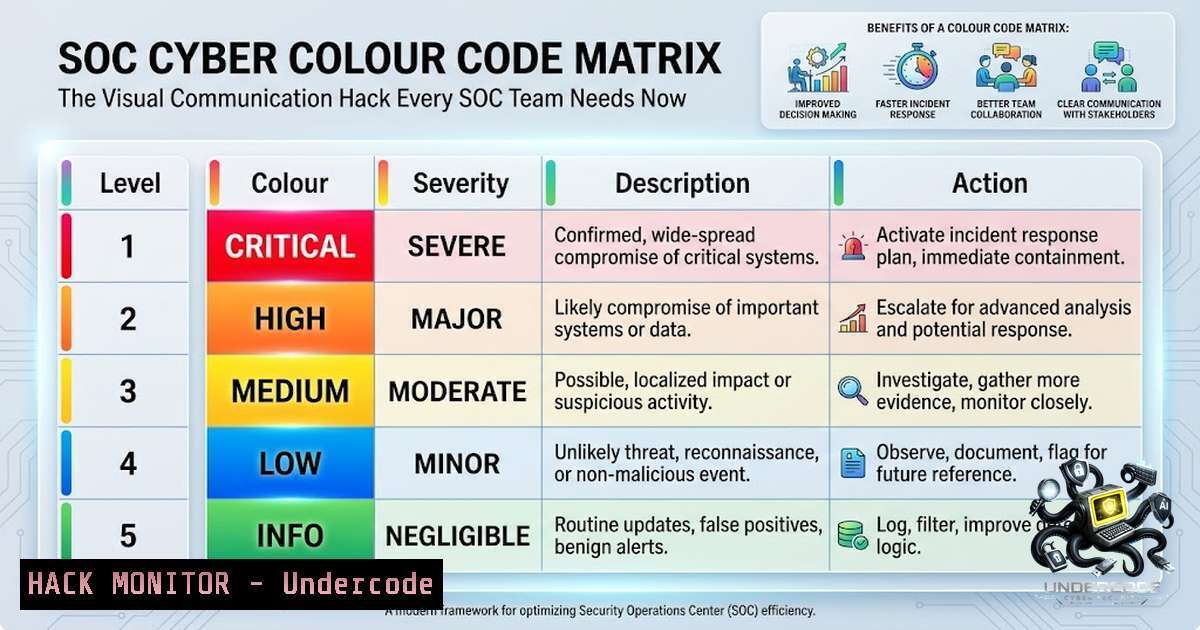
In the high-pressure environment of a Security Operations Center (SOC), seconds matter—and miscommunication during incident triage can be the difference between containment and catastrophe. Cybersecurity professional Izzmier Izzuddin Zulkepli recently introduced a simple yet powerful concept: the SOC Cyber Colour Code Matrix, a visual framework designed to make incident communication faster, clearer, and more consistent across all tiers of SOC operations. By mapping specific colours to distinct cyber threat scenarios—from suspicious activity to active attacks and data breaches—this draft concept promises to bridge the gap between technical complexity and operational clarity, empowering SOC teams to speak a common visual language during the most critical moments of response.
Learning Objectives:
- Understand the SOC Cyber Colour Code Matrix framework and its application in incident triage, escalation, and response.
- Learn practical Linux and Windows command-line techniques for investigating the threats mapped to each colour code.
- Master SIEM query patterns and threat-hunting strategies aligned with colour-coded incident categories.
- Develop a structured approach to SOC communication that reduces mean time to detect (MTTD) and mean time to respond (MTTR).
You Should Know:
1. Decoding the SOC Cyber Colour Code Matrix
The SOC Cyber Colour Code Matrix assigns specific colours to different cyber situations, enabling analysts to quickly communicate the nature and severity of an incident without lengthy explanations. While still a draft, the framework categorises threats as follows:
- 🟡 Yellow – Suspicious Activity: Unusual behaviour that does not yet meet the threshold for malicious activity but requires monitoring. Examples include anomalous outbound connections, unusual login times, or unexpected system changes.
-
🟠 Orange – Phishing: Suspected or confirmed phishing attempts targeting users. This includes credential harvesting, malicious attachments, or links to known malicious domains.
-
🔴 Red – Account Compromise: Unauthorised access to user accounts, often indicated by impossible travel, multiple failed logins followed by success, or atypical data access patterns.
-
⚫ Black – Active Attack: An ongoing, confirmed attack in progress—ransomware execution, lateral movement, or data exfiltration in real time.
-
🔵 Blue – Data Breach: Confirmed or suspected exfiltration of sensitive data, requiring immediate containment and legal notification procedures.
-
🟣 Purple – Security Tool Outage: Critical security controls (SIEM, EDR, firewalls) are down or degraded, creating visibility gaps that attackers could exploit.
Step‑by‑step guide: Implementing the Colour Code in Your SOC
- Define your colour palette: Standardise the colours across all SOC dashboards, ticketing systems, and communication channels. Use hex codes for consistency (e.g., FF0000 for Red).
-
Train your team: Conduct tabletop exercises where analysts practice escalating incidents using colour codes instead of lengthy descriptions. Time each exercise to measure improvement.
-
Integrate with your SIEM: Create colour-coded alert rules. For example, in Splunk:
index=security sourcetype=windows_security EventCode=4625
| eval severity=case(count>10, "RED", count>5, "ORANGE", count>0, "YELLOW")
| table _time, user, src_ip, severity
-
Map to playbooks: Link each colour to a specific response playbook. Red triggers the active attack playbook; Blue triggers the data breach notification workflow.
-
Review and refine: After each incident, evaluate whether the colour accurately represented the situation and adjust thresholds accordingly.
-
Investigating Yellow Alerts: Suspicious Activity with Linux Commands
When a Yellow alert is triggered, analysts must quickly determine whether the suspicious activity is benign or escalating. Linux command-line tools are indispensable for this investigation.
Step‑by‑step guide: Investigating Suspicious Processes on Linux
- Identify unusual processes: Use `ps` and `top` to spot resource-heavy or unfamiliar processes.
ps aux --sort=-%cpu | head -20
-
Check for hidden processes: Attackers often hide processes using techniques like LD_PRELOAD or kernel modules. Use `unhide` to detect them:
sudo unhide proc
-
Examine network connections: Suspicious outbound connections often indicate beaconing or data exfiltration.
sudo netstat -tunap | grep ESTABLISHED
-
Review authentication logs: Failed login attempts from unusual IPs may precede a compromise.
sudo grep "Failed password" /var/log/auth.log | awk '{print $(NF-3)}' | sort | uniq -c | sort -1r
5. Analyse systemd logs for anomalies:
sudo journalctl -xe --since "1 hour ago" | grep -i error
- Responding to Orange and Red Alerts: Phishing and Account Compromise
Phishing and account compromise require rapid credential validation and containment. Windows PowerShell provides powerful tools for this investigation.
Step‑by‑step guide: Windows Event Log Analysis for Account Compromise
- Query failed logon attempts (Event ID 4625): Identify brute-force patterns.
Get-WinEvent -FilterHashtable @{LogName='Security'; ID=4625; StartTime=(Get-Date).AddHours(-24)} | Select-Object TimeCreated, @{N='User';E={$<em>.Properties[bash].Value}}, @{N='SourceIP';E={$</em>.Properties[bash].Value}} | Group-Object SourceIP | Sort-Object Count -Descending -
Detect successful logons after failures (Event ID 4624): This pattern often indicates a successful compromise.
Get-WinEvent -FilterHashtable @{LogName='Security'; ID=4624; StartTime=(Get-Date).AddHours(-24)} | Where-Object { $<em>.Properties[bash].Value -eq 10 } | Logon type 10 = RemoteInteractive Select-Object TimeCreated, @{N='User';E={$</em>.Properties[bash].Value}}, @{N='SourceIP';E={$_.Properties[bash].Value}} -
Check for new user accounts (Event ID 4720): Attackers often create backdoor accounts.
Get-WinEvent -FilterHashtable @{LogName='Security'; ID=4720; StartTime=(Get-Date).AddDays(-7)} |
Format-Table TimeCreated, Message -AutoSize
4. Enable PowerShell logging for deeper visibility:
Set-ItemProperty -Path "HKLM:\SOFTWARE\Policies\Microsoft\Windows\PowerShell\ScriptBlockLogging" -1ame "EnableScriptBlockLogging" -Value 1
- Black and Blue Alerts: Active Attack and Data Breach Response
When a Black or Blue alert is declared, the SOC moves into containment and eradication mode. This requires coordinated use of SIEM queries, network isolation, and forensic collection.
Step‑by‑step guide: Active Attack Containment Workflow
- Isolate the affected host using EDR or network controls:
– Linux: Use `iptables` to block all outbound traffic except to management IPs.
sudo iptables -A OUTPUT -j DROP
sudo iptables -A OUTPUT -d <management_ip> -j ACCEPT
– Windows: Use `New-1etFirewallRule` to block outbound traffic.
New-1etFirewallRule -DisplayName "Block Outbound" -Direction Outbound -Action Block
2. Capture volatile data before shutdown:
- Linux memory capture:
sudo dd if=/dev/mem of=/tmp/memory.dump bs=1M
- Windows process list:
Get-Process | Export-Csv -Path C:\forensics\processes.csv -1oTypeInformation
- Query SIEM for related indicators: Search for the same source IP, user account, or file hash across all logs.
– Splunk example:
index= sourcetype= src_ip=<suspicious_ip> | stats count by dest, user, action
- Initiate the data breach notification workflow: Engage legal, PR, and executive teams per the Blue playbook.
-
Purple Alerts: Security Tool Outage and Visibility Gaps
A Purple alert indicates that critical security tools are offline or degraded. This is often an attacker’s prime opportunity to move undetected.
Step‑by‑step guide: Restoring Visibility and Detecting Evasion
1. Verify SIEM health:
- Linux: Check service status.
sudo systemctl status splunk
sudo journalctl -u splunk -xe --since "1 hour ago"
2. Check EDR agent connectivity:
- Windows: Verify the service is running.
Get-Service -1ame crowdstrike, sentinel, defender | Select-Object Name, Status
- Deploy fallback monitoring: Use `tcpdump` or `Wireshark` to capture raw network traffic while the SIEM is recovering.
– Linux:
sudo tcpdump -i any -w /tmp/fallback_capture.pcap -C 100 -W 10
- Audit for attacker activity during the outage: Review all logs that were not ingested during the outage window, paying special attention to privilege escalations and new service creations.
What Undercode Say:
- Key Takeaway 1: The SOC Cyber Colour Code Matrix is a powerful communication accelerator, but its success depends on consistent training, clear definitions, and integration with existing SOC workflows. Without standardisation, colour codes can create more confusion than clarity.
-
Key Takeaway 2: Technical proficiency in Linux and Windows command-line tools remains non-1egotiable for SOC analysts. The commands outlined above—from `journalctl` to
Get-WinEvent—are not just nice-to-haves; they are the frontline tools for every colour-coded investigation.
The SOC Cyber Colour Code Matrix represents a shift toward visual intelligence in security operations—a recognition that in high-stakes environments, cognitive load must be minimised to maximise decision quality. By pairing this framework with hands-on technical skills, SOC teams can reduce mean time to detect (MTTD) and mean time to respond (MTTR) significantly. However, the matrix is only as effective as the analysts wielding it; continuous practice, tabletop exercises, and post-incident reviews are essential to embed the colour logic into muscle memory. Moreover, organisations should consider extending the matrix to include custom colours for industry-specific threats (e.g., healthcare ransomware, financial fraud) and integrating it with automated alerting systems that dynamically assign colour codes based on severity scores. The draft nature of the matrix invites community feedback—a collaborative approach that could turn a simple idea into an industry standard.
Prediction:
- +1 The SOC Cyber Colour Code Matrix, if refined through community collaboration, has the potential to become a de facto standard in SOC communication, reducing incident response times by 20–30% within the next two years as more teams adopt visual escalation frameworks.
-
+1 As AI-driven SOC assistants proliferate, colour codes will likely be automated—with machine learning models assigning and updating colours in real time based on threat intelligence feeds, further reducing human error and cognitive overload.
-
-1 Without rigorous standardisation and cross-organisational adoption, the matrix risks becoming another fragmented tool—different colours meaning different things across teams, leading to mis-escalation and confusion during joint response efforts.
-
-1 Over-reliance on colour codes could desensitise analysts to the underlying severity of incidents, particularly if alerts are frequently misclassified or if threshold tuning is neglected, potentially leading to alert fatigue and missed critical threats.
▶️ Related Video (80% Match):
https://www.youtube.com/watch?v=56NDgBOSpUg
🎯Let’s Practice For Free:
🎓 Live Courses & Certifications:
Join Undercode Academy for Verified Certifications
🚀 Request a Custom Project:
Secure, high-velocity infrastructure and disruptive technological engineering. Contact our engineering team for high-tier development and proprietary systems:
[email protected]
💎 Smart Architecture | 🛡️ Secure by Design | ⭐ Trusted by Thousands
IT/Security Reporter URL:
Reported By: Izzmier Today – Hackers Feeds
Extra Hub: Undercode MoN
Basic Verification: Pass ✅


