Listen to this Post
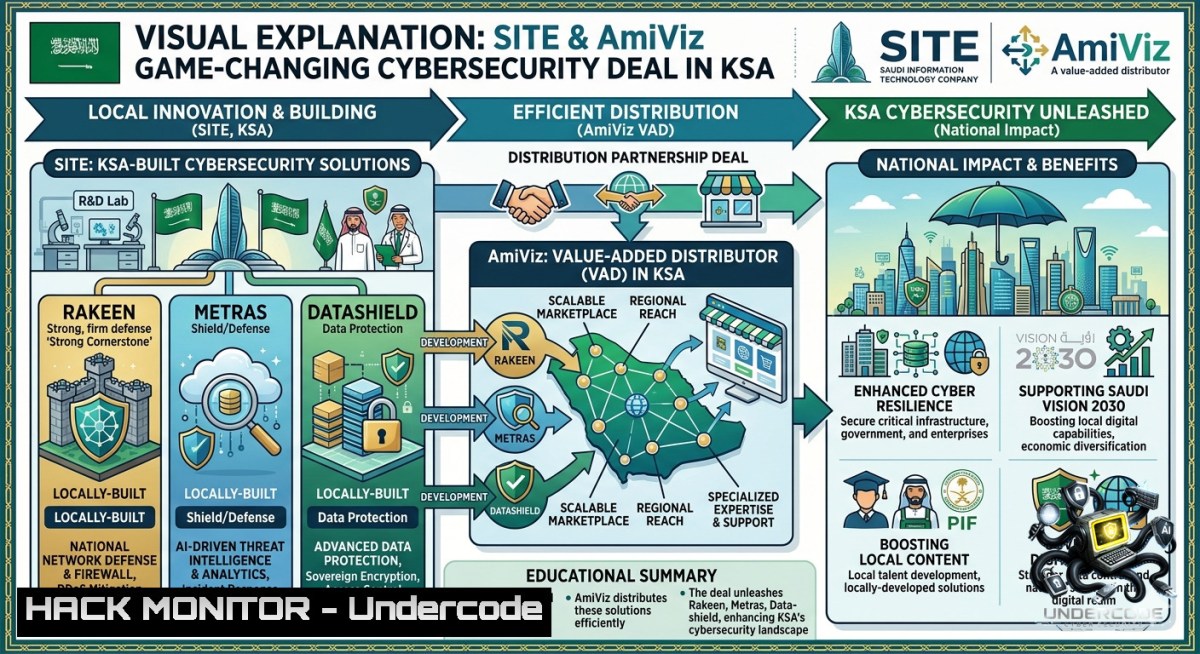
Introduction:
Saudi Arabia’s cybersecurity landscape is rapidly shifting toward homegrown innovation as local developers gain critical distribution channels. SITE’s new partnership with AmiViz across the Kingdom marks a pivotal expansion for its integrated product portfolio—Rakeen, Metras, and SITE Datashield—bringing sovereign security capabilities directly to enterprise customers. This article explores the technical underpinnings of these solutions and provides actionable implementation guides for security teams looking to operationalize similar locally-developed tools.
Learning Objectives:
– Understand how to deploy and configure a SIEM-like threat detection system inspired by Rakeen using open-source components.
– Implement data-at-rest encryption and key management analogous to Metras on both Linux and Windows environments.
– Establish data loss prevention (DLP) policies and monitoring comparable to SITE Datashield using native OS tools.
You Should Know:
1. Extended Partnership Context & Deploying Rakeen-Style Threat Detection
SITE’s locally developed Rakeen product is positioned as an integrated security analytics platform, likely combining log management, threat correlation, and incident response. To mirror its capabilities in a lab or production environment, you can deploy the ELK Stack (Elasticsearch, Logstash, Kibana) with Wazuh for SIEM-like functionality. Below is a step‑by‑step guide for a Linux‑based deployment.
Step‑by‑step: Deploying an Open‑Source SIEM (Rakeen Analogue) on Ubuntu 22.04
– Update system and install dependencies:
`sudo apt update && sudo apt upgrade -y`
`sudo apt install openjdk-11-jre-headless curl wget gnupg2 -y`
– Install Elasticsearch:
`wget -qO – https://artifacts.elastic.co/GPG-KEY-elasticsearch | sudo gpg –dearmor -o /usr/share/keyrings/elastic-keyring.gpg`
`echo “deb [signed-by=/usr/share/keyrings/elastic-keyring.gpg] https://artifacts.elastic.co/packages/7.x/apt stable main” | sudo tee /etc/apt/sources.list.d/elastic-7.x.list`
`sudo apt update && sudo apt install elasticsearch -y`
`sudo systemctl enable –1ow elasticsearch`
– Install Kibana and Logstash similarly, then configure Logstash to ingest Windows Event Logs via Winlogbeat. On Windows, download Winlogbeat and edit `winlogbeat.yml` to point to your Elasticsearch IP. Run:
`.\winlogbeat.exe setup -e`
`.\winlogbeat.exe start`
– Install Wazuh manager for threat intelligence correlation:
`curl -s https://packages.wazuh.com/key/GPG-KEY-WAZUH | sudo apt-key add -`
`echo “deb https://packages.wazuh.com/4.x/apt/ stable main” | sudo tee /etc/apt/sources.list.d/wazuh.list`
`sudo apt update && sudo apt install wazuh-manager -y`
– Verify alerts: Access Kibana at `http://
2. Hardening Data with Metras-Inspired Encryption & Key Management
Metras likely focuses on data protection at rest and in transit. For Linux, use LUKS for full disk encryption and GnuPG for file-level operations. On Windows, BitLocker plus EFS (Encrypting File System) provides similar controls. The following steps implement enterprise‑grade encryption workflows.
Step‑by‑step: Full Disk & File Encryption (Metras Workflow)
– Linux (Ubuntu) – Encrypt a secondary drive with LUKS:
`sudo apt install cryptsetup -y`
`sudo fdisk -l` (identify target drive, e.g., `/dev/sdb`)
`sudo cryptsetup luksFormat /dev/sdb` (set passphrase)
`sudo cryptsetup open /dev/sdb metras_data`
`sudo mkfs.ext4 /dev/mapper/metras_data`
`sudo mkdir /mnt/secure && sudo mount /dev/mapper/metras_data /mnt/secure`
– Automate unlock using keyfile (cautious use for servers):
`sudo dd if=/dev/urandom of=/root/keyfile bs=1024 count=4`
`sudo cryptsetup luksAddKey /dev/sdb /root/keyfile`
Add to `/etc/crypttab`: `metras_data /dev/sdb /root/keyfile luks`
– Windows – Enable BitLocker via PowerShell (Admin):
`Enable-BitLocker -MountPoint “C:” -TpmProtector` (for TPM)
`Enable-BitLocker -MountPoint “D:” -PasswordProtector -Password (ConvertTo-SecureString “YourStrongP@ssw0rd” -AsPlainText -Force)`
Backup recovery key: `(Get-BitLockerVolume -MountPoint “D:”).KeyProtector`
– File‑level encryption using gpg (Linux) and EFS (Windows):
Linux: `gpg –symmetric –cipher-algo AES256 sensitive.docx` → `sensitive.docx.gpg`
Windows: `cipher /e /s:C:\SensitiveFolder`
3. Configuring SITE Datashield DLP Policies Using Native OS Controls
Datashield implies data loss prevention and egress monitoring. Without a commercial DLP agent, Linux auditd and Windows Advanced Audit Policies can achieve similar monitoring of sensitive file access and USB insertion.
Step‑by‑step: Implementing DLP Monitoring (Datashield Style)
– Linux – Monitor reads on `/etc/shadow` and copy to USB storage:
`sudo apt install auditd audispd-plugins -y`
`sudo auditctl -w /etc/shadow -p r -k sensitive_read`
`sudo auditctl -w /media/ -p rw -k usb_access`
View logs: `sudo ausearch -k sensitive_read`
To persist: edit `/etc/audit/rules.d/audit.rules`
– Windows – Enable object access auditing via PowerShell (Admin):
`auditpol /set /subcategory:”File System” /success:enable /failure:enable`
`auditpol /set /subcategory:”Removable Storage” /success:enable /failure:enable`
For a specific folder: Right‑click → Properties → Security → Advanced → Auditing → Add `Everyone` with `Delete` and `Write` permissions.
View events: Open Event Viewer → Windows Logs → Security → filter Event IDs 4656 (handle open), 4663 (file access).
– Block USB writes on Windows via Group Policy:
Run `gpedit.msc` → Computer Config → Administrative Templates → System → Removable Storage Access → Enable “All Removable Storage classes: Deny write access”.
4. Cloud Hardening for Distributed Security Products (AWS & Azure)
As SITE scales via AmiViz, customers will likely deploy these tools in hybrid cloud environments. Hardening cloud infrastructure is critical to prevent misconfigurations.
Step‑by‑step: Cloud Security Posture Management (CSPM) Commands
– AWS – Enforce S3 bucket private ACLs and block public access:
`aws s3api put-bucket-acl –bucket your-bucket –acl private`
`aws s3api put-public-access-block –bucket your-bucket –public-access-block-configuration BlockPublicAcls=true,IgnorePublicAcls=true,BlockPublicPolicy=true,RestrictPublicBuckets=true`
Use AWS Config rule: `s3-bucket-public-read-prohibited` and `s3-bucket-public-write-prohibited`.
– Azure – Enforce HTTPS only on storage accounts:
`az storage account update –1ame mystorageaccount –resource-group myRG –https-only true`
Enable advanced threat protection: `az security atp storage update –storage-account mystorageaccount –resource-group myRG –is-enabled true`
– Linux VM hardening in cloud (SSH + firewall):
`sudo sed -i ‘s/PermitRootLogin yes/PermitRootLogin no/’ /etc/ssh/sshd_config`
`sudo ufw default deny incoming && sudo ufw default allow outgoing && sudo ufw allow 22/tcp && sudo ufw enable`
5. API Security for Managed Security Services (AmiViz Integration Context)
Many distribution agreements involve API-based provisioning of security services. Ensure APIs that expose Rakeen, Metras, or Datashield are hardened against injection and broken authentication.
Step‑by‑step: API Security Testing & Mitigation
– Rate limiting with Nginx (Linux):
In `/etc/nginx/nginx.conf`:
`limit_req_zone $binary_remote_addr zone=login:10m rate=5r/m;`
Apply to location: `limit_req zone=login burst=10 nodelay;`
– Test for SQL injection using sqlmap (kali/parrot):
`sqlmap -u “https://target.api/v1/data?id=1” –dbs –batch`
– Implement JWT validation in Python (mitigation example):
import jwt
try:
decoded = jwt.decode(token, SECRET_KEY, algorithms=["HS256"])
except jwt.InvalidTokenError:
return "Unauthorized", 401
– Windows – Use IIS Request Filtering to block malicious verbs:
Open IIS → Select site → Request Filtering → Verbs tab → Allow only GET, POST, PUT, DELETE.
What Undercode Say:
– Key Takeaway 1: SITE’s partnership with AmiViz is a strategic multiplier for locally developed cybersecurity products, reducing reliance on foreign solutions while addressing Saudi Vision 2030’s digital sovereignty goals.
– Key Takeaway 2: Technical teams can replicate core functionalities of Rakeen (SIEM), Metras (encryption), and Datashield (DLP) using open‑source and native OS tools, enabling cost‑effective validation before vendor lock‑in.
Analysis: This move signals a maturation of the Saudi cybersecurity market, shifting from pure reselling to value‑added distribution of homegrown tech. The integration of AI into such products (e.g., Rakeen’s anomaly detection) is likely the next phase, as local vendors compete with global SIEMs. However, channel partners must invest in training for these specific tools—AmiViz’s success hinges on upskilling regional MSSPs. Additionally, the lack of public API documentation or open-source references for SITE’s products suggests a controlled, enterprise-first release cycle. From a defensive perspective, organizations adopting these solutions should pressure vendors for transparent vulnerability disclosure programs. The technical commands provided above demonstrate that many core security controls remain OS‑native, meaning even proprietary products ultimately rely on standard system hooks—a double‑edged sword for both innovation and attacker exploitation.
Prediction:
+1 Saudi Arabia’s local cybersecurity revenue share will exceed 30% by 2027, driven by deals like SITE‑AmiViz.
+N The partnership will catalyze similar joint ventures across the UAE and Qatar, creating a regional hub for Arabic‑language security interfaces.
-1 Without mandatory third-party penetration testing requirements, locally developed tools may accumulate technical debt faster than global peers.
-1 MSSPs using AmiViz might struggle with inconsistent implementation of the encryption and DLP steps outlined above, leading to data leakage incidents in early deployments.
▶️ Related Video (76% Match):
🎯Let’s Practice For Free:
🎓 Live Courses & Certifications:
[Join Undercode Academy for Verified Certifications](https://undercode.co.uk/certifications/)
🚀 Request a Custom Project:
Secure, high-velocity infrastructure and disruptive technological engineering. Contact our engineering team for high-tier development and proprietary systems:
[[email protected]](mailto:[email protected])
💎 Smart Architecture | 🛡️ Secure by Design | ⭐ Trusted by Thousands
IT/Security Reporter URL:
Reported By: [Aebaepaeyaes Share](https://www.linkedin.com/posts/aebaepaeyaes-share-7467184462062305280-tJlO/) – Hackers Feeds
Extra Hub: Undercode MoN
Basic Verification: Pass ✅
🔐JOIN OUR CYBER WORLD [ CVE News • HackMonitor • UndercodeNews ]
[💬 Whatsapp](https://undercode.help/whatsapp) | [💬 Telegram](https://t.me/UndercodeCommunity)
📢 Follow UndercodeTesting & Stay Tuned:
[𝕏 formerly Twitter 🐦](https://x.com/undercodeupdate) | [@ Threads](https://www.threads.net/@undercodetesting) | [🔗 Linkedin](https://www.linkedin.com/company/undercodetesting/) | [🦋BlueSky](https://bsky.app/profile/undercode.bsky.social)


