Listen to this Post
Introduction:
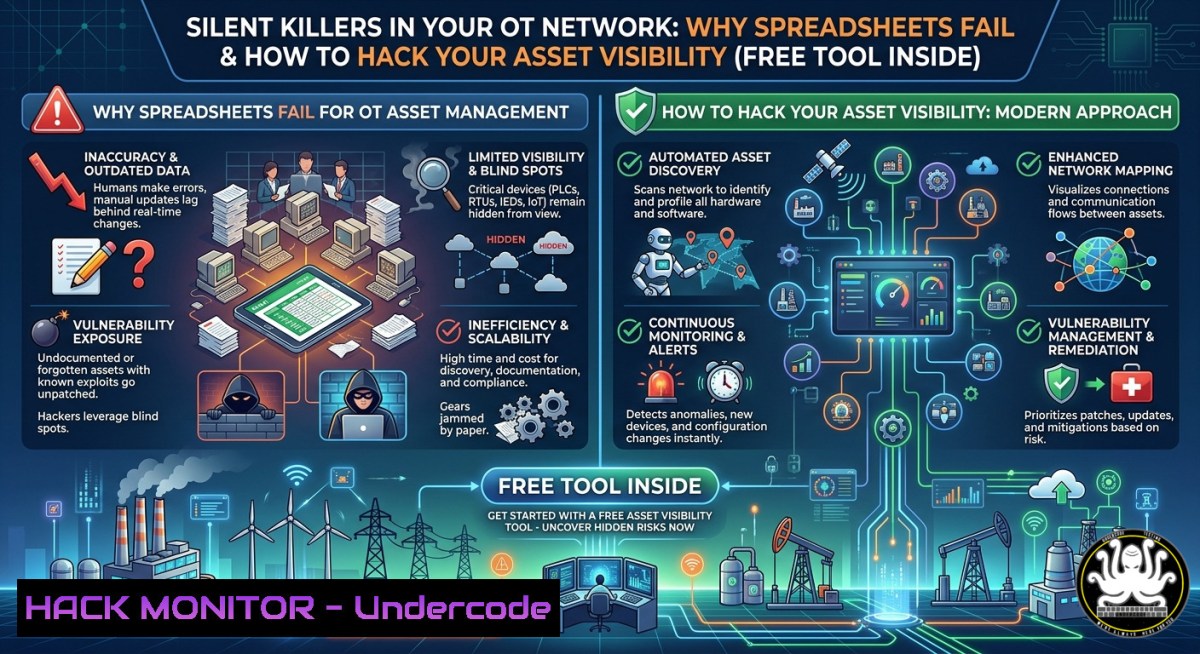
Industrial automation environments are increasingly targeted by threat actors exploiting blind spots—aging assets, unpatched vulnerabilities, and fragmented inventory records. Most operators still rely on spreadsheets or static documentation to manage critical automation assets, creating dangerous gaps in visibility that attackers love. The GEA Codex® Asset Care App offers a centralized digital platform to identify obsolete components, track lifecycle status, detect vulnerabilities, and benchmark system health, moving teams from reactive firefighting to proactive, data-driven asset management.
Learning Objectives:
- Understand the security and compliance risks of manual asset inventories in OT/ICS environments.
- Learn to deploy automated discovery techniques (including free trials like GEA Codex) to map automation assets across plants.
- Implement vulnerability detection, lifecycle tracking, and NIS2-aligned compliance workflows using both commercial and open-source tools.
You Should Know:
1. From Spreadsheet to Dashboard: Automating Asset Discovery
Most industrial sites start with Excel—but static lists miss rogue devices, expired certificates, and misconfigured controllers. Automated discovery is the first step toward visibility.
Step-by-step guide:
- Linux (nmap & ARP scanning):
`sudo nmap -sS -p 102,502,44818 –open -T4 192.168.1.0/24`
(Scans for Siemens S7 port 102, Modbus 502, EtherNet/IP 44818)
`arp-scan –localnet` (Identifies live devices without heavy probing)
- Windows PowerShell (native):
`Get-NetNeighbor -AddressFamily IPv4 | Where-Object {$_.State -eq “Reachable”}`
`Test-NetConnection -Port 502 192.168.1.10` (Modbus port check)
- Using GEA Codex trial: Upload existing IP lists or let the app auto-discover via read‑only network probes (free trial at https://go.gea/4jY). The onboarding expert helps structure your first asset inventory.
What this does: Builds a live, versioned asset database instead of a static spreadsheet. Run these scans weekly to catch unauthorised changes.
2. Identifying Obsolete Components and Lifecycle Risks
An obsolete PLC or HMI is a backdoor waiting to be kicked in. Attackers exploit end‑of‑life firmware with known, unpatched CVEs.
Step-by-step guide:
- Extract firmware versions via SNMP (if enabled):
`snmpwalk -v2c -c public 192.168.1.10 1.3.6.1.2.1.1.1.0`
(Returns system description including firmware)
- Check vendor lifecycle databases: Manually compare model numbers against Siemens/Rockwell/GE end‑of‑life bulletins.
- Automated with GEA Codex: The app cross‑references detected hardware against lifecycle databases, flagging obsolete assets with a risk score.
- Linux/Windows using `searchsploit` (offline exploit DB):
`searchsploit rockwell firmware 2.0`
Then mitigate by isolating obsolete devices behind a firewall or applying virtual patches.
3. Vulnerability Detection in OT/ICS Environments
Spreadsheets cannot run a vulnerability scan. Active scanning in OT is risky, but passive or low‑impact methods exist.
Step-by-step guide:
- Passive monitoring (no disruption): Use `Wireshark` or `zeek` on a span port to identify unencrypted traffic and suspicious protocol anomalies.
`sudo zeek -C -r capture.pcap`
- Low‑impact active scanning with OpenVAS (Linux):
`sudo gvm-setup` → configure a custom scan policy disabling dangerous NSE scripts (e.g., disable brute‑force and fuzzing plugins).
Target only non‑critical assets first.
- Windows tool: PLCScan (modbus scanner):
`plcscan.exe 192.168.1.0/24 -p 502 -t 500`
- Mitigation: Apply virtual patching via intrusion prevention systems (IPS) for known OT CVEs (e.g., Modbus function code 90 overflow). The GEA Codex app correlates detected vulnerabilities with NIS2 requirements, providing remediation priority.
4. Benchmarking System Health Across Plants
Comparing multiple facilities requires normalised metrics: patch level, asset age, number of open ports, compliance scores.
Step-by-step guide:
- Aggregate data using a simple Python script (Linux/WSL):
import csv plants = ['plant_a.csv', 'plant_b.csv'] for plant in plants: with open(plant) as f: data = [row for row in csv.DictReader(f)] obsolete = sum(1 for r in data if r['lifecycle'] == 'obsolete') print(f"{plant}: obsolete assets = {obsolete}") - Use GEA Codex benchmarking dashboard: Upload data from each plant; the app automatically compares lifecycle status, vulnerability density, and maintenance backlogs.
- Security angle: An outlier plant with 3x more obsolete devices is your most probable entry point. Target hardening there first.
5. Compliance Readiness for NIS2 and Other Regulations
NIS2 requires asset inventories, risk assessments, and incident reporting within 24 hours. Spreadsheets cannot produce an audit trail.
Step-by-step guide:
- Map your assets to NIS2 criticality levels:
Create a CSV with columns: IP, asset type, criticality (high/medium/low), last patch date, vendor support end date. - Automated compliance checks via PowerShell (Windows):
`Get-ItemProperty HKLM:\SOFTWARE\Microsoft\Windows\CurrentVersion\Uninstall\ | Select DisplayName, InstallDate` (for Windows‑based HMIs) - Linux audit script (Bash):
for ip in $(cat asset_list.txt); do
echo "Checking $ip"
nc -zv $ip 22 2>&1 | grep -q open && echo "SSH open – review access control"
done
- GEA Codex alignment: The app includes pre‑built NIS2 reporting templates, showing which assets lack patching or have exceeded support lifecycle. During the 4‑month free trial, the expert helps you generate your first compliance gap report.
6. Proactive Maintenance: From Reactive to Predictive
Reactive maintenance = after an outage or breach. Proactive = using asset visibility to schedule replacements before failure or exploitation.
Step‑by‑step guide:
- Set up a simple health scorecard:
Combine `ping -c 3 asset_ip` (latency), SNMP sysUptime (reboots indicate instability), and `nmap` open ports. - Automate alerts with crontab + notify (Linux):
`/60 /home/user/asset_health_check.sh | grep -i “offline” && curl -X POST https://webhook.site/alert` - Integrate with GEA Codex: The app’s predictive analytics highlight assets with “vulnerability + obsolescence” combination – replace these first.
- Windows Task Scheduler + PowerShell:
Trigger a script that logs asset status to a central SIEM (e.g., Splunk forwarder). Proactive detection of sudden port changes (e.g., port 502 opening on a controller) can indicate an attacker installing a rogue Modbus server.
- Leveraging Free Trials and Expert Onboarding (GEA Codex Case)
The post mentions a limited‑time free trial: 4 months of GEA Codex, personal onboarding, and initial expert support. This is a low‑risk way to replace spreadsheets.
Step‑by‑step guide to maximize the offer:
- Step 1: Click the trial link https://go.gea/4jY – prepare a list of your IP subnets and a maintenance window (zero disruption – the app uses read‑only discovery).
- Step 2: During expert onboarding, request a demonstration of vulnerability correlation (e.g., map CVE‑2021‑34527 to your Siemens controllers).
- Step 3: Upload your current spreadsheet(s) – the app deduplicates and enriches data.
- Step 4: Define SLAs: “Alert me if any asset has an unpatched CVE > 90 days.”
- Step 5: Use the remaining trial to benchmark two plants and present the risk reduction to management for budget approval.
What Undercode Say:
- Key Takeaway 1: Spreadsheets are a cybersecurity liability—they cannot scale, cannot detect real‑time changes, and offer zero compliance audit trails. Automated asset visibility is the foundation of OT security.
- Key Takeaway 2: Free trials like GEA Codex (4 months + expert onboarding) remove the cost barrier. Use this period not just to inventory but to build workflows: lifecycle tracking, vulnerability prioritisation, and NIS2 gap analysis.
- Analysis (10 lines): The post correctly identifies that most industrial operators lack “visibility” – but the deeper issue is that without automation, security teams drown in false negatives. Attackers routinely scan for forgotten HMIs, obsolete PLCs, and misconfigured engineering workstations. The GEA Codex approach shifts from reactive spreadsheets to a proactive digital twin of your automation assets. Key technical value: the app identifies obsolete components (attackers love EOL firmware) and benchmarks plant health, enabling risk-based decision making. However, visibility alone is not protection – the article should also mention network segmentation and zero‑trust for OT. For Linux/Windows practitioners, integrating the app’s output with `nmap` cron jobs or PowerShell audit scripts creates a hybrid approach: continuous discovery + vulnerability correlation. The free trial’s expert support is critical—most OT teams misconfigure asset scanners (e.g., crashing a PLC with aggressive scans). Use that support to tune discovery parameters. NIS2 deadlines (October 2024 for EU member states) make this a timely offer; failure to demonstrate an automated asset inventory will result in regulatory fines. Overall, GEA Codex solves the “what do we have?” problem, which is the prerequisite for any security control.
Prediction:
Within two years, industrial asset management will fully migrate from spreadsheets to continuous discovery platforms integrated with SIEM and SOAR. The GEA Codex model—free trial + expert onboarding—will become the industry standard for vendor‑agnostic OT visibility. As NIS2 enforcement begins, fines for incomplete or manual inventories will force even small operators to adopt automated asset tracking. Simultaneously, attackers will evolve to directly target asset management APIs, making API security (OAuth, mTLS) a critical hardening step for these platforms. We predict a 300% increase in OT‑focused asset discovery tools by 2026, with consolidation around platforms that include built‑in vulnerability exploitation validation (e.g., safe “attack simulation” modes). The biggest risk will shift from “no visibility” to “too much unverified data” – requiring AI‑driven anomaly detection to separate noise from genuine threats. Start building visibility now, or become the next post‑mortem case study.
▶️ Related Video (70% Match):
🎯Let’s Practice For Free:
IT/Security Reporter URL:
Reported By: What If – Hackers Feeds
Extra Hub: Undercode MoN
Basic Verification: Pass ✅
🎓 Live Courses & Certifications:
Join Undercode Academy for Verified Certifications
🚀 Request a Custom Project:
Secure, high-velocity infrastructure and disruptive technological engineering. Contact our engineering team for high-tier development and proprietary systems:
[email protected]


