Listen to this Post
Introduction
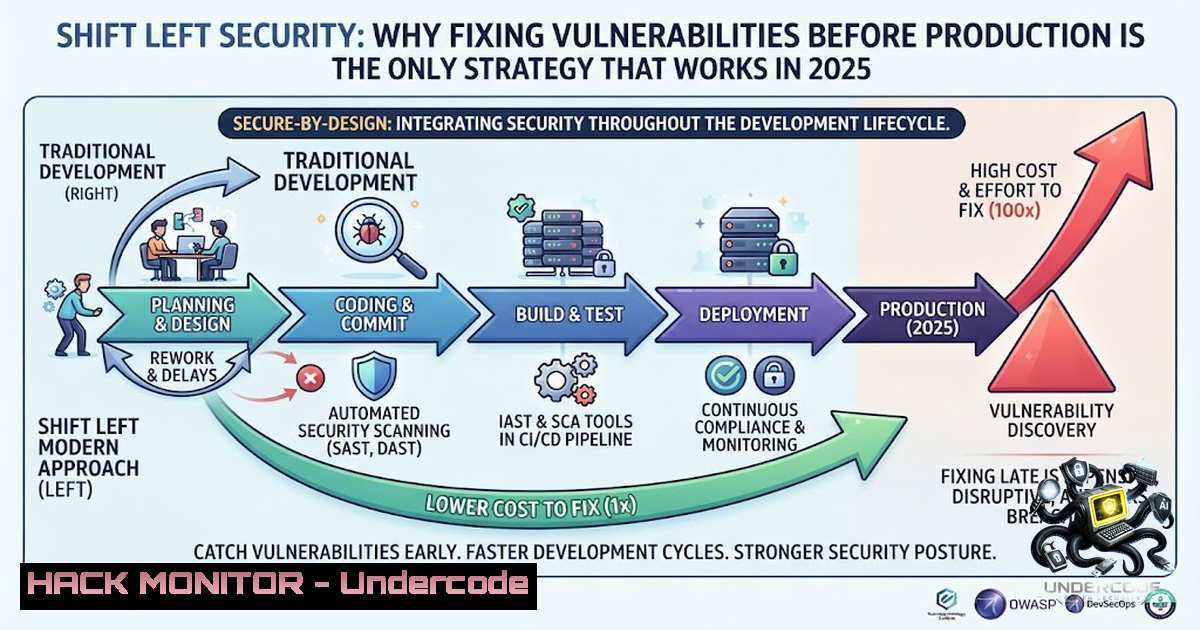
The traditional approach of tacking security onto the end of the Software Development Lifecycle (SDLC) is not just inefficient—it is financially reckless. Organizations that discover vulnerabilities during production face remediation costs that can be up to 30 times higher than fixing them during the coding phase, according to industry studies. Shift Left Security addresses this by embedding security practices into every stage of development, transforming security from a final checkpoint into an integrated, continuous process that empowers developers to build resilient applications from day one.
Learning Objectives
- Understand the core principles of Shift Left Security and its impact on the SDLC
- Implement practical SAST, SCA, and IaC security scanning in CI/CD pipelines
- Configure container image scanning and CI/CD security gates for automated vulnerability prevention
You Should Know
- Secure Coding: Building the Foundation Before the First Commit
Secure coding is the most cost-effective security control available. It involves writing code that adheres to security best practices, such as input validation, output encoding, proper authentication mechanisms, and secure session management. The Open Web Application Security Project (OWASP) provides comprehensive guidelines, including the OWASP Top 10, which highlights the most critical web application security risks.
To enforce secure coding standards, teams can integrate linters and static analysis tools directly into their Integrated Development Environments (IDEs). For example, ESLint with security plugins for JavaScript, Bandit for Python, and Brakeman for Ruby on Rails can catch vulnerabilities before code is even committed.
Step‑by‑step guide to implementing secure coding practices:
- Establish a Secure Coding Standard: Adopt frameworks like OWASP ASVS (Application Security Verification Standard) to define your organization’s security requirements. Customize these guidelines to fit your technology stack and risk profile.
- Integrate Pre-commit Hooks: Use Git hooks to run security linters locally before code is pushed to the repository. For example, create a pre-commit hook that runs `eslint –plugin security` for JavaScript projects or `bandit -r .` for Python. This provides immediate feedback to developers.
- Conduct Regular Code Reviews with Security Focus: Incorporate security checklists into your peer review process. Reviewers should specifically look for authentication bypasses, injection flaws, and insecure cryptographic implementations.
- Provide Developer Security Training: Conduct quarterly workshops on secure coding, focusing on real-world attack scenarios and how to mitigate them in your specific environment. This changes the developer mindset from “security is someone else’s problem” to “security is my responsibility.”
Linux/Windows Commands for Secure Coding Setup:
- Linux: `git config core.hooksPath /path/to/hooks` to set a custom hooks directory.
- Windows (PowerShell): `Set-ExecutionPolicy RemoteSigned -Scope CurrentUser` to allow script execution for hook scripts.
- Verify Dependencies: `npm audit –production` to check for known vulnerabilities in Node.js packages.
- SAST (Static Application Security Testing): Analyzing Code Without Execution
SAST tools analyze source code, bytecode, or binary code to identify vulnerabilities without executing the application. They can detect issues like SQL injection, cross-site scripting (XSS), and hardcoded secrets early in the development process. Modern SAST tools integrate seamlessly with popular IDEs and CI/CD pipelines, providing developers with actionable feedback.
Common SAST tools include SonarQube, Checkmarx, Fortify, and open-source options like Semgrep and FindSecBugs. These tools produce reports that highlight vulnerability locations, severity levels, and recommended fixes.
Step‑by‑step guide to integrating SAST in your pipeline:
- Select a SAST Tool: Evaluate tools based on your language support, scalability, and false-positive rate. For rapid adoption, start with Semgrep or SonarQube Community Edition.
- Configure the Tool: Create a configuration file (e.g., `semgrep.yml` or
sonar-project.properties) that defines your scanning rules. Exclude test directories and third-party code to reduce noise. - Integrate into CI/CD: Add a SAST scanning step in your Jenkins, GitLab CI, or GitHub Actions pipeline. For Jenkins, use the SonarQube Scanner plugin. For GitHub Actions, use the
semgrep/semgrep-action@v1. - Set a Quality Gate: Define a threshold for acceptable issues. For example, block the build if there are any critical or high-severity vulnerabilities. This enforces the Shift Left principle by preventing insecure code from proceeding.
- Establish a Remediation Workflow: Generate tickets for identified vulnerabilities directly in your Jira or Azure DevOps board. Assign them to the original developers with prioritized deadlines.
Commands for SAST Integration:
- SonarQube (Linux): `sonar-scanner -Dsonar.projectKey=my_project -Dsonar.sources=. -Dsonar.host.url=http://localhost:9000`
– Semgrep (Linux/Windows): `semgrep –config=p/security-audit . –output=sast_report.json` - Windows PowerShell: `.\sonar-scanner.bat -Dsonar.projectKey=my_project -Dsonar.sources=.`
- SCA (Software Composition Analysis): Securing Your Open-Source Supply Chain
Modern applications are composed of 70-90% open-source components, making SCA critical for security. SCA tools identify known vulnerabilities (CVEs) in libraries and dependencies, alerting teams about outdated or malicious packages. They also provide insights into licensing compliance and software bill of materials (SBOM) generation.
Tools like Snyk, WhiteSource (Mend), and OWASP Dependency-Check scan package manifests (e.g., package.json, requirements.txt, pom.xml) against vulnerability databases like the National Vulnerability Database (NVD) and GitHub Security Advisories.
Step‑by‑step guide to implementing SCA:
- Identify Dependency Files: Map all repositories and identify their dependency files. Create a comprehensive inventory using tools like `cdxgen` to generate SBOMs.
- Choose an SCA Tool: For open-source, start with OWASP Dependency-Check. For commercial, Snyk offers extensive integration with IDE and CI/CD.
- Automate Dependency Scanning: Add a step to your CI/CD pipeline that runs on every pull request. For example, use `snyk test` or
dependency-check --scan .. - Set Up Automated Updates: Configure Dependabot or Renovate to automatically create pull requests for vulnerable or outdated dependencies. This reduces manual overhead.
- Monitor for New Vulnerabilities: Subscribe to security advisories and configure SCA tools to continuously scan for newly disclosed vulnerabilities even after deployment. Use webhook alerts to notify security teams.
Commands for SCA Implementation:
- OWASP Dependency-Check (Linux): `dependency-check –project “MyApp” –scan /path/to/src –out /path/to/report`
– Snyk (Windows): `snyk test –severity-threshold=high`
– Generate SBOM (Linux): `cdxgen -o bom.json`
- Infrastructure as Code (IaC) Security: Hardening Your Cloud Before Provisioning
IaC security validates infrastructure definitions—such as Terraform, CloudFormation, and Kubernetes manifests—against security best practices before they are deployed. This prevents misconfigurations that could expose cloud resources to attacks. Common misconfigurations include overly permissive IAM roles, open storage buckets, and unencrypted databases.
Tools like Checkov, Terrascan, and tfsec analyze IaC templates for compliance with frameworks like the CIS Benchmarks and PCI-DSS. They can also enforce organizational policies, ensuring that all infrastructure meets security standards.
Step‑by‑step guide to IaC security:
- Scan IaC Templates Locally: Run Checkov on your Terraform or Kubernetes files during local development. For example, `checkov -d /terraform` to scan an entire directory.
- Integrate into Pre-Commit Hooks: Add a pre-commit hook that blocks commits with critical misconfigurations. This provides immediate feedback to developers.
- Validate in the CI/CD Pipeline: Include an IaC scanning stage in your pipeline. For GitHub Actions, use
bridgecrewio/checkov-action@master. For Jenkins, use the Checkov plugin. - Automate Remediation: Configure your pipeline to automatically generate pull requests that fix identified misconfigurations. For example, Checkov can output a plan to remediate issues.
- Continuously Scan Deployed Infrastructure: Use tools like AWS Config or Azure Policy to continuously monitor deployed resources for drift and compliance violations.
Commands for IaC Security:
- Checkov (Linux): `checkov -d /path/to/terraform –framework terraform -o json`
– tfsec (Windows): `tfsec . –format json –out tfsec_report.json`
– Kubernetes (Linux): `kubectl kustomize . | checkov -f -`
- Container Image Scanning: Securing the Artifact Before Deployment
Container images often include vulnerable operating system packages and application dependencies. Scanning these images before they are pushed to registries or deployed to orchestrators is essential to prevent known vulnerabilities from reaching production. Container scanning tools inspect layers, identify package versions, and cross-reference them with vulnerability databases.
Popular tools include Trivy, Clair, and Anchore. They can be integrated into CI/CD pipelines to block vulnerable images and can also be configured to scan images in registries continuously.
Step‑by‑step guide to container image security:
- Integrate Scanning into Build Process: Add a container scan step after your image is built but before it is pushed to the registry. For example, run
trivy image myapp:latest --severity HIGH,CRITICAL. - Configure a Vulnerability Policy: Define a policy that blocks images with critical vulnerabilities. For example, fail the build if any critical or high-severity issue is found.
- Add to Pre-Deployment Gates: In your Kubernetes deployment pipeline, use tools like OPA (Open Policy Agent) to verify that images have passed scanning before applying manifests.
- Schedule Registry Scans: Configure daily or weekly scans of your container registry to detect newly discovered vulnerabilities in already-pushed images.
- Implement Image Signing: Use tools like Cosign to sign images after they pass security scans, ensuring that only verified images are deployed.
Commands for Container Scanning:
- Trivy (Linux/Windows): `trivy image –severity HIGH,CRITICAL –ignore-unfixed python:3.9-slim`
– Docker Scout (Linux): `docker scout cves myapp:latest`
– Clair (Kubernetes): `clair-scanner –clair=http://clair:6060 myapp:latest`
6. CI/CD Security Gates: Automating Go/No-Go Decisions
CI/CD security gates are automated checkpoints that evaluate security results and decide whether to proceed or halt the deployment. They aggregate findings from SAST, SCA, IaC scans, and container scans, applying a unified policy to determine if the build meets security standards. This ensures that insecure code or infrastructure never reaches production.
Tools like OPA, Argo CD (with application health checks), and Jenkins pipelines with conditional steps can enforce these gates. They provide a single pane of glass for security decisions across all stages of the pipeline.
Step‑by‑step guide to setting up CI/CD security gates:
- Define Security Policy: Create a policy that sets acceptable thresholds for severity and quantity of vulnerabilities. For example, allow no critical issues, no more than 5 high issues, and no high misconfigurations.
- Collect Scan Reports: Configure your pipeline to collect outputs from SAST, SCA, IaC, and container scans in a standardized format (JSON, SARIF).
- Implement a Gatekeeper Service: Use OPA to evaluate all reports against your policy. For example, write a Rego policy that checks if any report contains a critical finding.
- Integrate the Gate: Insert a pipeline step that consumes reports and outputs a pass/fail decision. For Jenkins, use the `pipeline` script block. For GitHub Actions, use custom scripts or marketplace actions.
- Create Audit Trail and Alerts: Log all gate decisions and trigger alerts when a gate fails. Integrate with security dashboards to provide real-time visibility.
Commands for CI/CD Security Gates:
- OPA Evaluation (Linux): `opa eval –data policy.rego –input report.json “data.main.allow”`
– Jenkins Pipeline Script: `def pass = sh(script: “opa eval –data policy.rego –input report.json ‘data.main.allow'”, returnStdout: true).trim()`
– GitHub Actions Conditional: `if: steps.eval.outputs.pass == ‘true’`
7. Continuous Monitoring: Maintaining Security Posture After Deployment
Shift Left doesn’t end at deployment. Continuous monitoring involves runtime detection of threats, misconfigurations, and emerging risks in production environments. It includes Web Application Firewalls (WAFs), intrusion detection systems (IDS), and cloud security posture management (CSPM) tools. This ongoing vigilance ensures that security is maintained and that any new vulnerabilities discovered are promptly addressed.
Step‑by‑step guide to continuous monitoring:
- Deploy Runtime Agents: Install agents like Datadog, Sysdig, or Falco on your Kubernetes clusters and hosts to monitor for anomalies and intrusions.
- Set Up Alerting: Configure alerts for suspicious activities—such as unusual outbound traffic, privilege escalation attempts, or failed authentication spikes—with notifications to the security team.
- Integrate with SIEM: Forward logs and alerts to a Security Information and Event Management (SIEM) system for correlation and advanced analysis.
- Schedule Regular Penetration Testing: Complement automated monitoring with periodic manual and automated penetration tests to discover complex vulnerabilities that automated tools might miss.
- Implement a Vulnerability Management Program: Continuously re-scan your environment and prioritize remediation based on severity and exploitability, tracking progress through a dedicated dashboard.
What Undercode Say
- Early Detection Is the Ultimate Cost Saver: Every dollar spent on a vulnerability during design saves at least six dollars during testing and up to thirty dollars in production. This economic reality must drive all SDLC decisions.
- Shift Left Is a Cultural Shift, Not a Tooling Exercise: The most sophisticated SAST and SCA tools are useless if developers don’t understand the principles behind them. Investing in developer education and fostering a “security champions” program creates a resilient organizational security culture.
- Automation and Integration Are Non-1egotiable: Manual security checks are too slow and inconsistent for modern CI/CD. By integrating security gates and automating remediation workflows, organizations can achieve both speed and security, delivering features confidently without delays.
- Post-Deployment Monitoring Completes the Circle: Shift Left without continuous monitoring is incomplete. Production threats are constantly evolving, and without runtime visibility, you are effectively blind to exploits that bypassed earlier checks.
- The Future Is Policy as Code: As security gates become more sophisticated, policies will be written in code, stored in version control, and automatically tested. This brings compliance and governance into the developer workflow, further reducing friction and enhancing security posture.
Prediction
- +1: Organizations that fully adopt Shift Left principles will see a 40-60% reduction in security incident response costs within two years, as fewer critical vulnerabilities reach production, leading to higher customer trust and lower insurance premiums.
- +1: The integration of AI-powered SAST and SCA tools will accelerate vulnerability detection, reducing false positives by over 50% and enabling developers to fix issues in real-time, making security truly invisible.
- -1: However, as security tooling becomes more integrated, attackers will shift focus to exploiting misconfigurations in the tooling itself and targeting CI/CD pipelines, creating a new attack surface that organizations must aggressively protect with pipeline security and least-privilege access controls.
▶️ Related Video (76% Match):
🎯Let’s Practice For Free:
🎓 Live Courses & Certifications:
Join Undercode Academy for Verified Certifications
🚀 Request a Custom Project:
Secure, high-velocity infrastructure and disruptive technological engineering. Contact our engineering team for high-tier development and proprietary systems:
[email protected]
💎 Smart Architecture | 🛡️ Secure by Design | ⭐ Trusted by Thousands
IT/Security Reporter URL:
Reported By: Cybersecurity Shiftleft – Hackers Feeds
Extra Hub: Undercode MoN
Basic Verification: Pass ✅


