Listen to this Post
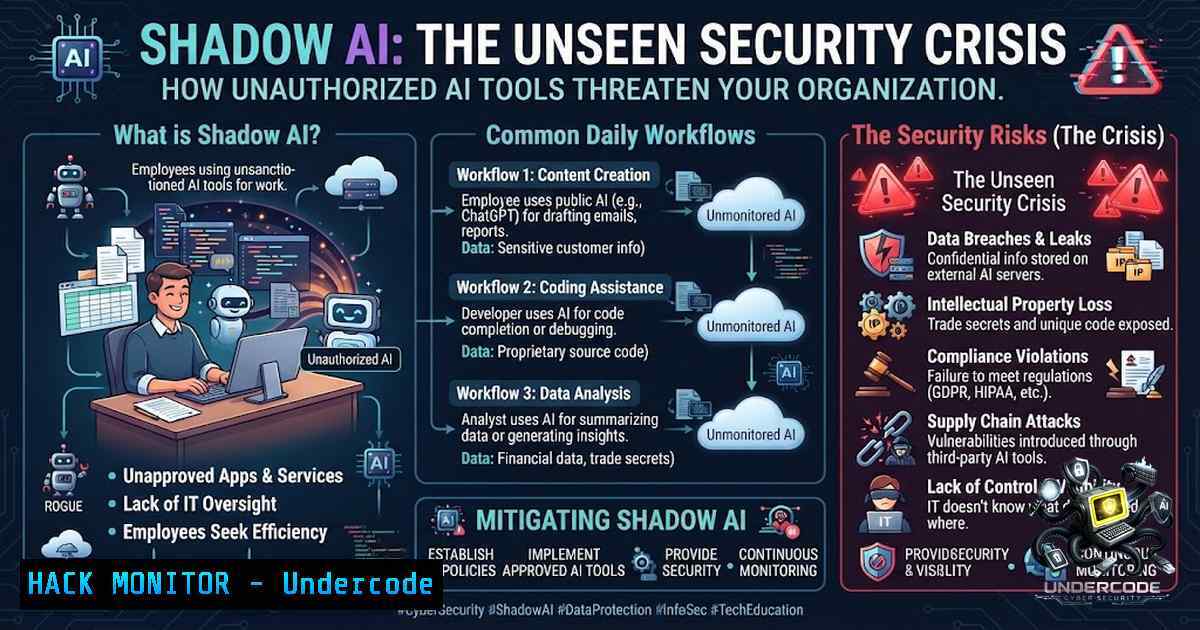
Introduction:
The integration of Artificial Intelligence into daily business operations has become so seamless that most employees interact with generative AI tools multiple times a day without formal oversight, creating an expansive and unmanaged attack surface. This phenomenon, known as “Shadow AI,” occurs when individuals use unsanctioned AI services for tasks like code generation, data analysis, and content creation, bypassing IT and security protocols. While these tools boost productivity, they introduce severe risks, including data leakage, model poisoning, and compliance violations, demanding immediate attention from cybersecurity professionals and IT leaders.
Learning Objectives:
- Identify the specific security risks associated with unsanctioned AI tools, including data exposure and intellectual property theft.
- Implement technical controls to detect, monitor, and mitigate Shadow AI within enterprise networks and cloud environments.
- Establish a strategic framework for secure AI adoption, balancing innovation with robust data governance and access controls.
You Should Know:
1. Identifying Shadow AI in Your Environment
The first step to securing Shadow AI is visibility. Many organizations are unaware of the sheer volume of AI tools being accessed by their employees. To identify these tools, IT teams must move beyond traditional web filtering and adopt Next-Generation Firewall (NGFW) and Secure Web Gateway (SWG) policies that leverage application signatures. For instance, Palo Alto Networks and Zscaler provide granular controls to categorize AI and machine learning platforms. On the network level, you can use `tcpdump` or Wireshark to capture traffic anomalies, but a more systematic approach involves utilizing Endpoint Detection and Response (EDR) tools.
To audit outgoing traffic on a Linux-based proxy server, you can use a script to analyze logs:
 Use grep and awk to identify connections to known AI domains from proxy logs
grep -E "chat.openai.com|claude.ai|bard.google.com" /var/log/squid/access.log | awk '{print $1, $7}' | sort | uniq -c | sort -1r
For Windows environments, leveraging PowerShell to parse firewall logs is crucial. To enable logging and filter for external AI platforms, you can use:
 Enable firewall logging and look for outbound connections to AI domains
Get-1etFirewallProfile | Set-1etFirewallProfile -LogAllowed True -LogBlocked True
 Then parse the log at %windir%\system32\LogFiles\Firewall\pfirewall.log
Select-String -Path "C:\Windows\System32\LogFiles\Firewall\pfirewall.log" -Pattern "chat.openai.com" | Export-Csv AI_Access_Log.csv
2. The API Security Blindspot
Shadow AI often manifests through API keys embedded in code or scripts. Developers frequently paste proprietary code into AI platforms for debugging, inadvertently exposing sensitive API tokens and internal logic. Security teams must implement automated secret scanning. Tools like `trufflehog` or `git-secrets` can scan repositories for exposed credentials. For real-time monitoring, you can deploy a Python script to check for high-risk patterns:
import re
import os

Simulated regex for API key patterns
patterns = {
"OpenAI": r"sk-[a-zA-Z0-9]{48}",
"AWS": r"AKIA[0-9A-Z]{16}"
}

def scan_file(filepath):
with open(filepath, 'r') as file:
content = file.read()
for key, pattern in patterns.items():
if re.search(pattern, content):
print(f"Potential {key} key found in {filepath}")

Walk through directory
for root, dirs, files in os.walk("."):
for file in files:
if file.endswith((".py", ".js", ".env")):
scan_file(os.path.join(root, file))
To mitigate this, organizations should enforce outbound proxy policies that require authentication and block requests to unapproved domains, ensuring that API keys are rotated frequently using HashiCorp Vault or AWS Secrets Manager.
3. Hardening Cloud Environments Against AI Data Leakage
In cloud architectures (AWS, Azure, GCP), Shadow AI can result in data exfiltration via malicious or unapproved third-party models. Implementing Data Loss Prevention (DLP) is critical. For AWS, use S3 Access Analyzer and Macie to detect sensitive data being moved to different regions or accounts. To prevent users from spinning up unauthorized AI instances, enforce Service Control Policies (SCP) that restrict specific actions:
{
"Version": "2012-10-17",
"Statement": [
{
"Effect": "Deny",
"Action": [
"sagemaker:CreateNotebookInstance",
"bedrock:InvokeModel"
],
"Resource": ""
}
]
}
For Azure, implement Conditional Access policies that block logins from non-corporate IPs to prevent employees from accessing AI tools from insecure networks. Additionally, ensure that network security groups (NSGs) are configured to restrict outbound traffic to specific ports and IP ranges, preventing direct access to public AI endpoints.
4. Building a Secure AI Gateway
To reclaim control, organizations should deploy a Secure AI Gateway (e.g., Cloudflare AI Gateway or a custom MITM proxy) that acts as a broker between users and AI providers. This gateway enforces data sanitization—stripping out Personally Identifiable Information (PII) before it reaches the LLM. You can set up a basic interception point using `mitmproxy` to log and redact sensitive headers:
from mitmproxy import http

def request(flow: http.HTTPFlow) -> None:
 Sanitize headers
if "Authorization" in flow.request.headers:
flow.request.headers["Authorization"] = "[bash]"
 Log the domain
print(f"Request to: {flow.request.pretty_host}")
This approach allows security teams to audit, rate-limit, and log every interaction with AI services while enforcing usage policies.
- Linux and Windows Commands for AI-Related Threat Hunting
Threat hunting for Shadow AI involves monitoring process creation and network connections.
- On Linux: Use `auditd` to monitor execution of web browsers or Python scripts that might be initiating AI connections.
Monitor execve syscalls for browser launches
auditctl -a always,exit -S execve -k AI_ACCESS
-
On Windows: Use Sysmon to log process creation and network connections. Configure Sysmon to capture DNS queries:
<EventFiltering>
<RuleGroup name="DNS">
<Data name="Image" condition="end with">chrome.exe</Data>
<Data name="QueryName" condition="contains">.ai</Data>
</RuleGroup>
</EventFiltering>
6. Implementing Security Awareness and Training
Technical controls are insufficient without a robust training program. Traditional security awareness training does not cover the nuances of prompt engineering or the risks of uploading sensitive documents. Security teams should create internal “red team” exercises where they prompt employees using fake phishing emails that lure them to malicious AI platforms. This reinforces the “Think Before You Paste” policy. Develop a mandatory training module covering:
- The legal implications of data sovereignty and AI.
- Prompt injection attacks and how to identify malicious outputs.
- The importance of using only corporate-approved LLMs.
7. Incident Response: When Shadow AI Goes Wrong
If a breach occurs via Shadow AI, immediate containment is necessary. Create an AI-specific incident response playbook.
Step 1: Isolation. Disconnect the affected endpoint from the network to prevent further data exfiltration.
Step 2: Revocation. Revoke any API keys or tokens that may have been exposed in the AI chat history.
Step 3: Forensics. Search browser history and cache for evidence of what data was sent. Use `dumpsec` (Windows) or `browser-history-tools` to extract data.
Step 4: Communication. Follow the regulatory guidelines for data breaches (GDPR, CCPA) and notify affected stakeholders. The playbook should be updated regularly as the threat landscape evolves.
What Undercode Say:
- Key Takeaway 1: Shadow AI transforms every employee into a potential risk vector, making traditional perimeter-based security obsolete; security must shift to data-centric models focusing on content and context.
- Key Takeaway 2: Proactive monitoring, coupled with the establishment of a secure AI gateway, is not a hindrance to productivity but a necessary framework that empowers teams to innovate safely.
Analysis: The proliferation of Shadow AI is a direct consequence of the friction between security protocols and employee efficiency. Organizations that attempt to block all AI traffic will face pushback, leading to “Shadow IT” escalating into “Shadow AI.” Therefore, the solution lies in collaboration: security leaders must partner with business units to understand their use cases and provide sanctioned, secure alternatives. This includes setting up private instances of open-source models like Llama 2 to ensure data remains on-premise. Furthermore, the role of the CISO is evolving to include “AI Data Custodian,” requiring them to understand the nuances of model training and data ingestion. The failure to do so will result in non-compliance fines that dwarf the cost of implementing these security measures.
Prediction:
- +1: The regulatory landscape will mature, leading to AI “Trust Certificates” that will become a prerequisite for enterprise insurance, fostering a safer ecosystem.
- +1: The development of automated AI firewalls will reduce the manual burden on SOC teams, enabling faster threat response to unsanctioned tool usage.
- -1: The rising complexity of AI security will exacerbate the cybersecurity skills gap, with a shortage of professionals capable of securing AI pipelines and architectures.
- -1: Cybercriminals will increasingly exploit Shadow AI as a vector for supply chain attacks, embedding malicious code into seemingly benign AI-generated scripts used by developers.
▶️ Related Video (86% Match):
🎯Let’s Practice For Free:
🎓 Live Courses & Certifications:
Join Undercode Academy for Verified Certifications
🚀 Request a Custom Project:
Secure, high-velocity infrastructure and disruptive technological engineering. Contact our engineering team for high-tier development and proprietary systems:
[email protected]
💎 Smart Architecture | 🛡️ Secure by Design | ⭐ Trusted by Thousands
IT/Security Reporter URL:
Reported By: Naresh Singh – Hackers Feeds
Extra Hub: Undercode MoN
Basic Verification: Pass ✅


