Listen to this Post
Introduction:
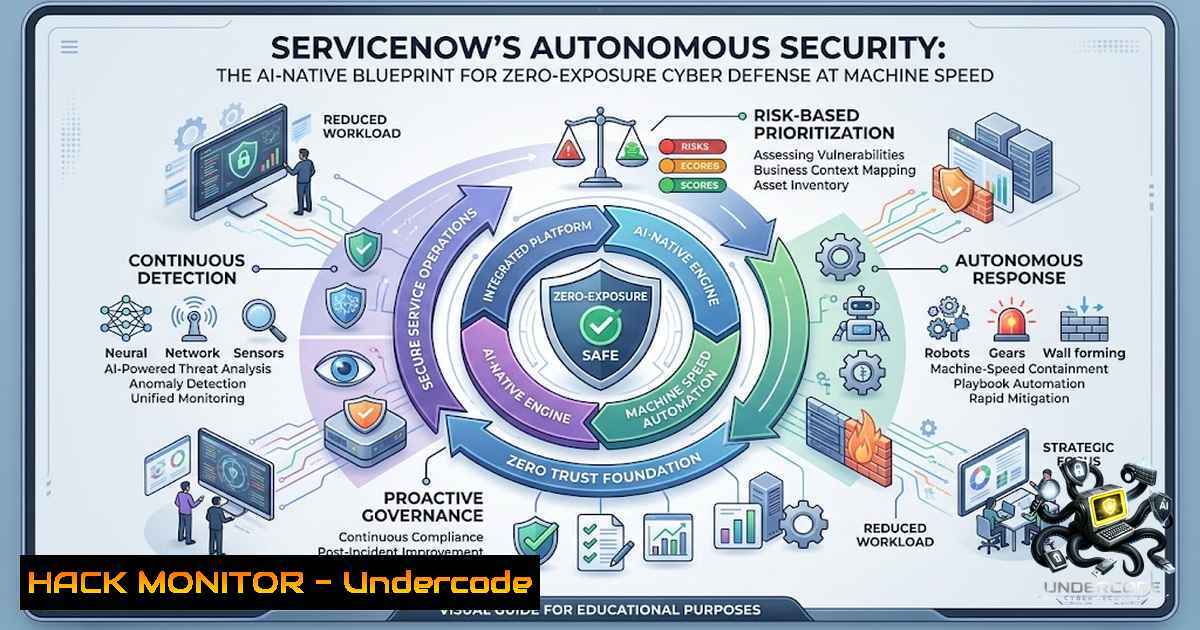
As enterprises aggressively adopt agentic AI, the attack surface expands exponentially—every new AI agent, machine identity, and line of code multiplies exposure faster than human-led security teams can respond. ServiceNow’s Autonomous Security vision directly confronts this crisis with six AI-powered solutions and autonomous AI Specialists, shifting organizations from fragmented, reactive security to a prevention-first, AI-1ative cyber defense model that operates at machine speed across users, AI agents, and critical infrastructure.
Learning Objectives:
- Understand the architecture and operational mechanics of ServiceNow’s six Autonomous Security solutions and their integration within the AI Control Tower.
- Master the configuration and deployment of AI Specialists—particularly the Vulnerability Resolution AI Specialist—for autonomous vulnerability triage, prioritization, and patch execution.
- Implement unified exposure management, continuous vulnerability detection, cyber-physical security, identity governance, agentic incident response, and continuous compliance workflows using verified command-line and API-based techniques.
You Should Know:
- Architecting the AI Control Tower: Unified Exposure Management and Continuous Vulnerability Detection
The foundation of ServiceNow’s Autonomous Security is the AI Control Tower, a centralized governance layer that consolidates security findings from siloed tools—endpoints, clouds, identities, and OT/IoT—into a single, contextualized data stream. The average enterprise runs over 70 security tools, creating fragmented insights that blind teams to exploitable risks. The AI Control Tower breaks these silos by ingesting vulnerability data from any source, enriching it with Early Warning threat intelligence and Fix Intelligence—prioritized remediation steps derived from exploitability and business criticality.
To operationalize this, security engineers must configure the Agentic Exposure Management pipeline. This involves setting up data connectors to pull CVEs from scanners (e.g., Tenable, Qualys), cloud posture management tools (e.g., AWS Security Hub, Azure Defender), and application security platforms (e.g., Snyk). The platform then applies risk-scoring algorithms that weigh CVSS scores against asset criticality and active threat intelligence.
Step‑by‑step guide: Configuring Unified Exposure Management
- Access the AI Control Tower Dashboard – Navigate to `Security Operations > Exposure Management` in the ServiceNow instance.
- Add Data Sources – Under
Integration > Data Connectors, select “Add Source.” Choose from pre-built connectors for AWS, Azure, GCP, Tenable, Qualys, and custom REST APIs. For custom sources, use the following REST API endpoint to push vulnerability data:curl -X POST https://<instance>.service-1ow.com/api/now/table/x_sn_vuln_finding \ -H "Accept: application/json" \ -H "Content-Type: application/json" \ -H "Authorization: Bearer <your_token>" \ -d '{"vulnerability_id":"CVE-2026-1234","asset_ip":"192.168.1.100","severity":"CRITICAL","description":"...","source":"custom_scanner"}' - Enrich with Business Context – In the `Asset Management` module, map each asset to a business service (e.g., “Payment Gateway,” “HR Portal”) and assign a criticality score (1–5). The AI Control Tower uses this to prioritize vulnerabilities that affect mission-critical services.
- Enable Early Warning Threat Intelligence – Subscribe to the ServiceNow Threat Intelligence feed (or integrate with third-party feeds like Recorded Future) under
Threat Intelligence > Feeds. This feed dynamically adjusts priority scores based on active exploit activity. - Review the Consolidated Exposure Stream – The `Exposure Workspace` now displays a unified list where each finding includes the asset owner, business impact, exploit likelihood, and recommended Fix Intelligence actions. Exposures are automatically ranked, and high-priority items are flagged for autonomous remediation.
-
Deploying Autonomous AI Specialists for Vulnerability Resolution and Incident Response
ServiceNow introduces AI Specialists—autonomous agents that execute end-to-end security workflows without human intervention. The Vulnerability Resolution AI Specialist is the flagship capability: it triages incoming vulnerability findings, prioritizes fixes using threat and business context, and executes low-risk patches autonomously. For higher-risk decisions, it escalates to analysts with a pre-built response plan. The Tier 2 SOC AI Specialist enriches and correlates incidents, performs containment or blocking actions, and escalates only the most complex cases.
Step‑by‑step guide: Enabling and Tuning the Vulnerability Resolution AI Specialist
- Activate the AI Specialist – In ServiceNow, navigate to
AI Operations > AI Specialists. Locate “Vulnerability Resolution AI Specialist” and click “Activate.” The system will request permissions to read vulnerability records and execute patch actions via integrated patch management tools (e.g., Microsoft SCCM, Ansible, AWS Systems Manager). - Define Auto-Remediation Policies – Under
Policies > Auto-Remediation, create rules that define which findings the AI can patch autonomously. For example:
– Rule 1: If severity = LOW or MEDIUM AND asset_environment = “Development” AND exploit_available = FALSE → Auto-approve patch.
– Rule 2: If severity = CRITICAL AND asset_environment = “Production” → Escalate to human analyst with generated patch script.
3. Integrate Patch Orchestration – Configure the AI Specialist’s execution backend. For Linux environments, the AI can generate and run Ansible playbooks:
<ul>
<li>name: Apply security patch for CVE-2026-1234
hosts: '{{ target_host }}'
tasks:</li>
<li>name: Update package
apt:
name: '{{ package_name }}'
state: latest
when: ansible_os_family == "Debian"</li>
<li>name: Reboot if required
reboot:
reboot_timeout: 300
when: reboot_required
For Windows, the AI can invoke PowerShell scripts via WinRM:
Install-WindowsUpdate -KBArticleID KB5012345 -AcceptAll -AutoReboot
- Set Escalation Thresholds – In the AI Specialist’s configuration, define escalation rules: if the AI encounters a dependency conflict, missing prerequisites, or a patch that would require a service restart during business hours, it pauses and notifies the on-call engineer via ServiceNow ITSM.
- Monitor the Closure Pipeline – The `Exposure Closure Pipeline` dashboard shows real-time metrics: number of findings triaged, patches applied, escalations, and mean-time-to-remediate (MTTR). The AI Specialist continuously learns from analyst feedback, improving its prioritization and patch selection over time.
-
Cyber-Physical Security and Identity Governance for AI Agents
ServiceNow’s Autonomous Security extends beyond IT to cyber-physical systems—OT, IoT, and medical devices—and introduces AI Agent Access Security to govern non-human identities. The platform discovers agentless OT/IoT networks, monitors their behavior, and enforces least-privilege access for both human and machine identities. With machine identities doubling every 18 months, this capability is critical to preventing privilege escalation and lateral movement.
Step‑by‑step guide: Securing OT/IoT and Non-Human Identities
- Discover Cyber-Physical Assets – Navigate to
Discovery > Cyber-Physical Discovery. ServiceNow uses passive network monitoring (via SNMP, Modbus, BACnet) to identify OT/IoT devices without installing agents. Run a discovery scan against your OT network segment:Example: Using SNMP to discover a PLC snmpwalk -v2c -c public 192.168.10.0/24 1.3.6.1.2.1.1.1.0
The platform ingests this data and maps each device to its firmware version, vendor, and network role.
- Enforce Non-Human Identity Remediation – Under
Identity Management > Non-Human Identities, the system lists all service accounts, API keys, and AI agent tokens. For each identity, review its permissions and last rotation date. Enable automated key rotation:
– For AWS IAM roles, the AI Specialist can invoke `aws iam rotate-access-key` via a pre-built integration.
– For service accounts in Active Directory, the platform can trigger a PowerShell script to reset the password and update dependent services:
$NewPassword = ConvertTo-SecureString -String "ComplexP@ssw0rd" -AsPlainText -Force
Set-ADAccountPassword -Identity "svc_ai_agent" -1ewPassword $NewPassword -Reset
3. Implement Least-Privilege Access for AI Agents – In the `AI Agent Access Security` dashboard, review each AI agent’s entitlements. Use the “Remediate” button to generate a least-privilege policy based on the agent’s actual usage patterns over the last 30 days. The system automatically revokes unused permissions and alerts on over-privileged agents.
4. Continuous Monitoring – Enable real-time alerts for anomalous behavior, such as an OT device communicating with an external IP or an AI agent attempting to access a sensitive database. The platform correlates these events with threat intelligence and can trigger autonomous containment actions (e.g., isolating the device via network ACLs).
- Agentic Incident Response and Continuous Compliance as a Live Signal
ServiceNow transforms incident response and compliance from periodic, manual exercises into continuous, automated workflows. The Agentic Incident Response capability uses AI to build response plans, enrich and correlate incidents, and execute containment actions. Meanwhile, continuous compliance monitors access rights, segregation of duties, and configuration states in real time, providing on-demand evidence for SOC 2, ISO 27001, PCI-DSS, and HIPAA. The platform even includes cryptographic asset compliance to identify legacy algorithms and plan migration to quantum-resistant standards.
Step‑by‑step guide: Automating Incident Response and Compliance Evidence
- Configure Agentic Incident Response – In
Security Operations > Incident Response, enable the “Tier 2 SOC AI Specialist.” Define playbooks for common incident types (e.g., ransomware, data exfiltration, phishing). The AI will automatically:
– Enrich alerts with threat intelligence (IP reputation, file hashes, user context).
– Correlate related incidents into a single case.
– Execute initial containment: isolate compromised endpoints via EDR API (e.g., CrowdStrike, Microsoft Defender):
curl -X POST https://api.crowdstrike.com/devices/contain \
-H "Authorization: Bearer <token>" \
-d '{"device_ids": ["12345"], "comment": "Contained by ServiceNow AI"}'
– Escalate only if the AI’s confidence score falls below a threshold (e.g., 80%).
2. Set Up Continuous Compliance Monitoring – Navigate to Compliance > Continuous Monitoring. Select the frameworks you need to comply with (e.g., ISO 27001, PCI-DSS). The platform will automatically map controls to your existing configurations and identities.
– For segregation of duties, the AI scans all user and service account assignments and flags violations (e.g., a single user having both procurement and payment approval roles).
– For configuration state, it checks cloud resources against CIS benchmarks using APIs:
 Check S3 bucket public access via AWS CLI
aws s3api get-bucket-acl --bucket my-bucket --query 'Grants[?Grantee.URI==\"http://acs.amazonaws.com/groups/global/AllUsers\"]'
3. Generate On-Demand Evidence – Instead of waiting for annual audits, use the `Compliance Evidence` module to generate a real-time report. The AI extracts relevant logs, access reviews, and patch records, packages them into a format accepted by auditors. This reduces audit preparation time from weeks to hours.
4. Plan Quantum-Resistant Cryptography – Under Cryptographic Compliance, the platform inventories all certificates, keys, and algorithms in use. It identifies weak or deprecated algorithms (e.g., SHA-1, RSA-1024) and recommends migration paths to quantum-resistant algorithms (e.g., CRYSTALS-Kyber, Dilithium). The AI can even automate the renewal of certificates with stronger algorithms via integration with PKI infrastructure.
5. Shift Zero: Embedding Prevention Across Every Layer
The ultimate goal of ServiceNow’s Autonomous Security is Shift Zero—a state where zero exposure is maintained at all times, with every system, identity, and agent governed and secured in real-time. This is not a static destination but a continuous cycle of discovery, prioritization, remediation, and verification. The platform’s AI Control Tower provides a single pane of glass where security teams can answer, with proof, what every system is doing, why, and who is accountable.
Step‑by‑step guide: Implementing Shift Zero Governance
- Establish a Zero-Exposure Baseline – Run a full discovery scan across all assets (IT, OT, cloud, code repositories, and AI agents). The AI Control Tower generates a baseline exposure score.
- Define Acceptable Risk Thresholds – In
Governance > Risk Appetite, set thresholds for each business unit. For example, financial services may require zero critical exposures, while development environments may tolerate medium-risk findings for up to 48 hours. - Automate Remediation Workflows – For any exposure exceeding the threshold, the AI Specialist automatically triggers remediation. For code-level vulnerabilities, the platform can integrate with CI/CD pipelines to block deployments containing critical CVEs:
Example: GitHub Actions step to fail build if critical vuln found</li>
</ol>

- name: Run Snyk Security Scan
run: snyk test --severity-threshold=high
- name: Block Deployment if Critical Vuln
if: failure()
run: exit 1
4. Continuous Verification – The AI Control Tower re-scans assets after each remediation to confirm closure. If the exposure persists, it escalates to a human analyst with a detailed root-cause analysis.
5. Governance Dashboard – The `Shift Zero Dashboard` displays real-time metrics: total exposures, closure rate, mean-time-to-remediate, and compliance posture. This allows CISOs to demonstrate proactive security to the board, transforming security from a cost center into a business accelerant.What Undercode Say:
- Key Takeaway 1: ServiceNow’s Autonomous Security is not merely a toolset but a paradigm shift—from reactive, tool-heavy security operations to a unified, AI-1ative defense that operates at machine speed. The integration of six solutions into a single AI Control Tower eliminates the fragmentation that plagues modern security teams.
- Key Takeaway 2: The deployment of autonomous AI Specialists for vulnerability resolution and incident response represents a tangible leap toward self-healing infrastructure. However, organizations must invest in rigorous governance and continuous monitoring to prevent AI agents from becoming new attack vectors themselves.
Analysis: The announcement comes at a critical juncture: agentic AI adoption is outpacing security governance, and traditional security tools cannot keep up with the velocity of AI-generated risk. ServiceNow’s approach—consolidating exposure management, identity security, cyber-physical protection, and compliance into a single, AI-driven platform—addresses the root cause of security debt: fragmentation. The introduction of AI Specialists that autonomously triage, patch, and respond shifts the security team’s role from firefighting to strategic oversight. However, the success of this vision hinges on two factors: first, the quality of the underlying threat intelligence and business context that drive prioritization; second, the organization’s willingness to trust AI with autonomous actions, which requires robust fail-safes and continuous validation. The inclusion of quantum-resistant cryptography planning and OT/IoT discovery further demonstrates that ServiceNow is thinking beyond traditional IT, securing the entire digital-physical continuum. For CISOs, this is a compelling blueprint, but it demands a cultural shift toward data-driven, automated decision-making and a commitment to keeping the AI Control Tower itself secure.
Prediction:
- +1 ServiceNow’s Autonomous Security will likely become the de facto standard for large enterprises undergoing AI transformation, forcing competitors (Microsoft, Palo Alto, CrowdStrike) to accelerate their own AI-1ative consolidation strategies.
- +1 The autonomous remediation capabilities will significantly reduce MTTR for critical vulnerabilities, potentially cutting average breach containment costs by 40–60% within two years, as measured by industry benchmarks.
- -1 The reliance on centralized AI governance introduces a single point of failure; a compromise of the AI Control Tower or its underlying models could lead to catastrophic, widespread automated actions (e.g., mass patch failures or false incident escalations), necessitating air-gapped backup controls.
- -1 Regulatory bodies may impose new compliance requirements specifically for autonomous security systems, mandating human-in-the-loop for certain high-risk actions and explainable AI (XAI) for all automated decisions, which could slow adoption in highly regulated industries.
- +1 The integration of cyber-physical security and quantum-resistant cryptography positions ServiceNow to capture significant market share in critical infrastructure (energy, healthcare, manufacturing), where legacy systems are most vulnerable and AI-driven protection is most needed.
▶️ Related Video (82% Match):
🎯Let’s Practice For Free:
🎓 Live Courses & Certifications:
Join Undercode Academy for Verified Certifications
🚀 Request a Custom Project:
Secure, high-velocity infrastructure and disruptive technological engineering. Contact our engineering team for high-tier development and proprietary systems:
[email protected]
💎 Smart Architecture | 🛡️ Secure by Design | ⭐ Trusted by ThousandsIT/Security Reporter URL:
Reported By: Servicenow Has – Hackers Feeds
Extra Hub: Undercode MoN
Basic Verification: Pass ✅🔐JOIN OUR CYBER WORLD [ CVE News • HackMonitor • UndercodeNews ]
📢 Follow UndercodeTesting & Stay Tuned:


