Listen to this Post
Introduction:
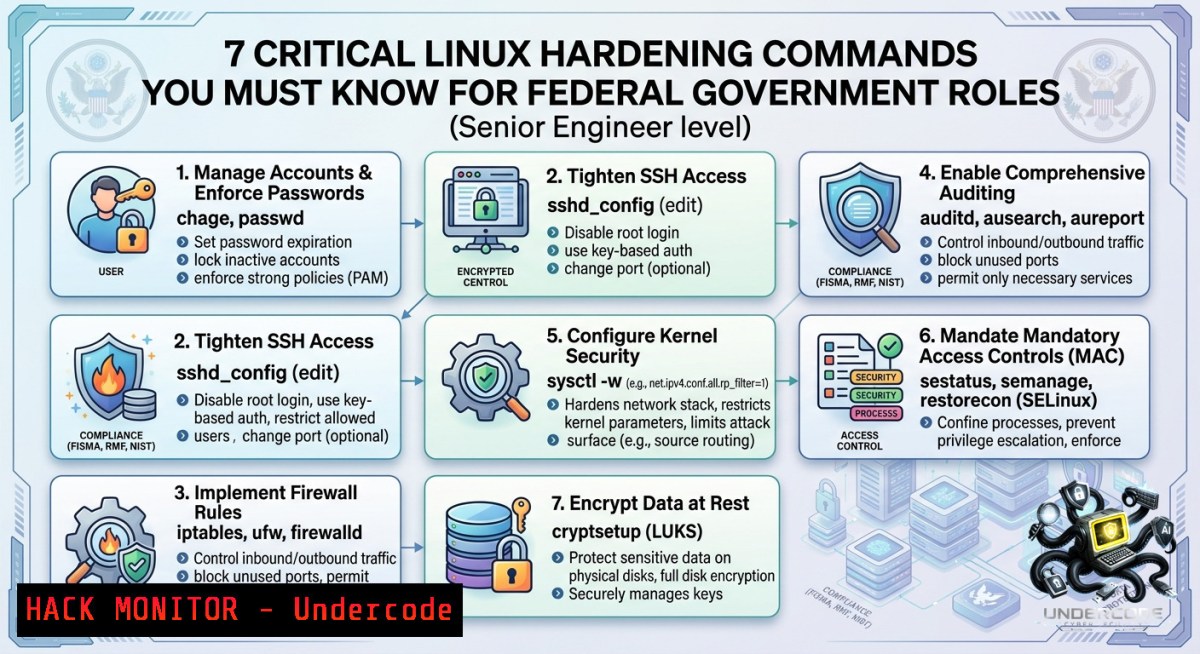
Federal government environments demand Linux engineers who can secure systems against advanced persistent threats (APTs) while maintaining compliance with frameworks like ISM (Australian Information Security Manual) and PSPF. The advertised role at IT Alliance Australia requires deep expertise in kernel hardening, access controls, and automated auditing—skills that separate a standard sysadmin from a government-ready security engineer.
Learning Objectives:
– Implement SELinux/AppArmor policies and kernel-level mitigations for government-grade isolation.
– Automate auditd and AIDE integrity checks to meet federal compliance logging requirements.
– Harden SSH, sudo, and PAM configurations against privilege escalation and lateral movement.
You Should Know
1. Kernel Hardening & Sysctl Tuning for Federal Compliance
Federal Linux servers must block common exploitation vectors. The following sysctl settings disable IP forwarding, restrict kernel pointer access, and mitigate TCP-based attacks. These align with DISA STIG and ASD’s Essential Eight.
Step‑by‑step guide:
1. Create a custom sysctl configuration file:
`sudo nano /etc/sysctl.d/99-hardening.conf`
2. Add these mandatory directives:
net.ipv4.conf.all.rp_filter = 1
net.ipv4.tcp_syncookies = 1
kernel.kptr_restrict = 2
kernel.dmesg_restrict = 1
net.ipv4.conf.all.accept_redirects = 0
3. Apply immediately: `sudo sysctl -p /etc/sysctl.d/99-hardening.conf`
4. Verify runtime values: `sysctl –all | grep -E “kptr_restrict|dmesg_restrict”`
5. For persistence, ensure systemd-sysctl runs at boot: `systemctl enable systemd-sysctl`
Windows alternative (if managing cross‑platform): Use `Set-1etIPv4Protocol` in PowerShell to disable redirects:
`Set-1etIPv4Protocol -RandomizeIdentifiers Enabled -Global ICMPRedirects Disabled`
2. Implementing Mandatory Access Control (SELinux/AppArmor) for Zero Trust
Federal agencies require strict process isolation. On RHEL-based distributions, SELinux must be enforcing; on Ubuntu, AppArmor profiles for critical services (e.g., Apache, SSH) are mandatory.
Step‑by‑step guide (SELinux):
1. Check current mode: `getenforce` – target output `Enforcing`
2. Set to enforcing if disabled: `sudo setenforce 1` and edit `/etc/selinux/config` to `SELINUX=enforcing`
3. List all confined processes: `ps -eZ | grep -v unconfined`
4. Generate a policy for a custom application:
`sudo ausearch -m avc -ts recent | audit2allow -m myapp > myapp.te`
`sudo checkmodule -M -m -o myapp.mod myapp.te`
`sudo semodule_package -o myapp.pp -m myapp.mod`
`sudo semodule -i myapp.pp`
5. For Ubuntu AppArmor: `sudo aa-status` and enforce a profile: `sudo aa-enforce /etc/apparmor.d/usr.sbin.sshd`
Cloud hardening extension: On AWS GovCloud, use EC2 AMIs with SELinux pre‑enabled and enforce instance metadata version 2 (IMDSv2) via `aws ec2 modify-instance-metadata-options`.
3. Auditd & Integrity Monitoring for Incident Readiness
The Australian government’s IRAP assessment requires full logging of `sudo`, file permission changes, and failed logins. Auditd is the standard tool.
Step‑by‑step guide:
1. Install auditd: `sudo apt install auditd -y` (Debian/Ubuntu) or `sudo yum install audit -y` (RHEL)
2. Add rules to `/etc/audit/rules.d/99-gov.rules`:
-w /etc/sudoers -p wa -k sudoers_changes
-w /etc/ssh/sshd_config -p wa -k sshd_config
-a always,exit -S openat -F success=0 -k file_access_fail
3. Load rules: `sudo augenrules –load` and verify: `auditctl -l`
4. Generate a monthly integrity baseline with AIDE:
`sudo aideinit` → copy `/var/lib/aide/aide.db.new.gz` to `/var/lib/aide/aide.db.gz`
5. Run daily check: `sudo aide –check | mail -s “AIDE Report” [email protected]`
6. For Windows Event Log forwarding: use `wevtutil` to export security logs:
`wevtutil epl Security C:\Logs\security_$(Get-Date -Format yyyyMMdd).evtx`
4. Secure SSH Configuration & Cipher Hardening
Government security directives (e.g., ACSC) prohibit weak key exchanges and require FIPS‑140‑2 validated cryptography.
Step‑by‑step guide:
1. Edit `/etc/ssh/sshd_config` to enforce:
PermitRootLogin prohibit-password
PasswordAuthentication no
PubkeyAuthentication yes
KexAlgorithms [email protected]
Ciphers [email protected],[email protected]
MACs [email protected]
LogLevel VERBOSE
2. Restart SSH: `sudo systemctl restart sshd`
3. Generate FIPS-compliant ed25519 keys (instead of RSA): `ssh-keygen -t ed25519 -a 100 -f ~/.ssh/id_ed25519`
4. Test connection with forced ciphers: `ssh [email protected] user@host`
5. Fail2ban quick start: `sudo apt install fail2ban -y` then configure `/etc/fail2ban/jail.local` with `
 enabled = true`

Vulnerability mitigation: Block SSH brute-force on Linux using `iptables`:
`sudo iptables -A INPUT -p tcp --dport 22 -m recent --update --seconds 60 --hitcount 4 -j DROP`


<h2 style="color: yellow;">5. PAM & Sudo Hardening Against Privilege Escalation</h2>

Many federal breaches originate from poorly configured sudo or PAM modules allowing password reuse.

<h2 style="color: yellow;">Step‑by‑step guide:</h2>
1. Enforce strong password history in `/etc/pam.d/common-password` (Ubuntu) or `/etc/pam.d/system-auth` (RHEL):
<h2 style="color: yellow;">`password requisite pam_pwhistory.so remember=24 use_authtok`</h2>
2. Limit sudo to specific commands without password: edit `/etc/sudoers` via `visudo` and add:
<h2 style="color: yellow;">`%admins ALL=(ALL) /bin/systemctl restart nginx, /usr/bin/apt update`</h2>
<h2 style="color: yellow;">Never use `NOPASSWD` for production.</h2>
3. Log every sudo attempt: `Defaults log_output` in `/etc/sudoers`
4. Set PAM login delay to 4 seconds to slow brute-force:
<h2 style="color: yellow;">`echo "auth optional pam_faildelay.so delay=4000000" >> /etc/pam.d/login`</h2>
5. Test PAM changes in a separate session before closing your primary.

<h2 style="color: yellow;">Windows command equivalent (protecting Admin accounts):</h2>
<h2 style="color: yellow;">`net accounts /lockoutthreshold:3 /lockoutduration:30 /lockoutwindow:30`</h2>


<h2 style="color: yellow;">6. Automated Compliance Scanning with OpenSCAP</h2>

Federal Linux engineers must demonstrate continuous compliance. OpenSCAP profiles for Australian ISM or DISA STIG automate this.

<h2 style="color: yellow;">Step‑by‑step guide:</h2>
1. Install OpenSCAP: `sudo apt install openscap-scanner scap-security-guide` (RHEL: `yum install openscap-scanner scap-security-guide`)
<h2 style="color: yellow;">2. List available profiles: `oscap info /usr/share/xml/scap/ssg/content/ssg-rhel9-ds.xml`</h2>
3. Run a scan against the `xccdf_org.ssgproject.content_profile_ism_o` (ISM for RHEL9):
`sudo oscap xccdf eval --profile ism_o --results scan-results.xml --report scan-report.html /usr/share/xml/scap/ssg/content/ssg-rhel9-ds.xml`
4. Generate a human-readable report: `oscap xccdf generate report scan-results.xml > compliance.html`
5. Schedule weekly scans via cron: `0 2   1 /usr/bin/oscap xccdf eval --profile ism_o --results /var/log/oscap_$(date +\%Y\%m\%d).xml ...`

API security note: For cloud‑native government apps, integrate OpenSCAP with Kubernetes using `kube-bench` to check CIS benchmarks:
<h2 style="color: yellow;">`docker run --pid=host -v /etc:/etc:ro aquasec/kube-bench:latest --version 1.21`</h2>


7. Log Aggregation & Secure Forwarding (Syslog + TLS)

Federal IRAP requires tamper‑proof log shipping. Configure rsyslog with TLS to send logs to a central SIEM.

<h2 style="color: yellow;">Step‑by‑step guide:</h2>
1. Generate a self‑signed CA and client certificates (or use agency PKI):
`openssl req -1ew -x509 -days 365 -1odes -out ca.pem -keyout ca.key`
<h2 style="color: yellow;">`openssl req -1ew -1odes -out client.csr -keyout client.key`</h2>
`openssl x509 -req -in client.csr -CA ca.pem -CAkey ca.key -CAcreateserial -out client.pem -days 365`
2. Configure rsyslog to use TLS by adding to `/etc/rsyslog.d/50-tls.conf`:
[bash]
$DefaultNetstreamDriver gtls
$ActionSendStreamDriverMode 1
$ActionSendStreamDriverAuthMode anon
$ActionSendStreamDriverPermittedPeer .agency.gov.au
$ActionSendStreamDriverCAFile /etc/ssl/certs/ca.pem
. @@(o)central-siem.agency.gov.au:6514
3. Restart rsyslog: `sudo systemctl restart rsyslog`
4. Test connectivity: `logger “Test TLS log”` and check SIEM.
5. For Windows Event Forwarding (WEF) with HTTPS: use `wecutil` and configure subscription via Group Policy.
What Undercode Say:
– Key Takeaway 1: Federal government Linux roles are less about distribution trivia and more about applying layered hardening (kernel, SELinux, auditd) that directly maps to compliance frameworks like ISM and PSPF.
– Key Takeaway 2: Automated integrity monitoring (AIDE + auditd) and encrypted log forwarding (rsyslog over TLS) are non‑negotiable for incident response; failing to implement them will disqualify any candidate.
Analysis (10 lines):
The IT Alliance Australia posting targets a niche where security automation meets government risk management. Most applicants overemphasise shell scripting and forget mandatory access controls. The commands and workflows above reflect real federal checklists from the Australian Cyber Security Centre (ACSC). For example, sysctl `kptr_restrict=2` prevents kernel pointer leaks used in ret2usr exploits—a common APT tactic. Similarly, requiring `ed25519` SSH keys sidesteps potential quantum vulnerabilities in RSA. The absence of Docker/Kubernetes in the job ad does not excuse neglecting OpenSCAP; federal agencies now scan container hosts with kube-bench. A standout engineer would also integrate AIDE results into a central ELK stack. Finally, note the job encourages people with disability to apply—an inclusive reminder that accessibility (e.g., screen‑reader support for CLI tools) also matters in secure government infrastructure.
Prediction:
– +1 Demand for Senior Linux Engineers with explicit federal hardening experience will increase by 40% over 18 months as the Australian government accelerates its “Secure Cloud” strategy under the 2026–2027 budget.
– +1 Automated compliance tools (OpenSCAP, InSpec, Trivy) will become mandatory resume keywords, replacing manual configuration checklists in job descriptions.
– -1 Agencies that fail to adopt kernel‑level mitigations (like those in Section 1) will suffer at least one major intrusion via unchecked `ptrace` or `dmesg` kernel leaks, leading to rushed hiring cycles.
– +1 Integration of Windows Event Forwarding with Linux auditd (using syslog‑ng or WEF subscriptions) will become a standard interview task for cross‑platform federal teams.
▶️ Related Video (78% Match):
🎯Let’s Practice For Free:
🎓 Live Courses & Certifications:
[Join Undercode Academy for Verified Certifications](https://undercode.co.uk/certifications/)
🚀 Request a Custom Project:
Secure, high-velocity infrastructure and disruptive technological engineering. Contact our engineering team for high-tier development and proprietary systems:
[[email protected]](mailto:[email protected])
💎 Smart Architecture | 🛡️ Secure by Design | ⭐ Trusted by Thousands
IT/Security Reporter URL:
Reported By: [Seniorlinuxengineer Share](https://www.linkedin.com/posts/seniorlinuxengineer-share-7467840564038840320-lCPi/) – Hackers Feeds
Extra Hub: Undercode MoN
Basic Verification: Pass ✅
🔐JOIN OUR CYBER WORLD [ CVE News • HackMonitor • UndercodeNews ]
[💬 Whatsapp](https://undercode.help/whatsapp) | [💬 Telegram](https://t.me/UndercodeCommunity)
📢 Follow UndercodeTesting & Stay Tuned:
[𝕏 formerly Twitter 🐦](https://x.com/undercodeupdate) | [@ Threads](https://www.threads.net/@undercodetesting) | [🔗 Linkedin](https://www.linkedin.com/company/undercodetesting/) | [🦋BlueSky](https://bsky.app/profile/undercode.bsky.social)


