
Listen to this Post
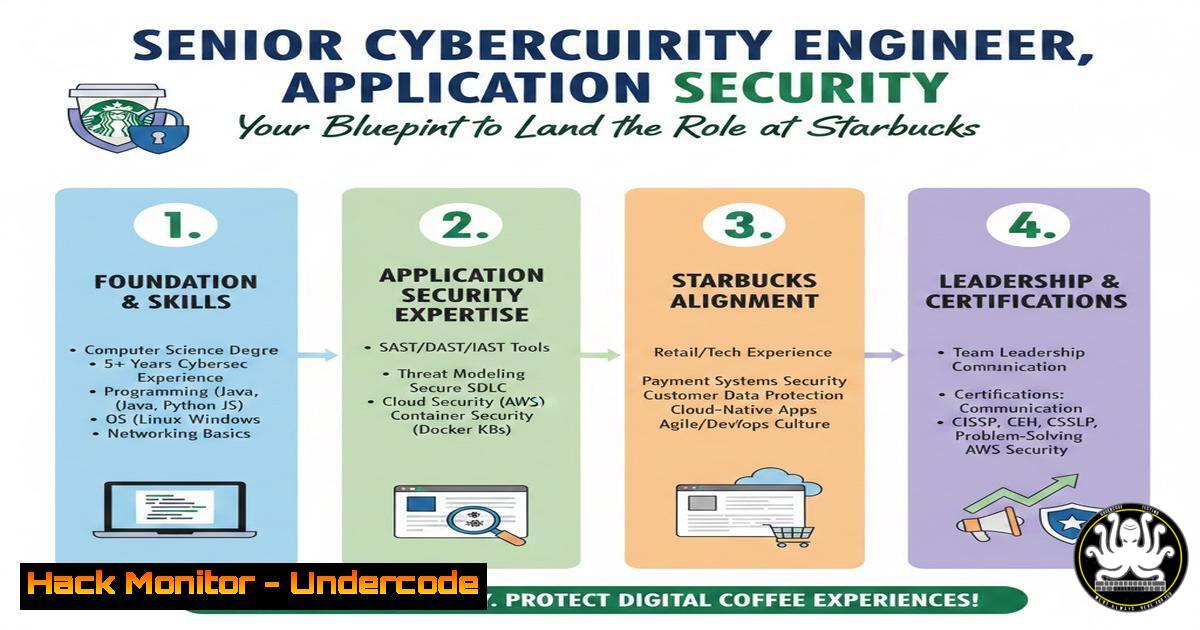
Introduction:
The demand for seasoned cybersecurity professionals continues to outpace the talent supply, with specialized roles like Senior Application Security Engineers commanding top priority. A recent posting by a hiring manager at Starbucks highlights a critical need for experts who can bridge the gap between development, operations, and offensive security. This role isn’t just about configuring tools; it requires a deep understanding of how applications are built, how they break, and how to automate defenses at scale. For professionals aiming to join a team of industry experts in a remote-capable capacity, mastering a specific blend of technical skills, from penetration testing to cloud hardening, is essential.
Learning Objectives:
- Understand the core responsibilities and technical stack required for a Senior Application Security (AppSec) role.
- Master practical, hands-on techniques for common penetration testing and threat modeling scenarios.
- Learn how to integrate security automation and tools into CI/CD pipelines.
- Identify key vulnerabilities in web applications and APIs using industry-standard commands and frameworks.
- Develop a strategy for continuous learning in cloud security and secure coding practices.
1. Reconnaissance: Setting Up Your Penetration Testing Lab
Before you can defend an enterprise like Starbucks, you must be able to think like an attacker. The first step in any engagement is reconnaissance. To practice this ethically, you need a controlled environment.
What this does:
A local penetration testing lab allows you to safely execute commands and use tools against vulnerable virtual machines (VMs) without legal repercussions. It mimics the process of discovering live hosts and services on a network.
Step‑by‑step guide:
- Install Virtualization Software: Download and install VMware Workstation or Oracle VirtualBox on your local machine.
- Download Target Machines: Import intentionally vulnerable VMs from platforms like VulnHub or TryHackMe (e.g., “Kioptrix” or “Mr. Robot”).
- Network Configuration: Set the VM network adapter to “NAT” or “Host-Only” to ensure it is isolated from your main network.
- Discover the Target (Linux): Use NetDiscover to find the IP address of your target VM on the local subnet.
sudo netdiscover -r 192.168.1.0/24
- Port Scanning (Linux): Once you have the target IP (e.g., 192.168.1.10), run an Nmap scan to enumerate open ports and services.
nmap -sV -sC -O 192.168.1.10
`-sV`: Detects service versions.
`-sC`: Runs default scripts.
`-O`: Attempts to identify the operating system.
2. Web Application Enumeration with Developer Tools
Modern AppSec engineering requires a blend of automated and manual testing. Before firing up heavy scanners, a senior engineer uses browser-based tools to map the application’s attack surface.
What this does:
Using built-in browser Developer Tools (F12) and command-line HTTP clients helps you understand how the client-side code interacts with the backend API, revealing hidden endpoints and parameters.
Step‑by‑step guide:
- Open Developer Tools: In Chrome or Firefox, press `F12` and navigate to the “Network” tab.
- Interact with the App: Log in or click through the application. Observe the HTTP requests (GET, POST) and inspect the request headers, payloads, and response codes.
- Analyze JavaScript: Go to the “Sources” tab. Search for JavaScript files and look for hardcoded API keys, internal endpoints (e.g.,
/api/v2/internal/admin), or commented-out code that exposes logic. - Command-Line Replay (Linux): Use `curl` to replay a specific request you saw in the Network tab. This is crucial for testing input validation outside the browser’s constraints.
curl -X POST https://target-site.com/api/login \ -H "Content-Type: application/json" \ -d '{"username":"admin", "password":"test"}' - Test for Information Disclosure (Windows – PowerShell): Use `Invoke-WebRequest` in PowerShell to test for exposed `.git` folders or backup files.
Invoke-WebRequest -Uri "https://target-site.com/.git/config" -Method GET
3. Exploiting Common Vulnerabilities: SQL Injection (Manual)
Penetration testing experience is a major plus for the Starbucks role. Understanding how to manually verify a SQL injection vulnerability is a foundational skill that separates script kiddies from senior engineers.
What this does:
SQL Injection (SQLi) allows an attacker to interfere with the queries an application makes to its database. Manual verification involves injecting SQL meta-characters to see if the application breaks or reveals data.
Step‑by‑step guide (Ethical Testing only):
- Identify Input Vectors: Look for URL parameters (e.g., `https://site.com/product?id=5`), search bars, or login forms.
- Inject a Test Payload: Append a single quote (
') to the parameter value to break out of the SQL string context.https://site.com/product?id=5'
If the server returns a database error (e.g., “You have an error in your SQL syntax”), the application is likely vulnerable.
- Test Boolean Logic (Linux): Use `curl` to test logical conditions.
Request that should be True (always)
curl "https://site.com/product?id=5 AND 1=1"

Request that should be False
curl "https://site.com/product?id=5 AND 1=2"
If the first returns the product and the second returns nothing or an error, SQLi is confirmed.
- Extract Database Version: Use a UNION-based payload to pull database information.
https://site.com/product?id=5 UNION SELECT 1,2,@@version
Note: The number of columns (1,2) must match the original query’s column count, which requires enumeration.
4. Cloud Hardening: Securing Storage Buckets
A Senior AppSec Engineer at a global company will inevitably deal with cloud infrastructure. Misconfigured cloud storage (like AWS S3 buckets) is a leading cause of data breaches.
What this does:
This process involves auditing cloud storage permissions to ensure they are private and not world-writable or readable. It uses the AWS Command Line Interface (CLI) to simulate an attacker’s reconnaissance.
Step‑by‑step guide (Using AWS CLI):
1. Install and Configure AWS CLI:
 Linux/macOS
pip install awscli --upgrade
 Configure with credentials (use a test account)
aws configure
2. Enumerate Public Buckets: If you have a target company name (e.g., “starbucks-uploads”), you can try to list the bucket contents anonymously.
 Attempt to list a bucket without credentials
aws s3 ls s3://starbucks-uploads --no-sign-request
3. Check Bucket Permissions: Use the API to get the access control policy.
aws s3api get-bucket-acl --bucket starbucks-uploads --no-sign-request
aws s3api get-bucket-policy --bucket starbucks-uploads --no-sign-request
4. Hardening Action (Windows/Linux): If you own the bucket, apply a policy to block public access.
 Block all public access
aws s3api put-public-access-block --bucket your-secure-bucket --public-access-block-configuration BlockPublicAcls=true,IgnorePublicAcls=true,BlockPublicPolicy=true,RestrictPublicBuckets=true
- API Security Testing with Postman and JWT Tokens
Given the move toward microservices, API security is paramount. The job likely requires securing RESTful APIs handling sensitive data, such as payment or customer information.
What this does:
Automated and manual testing of API endpoints for broken authentication and excessive data exposure. This involves manipulating JSON Web Tokens (JWTs) and fuzzing endpoints.
Step‑by‑step guide:
- Intercept Traffic: Configure Postman or Burp Suite to act as a proxy.
- Decode JWT (Linux): Capture a JWT from an API request. Use a tool like `jq` and the terminal to decode it (JWT is Base64 encoded).
Split the token (header.payload.signature)
echo "eyJhbGciOiJIUzI1NiIsInR5cCI6IkpXVCJ9.eyJzdWIiOiIxMjM0NTY3ODkwIiwicm9sZSI6InVzZXIifQ.signature" | cut -d "." -f2 | base64 -d 2>/dev/null | jq .
This reveals the payload, e.g., `{“sub”:”1234567890″,”role”:”user”}`.
- Tamper with the Token: If the algorithm is misconfigured (e.g., supports “none” algorithm) or the secret is weak, you can modify the role to “admin”.
- Fuzz Parameters (Windows – PowerShell): Use a wordlist to brute-force API endpoints or parameters.
$wordlist = @("admin", "backup", "internal", "debug")
foreach ($word in $wordlist) {
$url = "https://api.target.com/v1/$word"
$response = Invoke-WebRequest -Uri $url -Method GET -SkipCertificateCheck
if ($response.StatusCode -eq 200) {
Write-Host "Found: $url" -ForegroundColor Green
}
}
6. Mitigation: Input Validation and Prepared Statements
Understanding exploitation is only half the battle. A Senior AppSec engineer must guide development teams on how to fix these flaws, specifically by implementing prepared statements (parameterized queries).
What this does:
This code-level remediation ensures that user input is treated as data, not executable code, completely preventing SQL Injection.
Step‑by‑step guide (Code Review Context – Python with SQLite):
1. Vulnerable Code (Do Not Use):
user_id = request.GET['id']
query = f"SELECT  FROM users WHERE id = {user_id}"  String concatenation
cursor.execute(query)
2. Secure Code (Using Parameterized Queries):
import sqlite3
def get_user(user_id):
conn = sqlite3.connect('database.db')
cursor = conn.cursor()
 The ? is a placeholder; the database library handles escaping
cursor.execute("SELECT  FROM users WHERE id = ?", (user_id,))
return cursor.fetchall()
3. For ORMs (Object Relational Mappers): Ensure the development team is using built-in sanitization methods (e.g., `User.objects.get(id=user_id)` in Django) rather than raw SQL.
7. Threat Modeling with OWASP Cornucopia
Finally, the “TPM” (Technical Program Manager) aspect of the job requires facilitating threat modeling sessions to identify risks before code is written.
What this does:
Threat modeling is a structured approach to identifying potential security threats in an application. OWASP Cornucopia is a card game designed to help identify vulnerabilities in web applications during the design phase.
Step‑by‑step guide:
- Gather the Team: Bring together developers, product managers, and testers.
- Define the Scope: Draw a simple Data Flow Diagram (DFD) of the feature or application, noting trust boundaries (e.g., where user input enters the system).
3. Draw Trust Boundaries:
[User Browser] --(Internet)--> [Web Server] --(Internal Network)--> [bash]
(Trust Boundary 1) (Trust Boundary 2)
4. Use STRIDE per Element: For each component, ask questions based on Microsoft’s STRIDE (Spoofing, Tampering, Repudiation, Info Disclosure, DoS, Elevation of Privilege).
5. Document Findings: Create a “Threat List” in a Confluence page or Jira, assigning risk ratings (Critical/High/Medium/Low) and proposed mitigations.
What Undercode Say:
- Hiring Experts Demands Depth: The preference for TPM or pentesting experience underscores that modern AppSec roles are not siloed. They require the offensive mindset to find flaws and the program management skills to drive remediation across large organizations like Starbucks.
- Automation is the Baseline: While manual testing skills are vital, the real value lies in automating these security checks (SAST, DAST, SCA) within CI/CD pipelines. An engineer who can code the security into the pipeline is worth more than one who only runs scans manually.
- Cloud and API Literacy is Non-Negotiable: The infrastructure of major enterprises has shifted. If you aren’t comfortable with AWS CLI commands, decoding JWTs, or hardening S3 buckets, you will struggle to keep up with the threats facing modern application architectures.
Prediction:
We will see a continued convergence of the “Security Engineer” and “DevOps Engineer” roles, solidifying into “DevSecOps.” The need for manual pentesters will not vanish, but their findings will increasingly be validated through automated regression tests. In the next 3-5 years, expect AI-assisted code analysis to become a standard part of the pull request process, shifting the Senior AppSec Engineer’s focus from finding low-hanging fruit to architecting complex, cross-platform security controls and mentoring AI models on secure coding standards.
▶️ Related Video (82% Match):
🎯Let’s Practice For Free:
IT/Security Reporter URL:
Reported By: Https: – Hackers Feeds
Extra Hub: Undercode MoN
Basic Verification: Pass ✅


