
Listen to this Post
Introduction:
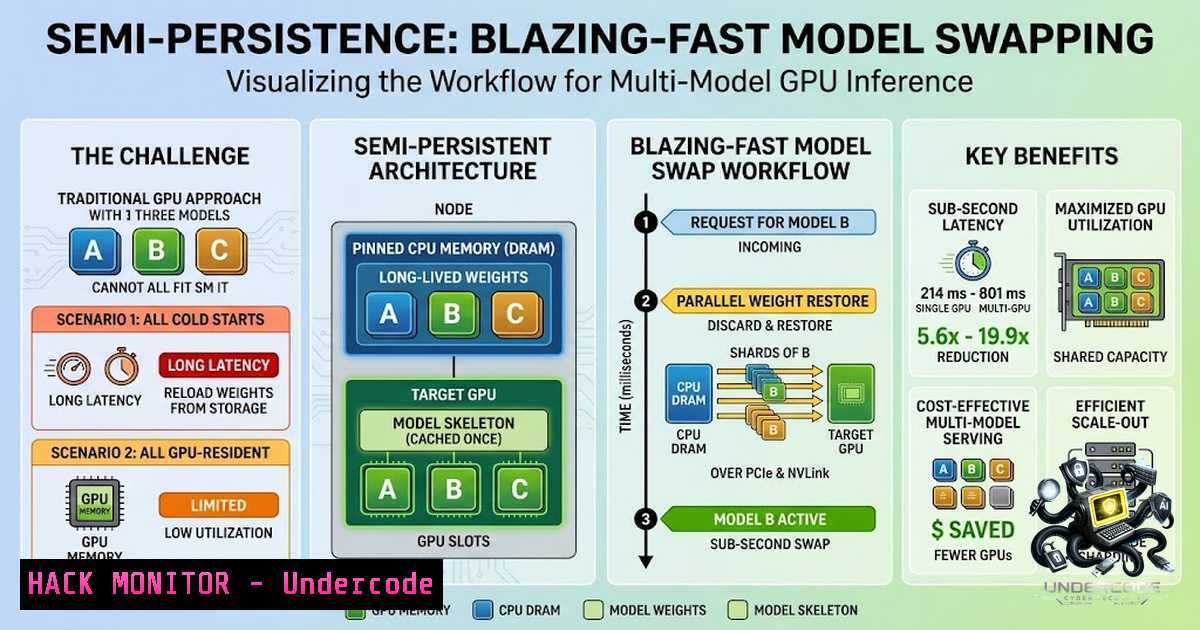
As organizations deploy specialized AI models for diverse tasks, serving platforms must host numerous models whose demand fluctuates over time. Keeping every model permanently loaded wastes expensive GPU capacity, yet traditional model swapping introduces latency that degrades user experience. Snowflake AI Research’s Semi-Persistence addresses this fundamental tension by keeping model weights in a pinned CPU-memory pool while allowing GPU copies to come and go with demand. This approach enables sub-second model swapping for single-GPU models and delivers 5.6× to 19.9× faster sleep/wake cycles compared to baseline vLLM.
Learning Objectives & Secrets:
- Objective 1: Master Semi-Persistence Architecture – Understand how pinned CPU memory pools and parallel PCIe/NVLink transfers enable fast model swapping without reloading from disk.
- Objective 2 Secret Tip: Optimize GPU Memory Utilization – Leverage Semi-Persistence to time-share GPUs across multiple models, increasing utilization without dedicating capacity to every model at all times.
- Objective 3 Secret Tip: Benchmark and Tune Swap Performance – Use Snowflake’s internal benchmarking methodology to measure end-to-end sleep/wake latency and identify bottlenecks in your own vLLM deployments.
You Should Know:
1. Understanding the Semi-Persistence Architecture
Semi-Persistence fundamentally rethinks how model weights are managed across memory hierarchies. Traditional vLLM sleep modes offer two suboptimal approaches: Level 1 copies weights from GPU to CPU before releasing GPU memory (fast wake but expensive sleep), while Level 2 discards GPU weights immediately (fast sleep but requires reloading from storage on wake). Either way, every sleep/wake cycle pays a slow path.
Semi-Persistence eliminates this by keeping model weights persistently in a page-locked (pinned) CPU memory pool. The lightweight model skeleton moves independently across disk, CPU, and GPU, while weights can be restored rapidly from CPU memory when the model is needed again. When demand returns, weights stream back to GPUs in parallel over PCIe and NVLink, achieving sub-second latency for single-GPU models.
To understand pinned memory’s role: page-locked CPU memory allows the PCIe DMA engine to transfer data directly without OS involvement, typically achieving 2–4× faster transfers than standard pageable memory. In PyTorch, this is enabled via `pin_memory=True` in DataLoader, which pre-allocates CPU memory in fixed regions for accelerated CPU-to-GPU transfers.
2. Deploying Semi-Persistence with vLLM
Semi-Persistence is implemented as an extension around the vLLM backend. To get started with Snowflake’s inference optimizations, install the Arctic Inference plugin:
 Install vLLM and Arctic Inference
pip install vllm==v0.8.4 arctic-inference
Enable Arctic Inference when starting your vLLM server:
ARCTIC_INFERENCE_ENABLED=1 vllm serve <model_name> \
--quantization "fp8" \
--tensor-parallel-size 1 \
--ulysses-sequence-parallel-size 2
For vLLM’s native sleep mode (which Semi-Persistence enhances), enable it with:
VLLM_SERVER_DEV_MODE=1 vllm serve <model_name> --enable-sleep-mode
Sleep mode allows temporarily releasing most GPU memory—including model weights and KV caches—without stopping the server. Management endpoints (/sleep, /wake_up) require dev mode and should only be exposed in trusted networks.
3. Optimizing GPU Memory with Pinned Memory Pools
Semi-Persistence relies on efficient pinned memory allocation. In PyTorch, you can implement pinned memory pools for custom inference pipelines:
import torch

Allocate pinned memory for model weights
pinned_weights = torch.empty(
model_size_bytes // 4,
dtype=torch.int32,
pin_memory=True
)

Stream to GPU asynchronously
gpu_weights = pinned_weights.cuda(non_blocking=True)
For multi-GPU environments, use `CUDA_VISIBLE_DEVICES` to bind processes to specific GPUs and avoid resource conflicts:
 Bind to specific GPU
CUDA_VISIBLE_DEVICES=0 python inference_server.py

For NUMA-aware binding
numactl --cpunodebind=0 --membind=0 python inference_server.py
The key insight: pinned memory allows the PCIe DMA engine to transfer data without CPU involvement, making swaps fast enough to stay out of the critical serving path.
4. Benchmarking Sleep/Wake Performance
Snowflake’s internal benchmarks across models from 2B to 397B parameters demonstrated 5.6× to 19.9× faster sleep/wake cycles with Semi-Persistence compared to baseline vLLM. To benchmark your own deployment:
 For offline benchmarking
python benchmarks/benchmark_offline.py \
--model <model_name> \
--prompt-length 2048 \
--max-1ew-tokens 512

For online benchmarking with configurable QPS
python benchmarks/benchmark_online.py \
--prompt-length 2048 \
--concurrency 1024 \
--qps 1.0
Key metrics to track:
- Sleep latency: Time to evict model from GPU
- Wake latency: Time to restore model to GPU
- End-to-end cycle: Total sleep + wake time
Semi-Persistence achieves sub-second swapping for single-GPU models by avoiding full reloads from disk.
5. Leveraging NVLink and PCIe for Parallel Transfers
Semi-Persistence exploits high-speed interconnects for parallel weight streaming. NVLink provides up to 900 GB/s total GPU-to-GPU bandwidth in 8-GPU configurations—7× the bandwidth of PCIe Gen 5. Fifth-generation NVLink supports 72 GPUs all-to-all communication at 1,800 GB/s.
For optimal performance:
- Single-GPU models: PCIe transfer from pinned CPU memory suffices for sub-second swaps
- Multi-GPU models: Parallel streaming over NVLink enables fast restoration of large models (up to 397B parameters)
To verify your PCIe topology:
nvidia-smi topo -m
This displays the GPU-to-GPU and GPU-to-CPU interconnection topology, helping identify optimal placement for pinned memory pools.
6. Security Considerations for Multi-Model Serving
When deploying Semi-Persistence in production, consider these security best practices:
- API Security: Sleep/wake management endpoints (
/sleep,/wake_up) require `VLLM_SERVER_DEV_MODE=1` and should only be exposed in trusted networks. These management endpoints can interrupt service if misused. - Model Isolation: When swapping models, ensure proper cleanup of KV caches and inference state to prevent cross-model data leakage.
- Resource Limits: Implement rate limiting and authentication for model-switching operations to prevent denial-of-service attacks through excessive sleep/wake cycles.
- Container Security: For production deployments in Snowpark Container Services, use compute pools with specified GPU resources and enforce network policies.
7. Production Deployment with Snowflake Cortex AI
Snowflake Cortex AI supports a broad portfolio of self-hosted open-source and frontier models accessible through a unified API. For production deployment:
- Model Registry: Register models in Snowflake Model Registry and deploy via Snowpark Container Services for GPU-based inference
- Compute Pools: Snowflake provides GPU-accelerated compute pools with NVIDIA A10G (24GB VRAM) and A100 GPUs
- Dynamic GPU Management: Snowflake Model Serving dynamically manages GPU memory, optimizing throughput and supporting streaming outputs without sacrificing performance
To deploy a model with Semi-Persistence optimizations:
-- Create a compute pool with GPU resources
CREATE COMPUTE POOL gpu_pool
MIN_NODES = 1
MAX_NODES = 1
INSTANCE_FAMILY = GPU_NV_M;

-- Deploy the model service
CREATE SERVICE model_service
IN COMPUTE POOL gpu_pool
FROM SPECIFICATION $$
... container spec with Semi-Persistence enabled
$$;
What Undercode Say:
- Key Takeaway 1: Semi-Persistence transforms multi-model GPU serving from a latency bottleneck into a practical, production-ready solution by keeping weights pinned in CPU memory and treating GPU copies as temporary—achieving 5.6× to 19.9× faster sleep/wake cycles.
- Key Takeaway 2: The key innovation is avoiding the slow path entirely: neither copying weights back from GPU (vLLM Level 1) nor reloading from storage (vLLM Level 2). Instead, weights remain in pinned CPU memory, enabling sub-second restoration via parallel PCIe/NVLink transfers.
Analysis: Semi-Persistence addresses a critical pain point in enterprise AI: the tension between GPU utilization and serving latency. As organizations deploy more specialized models (Snowflake’s Arctic Text-to-SQL models demonstrate frontier quality at 25× lower inference cost), the ability to efficiently time-share GPUs becomes essential. The open-sourcing of Semi-Persistence democratizes this capability, allowing any vLLM user to achieve near-instant model swapping. The 5.6× to 19.9× speedup across models from 2B to 397B parameters demonstrates the approach scales across model sizes. For single-GPU models achieving sub-second swaps, this effectively eliminates the swap penalty from the serving critical path.
Prediction:
- +1 Semi-Persistence will accelerate the adoption of specialized, fine-tuned models in production, as organizations can now serve dozens of task-specific models on shared GPU infrastructure without latency penalties.
- +1 The open-source release will drive community innovation in model-swapping techniques, with other inference engines adopting similar pinned-memory approaches.
- +1 Cloud providers will integrate Semi-Persistence patterns into managed AI services, reducing inference costs by 5–20× through better GPU utilization.
- -1 Organizations without proper monitoring may over-subscribe GPUs, leading to unpredictable latency spikes during concurrent model wake-ups.
- +1 The technique will enable new serving architectures where models are swapped based on real-time demand patterns, similar to serverless function scaling but for AI inference.
- +1 Combined with Snowflake’s Arctic Inference plugin (which delivers 16× faster embedding inference), Semi-Persistence positions Snowflake as a leader in cost-efficient, production-grade AI serving.
▶️ Related Video (92% Match):
🎯Let’s Practice For Free:
🎓 Live Courses & Certifications:
Join Undercode Academy for Verified Certifications
🚀 Request a Custom Project:
Secure, high-velocity infrastructure and disruptive technological engineering. Contact our engineering team for high-tier development and proprietary systems:
[email protected]
💎 Smart Architecture | 🛡️ Secure by Design | ⭐ Trusted by Thousands
IT/Security Reporter URL:
Reported By: https://lnkd.in/p/eCXTZP-7 – Hackers Feeds
Extra Hub: Undercode MoN
Basic Verification: Pass ✅


