Listen to this Post
Introduction:
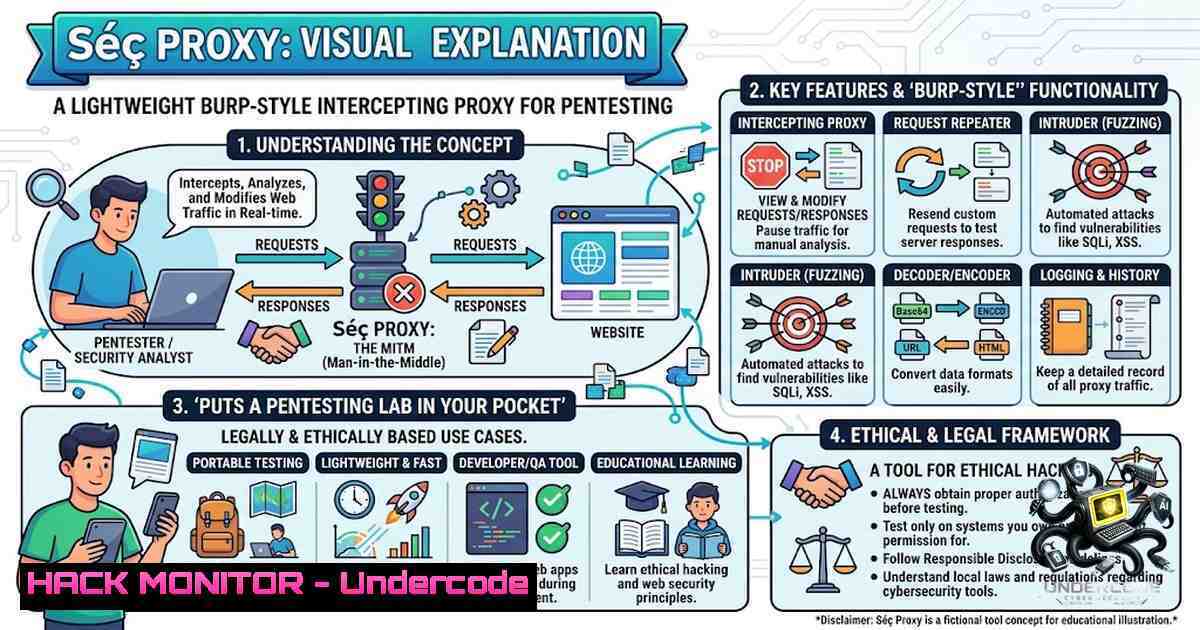
The traditional penetration testing workflow has long been tethered to bulky laptops and cumbersome software suites, creating a significant barrier for security professionals who need to operate in the field. Séç Proxy emerges as a game-changing solution—a lightweight, Burp Suite-inspired intercepting proxy designed to run seamlessly on both Android (via Termux) and desktop environments. This tool democratizes mobile security testing by enabling bug bounty hunters and pentesters to intercept, inspect, edit, replay, and scan HTTP/HTTPS traffic directly from their smartphones, effectively transforming any Android device into a portable penetration testing lab.
Learning Objectives:
- Master the setup and configuration of Séç Proxy on Android Termux and desktop environments for mobile application security testing
- Develop proficiency in intercepting, modifying, and replaying HTTP/HTTPS traffic to identify web application vulnerabilities
- Understand passive vulnerability scanning techniques and how to leverage built-in browser capabilities for efficient bug hunting
- Learn to integrate Séç Proxy into existing penetration testing workflows as a complementary tool to traditional proxy solutions
You Should Know:
- Understanding Intercepting Proxies and Their Role in Modern Security Testing
An intercepting proxy positions itself as a Man-in-the-Middle (MITM) between the client and server, allowing security testers to read, modify, and analyze all application requests and responses in real-time. This position is invaluable for identifying security flaws such as insecure direct object references, broken authentication, session management issues, and API misconfigurations. Traditional solutions like Burp Suite and OWASP ZAP have dominated this space, but they typically require significant system resources and are primarily desktop-bound.
Séç Proxy addresses this limitation by offering a mobile-first approach that doesn’t sacrifice functionality. Its built-in browser for both Android and desktop platforms eliminates the need for external browser configuration, while the passive vulnerability scanner automatically identifies common security issues without interrupting the tester’s workflow. This represents a paradigm shift in how security assessments can be conducted, particularly for mobile application testing where traditional proxy setups often struggle with certificate pinning and other mobile-specific security controls.
For Android devices, intercepting traffic typically requires either root access with iptables NAT rules or a VPN-based approach to force traffic through the proxy. Séç Proxy’s architecture appears designed to streamline this process, making it accessible even to testers working with non-rooted devices.
- Setting Up Séç Proxy on Android Termux: A Step-by-Step Guide
Termux provides a Linux-like environment on Android, making it the ideal platform for running Séç Proxy in mobile environments. Follow these steps to get started:
Prerequisites:
- Android device with Termux installed (recommended download from F-Droid)
- Internet connection for downloading dependencies
- Basic familiarity with command-line operations
Installation Steps:
Step 1: Update Termux Packages
pkg update && pkg upgrade -y
This ensures all system packages are current and compatible with the installation process.
Step 2: Install Required Dependencies
pkg install python git openssl-tool -y
pip install requests
Python and Git are essential for running and managing the proxy server.
Step 3: Clone or Download Séç Proxy
git clone [repository-url] sec-proxy
cd sec-proxy
Replace `[repository-url]` with the actual repository URL for Séç Proxy.
Step 4: Configure Proxy Settings
Edit the configuration file to set your target host and preferred port settings:
nano config.py
 Modify TARGET_HOST and PORT variables as needed
 Default configuration typically uses 127.0.0.1:8080
Step 5: Launch the Proxy Server
python proxy_server.py
Successful startup should display: Séç Proxy running on 127.0.0.1:8080.
Step 6: Configure Android Device to Use the Proxy
– Navigate to Settings → Wi-Fi → Modify Network
– Set proxy to Manual with host `127.0.0.1` and port `8080`
– For applications that don’t respect system proxy settings, consider using ProxyDroid or similar tools to force traffic through the proxy
Troubleshooting Common Issues:
- “Bad Gateway” (502) Error: Ensure the target host is correctly configured without protocol prefixes like `https://`
– Python Not Found: Verify Python installation with `python –version` and reinstall if necessary - Proxy Loop Issues: When running on Android, add Termux to the excluded applications list in your VPN/proxy settings to prevent traffic looping
3. Desktop Deployment and Cross-Platform Workflow Integration
While mobile deployment is Séç Proxy’s standout feature, its desktop capabilities ensure a consistent experience across platforms. For Linux systems, the setup process parallels the Termux installation, with the added benefit of native GUI support.
Desktop Installation (Linux/Kali):
Step 1: Install System Dependencies
sudo apt update
sudo apt install python3 python3-pip git -y
Step 2: Clone and Configure
git clone [repository-url] sec-proxy
cd sec-proxy
pip3 install -r requirements.txt
Step 3: Run the Proxy
python3 proxy_server.py
Windows Configuration:
For Windows users, Python installation through the official installer or Windows Subsystem for Linux (WSL) provides the necessary environment. The tool’s cross-platform compatibility ensures that security testers can maintain a consistent workflow regardless of their operating system preference.
Workflow Integration Tips:
- Configure your browser to use `127.0.0.1:8080` as a proxy for manual testing
- Combine with proxychains for command-line tool interception:
proxychains4 nmap -sT -Pn target.com
This routes tools like Nmap through your proxy, enabling traffic analysis
4. Traffic Interception, Manipulation, and Replay Techniques
The core functionality of any intercepting proxy lies in its ability to capture and modify traffic in real-time. Séç Proxy’s design emphasizes this capability with an intuitive interface that supports:
HTTP/HTTPS Traffic Capture:
The proxy automatically logs incoming and outgoing requests, preserving headers and body content for accurate analysis. This passive interception provides immediate visibility into application behavior without requiring active participation.
Request Modification:
Intercepted requests can be modified before forwarding to the server. Common modifications include:
– Changing parameter values to test for injection vulnerabilities
– Modifying headers to bypass authentication checks
– Altering cookies to test session management
– Manipulating file uploads to identify unrestricted file upload vulnerabilities
Replay Attacks:
Séç Proxy enables replaying captured requests with modified parameters, essential for:
– Testing race conditions
– Validating input validation mechanisms
– Assessing rate limiting implementations
– Performing fuzzing attacks against API endpoints
Passive Vulnerability Scanning:
The built-in scanner automatically analyzes traffic patterns to identify:
– Missing security headers (CSP, HSTS, X-Frame-Options)
– Insecure cookie attributes (missing HttpOnly, Secure flags)
– Information disclosure (exposed stack traces, directory listings)
– SSL/TLS misconfigurations
- API Security Testing and Cloud Hardening with Séç Proxy
Modern applications increasingly rely on APIs, making API security testing a critical component of any penetration testing engagement. Séç Proxy’s architecture supports comprehensive API testing through:
REST API Interception:
The proxy captures all HTTP methods (GET, POST, PUT, DELETE, PATCH) with full request/response logging. This visibility enables testers to identify:
– Broken object-level authorization (BOLA)
– Excessive data exposure
– Mass assignment vulnerabilities
– Security misconfigurations in API endpoints
Cloud Service Testing:
When testing applications hosted on cloud platforms, Séç Proxy facilitates:
– Identification of misconfigured S3 buckets through header analysis
– Detection of exposed cloud metadata endpoints
– Assessment of API gateway configurations
– Verification of cloud-1ative security controls
Security Headers Validation:
The passive scanner can be configured to check for essential security headers:
 Example header validation logic
required_headers = {
'Strict-Transport-Security': 'max-age=31536000; includeSubDomains',
'X-Content-Type-Options': 'nosniff',
'X-Frame-Options': 'DENY',
'Content-Security-Policy': "default-src 'self'"
}
 Missing headers are flagged as potential vulnerabilities
6. Vulnerability Exploitation and Mitigation Strategies
Understanding vulnerabilities is only half the battle; knowing how to exploit and mitigate them is where true security expertise lies. Séç Proxy provides the visibility needed to both identify and understand the exploitation path for common vulnerabilities:
SQL Injection Testing:
Intercept search queries and parameterized requests to test for injection points. Modify parameters with SQL payloads:
' OR '1'='1
'; DROP TABLE users; --
' UNION SELECT username,password FROM users --
Cross-Site Scripting (XSS):
Insert XSS payloads into request parameters to test for reflected and stored XSS:
<script>alert('XSS')</script>
<img src=x onerror=alert(1)>

<

svg/onload=alert('XSS')>
Command Injection:
Test input fields with command injection payloads:
; ls -la
| whoami
&& cat /etc/passwd
Mitigation Recommendations:
- Input Validation: Implement strict allowlisting of input characters
- Parameterized Queries: Use prepared statements for all database operations
- Output Encoding: Apply context-appropriate encoding for all user-supplied data
4. Security Headers: Implement comprehensive security headers
- Rate Limiting: Enforce rate limits to prevent brute force attacks
7. Advanced Configuration and Customization
Séç Proxy’s flexibility extends to its configuration options, allowing testers to tailor the tool to specific testing scenarios:
Custom Target Hosts:
Modify the target host configuration to redirect traffic to different environments:
TARGET_HOST = "https://api.staging.example.com"
 or for local testing:
TARGET_HOST = "http://localhost:3000"
Logging Configuration:
Enable detailed logging for forensic analysis:
LOG_LEVEL = "DEBUG"
REQUEST_LOGGING = True
RESPONSE_LOGGING = True
SAVE_TO_FILE = True
Extension Support:
Like Burp Suite’s extension ecosystem, Séç Proxy can be extended with custom Python scripts for:
– Custom vulnerability detection rules
– Automated fuzzing capabilities
– Integration with external tools and APIs
– Custom report generation
Performance Optimization:
For resource-constrained environments, adjust threading and connection limits:
MAX_THREADS = 10
CONNECTION_TIMEOUT = 30
BUFFER_SIZE = 8192
What Undercode Say:
- Mobile-First Security Testing is No Longer a Niche: Séç Proxy demonstrates that comprehensive penetration testing capabilities can be delivered on mobile platforms without compromising functionality. This opens up new possibilities for security professionals who need to test applications in field conditions or environments where traditional laptops are impractical. The tool’s success suggests a growing market for mobile-optimized security tools that bridge the gap between convenience and capability.
-
The Democratization of Security Tools Accelerates: By making professional-grade intercepting proxy functionality accessible on Android devices, Séç Proxy contributes to the broader trend of democratizing cybersecurity tools. This accessibility empowers a new generation of security researchers and bug bounty hunters who may not have access to expensive commercial solutions or powerful hardware. The open-source nature of such tools (implied by the Termux compatibility) further accelerates skill development and knowledge sharing within the security community.
-
Passive Scanning Represents the Future of Efficient Testing: The inclusion of a passive vulnerability scanner within an intercepting proxy represents a significant efficiency gain for security testers. By automatically identifying common issues during normal browsing and testing activities, the tool reduces the cognitive load on testers and ensures that basic vulnerabilities aren’t overlooked. This automated approach, combined with manual verification, creates a comprehensive testing methodology that balances thoroughness with efficiency.
Prediction:
- +1 The mobile security testing market will experience significant growth as tools like Séç Proxy mature, potentially reaching $2.5 billion by 2028 as organizations prioritize mobile application security.
- +1 Open-source intercepting proxies will increasingly incorporate AI-powered vulnerability detection, reducing false positives and accelerating the identification of complex security issues.
- +1 The integration of intercepting proxies with bug bounty platforms will streamline the reporting process, enabling hunters to submit findings directly from their testing environment.
- -1 Traditional desktop-based proxy tools may face disruption as mobile alternatives become more capable, potentially affecting commercial vendors’ market share.
- +1 Termux-based security tools will become standard equipment for penetration testers, with dedicated security distributions optimized for mobile testing emerging within the next 18 months.
- -1 The increased accessibility of professional-grade tools may lead to a surge in unskilled testers attempting bug bounty programs, potentially overwhelming platforms with low-quality reports.
- +1 Cloud-based collaborative testing platforms will integrate mobile proxy solutions, enabling distributed testing teams to work together seamlessly regardless of their physical location.
- +1 Security training programs will incorporate mobile-based testing tools into their curricula, recognizing the importance of portable testing capabilities in modern security operations.
▶️ Related Video (78% Match):
https://www.youtube.com/watch?v=0CIpMDJmPpc
🎯Let’s Practice For Free:
🎓 Live Courses & Certifications:
Join Undercode Academy for Verified Certifications
🚀 Request a Custom Project:
Secure, high-velocity infrastructure and disruptive technological engineering. Contact our engineering team for high-tier development and proprietary systems:
[email protected]
💎 Smart Architecture | 🛡️ Secure by Design | ⭐ Trusted by Thousands
IT/Security Reporter URL:
Reported By: Adoyi Steven – Hackers Feeds
Extra Hub: Undercode MoN
Basic Verification: Pass ✅


