Listen to this Post
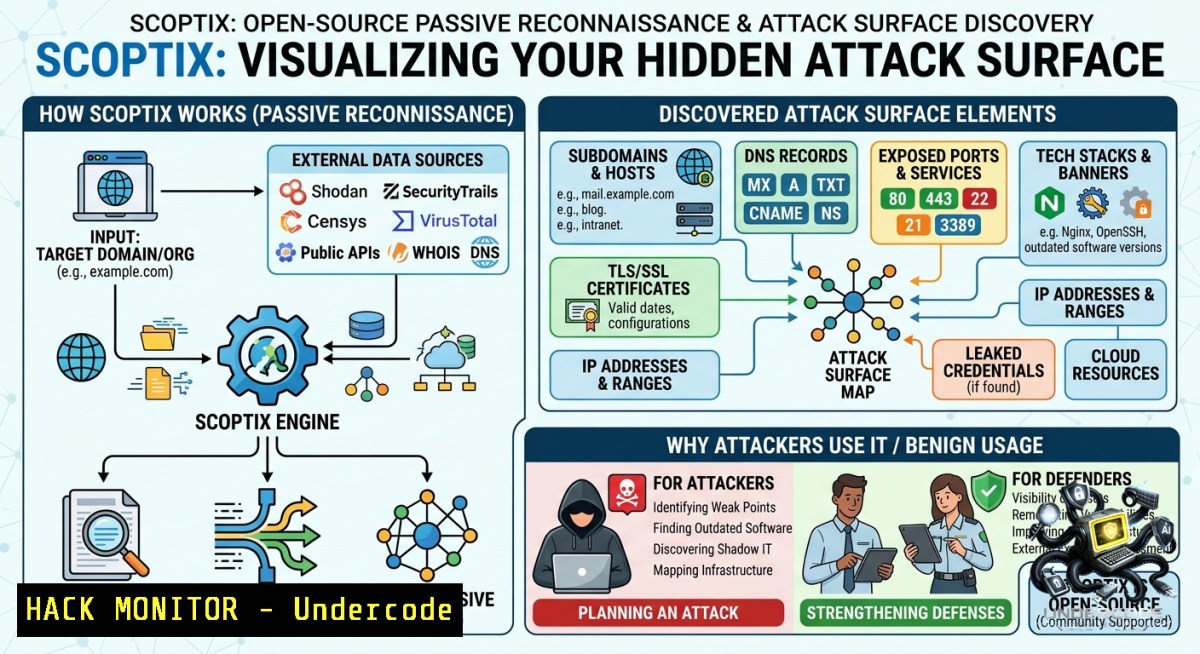
Introduction:
Attack surface discovery is no longer about loud port scans and active probes—modern red teams and bug bounty hunters rely on passive reconnaissance to map an organization’s external footprint without triggering alarms. SCOPTIX, a newly released open‑source tool, automates the collection of subdomains, URLs, DNS history, exposed credentials, and cloud secrets using only public archives like the Wayback Machine and VirusTotal. This article breaks down how SCOPTIX works, provides step‑by‑step installation and usage guides, and shows defenders how to locate the same weaknesses before adversaries do.
Learning Objectives:
– Deploy SCOPTIX using Docker and configure its passive data sources (VirusTotal, Wayback Machine) for external asset discovery.
– Execute reconnaissance scans to identify exposed subdomains, API keys, JavaScript‑buried secrets, and forgotten backup archives.
– Apply mitigation techniques—including WAF hardening, secret rotation, and origin protection—based on SCOPTIX findings.
You Should Know:
1. Deploying SCOPTIX with Docker (Linux & Windows)
SCOPTIX is containerized, making cross‑platform setup straightforward. The tool requires PostgreSQL, Redis, and Node.js, but Docker Compose handles all dependencies.
Linux / macOS (or WSL2 on Windows):
 Clone the repository
git clone https://github.com/your-org/scoptix.git  Replace with actual repo if different
cd scoptix

 Copy environment template
cp .env.example .env

 Edit .env to add API keys (see section 2)
nano .env

 Start all services
docker-compose up -d
Windows (PowerShell with Docker Desktop):
git clone https://github.com/your-org/scoptix.git
cd scoptix
copy .env.example .env
 Edit .env in Notepad
docker-compose up -d
The web interface becomes available at `http://localhost:3000`. Default credentials are typically set in the `.env` file—change them immediately.
Verification commands:
docker ps | grep scoptix  Should show API, worker, redis, postgres containers
docker logs scoptix-worker -f  Monitor job processing
2. Configuring Passive Data Sources (VirusTotal + Wayback Machine)
SCOPTIX relies on external APIs to fetch historical DNS, subdomains, and archived content. Without valid keys, many features return empty results.
Step‑by‑step guide:
1. VirusTotal API key: Register at `https://www.virustotal.com/gui/my-apikey`. A free key allows ~500 requests/day.
2. Wayback Machine (CDX API): No key required, but rate limiting applies.
3. Optional – SecurityTrails / Shodan: Add keys in `.env` for enriched data.
Edit `.env` with these variables:
VIRUSTOTAL_API_KEY=your_key_here
WAYBACK_ENABLED=true
 Optional
SECURITYTRAILS_API_KEY=your_sec_trails_key
SHODAN_API_KEY=your_shodan_key
After saving, restart the stack: `docker-compose restart`. To test API connectivity, run a quick scan against your own domain (e.g., `example.com`). Monitor logs for 401 or 429 errors.
3. Running a Passive Reconnaissance Scan – Step by Step
Once SCOPTIX is online, you can launch a scan entirely from the web UI or via its API. The tool performs no active requests—only queries public archives and passive DNS databases.
Using the Web UI:
1. Navigate to `http://localhost:3000` → New Scan.
2. Enter target domain (e.g., `yourcompany.com`).
3. Select modules:
– Subdomain Discovery (uses VirusTotal, crt.sh, AlienVault OTX)
– URL Extraction (Wayback Machine URLs)
– Exposure Discovery (scrapes JS files for secrets)
– Endpoint Discovery (extracts parameters from archived responses)
4. Enable Deep Scan – downloads JavaScript files from archived URLs (increases scan time but finds API keys embedded in old frontend code).
5. Click Start Scan. The job queues in BullMQ (Redis).
Via API (for automation):
curl -X POST http://localhost:3000/api/scans \
-H "Content-Type: application/json" \
-d '{"domain":"target.com","modules":["subdomains","urls","exposures"],"deep_scan":true}'
Monitor progress:
docker exec -it scoptix_redis_1 redis-cli llen bull:scoptix:wait Queue length
When complete, review the dashboard for categorized assets: subdomains grouped by IP, URLs sorted by extension (`.pdf`, `.js`, `.zip`), and a table of detected secrets.
4. Interpreting Exposure Findings & Mitigation Commands
SCOPTIX’s exposure engine scans for regex patterns matching API keys, tokens, database credentials, and cloud secrets (AWS, GCP, GitHub). A sample detection might reveal:
[bash] AWS Access Key found in https://target.com/backup.js -> AKIAIOSFODNN7EXAMPLE
Linux / Windows commands to verify and mitigate:
 Check if the key is still active (Linux with awscli)
aws sts get-caller-identity --access-key-id AKIAIOSFODNN7EXAMPLE --secret-access-key <secret> --region us-east-1

 Revoke the key immediately via AWS Console or CLI
aws iam update-access-key --access-key-id AKIAIOSFODNN7EXAMPLE --status Inactive

 Remove hardcoded secrets from Git history (if the JS file was from a public repo)
git filter-branch --force --index-filter \
"git rm --cached --ignore-unmatch path/to/backup.js" \
--prune-empty --tag-1ame-filter cat -- --all
For exposed password reset URLs (another common finding):
 Generate a report of all discovered URLs containing "reset" or "forgot"
grep -iE "(reset|forgot).token" scoptix_output_urls.txt
Mitigation : Implement short‑lived tokens (5–15 minutes), bind tokens to IP/user agent, and invalidate them after single use.
5. Comparing Scan Results to Detect Drift
One powerful feature of SCOPTIX is scan comparison—you can track how an organization’s external attack surface changes over time. This helps identify newly exposed subdomains (e.g., `dev-api.internal.company.com` suddenly appears) or leaked documents.
Step‑by‑step guide:
1. Run an initial baseline scan for `target.com`.
2. Wait 2–4 weeks.
3. Run a second scan (same modules).
4. In the UI, go to Scans → select both scans → Compare.
5. The diff view highlights:
– New subdomains (potential shadow IT)
– New exposed secrets (recent hardcoded keys)
– New file types (e.g., `.sql` backups uploaded to a public S3 bucket)
Automate comparisons with the API:
 Fetch scan IDs
curl http://localhost:3000/api/scans
 Compare using Python (pseudo)
import requests
r1 = requests.get("http://localhost:3000/api/scans/1/results")
r2 = requests.get("http://localhost:3000/api/scans/2/results")
 Set diff logic...
From a defender’s perspective, weekly automated comparisons help prioritize patching before external researchers report the same findings.
6. Hardening Against SCOPTIX‑Like Discovery (For Blue Teams)
If you’re defending an organization, SCOPTIX simulates what an adversary sees. Use its output to harden your infrastructure.
Key hardening actions with commands:
– Hide origin IP behind WAF – If SCOPTIX finds `origin-ip-lb.prod.internal` in DNS history, move to a reverse proxy and block non‑WAF traffic at the firewall:
 iptables example (Linux)
iptables -A INPUT -p tcp --dport 80 -s ! $(WAF_IP_RANGE) -j DROP
– Remove sensitive files from public archives – Request deletion from Wayback Machine: `https://web.archive.org/save/
– Rotate exposed secrets – Use AWS Secrets Manager or HashiCorp Vault:
aws secretsmanager rotate-secret --secret-id my/api-key
– Monitor for subdomain takeovers – SCOPTIX lists DNS records pointing to dangling cloud resources. Automate takedown:
 Check for unclaimed S3 buckets
for sub in $(cat subdomains.txt); do
aws s3 ls s3://$sub --1o-sign-request 2>&1 | grep "NoSuchBucket" && echo "$sub vulnerable"
done
What Undercode Say:
– Key Takeaway 1: Passive reconnaissance is no longer optional—tools like SCOPTIX make it trivial for any script kiddie to map your external assets and uncover forgotten secrets without ever sending a packet to your firewall.
– Key Takeaway 2: Most organizations fail to scrub public archives (Wayback Machine, GitHub commits, old JS bundles) of hardcoded credentials, leaving a time‑bomb that SCOPTIX can instantly locate.
Analysis: The rise of open‑source attack surface management tools democratizes offensive security but also lowers the barrier for malicious actors. SCOPTIX’s deep scan mode, which downloads and parses JavaScript files from archived pages, mimics the exact techniques used by advanced persistent threats (APTs) to harvest API keys. Defenders must adopt continuous monitoring (weekly scans of their own domains) and automate secret rotation. While passive tools respect ethical boundaries (no active scanning), they still reveal weaknesses that active scanners would miss—such as a password reset URL that expired six months ago but still lingers in a public index. The most dangerous finding is not an open port but a live, undiscovered `.zip` file containing database dumps, which SCOPTIX categorizes neatly under “archives.”
Expected Output:
Prediction:
– +1: By 2027, passive reconnaissance will become a standard compliance requirement for financial and healthcare sectors, with tools like SCOPTIX integrated into CI/CD pipelines to block deployments that leak secrets to public archives.
– -1: As open‑source recon tools proliferate, scripted attacks will shift entirely to passive data collection, making traditional perimeter defense (firewalls, IDS) nearly irrelevant—forcing a wholesale move to identity‑centric and API‑security models.
– +1: The same technology behind SCOPTIX will evolve into continuous attack surface monitoring (CASM) platforms, helping blue teams achieve real‑time visibility into their external digital exhaust.
▶️ Related Video (74% Match):
🎯Let’s Practice For Free:
🎓 Live Courses & Certifications:
[Join Undercode Academy for Verified Certifications](https://undercode.co.uk/certifications/)
🚀 Request a Custom Project:
Secure, high-velocity infrastructure and disruptive technological engineering. Contact our engineering team for high-tier development and proprietary systems:
[[email protected]](mailto:[email protected])
💎 Smart Architecture | 🛡️ Secure by Design | ⭐ Trusted by Thousands
IT/Security Reporter URL:
Reported By: [Syed Muneeb](https://www.linkedin.com/posts/syed-muneeb-shah-4b5424266_cybersecurity-bugbounty-reconnaissance-ugcPost-7469848009153961984-EF_m/) – Hackers Feeds
Extra Hub: Undercode MoN
Basic Verification: Pass ✅
🔐JOIN OUR CYBER WORLD [ CVE News • HackMonitor • UndercodeNews ]
[💬 Whatsapp](https://undercode.help/whatsapp) | [💬 Telegram](https://t.me/UndercodeCommunity)
📢 Follow UndercodeTesting & Stay Tuned:
[𝕏 formerly Twitter 🐦](https://x.com/undercodeupdate) | [@ Threads](https://www.threads.net/@undercodetesting) | [🔗 Linkedin](https://www.linkedin.com/company/undercodetesting/) | [🦋BlueSky](https://bsky.app/profile/undercode.bsky.social)


