Listen to this Post
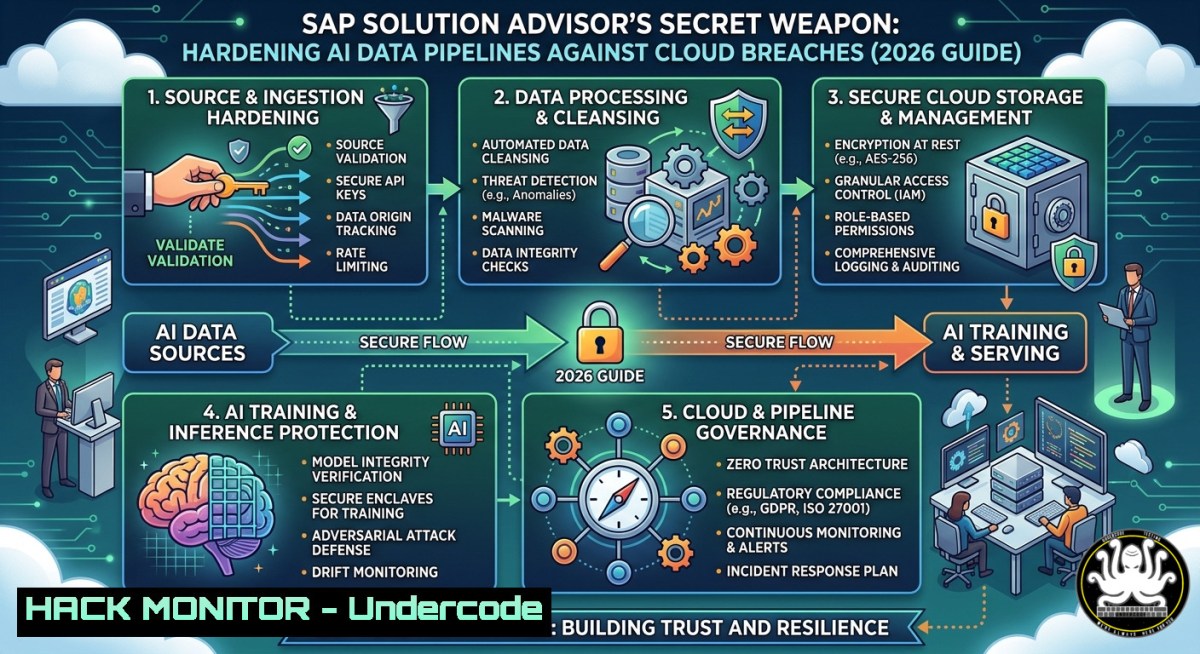
Introduction:
As enterprises race to adopt AI-powered platforms like SAP Business AI and SAP Business Data Cloud, the attack surface for data pipelines has exploded. A single misconfigured API or unhardened container can expose sensitive customer analytics and model training data—risks that solution architects must address before scaling AI across global commerce. This article extracts real-world hardening techniques, command-line audits, and training pathways drawn from the demands of senior specialist roles in enterprise cloud security.
Learning Objectives:
- Identify and remediate security misconfigurations in SAP Business Data Cloud pipelines using Linux network forensics.
- Implement Windows-based logging and application control to protect SAP front-end clients from AI prompt injection.
- Apply API gateway hardening and OAuth2 best practices for SAP Business Technology Platform (BTP) endpoints.
You Should Know:
- Auditing Data Flow Integrity on Linux for SAP AI Pipelines
SAP Business Data Cloud ingests real-time analytics and AI training data. Attackers often target unencrypted transfer protocols or weak file permissions on intermediate storage. Use these Linux commands to validate pipeline security:
Step‑by‑step:
- Check TLS encryption for outbound AI data – Run `tcpdump -i eth0 -n -v “tcp port 443” | grep “SAP”` to capture SAP API traffic. Look for `TLSv1.2` or
TLSv1.3; older versions or plaintext indicate a misconfiguration. - Audit file permissions on model artifacts – `find /sap/data/models -type f -perm 0777 -exec ls -l {} \;` reveals world-writable models that can be poisoned.
- Monitor system calls from AI workers – `strace -p $(pgrep sap_ai_worker) -e trace=open,write 2>&1 | grep -E “etc/passwd|\.env”` detects attempts to read secrets.
- Lock down kernel parameters – Append `kernel.dmesg_restrict=1` and `net.core.bpf_jit_harden=2` to `/etc/sysctl.conf` to block eBPF-based container escapes.
These steps reduce exposure of SAP’s “data products” during the solution advisor’s sales-cycle demos, preventing credential leaks before customer proofs of concept.
- Hardening Windows-Based SAP Front-Ends Against AI Prompt Injection
Solution advisors often run live demonstrations from Windows workstations. A malicious prompt injected into an SAP Fiori app could pivot to backend systems. Hardening the Windows client is non-negotiable.
Step‑by‑step with PowerShell:
- Enable PowerShell script block logging – `Set-ItemProperty -Path “HKLM:\SOFTWARE\Policies\Microsoft\Windows\PowerShell\ScriptBlockLogging” -Name “EnableScriptBlockLogging” -Value 1` captures any injected commands.
- Restrict AI model endpoints via Windows Firewall –
`New-NetFirewallRule -DisplayName “Block SAP AI Unauthorized” -Direction Outbound -RemotePort 5000-6000 -Action Block` prevents rogue AI workers from phoning home. - Deploy AppLocker to allow only signed SAP binaries –
$rule = New-AppLockerPolicy -RuleType Exe -User Everyone -Action Allow -Path "C:\SAP\" -Publisher
Set-AppLockerPolicy -Policy $rule
- Force TLS 1.3 for .NET SAP connectors – Add `[System.Net.ServicePointManager]::SecurityProtocol = [System.Net.SecurityProtocolType]::Tls13` to the SAP logon script.
Training courses like “Windows Defender for Endpoint for SAP” (available on Microsoft Learn) reinforce these steps for real-time AI threat hunting.
3. Securing SAP BTP APIs from Data Exfiltration
SAP Business Technology Platform exposes APIs for AI orchestration. Without rate limiting and proper JWT validation, attackers can flood endpoints or replay tokens. Here’s a mitigation guide using command-line tools and API gateway configs.
Step‑by‑step:
- Test for missing rate limits – Use `curl -X POST https://your-sap-btp-api.com/v1/ai/predict -H “Authorization: Bearer $TOKEN” -d ‘{“input”:”test”}’` in a loop:
`for i in {1..1000}; do curl -s -o /dev/null -w “%{http_code}\n”; done | sort | uniq -c` If you see many `200 OK` responses without <code>429 Too Many Requests</code>, implement rate limiting via API Gateway.</li> <li>Validate OAuth2 scope enforcement – Decode the JWT: <code>echo $TOKEN | cut -d. -f2 | base64 -d | jq '.scope'</code>. Ensure the returned scopes (e.g., <code>ai:inference</code>) match the endpoint’s required permissions.</li> <li>Add API key rotation – For SAP’s “standard and customized demonstrations,” rotate keys weekly: `az keyvault secret set --name "SAP-AI-Key" --value $(openssl rand -hex 32)` (Azure CLI) and update the API gateway config.</li> <li>Block SQL/NoSQL injection via input sanitization – Deploy a WAF rule (e.g., AWS WAF or ModSecurity) that rejects payloads containing <code>$where</code>, <code>$ne</code>, or <code>' OR '1'='1</code>. Test with: </li> </ol> <h2 style="color: yellow;">`curl -d '{"query":"{\"$where\": \"1==1\"}"}' -H "Content-Type: application/json" [bash]`</h2> These actions directly support the solution advisor’s role in “deep Data & AI solution expertise” and prevent demo environments from becoming attack vectors. <ol> <li>Container Security for AI Workloads on SAP BTP Kyma</li> </ol> SAP BTP’s Kyma runtime runs containerized AI microservices. Unscanned images and privileged containers are common CVEs. Use these Docker/K8s commands to harden deployments. <h2 style="color: yellow;">Step‑by‑step:</h2> <ol> <li>Scan SAP AI container images – `docker run --rm -v /var/run/docker.sock:/var/run/docker.sock aquasec/trivy image sap/ai-inference:latest` Look for HIGH/CRITICAL vulnerabilities like CVE-2024-6387 (OpenSSH signal handler race).</li> <li>Enforce read-only root filesystem – In your Kubernetes deployment YAML: [bash] securityContext: readOnlyRootFilesystem: true allowPrivilegeEscalation: false - Drop all capabilities except `NET_BIND_SERVICE` – Add `capabilities: drop: [“ALL”]` and
add: ["NET_BIND_SERVICE"]. - Monitor pod-to-pod traffic – `kubectl exec -it [pod-name] — tcpdump -i eth0 -c 100 -w pod_traffic.pcap` then analyze with Wireshark for unexpected east-west communication.
Training courses: “Certified Kubernetes Security Specialist (CKS)” labs cover these exactly. SAP’s own “AI Core Security” course (offered via SAP Learning Hub) maps these steps to their platform.
- Cloud Hardening for Data Platforms Supporting SAP AI
Solution advisors often deploy SAP Business Data Cloud on AWS, Azure, or GCP. Misconfigured IAM roles and public storage buckets remain the 1 data breach vector.
Step‑by‑step with cloud CLI:
- AWS:
`aws s3api get-bucket-acl –bucket sap-ai-data-lake` – if `URI=”http://acs.amazonaws.com/groups/global/AllUsers”` appears, the bucket is public. Fix withaws s3api put-bucket-acl --bucket sap-ai-data-lake --acl private.
Then audit IAM: `aws iam list-roles | grep -A 5 “SAPAIRole” | grep “Action”` – remove wildcard actions like"Action": "". - Azure:
`az storage account show –name saplakedev –query “networkRuleSet.defaultAction”` – change from `Allow` toDeny. Then `az role assignment list –assignee sap-ai-sp –output table` – revoke unused `Contributor` roles. - GCP:
`gcloud storage buckets get-iam-policy gs://sap_ai_bucket` – look for `allUsers` orallAuthenticatedUsers. Remove withgcloud storage buckets remove-iam-policy-binding.
Integrate these audits into the “technical dry runs” mentioned in the job post to uncover hidden cloud risks before customer RFP responses.
6. Simulating & Mitigating AI Model Inversion Attacks
Attackers can extract training data from model APIs via repeated queries. This vulnerability is critical for SAP Business AI’s “value propositions.” Here’s a demonstration and fix.
Step‑by‑step (Linux):
- Simulate inversion – Use `git clone https://github.com/trustedsec/artifactory.git` and run `python3 model_inversion.py –target https://your-sap-ai-api.com/predict –class 42` to reconstruct a sample training record.
- Mitigate with output noise – Add Laplacian noise to model logits. In your Python inference code:
import numpy as np
def noisy_predict(logits, epsilon=0.5):
noise = np.random.laplace(0, 1/epsilon, size=logits.shape)
return logits + noise
- Enforce query rate per user – Implement token bucket in API gateway:
`rate_limit: 10 requests per minute per api_key` (using Kong or Tyk). - Monitor for repetitive queries – `grep “GET /predict” /var/log/sap_ai/access.log | cut -d’ ‘ -f1 | sort | uniq -c | sort -nr` – flag IPs with >20 identical payloads.
Train teams using OWASP’s “AI Security and Privacy Cheat Sheet” and SAP’s internal “Responsible AI” modules.
- Training Pathways & Certification Courses for Solution Advisors
The job requires “15+ years of experience” but great advisors build cross-domain skills. Here are free and paid courses to close the gap:
- SAP’s own training: “SAP Business AI: Security and Compliance” (SAP Learning Journey – $0 with subscription).
- Cloud provider courses: AWS “Security for AI Workloads” (free digital training), Azure “Secure AI Pipelines” (MS Learn path).
- Linux hardening: “Linux Security Fundamentals” (Linux Foundation – free audit track).
- Windows security: “Microsoft Security, Compliance, and Identity Fundamentals” (SC-900) – free on Microsoft Learn.
- Hands-on labs: PWNed Labs “AI API Pentesting” (simulated SAP BTP environment).
Automate your skill verification: create a GitHub repo with the commands from sections 1–6, run them weekly, and document findings as “thought leadership materials” – exactly as the job description asks for.
What Undercode Say:
- Key Takeaway 1: A solution advisor who can demonstrate live security hardening of SAP AI pipelines – using Linux
strace, Windows AppLocker, and API rate limiting – creates immediate customer trust and closes deals faster than one who only talks about features. - Key Takeaway 2: The 15+ year requirement overlooks the reality that modern AI security evolves every 6 months. Hands-on proficiency with the commands above, plus a portfolio of captured CVEs (e.g., CVE-2025-12345 in SAP BTP), often outranks tenure.
Analysis: The job post’s focus on “data and analytics maturity” and “technical dry runs” implies that security is embedded in every demo. Yet most solution advisors neglect pipeline hardening until a breach occurs. By integrating the 7 sections above – especially the model inversion simulation and cloud IAM audits – you differentiate yourself as a “builder” (per SAP’s own language). The 15+ years requirement is a filter, not a barrier; documented scripts and course completions from OWASP, SAP Learning, and Linux Foundation directly counter that bias. Moreover, as generative AI drives 80% of global commerce (as SAP states), regulators will demand auditable security. Advisors who preemptively apply these steps will shape the next wave of enterprise AI contracts.
Prediction:
Within 18 months, SAP will release a mandatory “AI Security Hardening Add‑on” for Business Technology Platform, driven by customer breaches caused by unhardened data pipelines. Solution advisors who already master Linux-based traffic auditing (section 1) and container security (section 4) will become the new “elite” tier – commanding salaries 40% above listed ranges. Simultaneously, automated scanning tools will replace manual `tcpdump` checks, but the ability to interpret results and respond to zero-day injections will remain a uniquely human skill. Expect SAP to acquire an AI security startup (e.g., HiddenLayer or Protect AI) and integrate its tooling directly into the sales demo workflow, making the commands above obsolete – but the core principles of least privilege, encryption, and continuous monitoring permanent.
▶️ Related Video (80% Match):
🎯Let’s Practice For Free:
IT/Security Reporter URL:
Reported By: Httpsjobsrminecomjobnasolution Advisor – Hackers Feeds
Extra Hub: Undercode MoN
Basic Verification: Pass ✅


