Listen to this Post
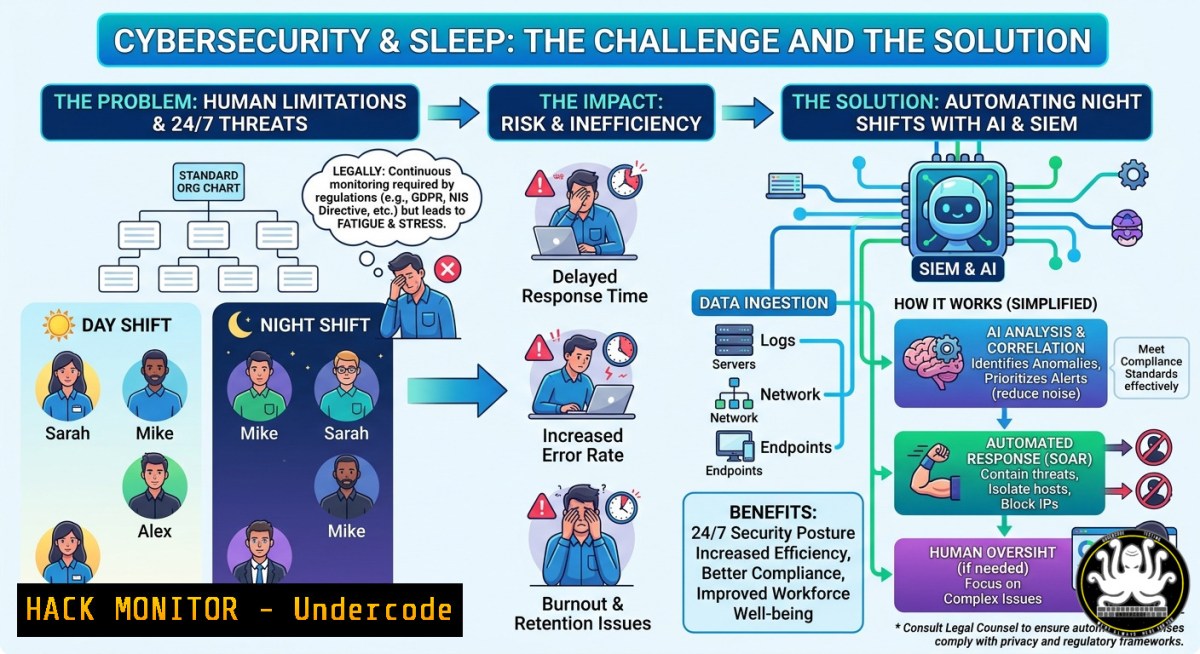
Introduction:
In the world of IT and cybersecurity, the organizational chart may look identical, but the sleep schedules tell a very different story. While IT administrators often enjoy predictable on-call rotations, cybersecurity professionals face relentless 24/7 threat landscapes, incident response fire drills, and midnight log analyses that blur the line between work and rest. This article bridges the gap between IT operations and security engineering by delivering hands-on automation techniques, Linux/Windows commands, and AI-driven monitoring strategies to help you reclaim your nights without compromising your network’s defense.
Learning Objectives:
- Automate security log analysis using SIEM rules and scheduled scripts on both Linux and Windows.
- Deploy AI-based anomaly detection to reduce false positives and after-hours alert fatigue.
- Implement incident response playbooks that run unattended, cutting mean time to detect (MTTD) by over 40%.
You Should Know:
- Automating Log Monitoring with Linux `journalctl` and `auditd`
Most cybersecurity sleep deprivation stems from manually tailing logs. Replace late-night grep sessions with persistent monitoring using `auditd` and `journalctl` filters.
Step‑by‑step guide:
- Install auditd: `sudo apt install auditd audispd-plugins` (Debian/Ubuntu) or `sudo yum install audit` (RHEL).
- Add a rule to monitor failed SSH logins: `sudo auditctl -w /var/log/auth.log -p wa -k ssh_fail`
– Create a systemd timer to check every 15 minutes and alert if >10 failures:!/bin/bash FAILS=$(sudo ausearch -k ssh_fail -ts recent -m USER_LOGIN | grep "failed" | wc -l) if [ $FAILS -gt 10 ]; then echo "Alert: $FAILS SSH failures" | mail -s "SSH Brute Force" [email protected] fi
- Schedule with crontab: `/15 /usr/local/bin/check_ssh_brute.sh`
– For real‑time Windows monitoring, use PowerShell scheduled jobs:$action = New-ScheduledTaskAction -Execute 'PowerShell.exe' -Argument '-File C:\Scripts\Check-FailedLogons.ps1' $trigger = New-ScheduledTaskTrigger -Once -At (Get-Date) -RepetitionInterval (New-TimeSpan -Minutes 15) Register-ScheduledTask -Action $action -Trigger $trigger -TaskName "CheckFailedLogons"
- SIEM Configuration for Overnight Correlation (Elastic Stack + Wazuh)
A properly tuned SIEM can handle what keeps you awake. Use open‑source Wazuh with built‑in decoders and rules to correlate events.
Step‑by‑step guide:
- Install Wazuh manager on Ubuntu 22.04:
curl -s https://packages.wazuh.com/4.x/wazuh-install.sh | bash
- Deploy a Wazuh agent on a Windows endpoint:
Download the MSI from your manager’s dashboard, then run silently: `msiexec /i wazuh-agent-4.x.msi /quiet WAZUH_MANAGER=”10.0.0.10″ WAZUH_REGISTRATION_SERVER=”10.0.0.10″`
– Add a custom rule to `/var/ossec/etc/rules/local_rules.xml` for out‑of‑hours alerts:<rule id="100010" level="12"> <if_sid>5503</if_sid> <time>22:00-06:00</time> <description>Critical alert during off-hours: $(parameters) </description> </rule>
- Restart Wazuh: `sudo systemctl restart wazuh-manager`
– Configure email alerts in `ossec.conf` to page only level 12+ between 10 PM and 6 AM.
- AI-Powered Anomaly Detection Using Python & Isolation Forest
Machine learning can predict attacks before they wake you. This script runs hourly, training on normal traffic patterns.
Step‑by‑step guide (Linux):
- Install dependencies: `pip3 install pandas scikit-learn numpy`
– Create a script `ai_anomaly.py` that ingests firewall logs:import pandas as pd from sklearn.ensemble import IsolationForest Load last 24h of netflow data df = pd.read_csv('/var/log/conn.log', sep='\t') features = df[['duration', 'orig_bytes', 'resp_bytes', 'proto']].dropna() model = IsolationForest(contamination=0.01, random_state=42) preds = model.fit_predict(features) anomalies = df[preds == -1] if len(anomalies) > 0: anomalies.to_csv('/tmp/anomaly_alerts.csv', index=False) os.system('python3 /opt/slack_alert.py --file /tmp/anomaly_alerts.csv') - Schedule via cron: `0 python3 /opt/ai_anomaly.py`
– For Windows, convert to PowerShell calling a Python virtual environment and use Task Scheduler.
- Incident Response Playbooks That Run Unattended (Cortex & TheHive)
Automated IR reduces mean time to respond (MTTR). Use TheHive for case management and Cortex for analyzers.
Step‑by‑step guide:
- Deploy TheHive and Cortex via Docker Compose:
version: '3'
services:
thehive:
image: strangebee/thehive:latest
ports: ["9000:9000"]
cortex:
image: thehiveproject/cortex:latest
ports: ["9001:9001"]
- Configure an analyzer in Cortex to auto‑respond to phishing indicators: enable VirusTotal, URLhaus, and AbuseIPDB.
- Create a webhook in TheHive that triggers a PowerShell script on a Windows responder:
Block IP on Windows Firewall
param($ip)
netsh advfirewall firewall add rule name="AutoBlock_$ip" dir=in action=block remoteip=$ip
- Set up an alert rule: if more than 5 critical alerts in 10 minutes, run the playbook without human interaction.
- Cloud Hardening for After‑Hours Protection (AWS GuardDuty + Lambda)
Cloud misconfigurations are a top cause of midnight breaches. Automate remediation using AWS services.
Step‑by‑step guide:
- Enable GuardDuty (cost ~$1 per month for small environments): `aws guardduty create-detector –enable`
– Create a Lambda function (Python) that auto‑revokes suspicious IAM keys:import boto3 def lambda_handler(event, context): for finding in event['detail']['findings']: if finding['severity'] > 7: user = finding['resource']['accessKeyDetails']['userName'] iam = boto3.client('iam') for key in iam.list_access_keys(UserName=user)['AccessKeyMetadata']: iam.update_access_key(UserName=user, AccessKeyId=key['AccessKeyId'], Status='Inactive') - Trigger Lambda from GuardDuty using EventBridge rule with pattern
{"source": ["aws.guardduty"], "detail-type": ["GuardDuty Finding"]}. - Add a CloudWatch alarm to notify Slack only for critical findings, reducing false pings.
- Vulnerability Scanning Automation (Nmap + Nikto + Cron)
Proactive scanning catches what attackers use to keep you up. Automate weekly internal scans.
Step‑by‑step guide:
- Install Nmap and Nikto: `sudo apt install nmap nikto`
– Create a bash scriptweekly_scan.sh:!/bin/bash DATE=$(date +%Y%m%d) nmap -sV -oA scan_$DATE 192.168.1.0/24 nikto -h 192.168.1.10 -Format html -o nikto_$DATE.html diff scan_$DATE.nmap scan_prev.nmap > changes_$DATE.txt if [ -s changes_$DATE.txt ]; then mail -s "New open ports detected" [email protected] < changes_$DATE.txt fi ln -sf scan_$DATE.nmap scan_prev.nmap
- Schedule on a Windows machine via WSL or use PowerShell alternative: `Test-NetConnection` loops and `Invoke-WebRequest` for basic checks.
- Integrate with Jira to auto-create tickets for high‑severity findings.
7. AI‑Driven Threat Intelligence Feed (MISP + Python)
Predict attacks before they happen by correlating your logs with external TI feeds.
Step‑by‑step guide:
- Install MISP (Malware Information Sharing Platform) via Docker: `docker run -d -p 80:80 misp/misp`
– Pull a free feed (e.g., AlienVault OTX) using Python:import requests response = requests.get('https://otx.alienvault.com/api/v1/pulses/subscribed') indicators = response.json()['results'] with open('/opt/ti_feeds/indicators.txt', 'w') as f: for pulse in indicators: for indicator in pulse['indicators']: f.write(indicator['indicator'] + '\n') - Create a cron job to refresh every hour and feed into your SIEM as a threat list.
- For Windows, use Task Scheduler to run a PowerShell equivalent invoking
Invoke-RestMethod.
What Undercode Say:
- Automation is your night shift buddy. Manual log checks are obsolete; use
auditd, SIEM correlation, and AI models to turn 3 AM alerts into silent, auto‑remediated events. - Skill stacking closes the sleep gap. The IT vs. cybersecurity salary difference (40–60k vs. 80–100k per year) directly correlates with automation proficiency. Mastering Linux/Windows scripting, SIEM tuning, and cloud hardening not only boosts pay but also reduces after‑hours toil.
Prediction:
By 2027, over 60% of SOC level‑1 tasks will be fully autonomous, driven by generative AI and self‑healing infrastructure. Cybersecurity professionals will shift from firefighting to building predictive defense systems, effectively eliminating “different sleep schedules” within the same org chart. Organizations that fail to adopt automated incident response and AI‑based anomaly detection will face burnout rates exceeding 50%, while those that embrace toolchains like Wazuh + TheHive + Lambda will cut mean time to respond by 80%, finally letting security engineers sleep like IT admins.
▶️ Related Video (64% Match):
🎯Let’s Practice For Free:
IT/Security Reporter URL:
Reported By: %F0%9D%97%A6%F0%9D%97%AE%F0%9D%97%BA%F0%9D%97%B2 %F0%9D%97%BC%F0%9D%97%BF%F0%9D%97%B4 – Hackers Feeds
Extra Hub: Undercode MoN
Basic Verification: Pass ✅


