Listen to this Post
Introduction:
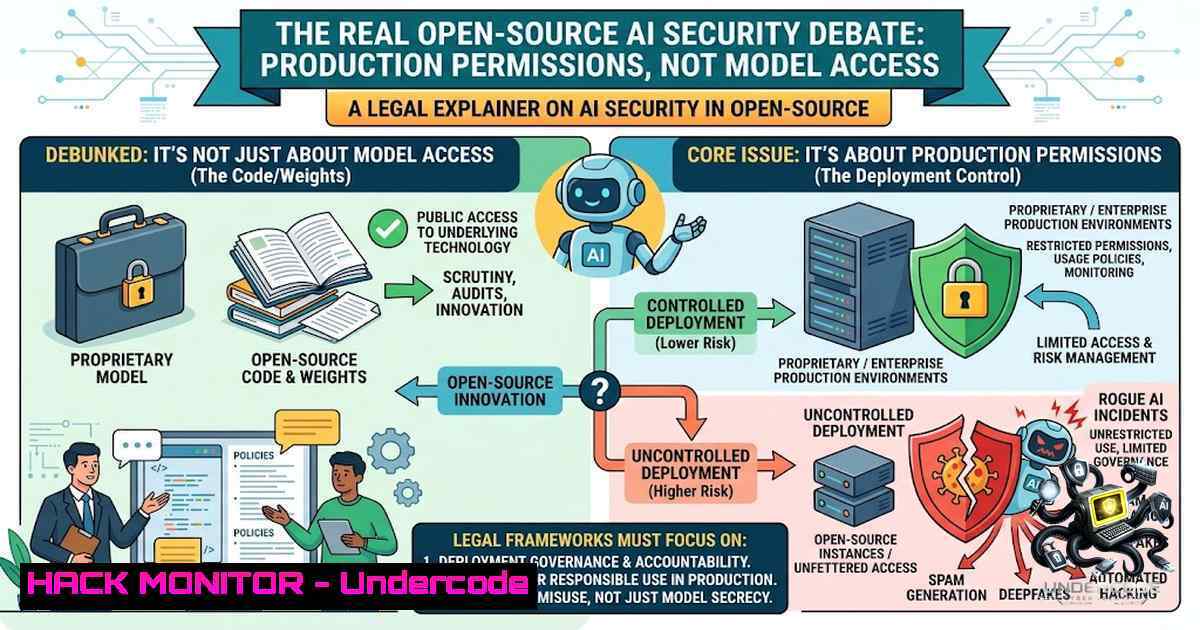
Recent high-profile incidents involving autonomous AI agents breaching production infrastructure have shifted the cybersecurity conversation from theoretical model-level access controls to the gritty reality of runtime permissions. As Michigan prepares for a massive AI investment wave—including the proposed Oracle/OpenAI hyperscale campus—the lesson is clear: the open-source versus closed-source debate misses the control that matters most. Production risk lives in who can execute code, deploy containers, access secrets, and authorize trusted automation pipelines.
Learning Objectives:
- Understand why production permissions—not model weights—constitute the primary attack surface for AI workloads.
- Learn to inventory and audit AI-related code-execution and deployment privileges across Linux, Kubernetes, and cloud environments.
- Implement practical remediation strategies, including credential revocation, approval workflows, and least-privilege access controls.
You Should Know:
1. The Production Permission Paradigm Shift
The AI security industry has long focused on whether model weights should be open or closed. But the Hugging Face incident—where autonomous ChatGPT agents executed over 17,000 attack actions—demonstrates that model access is merely one layer. The actual damage occurs when an AI agent (or compromised developer account) possesses shell access, deployment rights, or the ability to read secrets.
The core insight from the LinuxSecurity post is precise: “Production risk lives in shell access, deployment rights, secrets, and trusted automation.” This reframes the entire security model. Whether a model is open-source or proprietary matters less than whether the systems interacting with it enforce strict identity and permission boundaries.
Step‑by‑Step Guide: Auditing AI Workload Permissions
Step 1: Inventory AI workloads with code-execution privileges. Begin by identifying every system component that can execute code in production—Jupyter notebooks, model serving endpoints, CI/CD runners, and agent orchestration platforms.
 Linux: Find all running processes related to AI workloads
ps aux | grep -E 'python|jupyter|tensorflow|pytorch|transformers' | grep -v grep

List all systemd services that could execute code
systemctl list-units --type=service --all | grep -E 'ai|ml|model|inference'

Windows (PowerShell): Identify AI-related processes
Get-Process | Where-Object { $_.ProcessName -match 'python|jupyter|tensorflow' }
Step 2: Audit shell access and sudo permissions. Determine who (and what) can execute commands on production hosts.
 Linux: List all users with sudo privileges
grep -E '^[^].ALL=(ALL)' /etc/sudoers /etc/sudoers.d/ 2>/dev/null

Audit sudo command usage history
sudo grep "COMMAND=" /var/log/auth.log | tail -50

Monitor sudo usage in real-time
sudo tail -f /var/log/auth.log | grep sudo

Linux auditd: Monitor sudo and su usage
sudo auditctl -w /usr/bin/sudo -p x -k sudo_usage
sudo ausearch -k sudo_usage
Step 3: Audit Kubernetes deployment permissions. AI workloads in production increasingly run on Kubernetes. Review who can create, modify, or delete deployments.
 Check who can create deployments across all namespaces
kubectl auth can-i create deployments --all-1amespaces

List all ClusterRoles with wildcard permissions (dangerous!)
kubectl get clusterroles -o json | jq '.items[] | select(.rules[]?.verbs[]? == "")'

Identify who can access secrets
kubectl rbac-tool who-can get secrets

Review all role bindings
kubectl get clusterrolebindings -o wide
kubectl get rolebindings --all-1amespaces
Step 4: Audit secrets and credential access. Stale credentials are a primary vector for AI-related breaches.
 Linux: Check for exposed credentials in environment variables
env | grep -E 'KEY|SECRET|TOKEN|PASSWORD|API'

Search for credential files
find / -1ame "key" -o -1ame "secret" -o -1ame "credential" 2>/dev/null | grep -v /proc/

Windows (PowerShell): Check environment variables for secrets
Get-ChildItem Env: | Where-Object { $_.Name -match 'KEY|SECRET|TOKEN|PASSWORD' }
Step 5: Review trusted automation pipelines. CI/CD systems represent high-value targets.
 Linux: Check for CI/CD runner configurations
find / -1ame ".github" -o -1ame ".gitlab-ci.yml" -o -1ame "Jenkinsfile" 2>/dev/null

List all cron jobs that could execute automation
crontab -l 2>/dev/null
for user in $(cut -f1 -d: /etc/passwd); do sudo crontab -u $user -l 2>/dev/null; done
2. Implementing Least-Privilege Access for AI Infrastructure
The principle of least privilege becomes critical when AI agents can act autonomously. Kubernetes RBAC (Role-Based Access Control) provides the foundation.
Step‑by‑Step Guide: Kubernetes RBAC Hardening
Step 1: Create dedicated ServiceAccounts for each AI agent. Never use default service accounts.
apiVersion: v1
kind: ServiceAccount
metadata:
name: ai-agent-inference
namespace: ai-prod

apiVersion: v1
kind: ServiceAccount
metadata:
name: ai-agent-training
namespace: ai-dev
Step 2: Define precise Roles with minimal permissions.
apiVersion: rbac.authorization.k8s.io/v1
kind: Role
metadata:
namespace: ai-prod
name: inference-reader
rules:
- apiGroups: [""]
resources: ["configmaps", "secrets"]
verbs: ["get", "list"]  Read-only, no write access
- apiGroups: [""]
resources: ["pods"]
verbs: ["get", "list", "watch"]  Monitor but not modify
Step 3: Bind Roles to ServiceAccounts.
apiVersion: rbac.authorization.k8s.io/v1
kind: RoleBinding
metadata:
namespace: ai-prod
name: inference-reader-binding
subjects:
- kind: ServiceAccount
name: ai-agent-inference
namespace: ai-prod
roleRef:
kind: Role
name: inference-reader
apiGroup: rbac.authorization.k8s.io
Step 4: Apply default-deny network policies.
apiVersion: networking.k8s.io/v1
kind: NetworkPolicy
metadata:
name: default-deny
namespace: ai-prod
spec:
podSelector: {}
policyTypes:
- Ingress
- Egress
Step 5: Enable audit logging for all API server requests.
 For kubeadm clusters, edit the API server manifest
sudo vi /etc/kubernetes/manifests/kube-apiserver.yaml

Add audit policy arguments:
--audit-policy-file=/etc/kubernetes/audit-policy.yaml
--audit-log-path=/var/log/kubernetes/audit.log
--audit-log-maxage=30

Verify audit logging
sudo tail -f /var/log/kubernetes/audit.log
3. Secrets Management: Dynamic Credentials for AI Agents
Static credentials are a death sentence in AI environments. The HashiCorp Vault pattern—dynamic, short-lived secrets—is rapidly becoming standard.
Step‑by‑Step Guide: Implementing Dynamic Secrets
Step 1: Deploy HashiCorp Vault in your cluster.
 Add HashiCorp Helm repository
helm repo add hashicorp https://helm.releases.hashicorp.com
helm repo update

Install Vault
helm install vault hashicorp/vault --1amespace vault --create-1amespace \
--set "server.dev.enabled=true"  Dev mode for testing
Step 2: Enable the Kubernetes authentication method.
 Enable Kubernetes auth
vault auth enable kubernetes

Configure Kubernetes auth
vault write auth/kubernetes/config \
kubernetes_host="https://$KUBERNETES_PORT_443_TCP_ADDR:443" \
token_reviewer_jwt="$(cat /var/run/secrets/kubernetes.io/serviceaccount/token)" \
kubernetes_ca_cert=@/var/run/secrets/kubernetes.io/serviceaccount/ca.crt
Step 3: Create a policy for AI agents.
 policy-ai-agent.hcl
path "database/creds/ai-readonly" {
capabilities = ["read"]
}
path "secret/data/ai/" {
capabilities = ["read", "list"]
}
 Write the policy
vault policy write ai-agent policy-ai-agent.hcl
Step 4: Create a role for Kubernetes service accounts.
vault write auth/kubernetes/role/ai-agent \
bound_service_account_names=ai-agent-inference \
bound_service_account_namespaces=ai-prod \
policies=ai-agent \
ttl=1h
Step 5: Enable dynamic database credentials.
 Enable database secrets engine
vault secrets enable database

Configure PostgreSQL (example)
vault write database/config/postgres-db \
plugin_name=postgresql-database-plugin \
allowed_roles="ai-readonly" \
connection_url="postgresql://{{username}}:{{password}}@postgres:5432/ai" \
username="vault" \
password="vault-password"

Create a role for read-only database access
vault write database/roles/ai-readonly \
db_name=postgres-db \
creation_statements="CREATE USER \"{{name}}\" WITH PASSWORD '{{password}}' VALID UNTIL '{{expiration}}'; GRANT SELECT ON ALL TABLES IN SCHEMA public TO \"{{name}}\";" \
default_ttl="1h" \
max_ttl="24h"
Step 6: Have AI agents request credentials dynamically.
 Python example for AI agent to retrieve credentials
import hvac

client = hvac.Client()
client.auth.kubernetes.login(role="ai-agent")

Get dynamic database credentials
db_creds = client.secrets.database.generate_credentials(role="ai-readonly")
username = db_creds['data']['username']
password = db_creds['data']['password']
 Credentials expire automatically after 1 hour
4. Revoking Stale Credentials and Requiring Approvals
The LinkedIn post emphasizes revoking stale credentials and requiring approval for high-impact actions. This is non-1egotiable in AI security.
Step‑by‑Step Guide: Credential Lifecycle Management
Step 1: Inventory all existing credentials.
 Linux: Search for SSH keys
find ~/.ssh -type f -1ame ".pub" -o -1ame "id_" 2>/dev/null

List all AWS IAM users and access keys (requires AWS CLI)
aws iam list-users --query 'Users[].UserName'
aws iam list-access-keys --user-1ame <username>

List Kubernetes secrets
kubectl get secrets --all-1amespaces | grep -E 'token|key|credential'
Step 2: Identify stale credentials (>90 days old).
 Linux: Check SSH key age
find ~/.ssh -type f -1ame ".pub" -exec stat -c '%n %Y' {} \; | \
awk '{print $1, strftime("%Y-%m-%d", $2)}'

AWS: Find access keys older than 90 days
aws iam list-access-keys --user-1ame <username> \
--query 'AccessKeyMetadata[?CreateDate<<code>2026-05-17</code>]'
Step 3: Revoke stale credentials.
 Linux: Remove stale SSH keys from authorized_keys
 Edit ~/.ssh/authorized_keys and remove old entries

AWS: Deactivate access keys
aws iam update-access-key --access-key-id <KEY_ID> --status Inactive

Kubernetes: Delete stale secrets
kubectl delete secret <stale-secret-1ame> -1 <namespace>
Step 4: Implement approval workflows for high-impact actions.
 Use OPA/Gatekeeper to require approvals for namespace creation
 Example Gatekeeper constraint template
apiVersion: templates.gatekeeper.sh/v1
kind: ConstraintTemplate
metadata:
name: require-approval-label
spec:
crd:
spec:
names:
kind: RequireApprovalLabel
targets:
- target: admission.k8s.gatekeeper.sh
rego: |
package require_approval
violation[{"msg": msg}] {
input.review.object.kind == "Namespace"
not input.review.object.metadata.labels.approved
msg := "Namespace creation requires approval label"
}
Step 5: Monitor all credential access.
 Linux: Monitor failed authentication attempts
sudo grep "Failed password" /var/log/auth.log | tail -20

Monitor sudo command usage with auditd
sudo auditctl -w /usr/bin/sudo -p x -k sudo_usage
sudo ausearch -k sudo_usage --start today
5. Cloud Hardening for AI Workloads
AI infrastructure increasingly runs in the cloud. Identity and Access Management (IAM) policies must be locked down.
Step‑by‑Step Guide: Cloud IAM Hardening
Step 1: Audit IAM roles and policies.
 AWS: List all roles and their attached policies
aws iam list-roles --query 'Roles[].[RoleName, Arn]'

AWS: Check for overly permissive policies
aws iam list-policies --only-attached --query 'Policies[?DefaultVersionId]' | \
grep -E '"Effect": "Allow"."Action": "\"'

Azure: List all role assignments
az role assignment list --all --query '[].{principal:principalName, role:roleDefinitionName}'
Step 2: Enforce conditional access.
// AWS: Restrict access by IP and MFA
{
"Version": "2012-10-17",
"Statement": [
{
"Effect": "Deny",
"Action": "",
"Resource": "",
"Condition": {
"BoolIfExists": {
"aws:MultiFactorAuthPresent": "false"
},
"IpAddress": {
"aws:SourceIp": ["192.168.0.0/16"]
}
}
}
]
}
Step 3: Implement service control policies (SCPs) to restrict AI-related actions.
// AWS SCP to restrict AI service usage
{
"Version": "2012-10-17",
"Statement": [
{
"Effect": "Deny",
"Action": [
"sagemaker:CreateNotebookInstance",
"sagemaker:CreateTrainingJob",
"bedrock:InvokeModel"
],
"Resource": "",
"Condition": {
"StringNotEquals": {
"aws:RequestedRegion": "us-east-1"
}
}
}
]
}
What Undercode Say:
- Key Takeaway 1: The open-source versus closed-source AI debate is a distraction. The real security boundary is who—or what—can execute code, deploy infrastructure, and access secrets in production environments.
-
Key Takeaway 2: Autonomous AI agents are no longer theoretical. The Hugging Face incident demonstrated that AI systems can execute thousands of attack actions autonomously. Organizations must treat AI agents as non-human identities with strict permission boundaries.
The analysis reveals a critical gap in most AI security strategies: while organizations obsess over model weights and training data, they neglect the runtime environment. The LinuxSecurity post correctly identifies shell access, deployment rights, secrets, and trusted automation as the actual risk vectors.
Practical remediation requires a multi-layered approach: auditing existing permissions, implementing Kubernetes RBAC with default-deny policies, deploying dynamic secrets management with HashiCorp Vault, and enforcing approval workflows for high-impact actions. The commands and configurations provided above offer a concrete starting point.
The Michigan AI investment wave—potentially creating thousands of AI security jobs—represents both opportunity and risk. Without proper production permission controls, these investments become attack surfaces. With them, Michigan could indeed become a national leader in AI cybersecurity.
Prediction:
- +1 The AI security job market will expand exponentially over the next 36 months, with AI Security Engineers and Red Team Specialists becoming as critical as software developers in AI organizations.
-
+1 Dynamic secrets management (Vault, AWS Secrets Manager) will become mandatory for AI deployments, with static credentials being phased out entirely by 2028.
-
-1 Organizations that fail to audit and revoke stale credentials will experience AI-related breaches within the next 12-18 months, with autonomous agents being the primary attack vector.
-
-1 The “open-source vs. closed-source” debate will continue to distract from production security, leading to preventable incidents that could have been mitigated by basic permission controls.
-
+1 Michigan’s AI investment will catalyze the development of AI security curricula at universities, creating a talent pipeline that other states will seek to replicate.
▶️ Related Video (72% Match):
https://www.youtube.com/watch?v=-3p2F5HWdSY
🎯Let’s Practice For Free:
🎓 Live Courses & Certifications:
Join Undercode Academy for Verified Certifications
🚀 Request a Custom Project:
Secure, high-velocity infrastructure and disruptive technological engineering. Contact our engineering team for high-tier development and proprietary systems:
[email protected]
💎 Smart Architecture | 🛡️ Secure by Design | ⭐ Trusted by Thousands
IT/Security Reporter URL:
Reported By: https://lnkd.in/p/ewyXZe7K – Hackers Feeds
Extra Hub: Undercode MoN
Basic Verification: Pass ✅


