Listen to this Post
Introduction
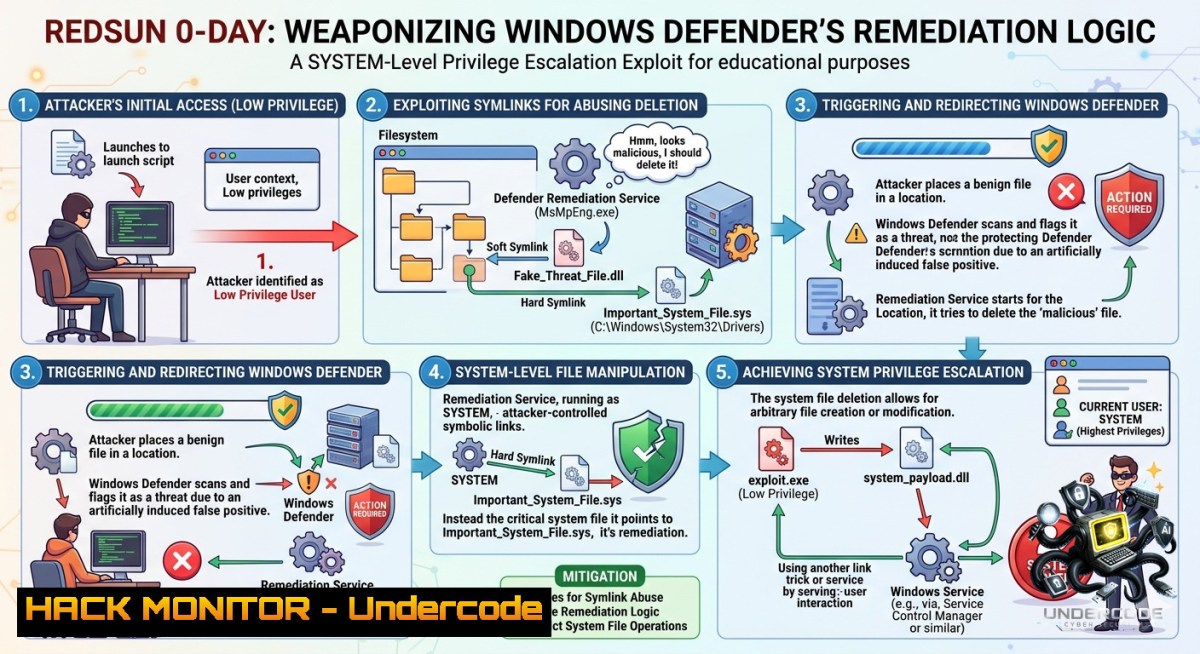
Modern Windows systems rely on Microsoft Defender as a trusted, privileged security component. However, the RedSun vulnerability demonstrates a disturbing reality: when a security tool operates at SYSTEM integrity without proper path validation, it can become an attacker’s most powerful privilege escalation vector. By exploiting a missing reparse point check in Defender’s cloud file remediation workflow, low-privileged users can force the antivirus to overwrite critical system binaries, effectively turning the defender against the system it is meant to protect.
Learning Objectives
– Understand the technical mechanics of the RedSun exploit chain, including Cloud Files API abuse, opportunistic locks, and NTFS directory junction redirection.
– Learn to detect exploitation indicators through Windows Event Logs, Sysmon, and PowerShell auditing.
– Implement practical mitigation strategies and verify patching status using Windows commands and PowerShell.
You Should Know
1. Anatomy of the RedSun Exploit Chain: When Defender Becomes the Attacker
The RedSun vulnerability (CVE-2026-41091) is a local privilege escalation flaw residing in Microsoft Defender’s Malware Protection Engine (MpSvc.dll), which runs as `MsMpEng.exe` with NT AUTHORITY\SYSTEM privileges. At its core, the issue stems from a missing reparse point validation during Defender’s remediation workflow for cloud-tagged files.
When Microsoft Defender detects a malicious file carrying cloud attributes via the Windows Cloud Files API, instead of simply quarantining or deleting it, the antivirus attempts to restore the file back to its original detection path. Crucially, this privileged write operation occurs without verifying whether the target path has been replaced with a reparse point or directory junction.
The exploit unfolds across five distinct phases:
Phase 1: Bait Creation — The exploit creates a temporary working directory (typically under `%TEMP%`) and drops a decoy executable named `TieringEngineService.exe`. To guarantee an immediate response from real-time protection, the exploit writes the standard EICAR test string into this file — often stored reversed and corrected in memory to evade static signature detection.
Phase 2: Cloud Files API Registration — Using legitimate Windows APIs, the exploit registers the temporary directory as a Cloud Sync Root via `CfRegisterSyncRoot()` and connects a callback provider with `CfConnectSyncRoot()`. It then converts the decoy executable into a cloud placeholder file using `CfCreatePlaceholders()`. This ensures that subsequent system interactions with the file can be intercepted and manipulated.
Phase 3: Oplock-Induced TOCTOU Window — The exploit requests a Batch Opportunistic Lock (Oplock) on the decoy file via `FSCTL_REQUEST_BATCH_OPLOCK`. When Defender’s real-time protection engine scans the EICAR file, it triggers the Cloud Files callback and hits the Oplock, effectively suspending the privileged antivirus thread while it holds an open handle — creating a critical Time-of-Check to Time-of-Use (TOCTOU) window.
Phase 4: Path Redirection via Reparse Points — While Defender is suspended, the exploit dynamically alters the filesystem structure: it renames the original temporary directory, recreates a new directory at the exact original path, and converts this new directory into an NTFS Mount Point (directory junction) targeting `\??\C:\Windows\System32`.
Phase 5: Weaponized Remediation Write — Defender resumes its remediation write, targeting the original detection path. The kernel transparently resolves the junction, and Defender writes the attacker-controlled binary directly into `C:\Windows\System32\TieringEngineService.exe` with SYSTEM privileges. The exploit then activates the Storage Tiers Management Engine COM server, which executes the replaced binary — delivering an interactive SYSTEM shell.
The following PowerShell commands can help you verify your Defender engine version and check for active exploitation indicators:
 Check current Defender engine and platform versions
Get-MpComputerStatus | Select-Object AMEngineVersion, AMProductVersion, AntivirusEnabled

 Query Windows Defender operational log for EICAR detections (Event ID 1116)
Get-WinEvent -LogName "Microsoft-Windows-Windows Defender/Operational" | Where-Object {$_.Id -eq 1116} | Select-Object TimeCreated, Message -First 20

 Search for suspicious TieringEngineService.exe modifications
Get-ChildItem -Path "C:\Windows\System32\TieringEngineService.exe" | Get-Acl | Select-Object -ExpandProperty Access
To monitor for suspicious junction creation and reparse point abuse on Windows systems:
 List all directory junctions and reparse points in System32 (run as Administrator)
fsutil reparsepoint query "C:\Windows\System32"

 Monitor for process creation events with Sysmon (Event ID 1)
 Add to Sysmon config:
<Sysmon>
<EventFiltering>
<ProcessCreate onmatch="include">
<Image condition="end with">TieringEngineService.exe</Image>
</ProcessCreate>
</EventFiltering>
</Sysmon>
2. Detection & Forensic Artifacts: Identifying RedSun Exploitation
Blue teams require actionable detection strategies to identify RedSun exploitation attempts in real-time. The exploit leaves a distinct forensic footprint across multiple Windows telemetry sources.
The earliest and most actionable signal originates from the Microsoft-Windows-Windows Defender/Operational log. Event ID 1116 records malware detections, while Event ID 1119 specifically indicates a remediation action failure. For RedSun, researchers have observed Defender flagging `TieringEngineService.exe` dropped in a characteristic `RS-{GUID}` temporary directory — a naming pattern unique to the exploit’s staging process.
From a process chain perspective, the legitimate `TieringEngineService.exe` is a headless COM server that should never spawn `conhost.exe` under normal operating conditions. When RedSun successfully executes, the process tree reveals: `TieringEngineService.exe → conhost.exe → cmd.exe/powershell.exe` — a three-level chain that serves as a high-fidelity indicator of compromise.
For organizations leveraging Microsoft Defender for Endpoint and KQL, the following detection query can identify suspicious Cloud Files API usage:
// Detect Cloud Files API abuse for RedSun staging
DeviceProcessEvents
| where FileName == "RedSun.exe" or ProcessCommandLine contains "CfRegisterSyncRoot"
| project Timestamp, DeviceName, AccountName, ProcessCommandLine, InitiatingProcessFileName

// Hunt for TieringEngineService.exe spawning conhost
DeviceProcessEvents
| where FileName == "conhost.exe" and InitiatingProcessFileName == "TieringEngineService.exe"
| project Timestamp, DeviceName, AccountName, ProcessId, InitiatingProcessId

// Identify unusual directory junction creation in temp paths
DeviceFileEvents
| where ActionType == "FileCreated" and FileName contains ".TMP" and FolderPath contains "\\Temp\\RS-"
Additional forensic artifacts include:
– VSS Snapshot Creation: Defender creates Volume Shadow Copy snapshots before scanning; RedSun may trigger anomalous snapshot activity
– Prefetch Files: The exploit’s execution pattern leaves traces in `C:\Windows\Prefetch`
– ShimCache: RedSun execution can be reconstructed from ShimCache (AppCompatCache) registry entries
– MPLogs: Defender’s own diagnostic logs (`MpLog-.txt`) record detailed remediation actions
3. Mitigation Strategies & Patch Verification
Microsoft officially patched CVE-2026-41091 (RedSun) in May 2026, with fixed versions requiring immediate deployment. The vulnerability affects Microsoft Malware Protection Engine version 1.1.26030.3008 and earlier, and Microsoft Defender Antimalware Platform version 4.18.26030.3011 and below. Patched versions are 1.1.26040.8 (Engine) and 4.18.26040.7 (Platform).
Use the following commands to verify your patch status:
 Check current Defender versions (run as Administrator)
Get-MpComputerStatus | Select-Object AMEngineVersion, AMProductVersion, AntispywareEnabled, AntivirusEnabled

 Force immediate signature and engine update
Update-MpEngine

 Alternative method using command-line tool
cd "C:\Program Files\Windows Defender"
MpCmdRun.exe -SignatureUpdate
For environments where patching cannot be immediately applied, mitigation focuses on disabling the attack surface. The primary mitigation involves disabling the Cloud Files Mini Filter service (cldflt.sys), which prevents the Windows Cloud Files platform from loading and blocks cloud file placeholder hydration — rendering the RedSun exploit chain incomplete.
 Check status of Cloud Files Mini Filter driver
fltmc instances cldflt

 Disable Cloud Files Mini Filter (requires reboot)
sc config cldflt start= disabled

 Alternatively, via registry (reboot required)
Set-ItemProperty -Path "HKLM:\SYSTEM\CurrentControlSet\Services\cldflt" -1ame "Start" -Value 4
Additional hardening measures recommended by security researchers include:
– Enable Credential Guard to limit post-exploitation credential theft
– Restrict local user write/execute paths by implementing AppLocker or WDAC policies
– Monitor and alert on SYSTEM-level write operations to `C:\Windows\System32` from non-standard processes
The CISA Known Exploited Vulnerabilities (KEV) catalog added CVE-2026-41091 on May 20, 2026, with a binding operational directive for US federal agencies to patch by June 3, 2026.
What Undercode Say
– Key Takeaway 1: RedSun exposes a fundamental trust boundary failure where a privileged security component operates without validating path integrity before performing destructive write operations. The vulnerability class — missing reparse point validation during automated remediation workflows — represents a design flaw that could affect other endpoint protection products with similar architecture.
– Key Takeaway 2: The coordinated disclosure of BlueHammer, RedSun, and UnDefend by researcher Nightmare Eclipse (also known as Chaotic Eclipse) following a dispute with Microsoft’s Security Response Center highlights growing tensions in vulnerability disclosure ethics. While public PoC releases accelerate vendor patching, they also enable immediate exploitation — Huntress SOC observed active exploitation within days of disclosure, with infrastructure attributed to Russia-geolocated IPs, demonstrating the real-world consequences of weaponized disclosure.
Analysis: The RedSun vulnerability fundamentally redefines how security professionals must think about defensive tooling. Traditional risk models assume antivirus software exists solely as a protective boundary. RedSun inverts this trust assumption: the defender becomes the delivery mechanism. This is not merely a logic bug; it represents a class of vulnerabilities arising from the inherent tension between privileged operations and user-controlled filesystem state. The exploit chain’s elegance lies in its exclusive use of documented Windows features — Cloud Files API, oplocks, and reparse points are all legitimate components of the operating system. The vulnerability exists solely in the order and validation of their invocation. As endpoint detection and response (EDR) products incorporate increasingly complex automated remediation workflows, similar TOCTOU and path-validation flaws are likely to emerge across the security product landscape. Defense-in-depth strategies must now account for the possibility that a security tool itself may be the weakest link in the privilege separation chain.
Prediction
– -1 The RedSun disclosure model — researcher frustration leading to public PoC drops — will likely be emulated by other vulnerability researchers, creating a “disclosure arms race” that forces vendors to accelerate patch cycles but simultaneously exposes end users to increased in-the-wild exploitation risk during the zero-day window.
– -P The vulnerability class identified by RedSun (privileged remediation path without reparse point validation) will prompt a broader security audit of endpoint protection products from CrowdStrike, SentinelOne, and others, leading to multiple disclosures and hardening improvements across the industry over the next 12–18 months.
– -1 Legacy Windows environments with delayed patch management cycles remain vulnerable to RedSun and similar LPE exploits, with attackers using these flaws as reliable privilege escalation primitives following initial access via phishing or other vectors — extending the effective lifespan of these vulnerabilities well beyond patch release.
– +1 The incident will accelerate adoption of Zero Trust principles and endpoint detection strategies that treat every security component as potentially compromised, driving architectural changes where remediation actions require explicit path validation and integrity checks before privileged writes.
▶️ Related Video (86% Match):
🎯Let’s Practice For Free:
🎓 Live Courses & Certifications:
[Join Undercode Academy for Verified Certifications](https://undercode.co.uk/certifications/)
🚀 Request a Custom Project:
Secure, high-velocity infrastructure and disruptive technological engineering. Contact our engineering team for high-tier development and proprietary systems:
[[email protected]](mailto:[email protected])
💎 Smart Architecture | 🛡️ Secure by Design | ⭐ Trusted by Thousands
IT/Security Reporter URL:
Reported By: [Aleborges Exploitation](https://www.linkedin.com/posts/aleborges_exploitation-infosec-informationsecurity-share-7467249031811969024-gSpn/) – Hackers Feeds
Extra Hub: Undercode MoN
Basic Verification: Pass ✅
🔐JOIN OUR CYBER WORLD [ CVE News • HackMonitor • UndercodeNews ]
[💬 Whatsapp](https://undercode.help/whatsapp) | [💬 Telegram](https://t.me/UndercodeCommunity)
📢 Follow UndercodeTesting & Stay Tuned:
[𝕏 formerly Twitter 🐦](https://x.com/undercodeupdate) | [@ Threads](https://www.threads.net/@undercodetesting) | [🔗 Linkedin](https://www.linkedin.com/company/undercodetesting/) | [🦋BlueSky](https://bsky.app/profile/undercode.bsky.social)


