Listen to this Post
Introduction:
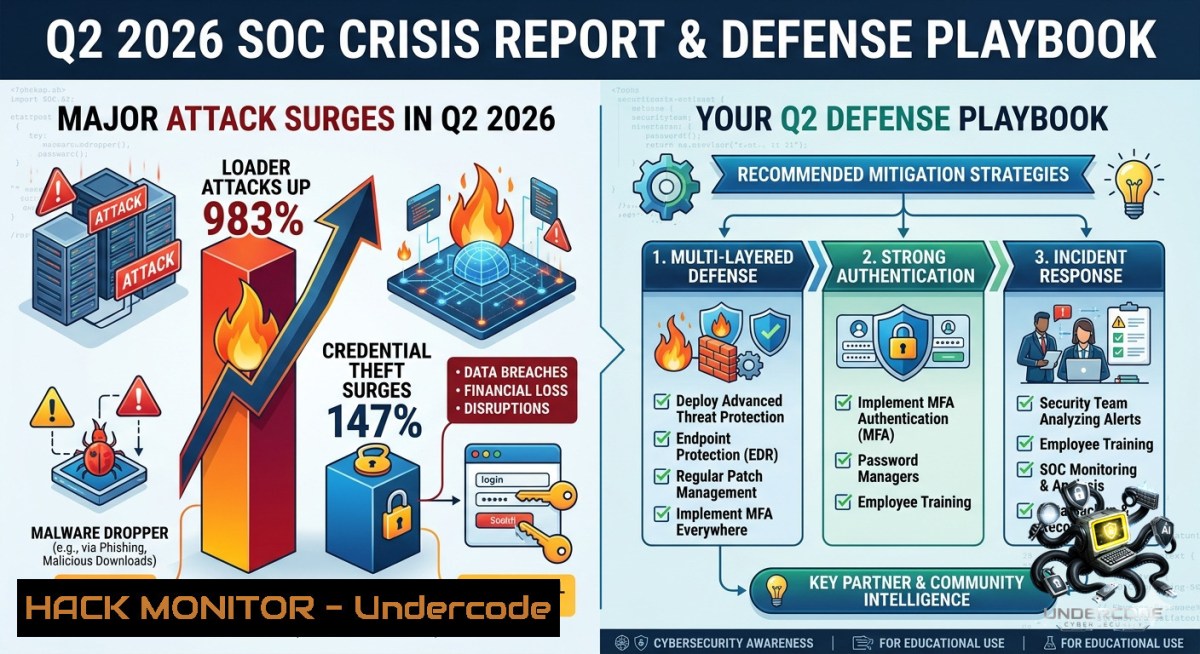
The first quarter of 2026 brought a seismic shift in the threat landscape, with SOC teams facing an unprecedented surge in loader-based malware and credential theft. Attackers are now weaponizing trusted system tools and moving laterally faster than ever, shrinking the window for detection from initial compromise to operational foothold. Based on analysis of over 2.1 million real-world investigations, this article translates Q1 threat intelligence into immediate Q2 defense priorities, equipping you with verified commands, SIEM queries, and hardening steps to close critical visibility gaps.
Learning Objectives:
– Understand the 98.3% growth in loader‑based attacks and the 14.7% increase in credential theft, including their root causes and attack chains.
– Implement technical countermeasures—Linux/Windows commands, EDR configurations, and SIEM correlation rules—to detect and block early‑stage compromise.
– Build a risk‑based defense strategy that prioritises identity integrity, trusted tool monitoring, and AI‑enhanced SOC workflows for Q2 2026.
You Should Know:
1. Loader‑Based Attacks: Detecting the Initial Compromise
Loader‑based attacks nearly doubled in Q1 2026, acting as the primary vehicle for delivering infostealers, RATs, and ransomware. These loaders often use PowerShell, JavaScript (LOLBAS), or steganography to evade traditional antivirus and EDR. To catch them early, SOC teams need to monitor suspicious process creation and script execution across endpoints.
Step‑by‑Step Detection & Mitigation (Windows & Linux):
– Windows: Monitor PowerShell in Constrained Language Mode
Enforce Constrained Language Mode to block malicious PowerShell code:
Set-ItemProperty -Path "HKLM:\SOFTWARE\Policies\Microsoft\Windows\PowerShell\ScriptBlockLogging" -1ame "EnableScriptBlockLogging" -Value 1
Set-ItemProperty -Path "HKLM:\SOFTWARE\Policies\Microsoft\Windows\PowerShell" -1ame "PSLockdownPolicy" -Value 1
What this does: Enables full script block logging and restricts PowerShell to a locked‑down mode, preventing most script‑based loaders from executing.
– Windows: Detect Suspicious Loader Behaviour via Sysmon
Install Sysmon with a configuration that logs process creation and network connections, then hunt for anomalies:
 Search for PowerShell downloading a payload from an unusual domain
Get-WinEvent -FilterHashtable @{LogName='Microsoft-Windows-Sysmon/Operational'; ID=1} | Where-Object { $_.Message -match 'powershell.iex|Invoke-Expression|downloadstring' }
What this does: Queries Sysmon event ID 1 (process creation) for suspicious PowerShell command lines, revealing loader attempts.
– Linux: Monitor for Unauthorised `curl`/`wget` Executions
auditctl -a always,exit -F arch=b64 -S execve -F path=/usr/bin/curl -k process
ausearch -i -sc curl,wget | grep -E "\.(exe|dll|bin|sh)"
What this does: Sets an audit rule on `curl` and `wget`, then searches for downloads of executable files, a common loader delivery method.
– EDR Configuration: Block PowerShell Download‑Cradles
In your EDR policy, add a rule to terminate any process with command line containing `-EncodedCommand`, `IEX(New-Object Net.WebClient).DownloadString`, or `Invoke-Expression`.
Why: Loaders frequently use these constructs to fetch and run malicious code in memory without touching disk.
– SIEM Correlation: Detect Sequential LOLBAS Execution
Create a correlation rule that fires when a parent process (e.g., `winword.exe`, `excel.exe`, `outlook.exe`) spawns `cmd.exe` then `powershell.exe` within 5 seconds.
Example Splunk query:
index=windows sourcetype=WinEventLog:Security EventCode=4688 | where ParentProcess in ("winword.exe","excel.exe","outlook.exe") and NewProcessName in ("C:\\Windows\\System32\\cmd.exe","C:\\Windows\\System32\\WindowsPowerShell\\v1.0\\powershell.exe") | stats count by ComputerName, ParentProcess, NewProcessName
2. Credential Theft Prevention: Hardening Identity & Access
Identity remains the primary attack surface, accounting for 58.7% of all incidents in Q1 2026. Attackers are stealing credentials via infostealer malware (up 84% year‑over‑year), session hijacking, and MFA bypass techniques. The speed of these attacks now outpaces traditional SOC response, with breach‑to‑encryption times dropping to just three hours in the fastest observed cases.
Step‑by‑Step Identity Hardening & Detection:
– Enforce Phishing‑Resistant MFA
Disable SMS, voice, and push‑based MFA. Require WebAuthn (FIDO2) or certificate‑based authentication for all critical systems.
Azure AD/Entra ID: Enable security defaults or create an Authentication Strength policy that mandates phishing‑resistant methods.
GWS: Enforce security keys (Titan, YubiKey) via Advanced Protection Program.
– Monitor for Session Token Replay
Use your SIEM to detect authentication events with unexpected user agents, IP geolocation mismatches, or simultaneous logins from distant locations.
Splunk query for anomalous token usage:
index=windows EventCode=4624 | where AuthenticationPackageName="Kerberos" and LogonType=10 | eval city=geoloc(Source_IP) | where city != "expected_city"
– Harden LSASS on Windows
Prevent credential dumping by enabling LSASS as a protected process and disabling WDigest:
reg add "HKLM\SYSTEM\CurrentControlSet\Control\Lsa" /v "RunAsPPL" /t REG_DWORD /d 1 /f
reg add "HKLM\SYSTEM\CurrentControlSet\Control\SecurityProviders\WDigest" /v "UseLogonCredential" /t REG_DWORD /d 0 /f
What this does: Forces LSASS to run as a Protected Process Light (PPL) and prevents Windows from storing plaintext credentials in memory, blocking Mimikatz and similar infostealers.
– Deploy Entra ID (Azure AD) Identity Protection
Configure user and sign‑in risk policies to automatically require MFA, password change, or block access when anomalous behaviour is detected (e.g., impossible travel, leaked credentials).
Action: In Entra ID > Security > Identity Protection, set user risk policy to “Medium and above: Require change password” and sign‑in risk policy to “Medium and above: Require MFA.”
– Create a Credential Theft Incident Playbook
Develop a runbook that includes: (1) immediate account disablement, (2) force password reset and MFA re‑registration, (3) revoke all existing tokens and sessions, (4) audit recent email rules and forwarding, and (5) check for persistence (scheduled tasks, startup items, web shells). Automate these steps using SOAR playbooks to reduce mean time to respond.
3. Adjusting Q2 Defense Strategy Using Q1 Threat Intelligence
The Q1 2026 Cyber Risk Report reveals that early‑stage compromise is an overlooked risk, with median times as short as 21 seconds to persistence establishment and 16 seconds to Living‑off‑the‑Land (LOTL) execution. Defenders have less time than ever to detect and respond. To adapt, SOC teams must shift from reactive alert triage to proactive threat hunting and implement automated containment.
Step‑by‑Step Strategy Adjustment for Q2 2026:
– Prioritise Visibility of Trusted Tools (LOLBAS)
Use your EDR to monitor native OS tools (PowerShell, WMI, BITSAdmin, MSHTA, Regsvr32) for suspicious usage patterns. Create a baseline of typical behaviour per role, then alert on deviations.
Linux equivalent: Monitor `bash`, `python`, `perl`, `awk`, `sed`, `curl`, `wget`, and `openssl` for unintended child processes or outbound connections.
– Implement Automated IOC Blocking
Feed the indicators of compromise (IOCs) from ANY.RUN’s Q1 report directly into your firewall, proxy, and EDR via an API‑driven threat intelligence platform (TIP). Focus on blocking:
– Domains associated with loader delivery (e.g., expired certificates, recently registered).
– IP addresses hosting steganography‑encoded payloads.
– Hash values of known loaders (e.g., CastleLoader, GuLoader, GachiLoader).
– Conduct Q2 Purple Team Exercises
Run simulation exercises that mimic loader‑based attacks and credential theft scenarios. Use open‑source tools like Atomic Red Team to test your detection and response capabilities:
 Simulate a loader downloading and executing a payload
Invoke-AtomicTest T1105 -TestNames "Download a file with PowerShell"
 Simulate credential dumping via LSASS
Invoke-AtomicTest T1003 -TestNames "Credential Dumping via LSASS"
Purpose: Validate that your EDR, SIEM, and IR playbooks trigger and contain the threat within the critical few‑minute window.
– Enable AI‑Assisted Alert Triage
Deploy an AI‑enhanced SIEM or SOAR that automatically correlates low‑level alerts (e.g., “PowerShell executed”, “suspicious process tree”) into a single incident with a risk score. This reduces alert fatigue and surfaces genuine loader or credential theft events faster.
Action: In your SIEM, configure a machine‑learning anomaly detection model for “process ancestry” and “script execution frequency.”
What Undercode Say:
– Speed is the new perimeter. The Q1 data proves that attackers are now moving from initial access to persistence in under 30 seconds. SOC teams must automate containment actions at machine speed, not human speed, and integrate threat intelligence directly into enforcement points.
– Identity is the battlefield. With 14.7% growth in credential theft and 58.7% of incidents involving identity abuse, traditional MFA is no longer sufficient. Phishing‑resistant authentication, continuous risk assessment, and API‑based token revocation are now non‑negotiable controls for Q2 2026.
Prediction:
– N Attackers will weaponise AI to generate polymorphic loaders that evade signature‑based detection by changing their hash and structure on each download, forcing SOC teams to rely solely on behavioural indicators and memory analysis.
– N By Q3 2026, the average time from credential theft to full account takeover will drop to under 10 minutes, pushing SOCs to implement just‑in‑time (JIT) access and zero‑standing‑privilege (ZSP) models for all privileged accounts.
– N Organisations that fail to shift from alert‑based to behavioural‑based monitoring will experience a 300% increase in successful loader‑initiated breaches, as traditional SIEM correlation rules miss the low‑and‑slow activity of weaponised trusted tools.
▶️ Related Video (72% Match):
🎯Let’s Practice For Free:
🎓 Live Courses & Certifications:
[Join Undercode Academy for Verified Certifications](https://undercode.co.uk/certifications/)
🚀 Request a Custom Project:
Secure, high-velocity infrastructure and disruptive technological engineering. Contact our engineering team for high-tier development and proprietary systems:
[[email protected]](mailto:[email protected])
💎 Smart Architecture | 🛡️ Secure by Design | ⭐ Trusted by Thousands
IT/Security Reporter URL:
Reported By: [Find Out](https://www.linkedin.com/posts/find-out-which-attack-trends-demand-your-share-7468267516969054209-7Y43/) – Hackers Feeds
Extra Hub: Undercode MoN
Basic Verification: Pass ✅
🔐JOIN OUR CYBER WORLD [ CVE News • HackMonitor • UndercodeNews ]
[💬 Whatsapp](https://undercode.help/whatsapp) | [💬 Telegram](https://t.me/UndercodeCommunity)
📢 Follow UndercodeTesting & Stay Tuned:
[𝕏 formerly Twitter 🐦](https://x.com/undercodeupdate) | [@ Threads](https://www.threads.net/@undercodetesting) | [🔗 Linkedin](https://www.linkedin.com/company/undercodetesting/) | [🦋BlueSky](https://bsky.app/profile/undercode.bsky.social)


