Listen to this Post
Introduction:
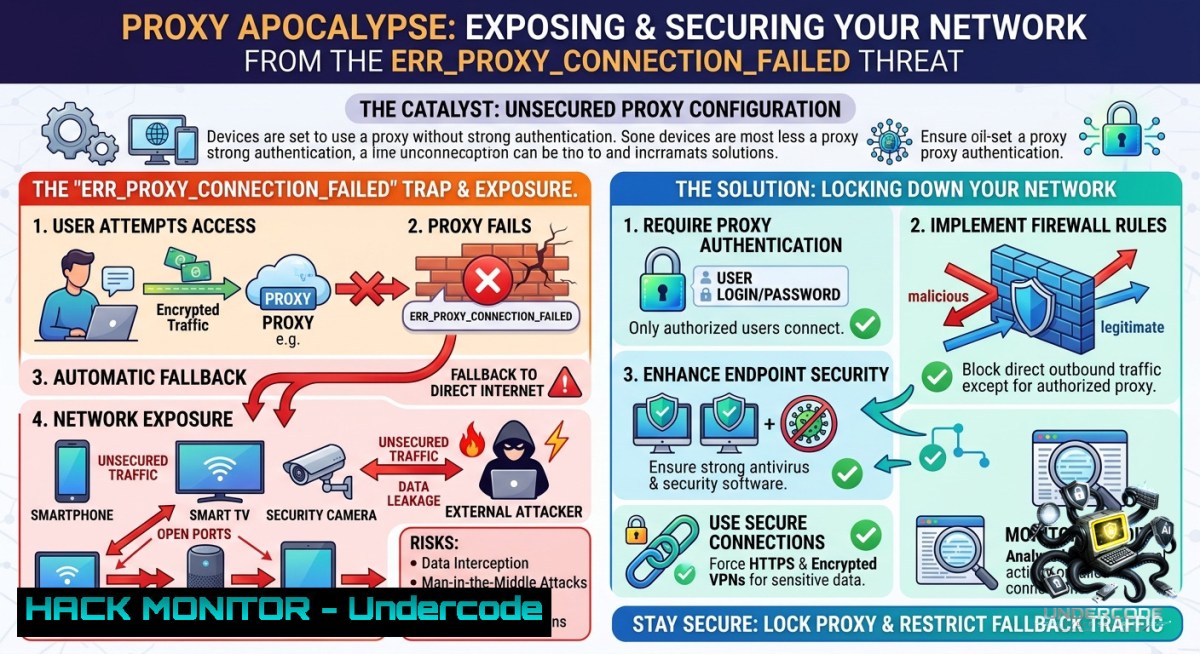
The dreaded `ERR_PROXY_CONNECTION_FAILED` error is more than a nuisance—it’s a gateway to understanding how attackers exploit misconfigured proxy servers to intercept traffic, bypass security controls, and establish persistence. This article dissects the root causes of proxy failures, provides actionable command-line fixes for both Linux and Windows environments, and reveals how red teams weaponize proxy settings while blue teams can harden them.
Learning Objectives:
– Diagnose and resolve `ERR_PROXY_CONNECTION_FAILED` using native OS tools and browser configurations.
– Implement proxy-aware security measures to prevent man-in-the-middle (MITM) attacks and unauthorized traffic redirection.
– Apply Linux and Windows commands to audit, lock down, and restore proxy settings in enterprise and cloud environments.
You Should Know:
1. Decoding the Proxy Failure: From User Error to Attack Vector
A proxy server acts as an intermediary between a client and the internet. When you see `ERR_PROXY_CONNECTION_FAILED` (Chromium-based browsers) or similar errors (e.g., `HTTP 407`, `SOCKS5 timeout`), it typically means the client cannot reach the configured proxy—either because the proxy is down, the address/port is wrong, or network ACLs block the connection. However, from a cybersecurity perspective, this error also appears when malware changes your proxy settings to redirect traffic to a malicious server (e.g., for SSL stripping or credential harvesting).
Step‑by‑step guide to identify the culprit:
– Windows: Open Command Prompt as administrator and run `netsh winhttp show proxy`. This displays the system-wide proxy. Compare it with your browser’s proxy settings (Chrome → Settings → System → Open your computer’s proxy settings).
– Linux: Check environment variables: `echo $http_proxy $https_proxy $ftp_proxy $no_proxy`. Also review `/etc/environment` or `/etc/profile.d/proxy.sh` for persistent settings.
– Browser-only proxies: In Firefox, go to `about:preferencesnetwork` → Settings. In Chrome/Edge, check `–proxy-server` flag via `chrome://version` or Edge equivalent.
– Quick test: Disable proxy entirely (Windows: Settings → Network & Internet → Proxy → Automatically detect settings ON, Use proxy server OFF). If internet returns, the proxy config is wrong or the proxy server is unavailable.
2. Linux Command Arsenal: Reset and Harden Proxy Configurations
Attackers often plant proxy settings via shell profiles or systemd environment files. Red teams use this for traffic interception (e.g., `mitmproxy`), while blue teams must audit and restore.
Step‑by‑step hardening and verification:
– List all proxy environment variables for current user:
env | grep -i proxy
– Check system-wide proxy (Debian/Ubuntu):
cat /etc/environment | grep -i proxy
cat /etc/apt/apt.conf.d/ | grep -i proxy
– Remove malicious proxy (temporary):
unset http_proxy https_proxy ftp_proxy all_proxy
– Persistent removal – edit `~/.bashrc`, `~/.profile`, or `/etc/environment` and delete lines like `export http_proxy=http://malicious:8080`.
– Prevent future abuse – set immutable attribute on critical proxy configs (use with caution):
sudo chattr +i /etc/environment
– Verify no proxy leaks using `curl` with diagnostic flags:
curl -v --1oproxy '' https://api.ipify.org
This bypasses any proxy and shows your external IP.
3. Windows Deep Dive: PowerShell, Registry, and Group Policy Controls
Windows proxy settings are stored in the registry (`HKCU\Software\Microsoft\Windows\CurrentVersion\Internet Settings`) and can be manipulated by malware (e.g., ProxyShell, ProxyLogon aftermath). The `ERR_PROXY_CONNECTION_FAILED` often appears after a malicious PAC file is injected.
Step‑by‑step command-line recovery and auditing:
– View current proxy settings (PowerShell as admin):
Get-ItemProperty -Path "HKCU:\Software\Microsoft\Windows\CurrentVersion\Internet Settings" | Select ProxyEnable, ProxyServer, ProxyOverride
– Disable proxy (immediate reset):
Set-ItemProperty -Path "HKCU:\Software\Microsoft\Windows\CurrentVersion\Internet Settings" -1ame ProxyEnable -Value 0
– Reset WinHTTP proxy (used by many applications and services):
netsh winhttp reset proxy
– Detect rogue PAC files – look for `AutoConfigURL` in registry:
Get-ItemProperty -Path "HKCU:\Software\Microsoft\Windows\CurrentVersion\Internet Settings" | Select AutoConfigURL
If it points to an external domain (e.g., `http://evil.com/proxy.pac`), remove it:
Remove-ItemProperty -Path "HKCU:\Software\Microsoft\Windows\CurrentVersion\Internet Settings" -1ame AutoConfigURL
– Enforce proxy via Group Policy to prevent user tampering – navigate to `gpedit.msc` → Computer Configuration → Administrative Templates → Windows Components → Internet Explorer → “Make proxy settings per-machine (rather than per-user)”. Enable and define a safe proxy.
4. Proxy Misconfiguration as an API Security Risk
Cloud-1ative environments and API gateways often rely on proxy configurations for egress traffic. A misconfigured `HTTP_PROXY` in a Kubernetes pod or CI/CD runner can leak internal API keys, cause `ERR_PROXY_CONNECTION_FAILED`, or even route traffic through an attacker-controlled endpoint.
Step‑by‑step secure proxy implementation for APIs:
– In Docker containers, avoid using `–env http_proxy=http://host.docker.internal:3128` if the proxy is untrusted. Instead, use explicit `–1etwork host` or configure `no_proxy` for internal services:
docker run -e HTTP_PROXY=http://corp-proxy:8080 -e NO_PROXY=localhost,127.0.0.1,.svc.cluster.local myapp
– Kubernetes – never set proxy environment variables in the pod spec without `no_proxy` covering cluster CIDRs. Use a mutating admission webhook to validate proxy settings.
– CI/CD secrets exposure – GitHub Actions, GitLab CI, Jenkins that use `http_proxy` may log the proxy URL. If that proxy requires authentication (e.g., `http://user:pass@proxy`), credentials leak in build logs. Mitigation: use dedicated secret variables and configure proxy via `http://$PROXY_USER:$PROXY_PASS@proxy` only in secure contexts.
– Test for proxy leaks with a simple Python script:
import os
print("HTTP_PROXY:", os.getenv('HTTP_PROXY'))
print("HTTPS_PROXY:", os.getenv('HTTPS_PROXY'))
Never commit this to logs.
5. Exploiting Proxy Failures for MITM and How to Defend
An attacker who can trigger `ERR_PROXY_CONNECTION_FAILED` can also force a fallback to direct internet access, bypassing corporate content filters. Worse, if they control a proxy server that occasionally responds, they can perform SSL/TLS interception (using a self-signed certificate that the victim unknowingly accepts).
Step‑by‑step red-team simulation and blue-team mitigation:
– Simulate a rogue proxy (for authorized testing only):
 Install mitmproxy
sudo apt install mitmproxy
mitmweb --listen-port 8080 --web-port 8081
Then configure a target machine’s proxy to your IP:8080.
– Detect unexpected proxy changes using Sysmon (Windows) event ID 13 (Registry modification) on `HKCU\…\Internet Settings\ProxyEnable`.
– Linux audit with `auditd`:
sudo auditctl -w /etc/environment -p wa -k proxy_change
sudo ausearch -k proxy_change
– Mitigation – deploy a transparent proxy (e.g., Squid in intercept mode) at the network perimeter so that clients cannot bypass it by disabling proxy settings. Also enforce certificate pinning and use TLS inspection with a corporate CA that rejects untrusted proxies.
– User training – teach employees to recognize `ERR_PROXY_CONNECTION_FAILED` and report it to security instead of googling “how to disable proxy” which may lead to malicious forum posts.
6. Restoring Connectivity Without Compromising Security
When a legitimate proxy server fails (e.g., IT updates the proxy address), users may brute-force settings or disable security tools. Provide controlled fallback mechanisms.
Step‑by‑step safe recovery procedure:
– Windows (managed endpoints) – deploy a PowerShell script via SCCM that checks proxy availability every 5 minutes:
$proxy = "http://corp-proxy.contoso.com:8080"
if (Test-Connection (($proxy -split "//")[bash] -split ":")[bash] -Count 1 -Quiet) {
 proxy is alive, nothing to do
} else {
Write-EventLog -LogName Application -Source "ProxyMonitor" -EventId 100 -EntryType Warning -Message "Proxy unreachable, switching to direct access temporarily"
Set-ItemProperty -Path "HKCU:\...\Internet Settings" -1ame ProxyEnable -Value 0
}
– Linux – use `nc` to test proxy port:
nc -zv proxy.corp.com 8080 && echo "Proxy OK" || (unset http_proxy && notify-send "Proxy failed - direct access enabled")
– Browser extensions – recommend only official proxy management extensions (e.g., FoxyProxy) that log changes and allow quick switching without lowering security posture.
What Undercode Say:
– Key Takeaway 1: `ERR_PROXY_CONNECTION_FAILED` is not just a connectivity error—it’s a potential indicator of compromise (IoC). Malicious proxy changes are a common persistence mechanism used by info-stealers and ransomware gangs to redirect traffic to command-and-control servers.
– Key Takeaway 2: Hardening proxy settings across Windows, Linux, and cloud environments requires a layered approach: OS-level registry/ENV monitoring, network-level transparent proxies, and user training to avoid manual overrides that weaken security.
Analysis: Proxy misconfigurations rank high on the OWASP Top 10 for API security (improper assets management) and are often overlooked in penetration tests. Red teams can escalate from a simple `ERR_PROXY_CONNECTION_FAILED` to full traffic interception within minutes if the victim trusts a malicious proxy auto-config (PAC) file. Conversely, blue teams that routinely audit proxy settings using the commands above can detect lateral movement and data exfiltration attempts. The shift to hybrid work has increased reliance on proxies for cloud security gateways, making this error both a technical headache and a security telemetry goldmine. Organizations should treat every proxy failure as a potential incident, not a helpdesk ticket.
Prediction:
– -1 Increased targeting of proxy auto-config (PAC) files – Attackers will embed malicious JavaScript in PAC files to selectively redirect banking or cloud console traffic while leaving social media untouched, evading user suspicion. Expect AI-driven PAC generators that adapt to victim behavior.
– -1 Rise of “proxy-less” malware – To avoid detection via proxy registry changes, next-gen malware will use DNS over HTTPS (DoH) and custom Tunneling protocols, bypassing corporate proxies entirely and rendering `ERR_PROXY_CONNECTION_FAILED` irrelevant.
– +1 Automated proxy hardening in CI/CD pipelines – Security tools like Checkov and Terrascan will soon include rules to detect unsafe `http_proxy` declarations in Dockerfiles and Kubernetes manifests, preventing leaks before deployment.
– +1 Native browser sandboxing for proxy settings – Chromium and Firefox may introduce permission prompts before any extension or OS-level proxy change, reducing the success rate of user-assisted proxy attacks.
▶️ Related Video (72% Match):
🎯Let’s Practice For Free:
🎓 Live Courses & Certifications:
[Join Undercode Academy for Verified Certifications](https://undercode.co.uk/certifications/)
🚀 Request a Custom Project:
Secure, high-velocity infrastructure and disruptive technological engineering. Contact our engineering team for high-tier development and proprietary systems:
[[email protected]](mailto:[email protected])
💎 Smart Architecture | 🛡️ Secure by Design | ⭐ Trusted by Thousands
IT/Security Reporter URL:
Reported By: [Mohit Hackernews](https://www.linkedin.com/posts/mohit-hackernews_ai-just-found-21-zero-days-in-ffmpeg-share-7468928542160941056-N8-B/) – Hackers Feeds
Extra Hub: Undercode MoN
Basic Verification: Pass ✅
🔐JOIN OUR CYBER WORLD [ CVE News • HackMonitor • UndercodeNews ]
[💬 Whatsapp](https://undercode.help/whatsapp) | [💬 Telegram](https://t.me/UndercodeCommunity)
📢 Follow UndercodeTesting & Stay Tuned:
[𝕏 formerly Twitter 🐦](https://x.com/undercodeupdate) | [@ Threads](https://www.threads.net/@undercodetesting) | [🔗 Linkedin](https://www.linkedin.com/company/undercodetesting/) | [🦋BlueSky](https://bsky.app/profile/undercode.bsky.social)


