Listen to this Post
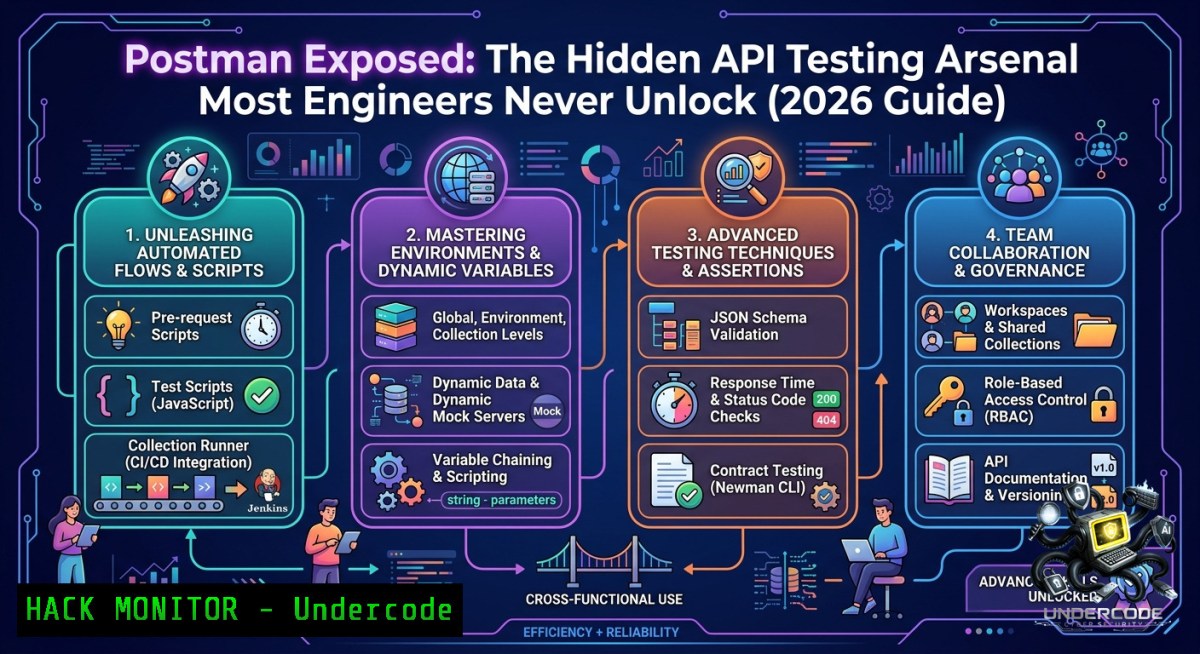
Introduction:
Most developers treat Postman as a glorified cURL wrapper—click “Send,” eyeball the response, and move on. In reality, Postman is a complete API lifecycle platform that bridges development, testing, automation, and collaboration. Mastering its deeper features transforms how you debug, validate, and secure APIs, turning reactive testing into proactive quality assurance.
Learning Objectives:
- Master Postman environments, variables, and collections to build scalable, reusable API test suites
- Automate API validation and security scanning using Collection Runner and Newman in CI/CD pipelines
- Implement mock servers and live documentation to accelerate parallel frontend/backend development
You Should Know:
- Environment & Variable Mastery – Dynamic Configurations Without Hardcoding
Postman environments let you switch between development, staging, and production instantly. Variables like{{base_url}},{{api_key}}, and `{{user_id}}` keep requests portable.
Step‑by‑step guide:
- Create environments: Click “Environments” → “+” → name it “Development”. Add variable `base_url` with initial value `https://dev.api.example.com`.
– Use variables in requests: `GET {{base_url}}/users/{{user_id}}`. - Automate variable assignment using pre‑request scripts or test scripts:
// Pre‑request script: generate timestamp
pm.variables.set("timestamp", Date.now());</li>
</ul>

// Test script: extract JWT token from response and set environment variable
const jsonData = pm.response.json();
pm.environment.set("auth_token", jsonData.token);
– On Linux/macOS or Windows (Git Bash), you can also drive Postman via Newman with environment files:
newman run collection.json -e dev_environment.json --env-var "user_id=42"
Why it matters: Hardcoded URLs and tokens break as soon as you move to production. Variables make test suites maintainable and team‑friendly.
- Test Scripts & Assertions – Turn Requests into Automated Checks
Postman’s test scripts run after a response arrives. They validate status codes, response times, schema, and even security properties.
Step‑by‑step guide:
- Open a request, go to “Tests” tab. Write assertions using the `pm` object:
pm.test("Status code is 200", () => pm.response.to.have.status(200));
pm.test("Response time < 300ms", () => pm.response.to.have.responseTime.below(300));
pm.test("Content-Type is JSON", () => pm.response.to.have.header("Content-Type", "application/json"));</li>
</ul>

// Security: ensure no sensitive data in response
const body = pm.response.json();
pm.test("No password field exposed", () => pm.expect(body).to.not.have.property("password"));

// Schema validation (using tv4 or built‑in)
const schema = { "type": "object", "properties": { "id": { "type": "integer" } } };
pm.test("Schema valid", () => pm.response.to.have.jsonSchema(schema));
– Run the collection manually or via Collection Runner. Failed tests stop the run or flag errors.
Windows/Linux tip: Export the collection and use Newman to get JUnit‑style reports:newman run collection.json --reporters junit --reporter-junit-export results.xml
Use these results in Jenkins or Azure DevOps to enforce API quality gates.
- Collection Runner & Newman Automation – CI/CD Ready API Testing
The Collection Runner runs an entire folder of requests, with data files for parameterized tests. Newman is its CLI counterpart, ideal for headless automation.
Step‑by‑step guide:
- Install Node.js, then Newman:
Linux / macOS / Windows (Node.js required)
npm install -g newman
- Export your collection and environment as JSON files from Postman.
- Run a basic test:
newman run MyAPI.Collection.json -e Staging.Environment.json
- Use a CSV/JSON data file to loop through test cases:
newman run collection.json --iteration-data test_data.csv --iterations 5
- Integrate into GitHub Actions (
.github/workflows/api-test.yml):</li> <li>name: Run Postman tests run: | npm install -g newman newman run postman/collection.json -e postman/env.json --reporters cli,json
Pro security use‑case: Combine Newman with OWASP API Security Top 10 test cases (e.g., BOLA, excessive data exposure) and fail the pipeline if critical vulnerabilities are detected.
- Mock Servers – Parallel Development Without Backend Code
Mock servers simulate API endpoints based on your collection’s example responses. Frontend teams can start integration immediately.
Step‑by‑step guide:
- In a collection, add an example response: select a request → “Save Response” → “Save as Example”. Edit the example to return fake data.
- Click the collection’s “…” menu → “Mock Collection” → give it a name. Postman generates a mock URL like `https://mock.postman.com/…`.
– Frontend code calls `GET https://mock.postman.com/users/1` and receives the example response. - Later, switch the base URL to the real backend. No code changes required if using environment variables.
Advanced: Add mock server logic with “x‑mock‑response‑name” headers to select different examples dynamically. This allows simulating error cases (404, 500) before backend is ready.
- API Documentation Generation – Living Docs That Never Stale
Postman auto‑generates documentation from your collection. Every change to endpoints, headers, or examples updates the docs instantly.
Step‑by‑step guide:
- Add descriptions to each request, folder, and parameter (using Markdown).
- Click the collection → “View Documentation” → “Publish”. Postman gives you a public or team‑only URL.
- Embed the documentation in your internal developer portal.
- For offline or version‑controlled docs, export as HTML using Newman or the Postman API:
Using Postman API to generate documentation (requires API key)
curl -X POST https://api.getpostman.com/collections/{{collection_uid}}/documentation \
-H "X-Api-Key: {{your_api_key}}" \
-H "Content-Type: application/json"
Security note: Never publish production API keys in examples. Use placeholders like `{{api_key}}` and note in the docs that users must supply their own.
- Security Testing with Postman – Exploiting and Mitigating API Vulnerabilities
Postman isn’t just for functional tests; it’s a lightweight API security scanner. You can craft attack payloads and automate detection of common flaws.
Step‑by‑step guide:
- Broken Object Level Authorization (BOLA): Use a pre‑request script to iterate over user IDs.
// Pre‑request script for BOLA test
const userIds = [1, 2, 3, 99, "admin"];
const currentId = userIds[pm.iterationData.get("index") % userIds.length];
pm.variables.set("target_id", currentId);
Then request
GET /api/users/{{target_id}}. In test script, check if unauthorized access returns 200 OK. - Mass Assignment: Send extra fields in POST/PUT requests. Example:
{"username": "test", "is_admin": true}. Test if the server ignores or accepts the admin flag. - SQL Injection & NoSQL Injection: Replace parameter values with `’ OR ‘1’=’1` or
{"$ne": null}. Look for error messages or changed behavior. - Rate Limiting: Create a Collection Runner with 100 iterations and no delay. Check if the API returns 429 after a threshold.
- Automated security suite: Combine all attack requests in a “Security” folder. Run it nightly via Newman and send alerts on failures.
Mitigation commands (Linux/Windows for server hardening):
Rate limiting with Nginx (Linux) limit_req_zone $binary_remote_addr zone=api:10m rate=10r/s; Windows firewall blocking brute force attempts New-1etFirewallRule -DisplayName "Block excessive API calls" -Direction Inbound -Action Block -RemoteAddress @("1.2.3.4")- CI/CD Integration and Advanced Reporting – From Local Tests to Governance
Newman’s real power emerges when you plug it into enterprise pipelines. Combine with Postman’s API to upload results, track history, and enforce compliance.
Step‑by‑step guide:
- Generate HTML reports for management:
newman run collection.json -e env.json --reporters html --reporter-html-export test-report.html
- Upload results to Postman’s cloud (Team plan) using the `–reporters postman-api` flag.
- Use Jenkins pipeline with Postman stage:
stage('API Security Tests') { steps { sh 'newman run SecurityCollection.json -e ProdEnv.json --bail' } post { always { publishHTML([reportDir: '.', reportFiles: 'newman/.html']) } } } - For Windows Server CI/CD (Azure DevOps):
npm install -g newman
newman run $(Build.SourcesDirectory)/api-tests/collection.json -e $(Build.SourcesDirectory)/api-tests/azure.env.json
- Advanced: Use Postman’s “Monitor” feature to schedule collection runs every hour from Postman’s cloud, without maintaining your own runner.
What Undercode Say:
- Key Takeaway 1: Postman is not a toy; it’s a platform that covers the entire API lifecycle—from design to testing to documentation to monitoring.
- Key Takeaway 2: Engineers who automate API validation with environments, scripts, and CI/CD integration produce more reliable and secure backends than those who manually click “Send.”
- Analysis: The original post correctly identifies that memorizing HTTP methods is useless without understanding the request–response lifecycle. Postman democratizes that understanding by giving visual feedback and programmable hooks. However, many teams stop at functional testing and ignore security scripts (BOLA, injection, rate limiting). Adding security assertions transforms Postman into a first‑line defense against OWASP API Top 10. Moreover, coupling Newman with infrastructure‑as‑code (e.g., Terraform) allows you to test APIs before they are even deployed. The missing piece is AI‑assisted test generation: future versions could auto‑generate edge‑case payloads based on OpenAPI schemas, making Postman even more powerful. For now, mastering the seven steps above places you ahead of 95% of developers who only “scratch the surface.”
Prediction:
+1 Shift toward “API testing as code” will accelerate, with Postman collections stored in Git and Newman runs becoming mandatory in PR pipelines.
+1 Security testing will merge with functional testing; every collection will include a BOLA and injection folder, reducing API breach incidents.
-1 Teams that rely solely on Postman’s GUI for manual testing will fall behind as CI/CD‑native tools like Bruno and Hoppscotch gain traction.
-1 Over‑automation without maintaining test data and environments leads to false positives/negatives, eroding trust in API test suites.
+1 Postman’s mock servers and documentation features will become the de facto standard for API‑first design, outcompeting Swagger UI in collaborative enterprises.▶️ Related Video (82% Match):
🎯Let’s Practice For Free:
🎓 Live Courses & Certifications:
Join Undercode Academy for Verified Certifications
🚀 Request a Custom Project:
Secure, high-velocity infrastructure and disruptive technological engineering. Contact our engineering team for high-tier development and proprietary systems:
[email protected]
💎 Smart Architecture | 🛡️ Secure by Design | ⭐ Trusted by ThousandsIT/Security Reporter URL:
Reported By: Iamtolgayildiz Postman – Hackers Feeds
Extra Hub: Undercode MoN
Basic Verification: Pass ✅🔐JOIN OUR CYBER WORLD [ CVE News • HackMonitor • UndercodeNews ]
📢 Follow UndercodeTesting & Stay Tuned:
- Collection Runner & Newman Automation – CI/CD Ready API Testing
- Test Scripts & Assertions – Turn Requests into Automated Checks


