Listen to this Post
Introduction:
In the world of cybersecurity, the most devastating vulnerabilities often come not from complex stack overflows or zero-day exploits, but from simple logical oversights. A recent discovery on the popular art platform Pixiv highlights exactly this, where a business logic flaw allowed non-paying users to access premium ad-free browsing for free. This incident underscores a critical truth in API security: while we often focus on input validation and encryption, the server’s ability to verify a user’s current permissions is the bedrock of any secure application.
Learning Objectives:
- Understand how business logic flaws bypass traditional security controls.
- Learn to identify and mitigate authorization bypass vulnerabilities in REST APIs.
- Explore practical command-line and code examples for testing and hardening authorization checks.
You Should Know:
1. The Vulnerability: Trusting the Client’s Payload
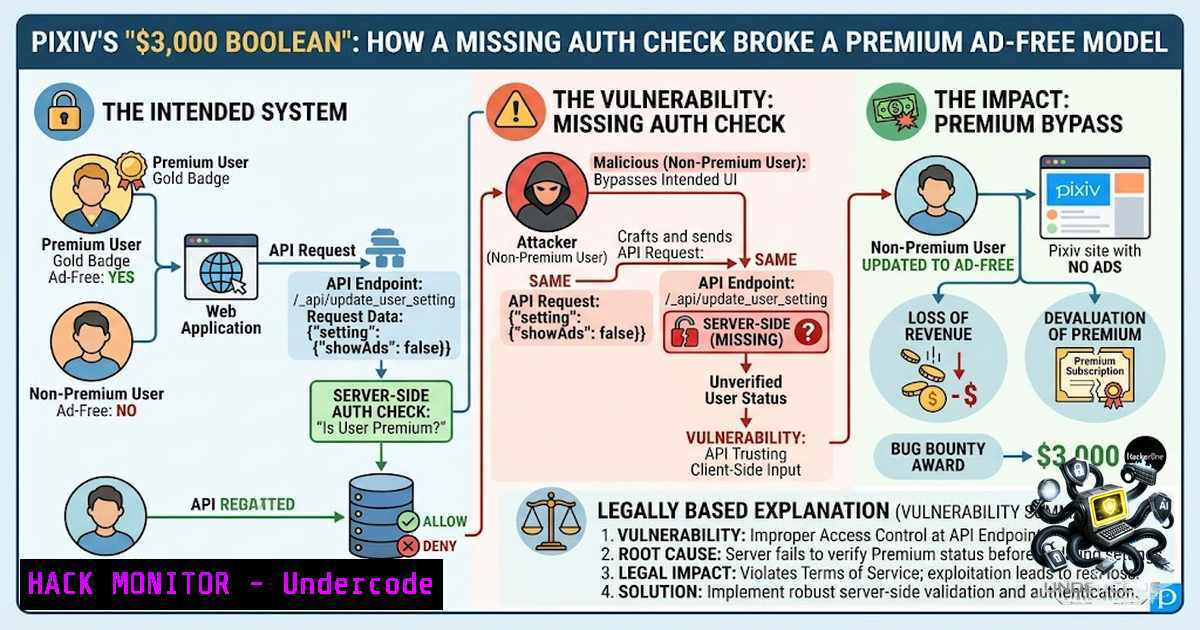
The vulnerability at Pixiv existed because the API endpoint responsible for updating user settings failed to verify the user’s premium status. The endpoint accepted a simple Boolean value and applied it without checking the user’s subscription level. This is a classic example of broken access control.
Step‑by‑step guide explaining what this does and how to use it:
1. The Attack Flow: An authenticated user navigates to the settings page. Using a tool like Burp Suite or even the browser’s developer tools, they intercept the request to / _api/update_user_setting.
2. The Payload: The attacker modifies the request body to include "showAds": false. The server receives this and, trusting the input, updates the user’s preference.
3. The Result: The frontend, displaying the new settings, no longer loads ad content for the user. The attack bypasses the premium check because the backend does not re-query the subscription database to compare the user’s requested setting with their actual account permissions.
Testing for This Flaw (Linux Command Example):
You can simulate this with `curl` to test if an endpoint is vulnerable.
 Simulating a legitimate premium user request (should succeed)
curl -X POST https://api.pixiv.net/_api/update_user_setting \
-H "Authorization: Bearer VALID_PREMIUM_TOKEN" \
-H "Content-Type: application/json" \
-d '{"setting":{"showAds":false}}'

Simulating a non-premium user request (should fail but returned success)
curl -X POST https://api.pixiv.net/_api/update_user_setting \
-H "Authorization: Bearer NON_PREMIUM_TOKEN" \
-H "Content-Type: application/json" \
-d '{"setting":{"showAds":false}}'
If both return {"success": true}, the endpoint is vulnerable.
2. The Root Cause: Missing Authorization Enforcement
The root cause was the lack of a server-side condition that checks the user’s role before applying the setting. The system effectively said, “If the user sends this value, apply it,” rather than, “If the user sends this value, check if they are allowed to have it, then apply it.”
Step‑by‑step guide explaining what this does and how to use it:
1. Identify the Resource: Determine the endpoint that controls a feature with tiered access (e.g., /admin, /settings, /api/v1/permissions).
2. Map the State: Understand what flags a system uses to define a user’s privileges (e.g., is_premium, role_id, account_type).
3. Implement the Fix: The server must retrieve the user’s current subscription status from the database and compare it to the requested change before committing it to the database.
Secure Code Example (Pseudocode/Node.js):
app.post('/_api/update_user_setting', authenticate, async (req, res) => {
const userId = req.user.id;
const { showAds } = req.body.setting;

// Retrieve user's current subscription status from DB
const user = await db.query('SELECT is_premium FROM users WHERE id = ?', [bash]);

// Authorization Check: Prevent non-premium users from disabling ads
if (showAds === false && user.is_premium !== true) {
return res.status(403).json({ error: "Premium subscription required for this action." });
}

// Update settings
await db.query('UPDATE user_settings SET show_ads = ? WHERE user_id = ?', [showAds, userId]);
res.json({ success: true });
});
3. API Security Checklist: Prevention & Mitigation
To avoid such vulnerabilities, a multi-layered approach to authorization is necessary. This involves principles like the “Principle of Least Privilege” and secure API design.
Step‑by‑step guide explaining what this does and how to use it:
1. Implement Role-Based Access Control (RBAC): Define clear roles (e.g., FREE, PREMIUM, ADMIN) and check these roles on every API endpoint that handles sensitive data or features.
2. Validate on Both Ends: Never rely solely on the frontend to disable buttons or hide options. The backend is the ultimate source of truth for permissions.
3. Use Middleware: In frameworks like Express or Django, create an `authorize` middleware that runs before the route logic to validate user permissions against the requested action.
4. Audit Logs: Log all changes to user privileges. If a free user tries to update a premium field, log the failed attempt for security monitoring.
Windows Command for API Testing (using PowerShell):
 Using PowerShell to test the endpoint with a non-premium token
$body = @{ setting = @{ showAds = $false } } | ConvertTo-Json
Invoke-RestMethod -Uri "https://api.pixiv.net/_api/update_user_setting" `
-Method Post `
-Headers @{ Authorization = "Bearer NON_PREMIUM_TOKEN" } `
-Body $body -ContentType "application/json"
4. The Business Logic Flaw: Beyond Code Execution
Many engineers assume a vulnerability requires arbitrary code execution to be critical. However, business logic flaws affect the core function of the application. In Pixiv’s case, the value proposition of the premium service was undermined, which directly impacts the company’s revenue model. This is why such bugs often receive high bounties; they strike at the heart of the business.
Step‑by‑step guide explaining what this does and how to use it:
1. Map the Business Flow: Before writing code, map out the user journey and privileges. (e.g., “Free user visits settings -> Clicks ‘Remove Ads’ -> System checks Premium flag -> If false, return error”).
2. Code Review: During peer reviews, ask the question: “Could a user with a different privilege level execute this action?”
3. Penetration Testing: When testing, specifically target the `PUT` and `POST` requests that modify user features. Change values from `false` to `true` or numbers from `0` to `1` to see if the server enforces boundaries.
5. Bug Bounty Hunter’s Perspective: Logic Hunting
For bug bounty hunters, logic bugs like this are gold. They are often more common than memory corruption vulnerabilities and require a unique mindset. Hunting for them involves thinking like a business analyst and asking, “What features are behind a paywall, and how can I trick the system into giving them to me?”
Step‑by‑step guide explaining what this does and how to use it:
1. Identify the “Gated” Feature: Find the paid features (e.g., ad removal, higher resolution downloads, analytics data).
2. Inspect the Requests: Look for API calls that handle these features.
3. Modify the Parameters: Try to send paid: true, premium: 1, or `allowAccess: yes` in the request.
4. Check Responsiveness: If the feature is unlocked after the API call, you have likely found an authorization bypass.
Resource Links (OSINT & Tools):
- OWASP API Security Top 10: API3:2023 Broken Object Level Authorization & API4:2023 Broken Function Level Authorization.
- Tool: Burp Suite Autorize (for automated authorization checks).
- Tool: Postman Runner (for testing API endpoints in bulk).
6. Securing Cloud and Server Environments
In a cloud environment (AWS, Azure, GCP), the permissions are managed via IAM (Identity and Access Management) policies. The same principle applies to application servers; verifying roles is critical to preventing privilege escalation.
Hardening Tips:
- Environment Variables: Store sensitive permission rules in environment variables (e.g.,
PREMIUM_FEATURES = ["ad_remove", "hd_video"]). - Policy-as-Code: Use tools like Open Policy Agent (OPA) to write policies that separate application logic from authorization logic.
3. Cloud Commands (AWS CLI):
 Example of checking user permissions in AWS
aws iam list-attached-user-policies --user-1ame PremiumUser
 Ensure your application mimics this level of strict access.
What Undercode Say:
- Key Takeaway 1: Server-side authorization is non-1egotiable; every “premium” feature must be gated by a server-side check.
- Key Takeaway 2: Business logic flaws are often easier to exploit and more valuable to attackers than complex technical exploits.
Analysis:
The Pixiv incident is a textbook example of a “client-side trust” failure. It reveals a significant gap in the development lifecycle where security requirements were not translated into code. The $3,000 bounty indicates that the company values this finding, but it also reveals a systemic issue. This isn’t a one-off mistake; it’s a lesson in design philosophy. The developer likely assumed the frontend would handle the logic, which is a dangerous assumption. For enterprises, this reinforces the need for a “Zero Trust” security model within the application itself—never trust, always verify, especially when money and subscriptions are involved.
Prediction:
- +1: This vulnerability will prompt a massive audit of paywalled features across other SaaS platforms, leading to an increase in similar bug bounties being reported in 2026.
- +1: Pixiv’s quick response and bounty payout will strengthen trust in their bug bounty program, encouraging more ethical hackers to focus on their platform.
- -1: Expect a rise in script-kiddie tools that automate the scanning of API endpoints for privilege escalation, increasing the noise security teams must filter through.
- -1: If not properly rectified with a thorough code review and developer training, this type of vulnerability is likely to resurface in new features introduced in the future.
- +1: This incident serves as a powerful case study for training junior developers, emphasizing the importance of “Defense in Depth” during API development, which will improve overall AppSec maturity.
▶️ Related Video (82% Match):
🎯Let’s Practice For Free:
🎓 Live Courses & Certifications:
Join Undercode Academy for Verified Certifications
🚀 Request a Custom Project:
Secure, high-velocity infrastructure and disruptive technological engineering. Contact our engineering team for high-tier development and proprietary systems:
[email protected]
💎 Smart Architecture | 🛡️ Secure by Design | ⭐ Trusted by Thousands
IT/Security Reporter URL:
Reported By: Bugbounty Businesslogic – Hackers Feeds
Extra Hub: Undercode MoN
Basic Verification: Pass ✅


