Listen to this Post
Introduction
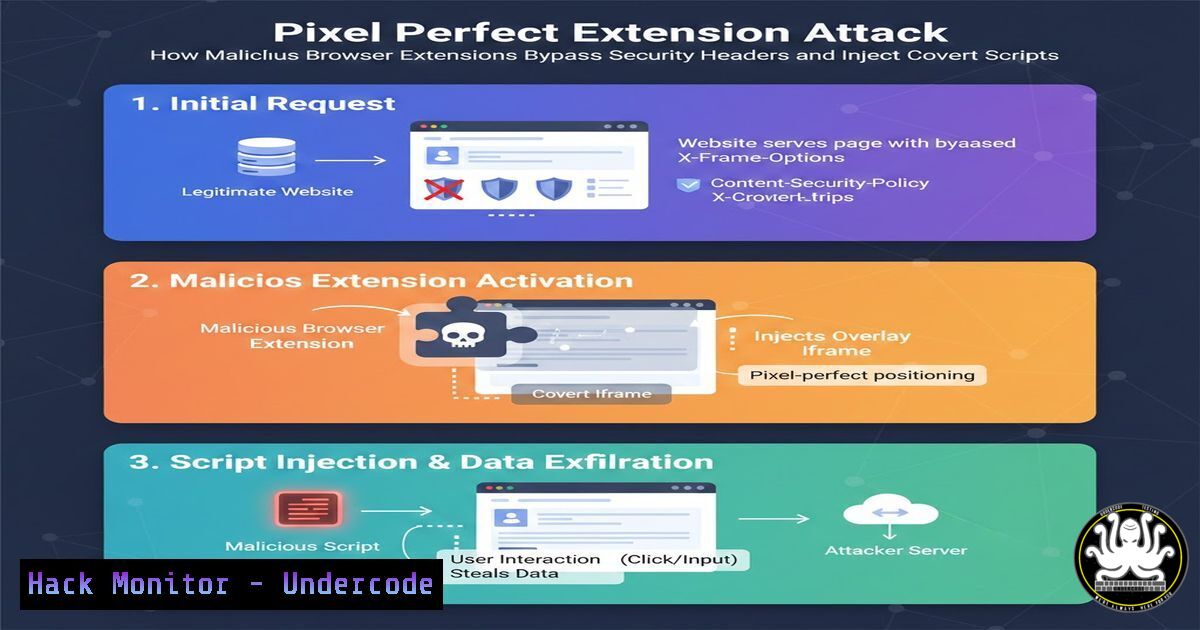
Browser extensions enhance productivity but also introduce a significant attack surface. The recently disclosed “Pixel Perfect” abuse demonstrates how a seemingly innocuous extension can covertly inject malicious scripts into every webpage and surgically remove critical security headers like Content-Security-Policy (CSP). This article dissects the technical mechanics behind such attacks, provides actionable steps to audit and harden your browser environment, and explores the evolving landscape of extension-based threats.
Learning Objectives
- Understand how browser extensions manipulate web content and headers using modern APIs.
- Identify indicators of compromise related to malicious extensions.
- Learn to audit installed extensions on Windows and Linux systems.
- Implement mitigation strategies through browser policies and user awareness.
- Analyze the impact of Manifest V3 on extension-based attacks.
You Should Know
1. Browser Extension Architecture and Permissions
Extensions operate through a combination of background scripts, content scripts, and a manifest file that declares required permissions. Malicious actors exploit these permissions to intercept network requests, modify DOM, and alter HTTP headers.
Step‑by‑step: Inspect Extension Permissions in Chrome
1. Open Chrome and navigate to `chrome://extensions/`.
2. Enable “Developer mode” (toggle in top‑right).
- Click “Details” on any extension, then scroll to “Permissions”.
- Look for excessive privileges like
<all_urls>,webRequest, or `declarativeNetRequest` – these allow global script injection and header manipulation.
Example Manifest (Malicious)
{
"manifest_version": 3,
"name": "Pixel Perfect",
"permissions": [
"declarativeNetRequest",
"scripting"
],
"host_permissions": ["<all_urls>"],
"background": {
"service_worker": "background.js"
}
}
This grants the extension the ability to modify headers on any site and inject scripts.
2. Covert Script Injection via Content Scripts
Attackers use content scripts to inject JavaScript directly into the page context, bypassing same‑origin policy. They can steal credentials, log keystrokes, or modify transactions.
Step‑by‑step: Simulate a Benign Injection
1. Create a folder named `test-inject`.
2. Inside, create `manifest.json`:
{
"manifest_version": 3,
"name": "Inject Demo",
"version": "1.0",
"content_scripts": [{
"matches": ["<all_urls>"],
"js": ["content.js"],
"run_at": "document_end"
}]
}
3. Create `content.js`:
console.log("Injected script running on: " + window.location.href);
// Malicious version would exfiltrate data
4. Load the extension via `chrome://extensions/` (Load unpacked).
- Visit any website and open DevTools console to see the log.
A real attack would obfuscate the code and send stolen data to a C2 server.
3. Removing Security Headers with declarativeNetRequest
Extensions using the `declarativeNetRequest` API can strip or override response headers, effectively disabling security mechanisms like CSP, X‑Frame‑Options, or HSTS.
Step‑by‑step: Create an Extension That Removes CSP
1. Create folder `csp-remover`.
2. `manifest.json`:
{
"manifest_version": 3,
"name": "CSP Remover",
"version": "1.0",
"permissions": ["declarativeNetRequest"],
"host_permissions": ["<all_urls>"],
"background": {
"service_worker": "background.js"
}
}
3. `background.js`:
chrome.declarativeNetRequest.updateDynamicRules({
addRules: [{
id: 1,
priority: 1,
action: {
type: "modifyHeaders",
responseHeaders: [
{ header: "content-security-policy", operation: "remove" },
{ header: "x-frame-options", operation: "remove" }
]
},
condition: { urlFilter: "", resourceTypes: ["main_frame", "sub_frame"] }
}]
});
4. Load the extension. Now any site visited will have CSP removed, making it vulnerable to XSS that the site itself might have prevented.
4. Detecting Malicious Extensions on Your System
Regular auditing of installed extensions is crucial. Use the following commands to list extensions across browsers.
On Linux (Chrome-based)
ls -la ~/.config/google-chrome/Default/Extensions/
 Each subfolder is an extension ID; check manifest.json inside
cat ~/.config/google-chrome/Default/Extensions/EXTENSION_ID/version/manifest.json | grep -E "permissions|host_permissions"
On Windows (PowerShell)
 List Chrome extensions from registry (for policies)
Get-ItemProperty "HKLM:\Software\Policies\Google\Chrome\ExtensionInstallForcelist"
 List user-installed extensions
Get-ChildItem "$env:LOCALAPPDATA\Google\Chrome\User Data\Default\Extensions"
Also check `chrome://policy` in the browser to see enforced extensions.
On macOS
ls ~/Library/Application\ Support/Google/Chrome/Default/Extensions/
5. Mitigation: Enforcing Extension Policies
Enterprises can use group policies to restrict extensions. For individuals, manual reviews and browser security settings are key.
Windows GPO (for Chrome/Edge)
- Navigate to Administrative Templates > Google Chrome > Extensions.
- Enable “Configure the list of force-installed apps and extensions” to whitelist only approved extensions.
- Use “ExtensionInstallBlacklist” with “ to block all except those force‑installed.
Linux (via JSON policy file)
Create `/etc/opt/chrome/policies/managed/extension_policy.json`:
{
"ExtensionInstallForcelist": ["extension_id;https://update.url"],
"ExtensionInstallBlacklist": [""]
}
For Individuals
- Regularly visit `chrome://extensions/` and remove any unknown extensions.
- Review permissions – if a calculator extension requests access to all websites, uninstall it.
- Use browser sandboxing features like Chrome Profiles to separate work/personal extensions.
6. Testing Website Resilience Against Extension Abuse
Simulate a malicious environment to understand how your site behaves when security headers are stripped.
Using Selenium (Python) to Load a Page with a Custom Extension
1. Install Selenium and ChromeDriver.
2. Create a Python script:
from selenium import webdriver
from selenium.webdriver.chrome.options import Options

options = Options()
options.add_argument("--load-extension=/path/to/csp-remover")
driver = webdriver.Chrome(options=options)
driver.get("https://example.com")

Check if CSP is missing by trying to inject a script via DevTools protocol
 (or simply inspect via browser console manually)
driver.execute_script("console.log('Testing script injection');")
driver.quit()
3. If the extension removed CSP, any script injection (even via XSS) might succeed where it would otherwise be blocked. Use this to test your own site’s fallback mechanisms.
- The Shift to Manifest V3: Security Gains and Cat‑and‑Mouse
Manifest V3 restricts extension capabilities to reduce abuse.
– `webRequest` blocking is replaced by `declarativeNetRequest` with a limited rule set.
– Host permissions must be explicitly granted by the user at install time.
– Remote‑hosted code is disallowed – all code must be bundled.
Check Manifest Version of an Extension
Open the extension’s `manifest.json` and look for "manifest_version". Versions 3 are the current standard. While V3 raises the bar, attackers adapt by using social engineering to obtain broad permissions and by obfuscating malicious intent in bundled code.
What Undercode Say
- Key Takeaway 1: Browser extensions wield immense power; users and administrators must treat them as critical security components. The ability to remove security headers undermines the very defenses websites rely on.
- Key Takeaway 2: Proactive auditing and strict policy enforcement are the most effective defenses. On Windows and Linux, simple command‑line checks can reveal suspicious extensions before they cause damage.
- Analysis: The Pixel Perfect abuse exemplifies the supply‑chain risk inherent in browser extensions. Attackers no longer need to compromise servers – they can manipulate the client directly. This shifts the responsibility to endpoint visibility and user education. As Manifest V3 limits some vectors, we will likely see a rise in spear‑phishing campaigns that trick users into granting excessive permissions. Organizations should treat extensions like any other software: inventory, approve, and continuously monitor.
Prediction:
Over the next 12‑24 months, as Manifest V3 becomes mandatory, we will witness a decline in large‑scale extension‑based attacks that rely on header stripping and global script injection. However, attackers will pivot to more targeted approaches, exploiting extensions that still gain high‑privilege access through social engineering. Browser vendors will respond with stricter permission prompts and real‑time scanning, but the ultimate safeguard remains a vigilant user base and robust endpoint detection capabilities.
🎯Let’s Practice For Free:
IT/Security Reporter URL:
Reported By: Tushar Subhra – Hackers Feeds
Extra Hub: Undercode MoN
Basic Verification: Pass ✅


