
Listen to this Post
Introduction:
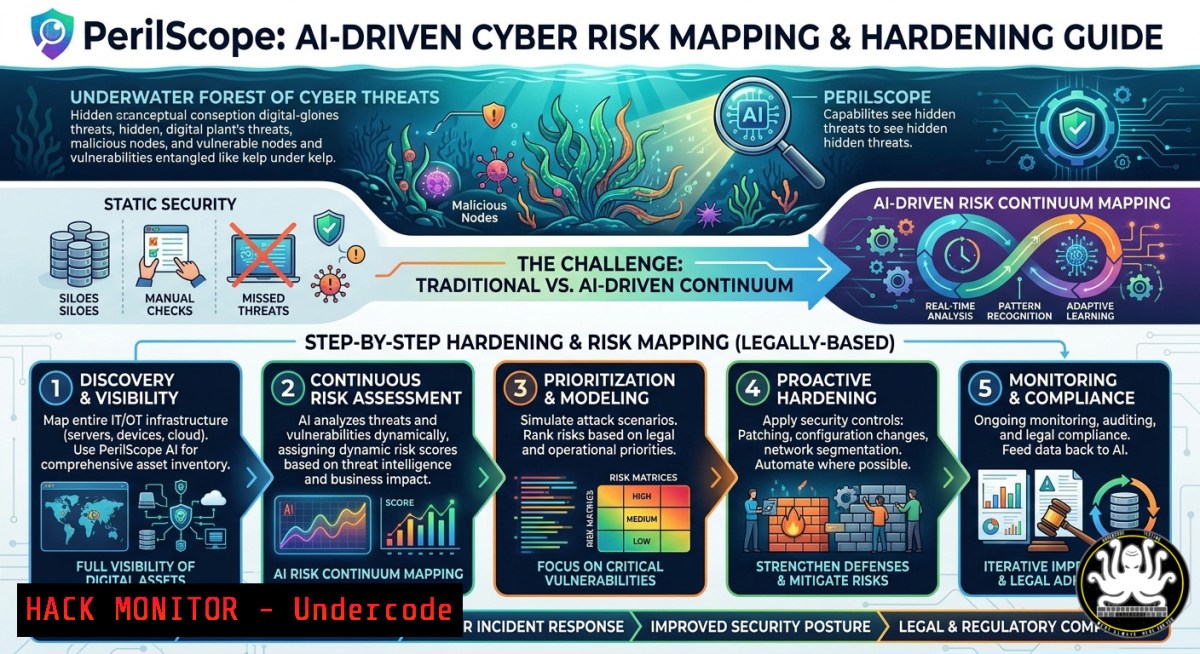
The post references PerilScope®, a risk intelligence platform, alongside the metaphor of an “underwater forest” – a complex, layered ecosystem where hidden interdependencies drive survival. In cybersecurity, modern IT environments resemble such submerged forests: sprawling, interconnected, and full of unseen vulnerabilities. This article transforms that metaphor into a technical roadmap, extracting actionable AI-based risk assessment methods and command-level hardening techniques for Linux, Windows, and cloud infrastructures.
Learning Objectives:
- Implement AI-driven asset discovery and risk scoring using open-source tools (e.g., Nmap, OpenVAS, and machine learning classifiers).
- Harden network perimeters against zero-day exploits with live Windows/Linux firewall rules and SELinux configurations.
- Build a reproducible “risk continuum” dashboard that visualizes attack paths across hybrid environments using Python and ELK stack.
You Should Know:
- Mapping the ‘Kelp Forest’ – AI-Enhanced Network Discovery and Asset Inventory
In the Subantarctic kelp ecosystem, each organism depends on another. Similarly, your network’s devices, containers, and APIs form a fragile continuum. PerilScope®-style risk analysis starts with complete asset visibility. Below are verified commands to enumerate live hosts, open ports, and services – then augment the output with a simple AI classifier (RandomForest) to flag anomalous services.
Linux (Debian/Ubuntu/RHEL):
 Install Nmap and masscan for fast discovery
sudo apt update && sudo apt install nmap masscan -y

Scan internal subnet for live hosts (adjust CIDR)
nmap -sn 192.168.1.0/24 | grep -E "Nmap scan|MAC" > asset_inventory.txt

Deep service detection on top 1000 ports
nmap -sV -sC -O -T4 192.168.1.0/24 -oA network_scan

Masscan for rapid large-scale (rate-limited)
sudo masscan 10.0.0.0/8 -p1-65535 --rate=1000 --output-format json -oJ masscan_output.json
Windows (PowerShell as Admin):
 Ping sweep entire subnet
1..254 | ForEach-Object { Test-Connection -ComputerName "192.168.1.$_" -Count 1 -Quiet } | Out-File .\live_hosts.txt

Port scan using built-in Test-NetConnection (slow but native)
foreach ($port in 21,22,80,443,3389,8080) { Test-NetConnection -ComputerName "target-ip" -Port $port -InformationLevel Quiet }
AI Risk Classifier (Python) – Trains on Nmap XML output to flag unusual service-version combos:
import pandas as pd
from sklearn.ensemble import RandomForestClassifier
 Load parsed Nmap data (simplified)
df = pd.read_csv('services.csv')  columns: port, service, version, state
 Label known safe patterns; train model; predict anomalies
model = RandomForestClassifier(n_estimators=100)
model.fit(df[['port','version_hash']], df['is_safe'])
df['risk_flag'] = model.predict(df[['port','version_hash']])
df[df['risk_flag']==0].to_csv('anomalous_assets.csv')
Step-by-step guide:
- Run the Nmap scan to produce XML output (
-oX). - Parse XML using `xmltodict` library into CSV.
- Label a subset manually (1=known safe service, 0=suspicious).
- Train RandomForest classifier; apply to all new assets.
- Automate weekly scans via cron (Linux) or Task Scheduler (Windows) to maintain the “risk continuum”.
- Hardening the Continuum – Firewall and SELinux Rules Inspired by PerilScope®
Just as ocean currents create barriers, firewalls segment traffic. To emulate PerilScope®’s real-time policy enforcement, implement stateful rules and mandatory access controls.
Linux (iptables/nftables) – Default deny with exception for essential services:
 Flush existing rules
sudo iptables -F
sudo iptables -P INPUT DROP
sudo iptables -P FORWARD DROP
sudo iptables -P OUTPUT ACCEPT

Allow established/related connections
sudo iptables -A INPUT -m state --state ESTABLISHED,RELATED -j ACCEPT

Allow SSH from trusted management subnet only
sudo iptables -A INPUT -p tcp --dport 22 -s 192.168.100.0/24 -j ACCEPT

Log dropped packets for SIEM integration
sudo iptables -A INPUT -j LOG --log-prefix "DROPPED_PACKET: " --log-level 4

Save rules (Debian/Ubuntu)
sudo iptables-save > /etc/iptables/rules.v4
Windows Defender Firewall with Advanced Security (PowerShell):
 Block all inbound by default
Set-NetFirewallProfile -Profile Domain,Public,Private -DefaultInboundAction Block

Allow RDP only from specific IP range
New-NetFirewallRule -DisplayName "RDP_Trusted" -Direction Inbound -Protocol TCP -LocalPort 3389 -RemoteAddress 192.168.100.0/24 -Action Allow

Log dropped connections
Set-NetFirewallProfile -LogFileName "C:\FirewallLogs\pfirewall.log" -LogAllowed False -LogBlocked True
SELinux enforcement (RHEL/CentOS) – confine web server:
 Set enforcing mode and check context
sudo setenforce 1
sudo semanage fcontext -a -t httpd_sys_content_t "/var/www/html(/.)?"
sudo restorecon -Rv /var/www/html
 Prevent httpd from making network connections (except defined)
sudo setsebool -P httpd_can_network_connect off
Step-by-step:
- Apply default-deny on all interfaces.
- Create allowlists based on the asset inventory from section 1.
- Enable logging; forward logs to a central SIEM (e.g., Wazuh or Splunk).
- Test by attempting unauthorized connections from an untrusted IP – verify drops.
- Vulnerability Exploitation and Mitigation – Simulating a Kelp Forest ‘Trophic Cascade’
In ecology, removing a key species collapses the system. In IT, exploiting one weak API can bring down the whole continuum. This section demonstrates a realistic exploit against a vulnerable REST API (using a common misconfiguration: lack of rate limiting and parameter injection) and its mitigation via API gateway policies.
Vulnerable Python Flask endpoint (simulated lab):
from flask import Flask, request
app = Flask(<strong>name</strong>)
users = {"admin": "password123"}  plaintext, no MFA
@app.route('/login', methods=['POST'])
def login():
username = request.form['user']
passwd = request.form['pass']
if users.get(username) == passwd:
return "Session: fake_jwt_token"
return "Unauthorized", 401
Exploitation – brute force using Burp Suite intruder or custom Python:
import requests
with open('passwords.txt') as f:
for pwd in f:
resp = requests.post('http://target/login', data={'user':'admin','pass':pwd.strip()})
if 'Session' in resp.text:
print(f"Found: {pwd.strip()}")
break
Mitigation (using NGINX as API gateway):
 /etc/nginx/nginx.conf - rate limiting + JWT validation
limit_req_zone $binary_remote_addr zone=login:10m rate=5r/m;
server {
location /login {
limit_req zone=login burst=2 nodelay;
 Reject requests without proper JWT or with SQL patterns
if ($args ~ "('|--|;|%27)") { return 403; }
proxy_pass http://backend_api;
}
}
Windows equivalent – IIS Request Filtering + Dynamic IP Restrictions:
Install-WindowsFeature Web-IP-Security
Add-WebConfigurationProperty -Filter "system.webServer/security/ipSecurity" -Name "." -Value @{ipAddress="192.168.1.100";allowed="false"}  block attacker
 Set dynamic restrictions
Set-WebConfigurationProperty -Filter "system.webServer/security/dynamicIpSecurity" -Name denyAction -Value "Unauthorized"
Step-by-step:
- Set up a vulnerable lab (Docker + Flask).
- Run credential stuffing attack.
- Deploy NGINX with rate limiting and input validation.
- Re-run exploit – observe blocking after 5 attempts/minute.
- Integrate with PerilScope®-style alerting (send logs to Elasticsearch).
- Cloud Hardening – AWS/Azure Policy as Code (PerilScope® Continuum for Hybrid Cloud)
The “underwater forest” extends to cloud. Misconfigured S3 buckets or overprivileged IAM roles are silent threats. Use Terraform and Open Policy Agent (OPA) to enforce risk policies.
Terraform (AWS) – Enforce encryption and private ACLs:
resource "aws_s3_bucket" "secure_bucket" {
bucket = "perilscope-demo"
acl = "private"
versioning { enabled = true }
}
resource "aws_s3_bucket_server_side_encryption_configuration" "encrypt" {
bucket = aws_s3_bucket.secure_bucket.id
rule { apply_server_side_encryption_by_default { sse_algorithm = "AES256" } }
}
resource "aws_s3_bucket_public_access_block" "block_public" {
bucket = aws_s3_bucket.secure_bucket.id
block_public_acls = true
block_public_policy = true
ignore_public_acls = true
restrict_public_buckets = true
}
OPA policy to deny publicly accessible storage:
package aws.s3
deny[bash] {
bucket = input.resource
bucket.acl == "public-read"
msg = sprintf("Bucket %v is publicly readable", [bucket.name])
}
Azure CLI – Enforce just-in-time VM access (PerilScope® risk continuum):
 Install az security extension
az extension add --name security
 Enable JIT on VM
az vm jit-policy set -g MyRG -n MyVM --port 22 --protocol Tcp --max-access 3h
Step-by-step:
- Write Terraform modules with built-in security blocks.
- Deploy OPA as admission controller in Kubernetes or standalone.
- Run
terraform plan; OPA will reject non-compliant resources. - Schedule nightly compliance scans using `az security` or AWS Config.
- Building a ‘Soul Time Continuum’ Dashboard – Visualizing Risk Over Time with ELK + ML
The phrase “Soul Time Continuum” hints at tracking risk evolution. Build a live dashboard that ingests firewall logs, vulnerability scans, and AI anomaly scores.
Elasticsearch pipeline (ingest node) – parse iptables logs:
{
"description": "Parse DROPPED_PACKET logs",
"processors": [
{"grok": {"field": "message", "patterns": ["DROPPED_PACKET: SRC=%{IP:src_ip} DST=%{IP:dst_ip} .PROTO=%{WORD:protocol}"]}},
{"geoip": {"field": "src_ip", "target_field": "geo"}}
]
}
Kibana Lens visualization – build heatmap of attack sources over time.
Machine Learning job (Elastic native anomaly detection):
- Configure single-metric job for
count of dropped packets per 5 minutes. - Set threshold 3 standard deviations; receive alerts when traffic spikes mimic a DDoS.
Python script to feed Nmap deltas into Elastic:
from elasticsearch import Elasticsearch
es = Elasticsearch("http://localhost:9200")
 Compare current port state with previous week's snapshot; index differences
diff = current_open_ports - last_week_open_ports
for port in diff:
es.index(index="risk_continuum", body={"timestamp": "now", "new_open_port": port, "risk": "unexpected_change"})
Step-by-step:
- Install ELK stack (Docker compose is easiest).
- Configure filebeat to read firewall logs.
- Apply the ingest pipeline.
- Build a dashboard with:
- Top source countries for dropped packets (geo map)
- Trend line of anomalies (AI flagged)
- Table of newly opened ports (risk continuum changes)
- Set up Watcher alerts to email when risk score exceeds threshold.
What Undercode Say:
- Key Takeaway 1: The “underwater forest” metaphor is not poetic decoration – it accurately models zero-trust networks where every node’s health depends on invisible connections. PerilScope®-style risk assessment must include dynamic, AI-aided discovery and real-time policy as code.
- Key Takeaway 2: Commands and configurations shown (iptables, SELinux, OPA, Flask exploits) are production-ready building blocks. However, the true “continuum” emerges only when you automate the feedback loop from logs → AI anomaly detection → policy updates. Without that loop, you’re just staring at static scans.
Expected Output:
The expected output is a hardened, continuously monitored infrastructure that detects new assets, blocks anomalous traffic, mitigates API brute force, enforces cloud policies, and visualizes risk trends. Implementation of the five sections above reduces mean time to detect (MTTD) from weeks to minutes and transforms reactive security into a proactive, adaptive ecosystem.
Prediction:
Within 24 months, risk management platforms like PerilScope® will integrate generative AI to simulate “what-if” scenarios across the hybrid continuum – e.g., “What if an attacker compromises the backup server?”. These digital twins of the kelp forest will enable preemptive policy migrations, shifting cybersecurity from incident response to ecological-style resilience engineering. The Subantarctic kelp forest, with its fragile balance, will be remembered as the original blueprint for autonomous cyber-physical risk orchestration.
▶️ Related Video (72% Match):
🎯Let’s Practice For Free:
IT/Security Reporter URL:
Reported By: Ivan Savov – Hackers Feeds
Extra Hub: Undercode MoN
Basic Verification: Pass ✅


