Listen to this Post
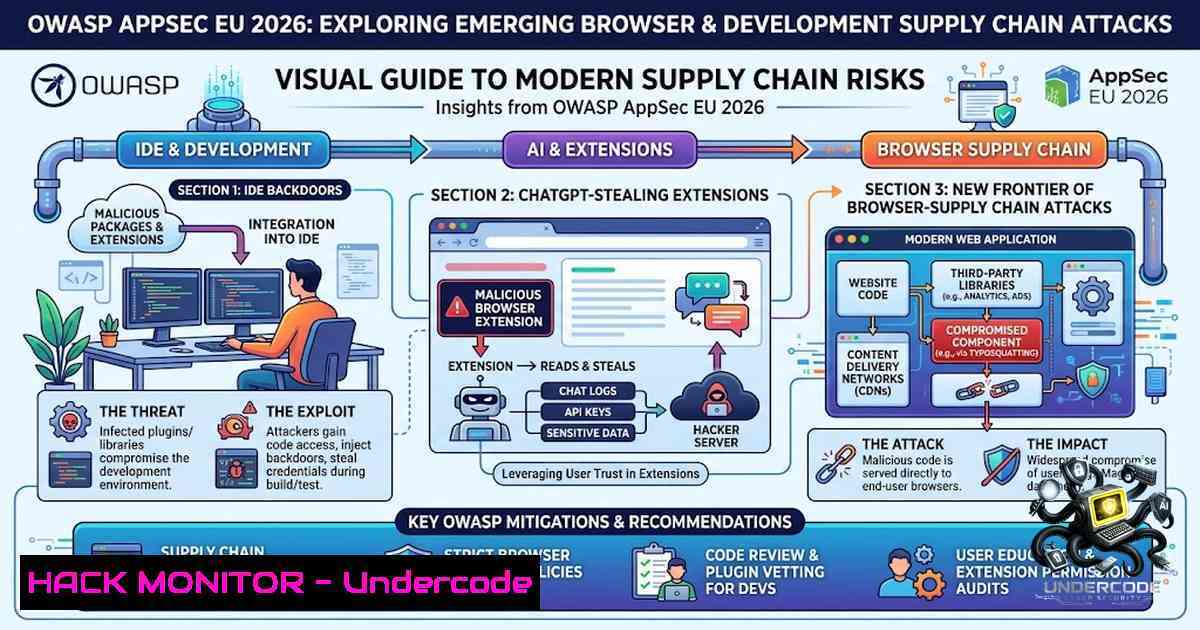
Introduction
The modern software supply chain extends far beyond open-source dependencies and build pipelines—it now reaches directly into the integrated development environments (IDEs) developers use daily and the browser extensions that power AI-assisted workflows. At OWASP Global AppSec EU 2026 in Vienna, security researchers demonstrated live how Chrome extensions can silently exfiltrate entire ChatGPT conversations via DOM manipulation, while separate attack waves revealed malicious JetBrains plugins stealing API keys from unsuspecting developers. These converging threats demand a fundamental rethinking of trust boundaries in the developer toolchain.
Learning Objectives
- Understand how malicious browser extensions abuse DOM access and Chrome APIs to exfiltrate AI conversations and browsing data without user knowledge
- Learn to identify and mitigate IDE plugin vulnerabilities that expose API keys and credentials to attacker-controlled infrastructure
- Master practical detection, removal, and hardening techniques across Linux, Windows, and browser environments
You Should Know
- How Chrome Extensions Steal AI Conversations via DOM Manipulation
The attack demonstrated at OWASP Vienna exploits a deceptively simple mechanism: a Chrome extension with broad permissions reads the Document Object Model (DOM) of AI chat pages and exfiltrates the content. Two real-world malicious extensions—”Chat GPT for Chrome with GPT-5, Claude Sonnet & DeepSeek AI” (600,000+ users) and “AI Sidebar with Deepseek, ChatGPT, Claude and more” (300,000+ users)—collectively compromised nearly one million users.
How It Works:
Once installed, the extension registers a listener with the `chrome.tabs.onUpdated` API, monitoring every tab change and page load in real time. When the user navigates to `chatgpt.com` or deepseek.com, the extension generates a unique `gptChatId` per victim and begins scraping DOM elements containing prompts, responses, and session IDs. The stolen data is stored locally, then Base64-encoded and transmitted in batches to command-and-control (C2) servers such as `deepaichats[.]com` and `chatsaigpt[.]com` approximately every 30 minutes.
Critically, this attack does not require exploiting vulnerabilities in the AI services themselves—it simply reads what is already rendered on the page. The extensions request user consent under the guise of “collecting anonymous analytics,” masking the true scope of data theft.
Step‑by‑Step Guide to Detection and Removal:
On Windows (Chrome/Edge/Brave):
- Open your browser and navigate to `chrome://extensions` (or `edge://extensions` for Edge).
2. Enable “Developer mode” (toggle in top-right corner).
- Review all installed extensions carefully. Look for unfamiliar names or extensions requesting broad permissions like “Read and change all data on websites you visit.”
- Identify and remove the malicious extensions by their IDs:
– `fnmihdojmnkclgjpcoonokmkhjpjechg` (“Chat GPT for Chrome with GPT-5, Claude Sonnet & DeepSeek AI”)
– `inhcgfpbfdjbjogdfjbclgolkmhnooop` (“AI Sidebar with Deepseek, ChatGPT, Claude and more”)
On Linux (Chromium-based browsers):
 List all installed extensions by examining the Local Extension Settings directory
ls -la ~/.config/google-chrome/Default/Local\ Extension\ Settings/

Check for the presence of malicious extension IDs
grep -r "fnmihdojmnkclgjpcoonokmkhjpjechg" ~/.config/google-chrome/Default/
grep -r "inhcgfpbfdjbjogdfjbclgolkmhnooop" ~/.config/google-chrome/Default/

To remove, delete the extension directory directly (browser must be closed)
rm -rf ~/.config/google-chrome/Default/Extensions/fnmihdojmnkclgjpcoonokmkhjpjechg/
rm -rf ~/.config/google-chrome/Default/Extensions/inhcgfpbfdjbjogdfjbclgolkmhnooop/
Network Detection (Enterprise):
Monitor outbound traffic to known C2 domains:
– `deepaichats[.]com`
– `chatsaigpt[.]com`
– `chataigpt[.]pro`
– `chatgptsidebar[.]pro`
Use the following Suricata/Snort rule pattern:
alert tcp $HOME_NET any -> $EXTERNAL_NET $HTTP_PORTS
(msg:"Malicious Chrome Extension C2 - ChatGPT Stealer";
flow:to_server,established;
content:"deepaichats.com"; http_host;
classtype:trojan-activity; sid:2026001;)
- IDE Plugin Vulnerabilities: The API Key Exfiltration Threat
Parallel to the browser extension attacks, researchers uncovered a coordinated malware campaign in the JetBrains Marketplace targeting developers directly. More than a dozen malicious plugins disguised as AI coding assistants—offering chat, commit message generation, code review, bug finding, and unit test support—secretly exfiltrate API keys entered by developers.
The Attack Pattern:
The plugin requires an API key to function as promised, but instead of using it exclusively for legitimate API calls, the malicious component adds an additional exfiltration pathway. According to researchers, the exfiltration occurs over plaintext HTTP to attacker-controlled IP addresses. The malware is not dependent on exotic environments—it directly intercepts user interactions and remains “functional,” making detection significantly more difficult.
Step‑by‑Step Guide to IDE Security Hardening:
On Windows (JetBrains IDEs):
- Open your IDE and navigate to `File` → `Settings` →
Plugins. - Review all installed plugins. Remove any that are unfamiliar, unverified, or no longer maintained.
- Check the plugin’s marketplace page for download counts, reviews, and publisher verification badges.
- For API keys stored in IDE settings, rotate them immediately if you suspect compromise.
On Linux (JetBrains IDEs):
 Locate the plugins directory
find ~/.local/share/JetBrains -type d -1ame "plugins" 2>/dev/null

List installed plugins with their metadata
ls -la ~/.local/share/JetBrains//plugins/

Check for suspicious plugin JAR files
find ~/.local/share/JetBrains -1ame ".jar" -exec strings {} \; | grep -i "exfil|http://\|callback"
API Key Rotation and Monitoring:
 For OpenAI API keys - check usage for unauthorized calls
curl -H "Authorization: Bearer $OPENAI_API_KEY" \
https://api.openai.com/v1/usage

For AWS keys - check CloudTrail for anomalous usage
aws cloudtrail lookup-events --lookup-attributes AttributeKey=AccessKeyId,AttributeValue=$AWS_ACCESS_KEY_ID

Generic API key exposure check in code repositories
grep -r "sk-[a-zA-Z0-9]" . --include=".py" --include=".js" --include=".env"
- Supply Chain Security: From Dependencies to Developer Toolchains
OWASP has formally recognized the expanding attack surface with the introduction of A03:2025 – Software Supply Chain Failures, encompassing the entire ecosystem of dependencies, build systems, and distribution infrastructure. The OWASP Secure Pipeline Verification Standard (SPVS) now provides explicit coverage for AI, complementing other supply chain security efforts like SLSA.
The threat extends to AI-generated code itself: research indicates that 40% of AI-generated code contains security vulnerabilities. Without SAST tools that understand AI-generated patterns and IDE-level guardrails, these vulnerabilities reach production faster than ever.
Step‑by‑Step Guide to Supply Chain Hardening:
Dependency Scanning (Linux/Windows):
 OWASP Dependency-Check - scan for known vulnerabilities
dependency-check --scan . --format HTML --out report.html

Snyk - test for vulnerabilities in dependencies
snyk test --all-projects

npm audit for Node.js projects
npm audit --production

Safety for Python dependencies
safety check -r requirements.txt
SBOM Generation and Verification:
 Generate SPDX SBOM using Syft
syft dir:. -o spdx-json > sbom.spdx.json

Verify SBOM against vulnerability databases
grype sbom.spdx.json

For container images
trivy image --sbom --format cyclonedx myapp:latest
4. Browser Extension Permissions: The “Anonymous Analytics” Deception
The malicious extensions at the center of this attack requested consent for “anonymous, non-identifiable analytics data” while actually exfiltrating complete conversation content and browsing histories. This highlights a critical gap in how browser permission models communicate risk to users.
Step‑by‑Step Guide to Permission Auditing:
On Chrome/Edge/Brave (All Platforms):
1. Navigate to `chrome://extensions/`
2. Click “Details” on each extension
- Scroll to “Permissions” and review what the extension can access
- Extensions requesting `”
“` or `”tabs”` permissions require heightened scrutiny
Command-line Audit (Linux):
 Extract and review manifest.json for all extensions
for ext in ~/.config/google-chrome/Default/Extensions//; do
if [ -f "$ext/manifest.json" ]; then
echo "=== $ext ==="
jq '.permissions, .host_permissions' "$ext/manifest.json" 2>/dev/null
fi
done
Windows PowerShell Audit:
 Find Chrome extensions and extract permissions
Get-ChildItem -Path "$env:LOCALAPPDATA\Google\Chrome\User Data\Default\Extensions\" -Recurse -Filter "manifest.json" | ForEach-Object {
Write-Host "=== $($<em>.Directory.Name) ==="
Get-Content $</em>.FullName | Select-String -Pattern '"permissions"|"host_permissions"'
}
- Defensive Strategies: The OWASP Agentic AI and Browser Security Frameworks
The OWASP Top 10 for Agentic Applications 2026 elevates risks already driving real incidents as organizations move AI agents from pilots into production. Key categories include Agent Goal Hijack and exfiltration via legitimate actions that bypass DLP.
Step‑by‑Step Guide to Browser Security Hardening:
Enterprise Browser Management:
- Implement extension allowlisting — only permit pre-approved extensions from trusted sources
- Enforce extension update policies — use Chrome’s `ExtensionInstallForceList` to manage versions
- Monitor extension behavior — use tools like Google’s Chrome Enterprise Reporting or third-party CASB solutions
Chrome Policy Configuration (Windows Registry):
[HKEY_LOCAL_MACHINE\SOFTWARE\Policies\Google\Chrome\ExtensionInstallBlocklist]
"1"=""

[HKEY_LOCAL_MACHINE\SOFTWARE\Policies\Google\Chrome\ExtensionInstallAllowlist]
"1"="[Approved Extension ID 1]"
"2"="[Approved Extension ID 2]"
Linux Chrome Policy (`/etc/opt/chrome/policies/managed/`):
{
"ExtensionInstallBlocklist": [""],
"ExtensionInstallAllowlist": [
"[Approved Extension ID 1]",
"[Approved Extension ID 2]"
],
"ExtensionSettings": {
"": {
"installation_mode": "blocked"
},
"[Approved Extension ID 1]": {
"installation_mode": "force_installed",
"update_url": "https://clients2.google.com/service/update2/crx"
}
}
}
6. Real-time DOM Monitoring and XSS Detection
To detect DOM-based exfiltration attempts in real time, security teams can deploy monitoring extensions like Real DOM XSS Automated Monitor, which detects potential DOM-Based Cross-Site Scripting flows by monitoring common DOM sinks and alerting when untrusted data is dynamically injected.
Step‑by‑Step Guide to DOM Monitoring:
- Install a DOM monitoring extension in a test environment
- Configure alerting for suspicious data flows from AI chat pages
- Monitor for `document.querySelector` and `innerHTML` calls targeting chat containers
4. Set up logging for all `chrome.tabs.onUpdated` events
Sample JavaScript Snippet for DOM Monitoring:
// Monitor DOM changes on AI chat pages
const observer = new MutationObserver((mutations) => {
mutations.forEach((mutation) => {
if (mutation.type === 'childList') {
// Check for exfiltration patterns
const chatElements = document.querySelectorAll('[data-message-author-role]');
if (chatElements.length > 0) {
console.warn('Chat content detected - possible exfiltration target');
// Log to security monitoring system
}
}
});
});

observer.observe(document.body, { childList: true, subtree: true });
What Undercode Say
- Key Takeaway 1: The browser extension trust model is fundamentally broken. Extensions with innocuous-sounding permissions like “anonymous analytics” can exfiltrate entire AI conversations, proprietary code, business strategies, and PII. The attack requires no zero-day exploits—only standard DOM access and Chrome APIs. Organizations must treat browser extensions as a critical supply chain risk.
-
Key Takeaway 2: IDE plugins represent the new frontier of credential theft. Malicious JetBrains plugins exfiltrate API keys over plaintext HTTP, enabling attackers to consume AI services at the victim’s expense and potentially access sensitive data processed by those services. The functional nature of these plugins makes detection challenging for average users.
-
Key Takeaway 3: The convergence of AI assistants, browser extensions, and IDE plugins creates a perfect storm for data exfiltration. With 40% of AI-generated code containing vulnerabilities and malicious extensions reaching 900,000 users, the attack surface has expanded beyond traditional boundaries. The OWASP community’s response—from the Agentic AI Top 10 to the Secure Pipeline Verification Standard—reflects the urgency of addressing these emerging threats.
-
Analysis: The live demo at OWASP Vienna of ChatGPT conversation theft via Chrome extension DOM reading serves as a wake-up call. The attack chain is remarkably simple: request broad permissions, monitor tab activity, scrape DOM content, and exfiltrate in Base64-encoded batches. No sophisticated exploit, no privilege escalation, no network interception—just abuse of legitimate browser APIs.
-
The fact that one of the malicious extensions earned Google’s “Featured” badge underscores the inadequacy of current vetting processes. Security researchers identified these extensions during routine analysis, but they remained downloadable even after disclosure. This highlights the need for continuous monitoring rather than point-in-time reviews.
-
The threat extends beyond individual users to enterprises. Exfiltrated chats may contain intellectual property, customer information, internal communications, and corporate URLs. This data can enable corporate espionage, identity theft, and targeted phishing campaigns. European organizations face additional GDPR compliance risks if personal data is compromised.
-
Proactive measures are essential. Organizations should implement extension allowlisting, monitor outbound traffic to known C2 domains, and educate users about the risks of “free” AI assistant extensions. The OWASP community’s work on browser extension security cheat sheets and real-time DOM monitoring tools provides practical resources for defenders.
Prediction
-
-1: The 900,000-user breach is not an isolated incident. The success of this campaign will inspire copycat attacks targeting other AI platforms (Claude, Gemini, Copilot) and other browsers (Firefox, Safari). We will see a wave of “AI assistant” extensions that are actually data exfiltration tools.
-
-1: IDE plugin marketplaces will become prime targets for supply chain attacks. The JetBrains campaign is a preview of broader attacks targeting VS Code extensions, IntelliJ plugins, and other development tools. Attackers will increasingly focus on developer toolchains because they provide access to the most valuable assets: source code, API keys, and production credentials.
-
-1: Browser vendors will face mounting pressure to overhaul their extension permission models. The current binary “allow/deny” approach for broad permissions like “read all website data” is insufficient. We will see movement toward granular, site-specific permissions and real-time behavior monitoring for extensions.
-
+1: The OWASP community’s rapid response—including the Agentic AI Top 10, SPVS updates for AI, and browser security cheat sheets—will provide defenders with practical frameworks for addressing these emerging threats. The collaborative, open-source nature of OWASP will accelerate the development of detection and mitigation tools.
-
+1: The live demonstrations at OWASP Vienna and the subsequent media coverage will raise awareness among developers and security professionals. This increased awareness, combined with improved tooling like real-time DOM monitors and SBOM generators, will make it harder for attackers to operate undetected.
-
-1: However, the fundamental asymmetry remains: attackers need to succeed only once, while defenders must succeed every time. The sheer volume of browser extensions (hundreds of thousands) and IDE plugins makes comprehensive vetting nearly impossible. Expect ongoing cat-and-mouse dynamics between attackers and security researchers.
▶️ Related Video (76% Match):
https://www.youtube.com/watch?v=4AA0YpHwDqw
🎯Let’s Practice For Free:
🎓 Live Courses & Certifications:
Join Undercode Academy for Verified Certifications
🚀 Request a Custom Project:
Secure, high-velocity infrastructure and disruptive technological engineering. Contact our engineering team for high-tier development and proprietary systems:
[email protected]
💎 Smart Architecture | 🛡️ Secure by Design | ⭐ Trusted by Thousands
IT/Security Reporter URL:
Reported By: Hexploit Owaspvienna2026 – Hackers Feeds
Extra Hub: Undercode MoN
Basic Verification: Pass ✅


