Listen to this Post
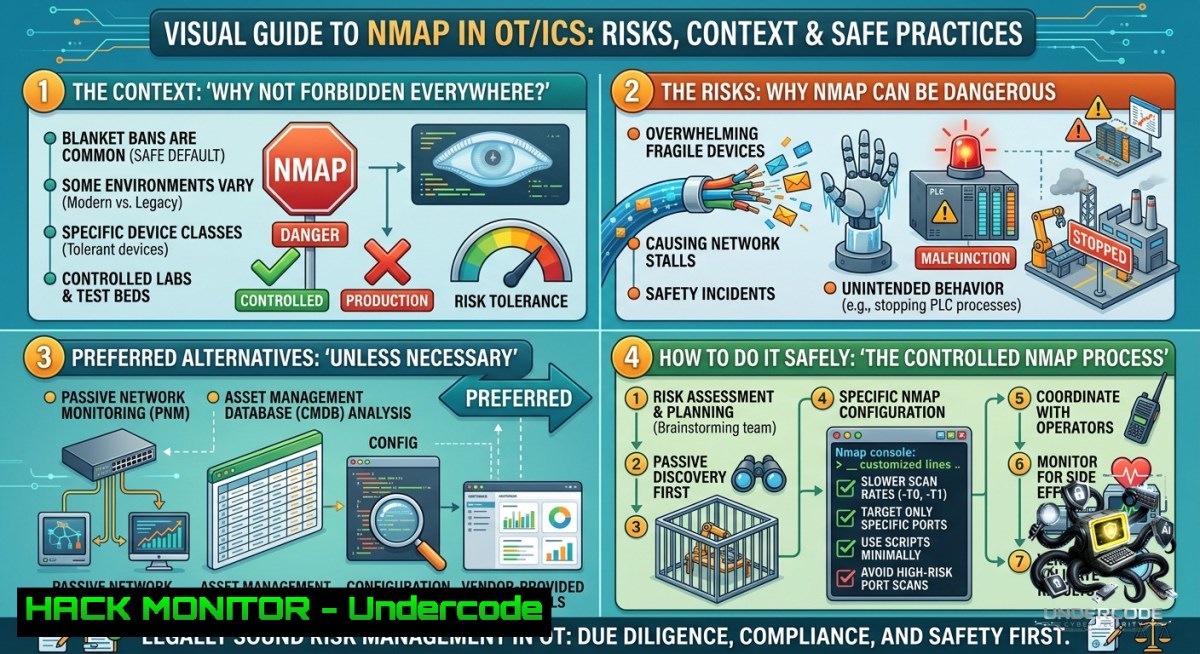
Introduction:
Active scanning tools like Nmap are widely banned in operational technology (OT) and industrial control system (ICS) environments due to risks of disrupting critical processes. However, a nuanced debate is emerging: can active scanning be permitted in non‑critical zones or during specific maintenance windows? This article explores the technical realities, safe scanning techniques, and policy frameworks needed to balance visibility with operational safety.
Learning Objectives:
– Understand why active scanning is typically prohibited in OT/ICS and which scenarios may allow limited use.
– Learn Nmap commands and alternatives for passive and low‑impact active reconnaissance in industrial networks.
– Implement technical controls (firewall rules, port knocking, rate limiting) to protect OT assets from accidental or malicious scans.
You Should Know:
1. The Risks of Active Scanning in OT/ICS – and When It Might Be Acceptable
Sending unexpected packets to legacy PLCs, RTUs, or DCS controllers can trigger hardware faults, cause state changes, or saturate low‑bandwidth fieldbus networks. Many OT devices crash under a simple Nmap SYN scan. However, plant segments that are logically air‑gapped, running in a test environment, or operating during a scheduled outage may tolerate limited active probing.
Step‑by‑step guide to assess risk before scanning:
– Step 1: Inventory all OT assets with their network protocols (e.g., Modbus/TCP port 502, DNP3 port 20000, Profinet).
– Step 2: Consult device manuals for known packet‑handling vulnerabilities (e.g., “ping of death” on old Siemens S7‑300).
– Step 3: Use a dedicated scan management host with limited bandwidth and only during a change‑controlled window.
– Step 4: Start with the most conservative scan: `nmap -sn -T0
– Step 5: Monitor PLC logs and physical process values during scanning; abort immediately if anomalies appear.
Linux command examples for safe discovery:
 Ultra‑slow ping sweep – one packet every 5 minutes
nmap -sn -T0 --min‑hostgroup 1 --max‑rtt‑timeout 5000 10.10.10.0/24

 List open ports without sending probes (read from pcap)
sudo tcpdump -i eth0 -c 1000 -w ot_traffic.pcap
nmap -sV -Pn -p 502,20000,44818 --script modbus‑discover -iL targets.txt
Windows alternative (PowerShell + Test‑NetConnection):
 Single TCP ping to a common OT port
Test-1etConnection 192.168.1.100 -Port 502 -InformationLevel Detailed

 Sweep a /24 subnet for Modbus (slow, avoid parallel bursts)
1..254 | ForEach-Object { Test-1etConnection "192.168.1.$_" -Port 502 -WarningAction SilentlyContinue } | Where-Object { $_.TcpTestSucceeded }
2. Passive Reconnaissance – The Preferred First Step in OT
Instead of sending probes, capture existing traffic to build a complete asset map. Passive analysis uses mirror ports or network taps and never injects packets. Tools like GRASSMARLIN, Zeek (formerly Bro), and Wireshark provide protocol‑aware parsing for OT.
Step‑by‑step passive monitoring with Zeek:
– Step 1: Install Zeek on a Linux machine with two NICs (one management, one monitoring).
`sudo apt install zeek` (or use Zeek LTS Docker container).
– Step 2: Place monitoring interface in promiscuous mode:
`sudo ip link set eth1 promisc on`
– Step 3: Create a minimal `local.zeek` script to log Modbus, DNP3, and EtherNet/IP:
@load protocols/modbus/package.zeek
@load protocols/dnp3/package.zeek
@load protocols/enip/package.zeek
– Step 4: Start Zeek with:
`sudo zeek -i eth1 local.zeek`
– Step 5: Parse `conn.log`, `modbus.log`, and `dnp3.log` to discover IP addresses, function codes, and register ranges.
Tutorial – Extract devices from pcap without Nmap:
Using `tshark` (Wireshark CLI):
 List all unique IPs communicating over Modbus TCP
tshark -r ot_capture.pcap -Y "modbus" -T fields -e ip.src -e ip.dst | sort -u

 Identify PLC firmware versions from the banner (if present)
tshark -r ot_capture.pcap -Y "tcp.payload" -T fields -e data | xxd -r -p | strings
3. Policy & Technical Safeguards to Permit Limited Active Scanning
If your risk assessment allows active scanning in non‑critical zones (e.g., operator workstations, engineering laptops), enforce strict guardrails. Combine network segmentation with scanning‑only credentials and rate limits.
Step‑by‑step to implement a “scanning DMZ” for OT:
– Step 1: Create a dedicated VLAN with ACLs that restrict scan traffic to specific target subnets and ports (e.g., only UDP 161 for SNMP, TCP 22 for SSH).
– Step 2: Configure a jump host (Linux or Windows) with hardened firewall rules:
Linux: `sudo iptables -A OUTPUT -d 10.0.0.0/8 -p tcp –dport 1:1024 -m limit –limit 1/s -j ACCEPT`
Windows (PowerShell as Admin):
`New-1etFirewallRule -DisplayName “OT_Scan_Limit” -Direction Outbound -RemoteAddress 10.0.0.0/8 -Protocol TCP -RemotePort 1-1024 -Action Allow -Throttle 1`
– Step 3: Use `nmap`’s `–scan‑delay` option:
`nmap -sS -p 1-1000 –scan‑delay 5s –max‑retries 1 10.0.0.50`
– Step 4: Log all scan activity to a SIEM with an immediate alert on high packet rates.
API security aspect – Many modern OT devices expose REST APIs over HTTPS. To safely test:
 Use curl with rate limiting (one request per 10 seconds)
for ip in $(cat ot_ips.txt); do
curl -k --limit-rate 1k -m 5 https://$ip/api/health
sleep 10
done
4. Hands‑on Lab: Simulated OT Scanning with Nmap (CTF‑Style)
In a test lab (e.g., using Dockerized PLC simulators like `opcplc` or `pymodbus`), you can safely experiment with aggressive scanning to understand potential failure modes.
Step‑by‑step lab setup:
– Step 1: Install Docker on a Linux VM:
`curl -fsSL https://get.docker.com | sh`
– Step 2: Run a Modbus simulator that reacts to scanning:
`docker run -d -p 5020:5020 –1ame modbus_sim oitc/modbus‑server`
– Step 3: Perform Nmap service scan against port 5020:
`nmap -sV -p 5020 –script modbus‑info localhost`
– Step 4: Observe simulated “faults” by monitoring container logs:
`docker logs -f modbus_sim`
– Step 5: Compare scan results against passive discovery (`nmap -sP` vs `tcpdump` + `nmap -Pn`).
Windows lab alternative:
Use `nmap.exe` from Zenmap and a free Modbus slave simulator (e.g., Simply Modbus). Run `nmap -sC -p 502 127.0.0.1` and note the increased latency – real OT devices might reset.
5. Hardening OT Networks Against Unauthorized Active Scanning
Defenders can implement countermeasures to block or alert on any scanning activity that escapes policy. These techniques are essential for production environments where active scanning remains forbidden.
Step‑by‑step hardening guide:
– Step 1: Deploy port knocking or “stealth” firewall rules that drop packets from unknown sources without sending RST/ICMP errors.
Linux iptables example:
`iptables -A INPUT -p tcp –dport 502 -m recent –update –seconds 60 –hitcount 4 -j DROP`
– Step 2: Use intrusion detection signatures to detect Nmap patterns (e.g., SYN‑FIN scan, Xmas scan).
Snort rule for Modbus TCP scan:
`alert tcp $EXTERNAL_NET any -> $OT_NET 502 (msg:”OT Modbus port probe”; flags:S; threshold: type both, track by_src, count 3, seconds 10; sid:1000001;)`
– Step 3: Implement a brownout – a network‑based “honeypot” that responds on unused IPs to waste scanner time.
Using Python scapy to respond to ARP and ICMP on dummy IPs:
from scapy.all import
def arp_reply(pkt):
if pkt[bash].op == 1:
send(ARP(op=2, psrc=pkt[bash].pdst, hwsrc="02:00:00:00:00:01", pdst=pkt[bash].psrc))
sniff(prn=arp_reply, filter="arp", store=0)
What Undercode Say:
– Key Takeaway 1: Active scanning in OT is not binary – risk varies by zone, device criticality, and protocol resilience. A blanket ban may be excessive if supported by technical safeguards and change management.
– Key Takeaway 2: Passive monitoring delivers 90% of the asset inventory without any operational risk; always start there. Only after exhausting passive methods and securing a maintenance window should active scanning be considered.
Analysis: The post from Mike Holcomb highlights a critical industry debate. Many OT security professionals have “tested Nmap in CTFs” but fear production. The real advance is layering passive tools (Zeek, GRASSMARLIN) with extremely rate‑limited active scans in isolated zones. Honeywell’s sponsorship of the OT Cyber Weekly episode suggests major vendors are now providing guidance rather than outright prohibition. For defenders, the most practical path is to instrument switch port mirroring, deploy OT‑aware IDS, and document a clear “no‑scan” policy for safety‑critical loops while allowing low‑impact scanning on purely informational paths.
Prediction:
– +1 Adoption of “safe scan” profiles (e.g., Nmap’s `-T0 –max‑scan‑delay 10s`) will become a standard OT audit requirement, reducing unsafe ad‑hoc probing.
– -1 Legacy PLCs without firmware updates will remain vulnerable to denial‑of‑service from any active scan, forcing operators to maintain air gaps that hinder threat hunting.
– +1 Open‑source passive fingerprinting tools will evolve to approximate Nmap’s OS detection without sending probes, merging the best of both approaches.
– -1 Attackers who compromise an engineering workstation will use legitimate remote diagnostics (e.g., Siemens TeleService) instead of Nmap, rendering port‑scanning bans irrelevant.
▶️ Related Video (64% Match):
🎯Let’s Practice For Free:
🎓 Live Courses & Certifications:
[Join Undercode Academy for Verified Certifications](https://undercode.co.uk/certifications/)
🚀 Request a Custom Project:
Secure, high-velocity infrastructure and disruptive technological engineering. Contact our engineering team for high-tier development and proprietary systems:
[[email protected]](mailto:[email protected])
💎 Smart Architecture | 🛡️ Secure by Design | ⭐ Trusted by Thousands
IT/Security Reporter URL:
Reported By: [Mikeholcomb Ot](https://www.linkedin.com/posts/mikeholcomb_ot-cyber-weekly-0602-nmap-active-ugcPost-7467356813714309120–yDI/) – Hackers Feeds
Extra Hub: Undercode MoN
Basic Verification: Pass ✅
🔐JOIN OUR CYBER WORLD [ CVE News • HackMonitor • UndercodeNews ]
[💬 Whatsapp](https://undercode.help/whatsapp) | [💬 Telegram](https://t.me/UndercodeCommunity)
📢 Follow UndercodeTesting & Stay Tuned:
[𝕏 formerly Twitter 🐦](https://x.com/undercodeupdate) | [@ Threads](https://www.threads.net/@undercodetesting) | [🔗 Linkedin](https://www.linkedin.com/company/undercodetesting/) | [🦋BlueSky](https://bsky.app/profile/undercode.bsky.social)


