
Listen to this Post
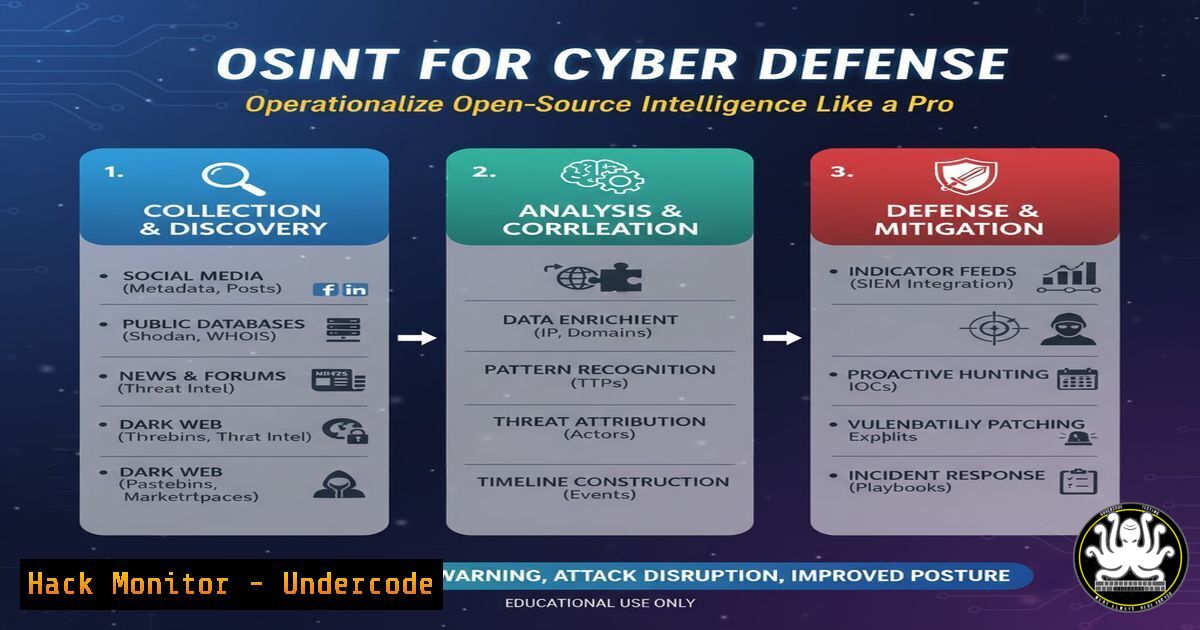
Introduction:
In the modern cybersecurity landscape, information is the ultimate weapon. Open-Source Intelligence (OSINT) refers to the collection and analysis of data gathered from publicly available sources to be used in intelligence contexts. While often associated with penetration testing and red teaming, mastering OSINT is equally critical for defenders to identify exposed assets, preempt social engineering attacks, and harden an organization’s digital footprint before malicious actors exploit it.
Learning Objectives:
- Understand the core principles of OSINT and its application in defensive cybersecurity.
- Learn to utilize command-line tools and frameworks for automated data gathering.
- Master techniques for harvesting email addresses, subdomains, and metadata.
- Identify exposed credentials and digital footprint risks using practical commands.
You Should Know:
- Domain and Subdomain Enumeration with
dig,nslookup, and `Sublist3r`
Before you can defend a network, you must know every inch of it. Attackers often find forgotten subdomains pointing to development servers or unpatched services. Defenders can use the same techniques to find and remediate these shadow IT assets.
Step‑by‑step guide:
- Using `dig` (Linux/macOS): The `dig` tool is a DNS lookup utility that reveals all records associated with a domain.
dig example.com ANY +noall +answer
This command queries for any DNS record (A, MX, TXT, NS) associated with the target. Pay special attention to TXT records, which sometimes leak internal configuration data or SPF information.
-
Using `nslookup` (Windows/Linux): A classic tool for querying DNS.
nslookup -type=any example.com
This works similarly to `dig` and is available natively on Windows systems.
-
Automated Subdomain Discovery with Sublist3r: This Python tool aggregates subdomains from search engines like Google, Yahoo, and Baidu.
Installation
git clone https://github.com/aboul3la/Sublist3r.git
cd Sublist3r
pip install -r requirements.txt

Usage
python sublist3r.py -d example.com -o subdomains.txt
This script is invaluable for generating a list of subdomains that can be cross-referenced with your asset inventory to identify rogue or forgotten servers.
2. Email Harvesting and Verification with `theHarvester`
Email addresses are the primary vector for phishing attacks. `theHarvester` is a powerful OSINT tool designed to gather emails, subdomains, hosts, employee names, and open ports from multiple public sources (search engines, PGP key servers).
Step‑by‑step guide:
- Installation and Basic Scan:
Installation (often pre-installed in Kali Linux)
sudo apt install theHarvester

Basic search for emails and hosts
theHarvester -d example.com -b all -f results.html
The `-b all` flag uses every available data source (Google, Bing, LinkedIn, etc.). The output is saved as an HTML report for easy analysis.
-
Analyzing the Results: The generated file will list email addresses found. Defenders can use this list to check if any accounts appear in known data breaches (using tools like `HaveIBeenPwned` API) and enforce multi-factor authentication (MFA) on those accounts proactively.
- Metadata Extraction from Public Documents (
exiftoolandpdf-parser)
Organizations often leak sensitive data through metadata in publicly available PDFs, images, and Office documents posted on their websites. This metadata can contain usernames, software versions, internal paths, and even geolocation data.
Step‑by‑step guide:
-
Using `exiftool` (Linux/Windows): A powerful Perl library and command-line application for reading, writing, and editing meta information.
Download a public document from the target website
wget https://www.example.com/files/document.pdf

Extract metadata
exiftool document.pdf
Look for fields like “Author,” “Creator,” “Producer,” and “Last Modified By.” These often reveal internal usernames (e.g.,
john.doe) which can be used to guess email naming conventions. -
Analyzing PDF Structure with
pdf-parser: This tool (part of the `pdf-tools` suite in Kali) parses a PDF document to identify malicious code or hidden objects.pdf-parser.py document.pdf
Defenders can use this to ensure no embedded JavaScript or external links are hidden in their public-facing PDFs.
4. Shodan: The Search Engine for Vulnerable Devices
Shodan scans the internet and indexes banners from servers, webcams, routers, and IoT devices. An attacker can use Shodan to find exposed industrial control systems or databases belonging to your organization.
Step‑by‑step guide:
- Command-Line Interface with `shodan` CLI:
Install the Shodan Python library
pip install shodan

Initialize with your API key
shodan init YOUR_API_KEY

Search for your organization's IP range
shodan search net:203.0.113.0/24
Replace `203.0.113.0/24` with your actual IP range. This search will list every device exposed to the internet, including open ports and services. If you see an SSH server on port 22 or a MySQL database on 3306, investigate immediately to determine if that exposure is authorized.
5. Exposed Credentials and Git Dorking with `truffleHog`
Developers sometimes accidentally commit secrets (API keys, passwords, tokens) to public repositories. `truffleHog` scans Git repositories for high-entropy strings and secrets, helping defenders find exposed credentials before attackers do.
Step‑by‑step guide:
- Scanning a Public Repository:
Install truffleHog
pip install truffleHog

Scan a repository
trufflehog --regex --entropy=False https://github.com/example/repo.git
The `–regex` flag checks for patterns matching common secrets, while the entropy check looks for high-entropy strings that look like passwords. If a secret is found, the development team must rotate the credentials immediately and rewrite the Git history to remove the secret.
6. Social Media Recon with `Twint` (Twitter Intelligence)
Twitter is a goldmine of OSINT data. `Twint` is an advanced scraping tool that allows you to scrape tweets without using the official Twitter API, making it harder for the target to detect the reconnaissance.
Step‑by‑step guide:
- Installation and User Search:
Installation
git clone https://github.com/twintproject/twint.git
cd twint
pip install -r requirements.txt

Search for tweets from a specific user
twint -u username --since 2025-01-01 -o tweets.csv --csv
Defensive teams can search for employees tweeting about their work, especially if they mention internal tools, software versions, or work locations. This data helps in building a social engineering defense strategy.
-
Searching for Tweets near a Physical Location:
twint -g="40.7128,-74.0060,1km" -o location_tweets.txt
This searches for tweets within a 1km radius of New York City. This can reveal employees checking in from the office or sensitive locations.
What Undercode Say:
- OSINT is a double-edged sword; the techniques used by penetration testers are identical to those used by real adversaries. Defenders must adopt an attacker’s mindset to effectively map and reduce their organization’s digital attack surface.
- Automation is key. Manual checks are unsustainable. Integrating tools like Sublist3r and Shodan into continuous security monitoring pipelines (CI/CD) allows organizations to discover and fix exposures in real-time rather than reacting to a breach.
- The weakest link is often human metadata. The usernames, email patterns, and social media posts harvested via OSINT are the building blocks for highly convincing spear-phishing campaigns. Security awareness training must evolve to cover digital footprint management, not just password security.
Prediction:
As AI models become integrated into corporate workflows, a new wave of OSINT will emerge focused on “LLMINT” (Large Language Model Intelligence). Attackers will probe public-facing AI chatbots to extract training data, system prompts, and internal configurations. Defenders will need to develop new tools to audit their AI implementations for data leakage, turning the principles of traditional OSINT towards the black box of machine learning models. The lines between data science and security will blur, forcing a convergence of skills in the near future.
▶️ Related Video (84% Match):
🎯Let’s Practice For Free:
IT/Security Reporter URL:
Reported By: Nathanielfried The – Hackers Feeds
Extra Hub: Undercode MoN
Basic Verification: Pass ✅


